Repository navigation
3. Generic Integration Guidelines
When integrating the eMandates Creditor Libraries into your own solution, you should follow the guidelines described in the following sections.
When receiving the package, you will notice a set of two files and four folders:
- CoreCommunicator.php and B2BCommunicator.php: these file are the entry points to the library, which you can integrate into your code.
- Configuration folder: used to keep the configuration class
- Entities folder: used to group the various request and response entities
- Libraries folder: used to group internal classes used by the library
- Schemas folder: holds the xsd schemas used to validate the requests and responses.
Some acquirers use a second certificate so the PHP library has added support to authenticate the incoming messages with it. The second certificate can be registered as the first one. The library can check if a message was authenticated with one of these two certificates.
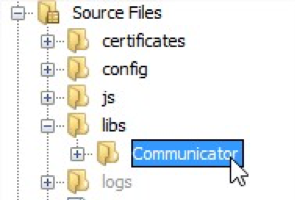
In your PHP application, unzip the Communicator library, add it to your libraries folder and include the specific Communicator that you need into your php file, like seen below. If you are using a framework, consult its documentation for adding new libraries.

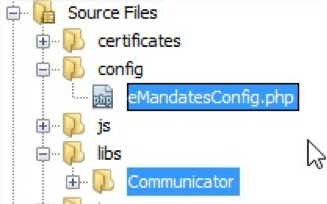
The Configuration will look for a file called eMandatesConfig.php, so we need to create one as shown below.
If you are planning on changing the configuration file name or its place on your project tree, you will also need to change the following line from /Communicator/Configuration/Configuration.php.

A sample eMandatesConfig file:
/**
 * Configuration parameters required by the Communicator lib.
 */

$emandates_config_params['contractID'] = '1234123456';
$emandates_config_params['contractSubID'] = '1';
$emandates_config_params['merchantReturnURL'] = 'https://webshop.nl/return';

/**
 * URLs for Requests
 */
$emandates_config_params['AcquirerUrl_DirectoryReq'] = "https://mandate.bank.nl";
$emandates_config_params['AcquirerUrl_TransactionReq'] = "https://mandate.bank.nl";
$emandates_config_params['AcquirerUrl_StatusReq'] = "https://mandate.bank.nl";

/**
 * LogPath and naming conventions
 * for the pattern: logs/Y-m-d/His.u-DirectoryRes.xml
 * the path is: logs/2015-02-11/115423.321-DirectoryRes.xml
 */
$emandates_config_params['enableXMLLogs'] = true;
$emandates_config_params['logPath'] = 'logs/';
$emandates_config_params['folderNamePattern'] = 'Y-m-d';
$emandates_config_params['fileNamePrefix'] = 'His.u';
// internal logging
$emandates_config_params['enableInternalLogs'] = true;
$emandates_config_params['fileName'] = 'eMandates.txt';

/**
 * Key files
 */
$emandates_config_params['passphrase'] = '123456';
$emandates_config_params['keyFile'] = './certificates/client.key';
$emandates_config_params['crtFile'] = './certificates/client.cer';
$emandates_config_params['crtFileAquirer'] = './certificates/server.cer';
$emandates_config_params['crtFileAquirerAlternative'] = './certificates/server-alternative.cer';
You are now ready to use the library to perform directory requests, issue new eMandates, amend existing eMandates or cancel existing eMandates (cancellation is available only for B2B). You can check section 5 – “Integration workflow” in this manual on more information on how to perform these operations.
You can copy/paste the following code snippet into a php file to start using the library right away.
<?php
require_once './libs/Communicator/CoreCommunicator.php';

// Initiate a CoreCommunicator with Default Configuration,
// from the eMandatesConfig.php
// Or without configuration parameter starting with version 1.2.5
$coreCommunicator = new CoreCommunicator(Configuration::getDefault());

$diRes = $coreCommunicator->Directory();Most eMandate messages from the creditor to the creditor bank contain a field called MessageId. If you do not have a method to generate your own message ID, you can instruct the library to do so, by using MessageIdGenerator.New(). This method will return a 16-character string which you can then assign to the MessageId field.