Repository navigation
4. Requirements
This chapter describes the settings that are required for the successful integration of the eMandate Creditor Libraries into the Creditor’s system.
The following pre-requisites are needed on your system before integrating the eMandate Creditor Libraries:
- It must be possible to make an SSL connection to the Routing Service’s web service from the web server through port 443.
- It must be possible to access to the local machine certificate store during the installation of the certificates on the web server.
The configuration of the libraries is possible at runtime during initialization or via a configuration file (development platform specific).
The following parameters are configurable in the libraries configuration:
- eMandates contract id – given by the Creditor Bank to the Creditor to unambiguously identify the Creditor when communicating with the Creditor Bank platform.
- eMandates contract subreference id – given by the Creditor Bank to the Creditor to unambiguously identity the branch or trading entity of the Creditor. This parameter is optional.
- merchant return URL – the web address provided by the Creditor in the transaction request that is used to redirect the Debtor back to the Creditor after completing the authorization.
- signing certificate fingerprint – the fingerprint of the private certificate used to sign messages sent by Creditor to the Creditor Bank’s Routing Service platform, also used by the Creditor Bank to authenticate incoming messages from Creditor.
- acquirer’s directory request URL– the web address of the Creditor Bank’s Routing service platform from where the list of Debtor Banks is retrieved.
- acquirer’s transaction request URL – the web address of the Creditor Bank’s Routing Service platform where the transactions are initiated.
- acquirer’s status request URL – the web address of the Creditor Bank’s Routing Service platform to where the library send status request messages.
- acquirer’s certificate fingerprint – the fingerprint of the certificate used to validate incoming messages from Creditor Bank to Creditor application.
- acquirer’s alternative certificate fingerprint (optional) – the fingerprint of the alternative certificate used to validate incoming messages from Creditor Bank to Creditor application.
- enable saving service log files – Enable the saving of service logs (all raw messages exchanged by the library).
- location of service log files – The disk location where the request messages sent by the library and the response messages received from the Acquirer will be logged.
- pattern for service log file names – A string describing what the file names of the service logs should look like, so they can be organized in different folders, by year, month, day, time of day and type of message. As an example pattern in the form of
%Y-%M-%D\%h%m%s.%f-%a.xmlwill create a directory for each day (in the form on 2014-01-20), and a file for each operation in the form of102045.924-AcquirerTrxReq.xml. When creating a pattern, you can use the following placeholders:- %Y = current year
- %M = current month
- %D = current day
- %h = current hour
- %m = current minute
- %s = current second
- %f = current millisecond
- %a = current action.
Following, you can find the approaches for configuring the PHP libraries
Sample configuration file:
<?php

/**
 * Configuration parameters required by the Communicator lib.
 */

$emandates_config_params['contractID'] = '1234123456';
$emandates_config_params['contractSubID'] = '1';
$emandates_config_params['merchantReturnURL'] = ' https://webshop.nl/return';

/**
 * URLs for Requests
 */
$emandates_config_params['AcquirerUrl_DirectoryReq'] = "https://mandate.bank.nl";
$emandates_config_params['AcquirerUrl_TransactionReq'] = "https://mandate.bank.nl";
$emandates_config_params['AcquirerUrl_StatusReq'] = "https://mandate.bank.nl";


/**
 * LogPath and naming conventions
 * for the pattern: logs/Y-m-d/His.u-DirectoryRes.xml
 * the path is: logs/2015-02-11/115423.321-DirectoryRes.xml
 */
$emandates_config_params['enableXMLLogs'] = true;
$emandates_config_params['logPath'] = 'logs/';
$emandates_config_params['folderNamePattern'] = 'Y-m-d';
$emandates_config_params['fileNamePrefix'] = 'His.u';
// internal logging
$emandates_config_params['enableInternalLogs'] = true;
$emandates_config_params['fileName'] = 'eMandates.txt';

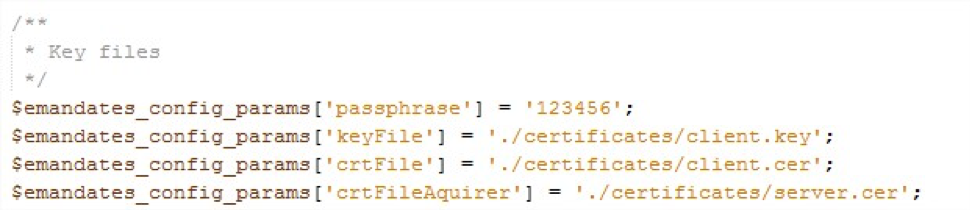
/**
 * Key files
 */
$emandates_config_params['passphrase'] = '123456';
$emandates_config_params['keyFile'] = './certificates/client.key';
$emandates_config_params['crtFile'] = './certificates/client.cer';
$emandates_config_params['crtFileAquirer'] = './certificates/server.cer';
$emandates_config_params['crtFileAquirerAlternative'] = './certificates/server-alternative.cer';
Usage:
- To load settings from configuration file:
$coreCommunicator = new CoreCommunicator(Configuration::getDefault());- To setup configuration from code first instantiate a new Configuration object, set its properties and then pass it to the Communicator as seen below:
$config = new Configuration(
		$passphrase, $keyFile, $crtFile, $crtFileAquirer, $crtAlternateFileAquirer,
		$contractID, $contractSubID, $merchantReturnURL,
		$AcquirerUrl_DirectoryReq, $AcquirerUrl_TransactionReq,
		$enableXMLLogs, $logPath, $folderNamePattern, $fileNamePrefix,

	// Initiate a CoreCommunicator
$coreCommunicator = new CoreCommunicator($config);- Starting with version 1.2.5 CoreCommunicator can be instantiated without the Configuration object, in such case the same default settings will still be set but inside CoreCommunicator’s constructor, same goes for B2BCommunicator:
$coreCommunicator = new CoreCommunicator();In order to be able to function, the library needs to have access to two certificates - the Creditor certificate and the Creditor bank's public certificate.
The creditor certificate is the private certificate used to sign messages sent by the Creditor to the Creditor Bank's Routing Service platform. Its public key is also used by the Creditor Bank to authenticate incoming messages from the Creditor.
The Creditor bank public certificate is the certificate used to authenticate incoming messages from the Creditor Bank. The library only needs its public key.
Note: How to obtain these certificates is outside the scope of this wiki, more details are available in the eMandates Creditor Implementation Guidelines Core and B2B - 11.4 Creating a key pair.
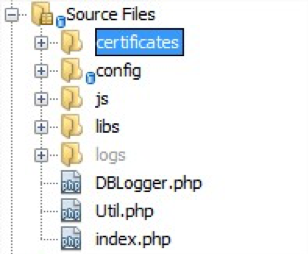
By default the library will load certificates from the certificates folder, if you are planning on changing the certificates location you should also change the eMandatesConfig.php file to load the proper certificates.
Note: The PHP OpenSSL module has trouble loading certificates that have all the data on a single line. The PHP library handles this case by processing both the signing certificate and the acquirer certificate to make sure the format is correct. This however does not happen for the signing private key, so if you get a warning such as “openssl_sign(): supplied key param cannot be coerced into a private key”, make sure the file path and the format are correct.