EV Smart Charging
PowerSync coordinates EV charging alongside battery optimization. The EV charging plan is included in the battery optimizer's schedule so both systems plan around each other — the EV won't compete with the battery for grid import at the worst time.
PowerSync shares your available grid capacity between the battery and the EV. When the battery is charging hard overnight, the EV gets what's left over. As the battery tapers off, more power flows to the EV automatically.
During the day, excess solar that can't go into the battery or power the house gets directed to the EV first before being exported.
Both the battery and EV plans update every 5 minutes.
| Mode | Description |
|---|---|
| Solar Only | Only charge from excess solar production |
| Prefer Solar | Prefer solar, use grid during cheap periods if needed |
| Cheapest | Charge during cheapest periods (grid or solar) |
| Meet Deadline | Charge to meet departure time, using cheapest available windows |
EV charger support is experimental and depends on the HA integration for your charger exposing the right entities and services.
| Charger Type | Control Method | Notes |
|---|---|---|
| Tesla vehicle charging | Tesla Fleet API, Teslemetry, Tesla BLE, or combined cloud + local fallback | Vehicle SOC/location/plug state is read from the selected Tesla EV provider |
| OCPP Chargers | Built-in OCPP central system or HACS OCPP entities | Works with chargers that expose OCPP status/start/stop/current control |
| Zaptec | Zaptec HA integration entity or direct Zaptec Cloud API | Standalone Zaptec Cloud mode does not require the Zaptec HA integration |
| Generic | Switch + Number entity, with optional status and SOC sensors | Use for any charger that exposes simple on/off and current-control entities |
| Sigenergy EVAC / EVDC | Sigenergy Modbus charger support | Uses the Sigenergy charger type, host, port, and slave ID configured in PowerSync |
If your charger's HA integration uses different service names or entity patterns, configure it as a Generic charger or report the entity pattern on Discord.
OCPP chargers connect via the Home Assistant OCPP integration. PowerSync can start/stop charging sessions and adjust the charge rate through it. The legacy OCPP WebSocket port setting is retained for existing installs, but current control expects charger entities from the HA OCPP integration. The mobile app includes an OCPP charger management screen — view connected chargers, start/stop, and monitor status.
Tesla EV charging is separate from the Tesla Powerwall energy-site provider. Configure the EV provider under Configure > EV charging:
| Provider | Use When |
|---|---|
| Fleet API / Teslemetry | You want cloud vehicle commands and telemetry |
| Tesla BLE (ESPHome) | You have local Bluetooth entities exposed by ESPHome |
| Teslemetry Bluetooth | You use Teslemetry's native HA Bluetooth entities |
| Both | You want local BLE/BT first with cloud fallback |
For BLE-style providers, the entity prefix must match the ESPHome or Teslemetry Bluetooth entity names. For multiple vehicles, enter comma-separated prefixes.
PowerSync supports either a Zaptec charger entity from the Zaptec HA integration or direct Zaptec Cloud API mode. Standalone Zaptec Cloud mode can use the Zaptec installation ID for current limiting and does not require the HA integration to expose the charger switch.
Use Generic Charger for any charger that exposes simple Home Assistant entities. The switch entity is required and must be a full entity ID such as switch.charger_charge.
| Entity | Required | Purpose |
|---|---|---|
| Charger switch entity | Yes | Starts and stops charging |
| Charger amps entity | Optional | Sets charging current |
| Connector status sensor | Optional | Confirms the vehicle is plugged in or preparing |
| EV battery SOC sensor | Optional | Provides the primary vehicle SOC |
| Fallback EV battery SOC sensor | Optional | Used only when the primary SOC sensor is missing, unknown, unavailable, or non-numeric |
The fallback SOC sensor is useful when one integration exposes charger state and another exposes the car battery level. PowerSync only uses it as a fallback, so a healthy primary SOC sensor remains authoritative.
If PowerSync cannot or should not control your charger, use Configure > Optimization > Planned EV load forecast sensor instead of setting up a controllable EV charger. This is intended for dumb EVSEs, read-only charger integrations, Node-RED flows, templates, MQTT sensors, or any other Home Assistant sensor that can publish expected EV demand.
The sensor must expose a planned_load attribute. PowerSync adds that planned load to the optimizer's household load forecast, but it does not start, stop, throttle, or otherwise own the charger. Controllable Smart EV Charging and forecast-only EV load can be used together; their load overlays are added before the battery optimizer runs.
Window format:
{
  "planned_load": [
    {
      "start": "2026-06-13T11:00:00+10:00",
      "end": "2026-06-13T14:00:00+10:00",
      "power_kw": 5.75
    }
  ]
}
Timestamped value format:
{
  "planned_load": {
    "2026-06-13T11:00:00+10:00": 5.75,
    "2026-06-13T14:00:00+10:00": 0
  }
}
Values are kW by default, or watts when the sensor unit is W.
Sigenergy chargers can be configured as either EVAC or EVDC. PowerSync connects over Modbus using the configured host, port, slave ID, and charger type, then exposes the charger to the same EV planning and dashboard paths as other chargers.
When EV charging is configured, PowerSync creates dedicated EV sensors:
| Sensor | Entity ID | Description |
|---|---|---|
| EV Power | sensor.power_sync_ev_power |
Current charging power (kW) |
| EV Battery Level | sensor.power_sync_ev_battery_level |
EV battery state of charge (%) |
These sensors are used by the dashboard power flow card and are available for automations.
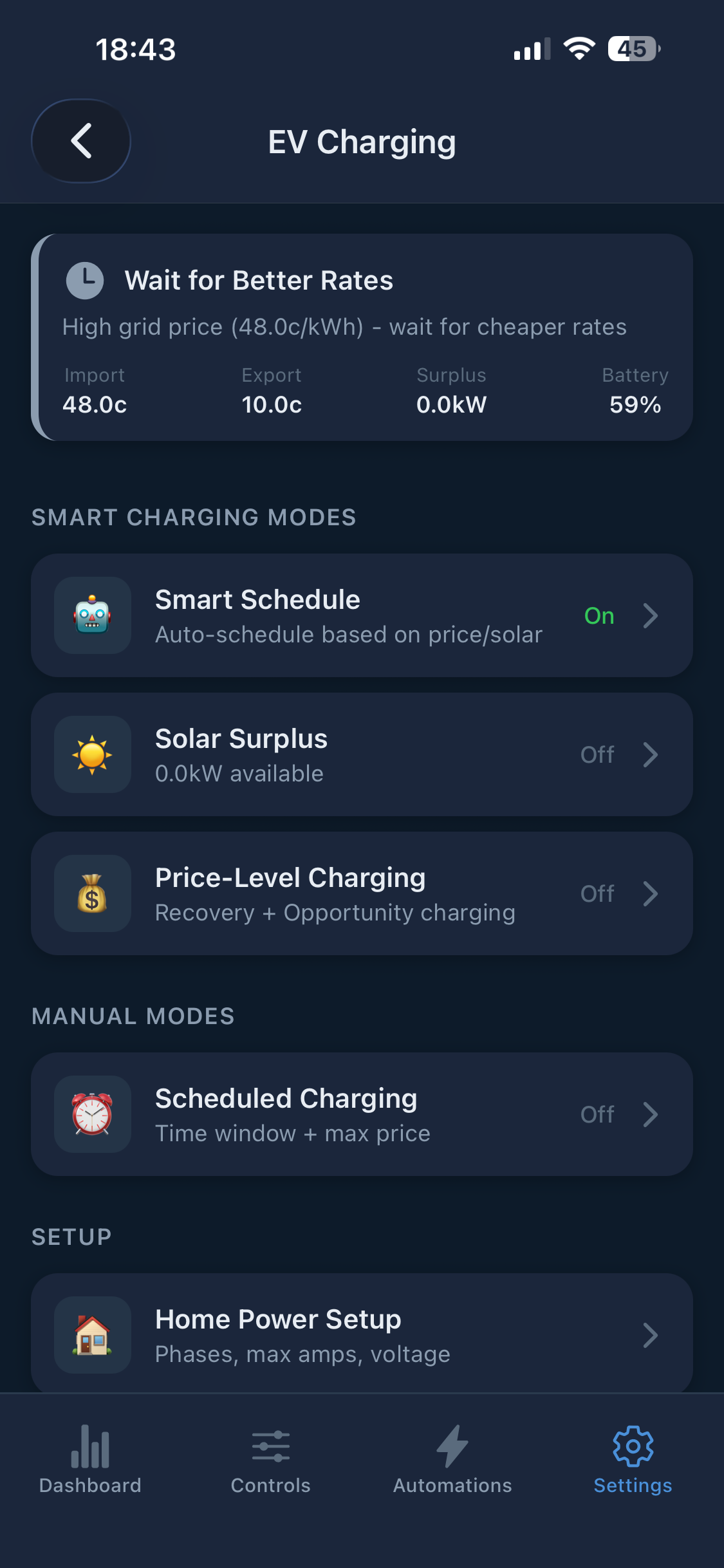
- In the mobile app: Settings > EV Charging
- Enable Smart EV Charging
- Select your Charger Type
- Enter charger connection details
- Set your Grid Capacity (typically 7kW single phase, 22kW three phase)
In Home Assistant, the same connection settings are available under Settings > Devices & Services > PowerSync > Configure > EV charging. Mobile app charging modes and automation actions are app-level PowerSync controls; they are not separate Home Assistant Developer Tools services.
| Setting | Description |
|---|---|
| Departure Time | When you need the car ready |
| Target SOC | Desired battery percentage |
| Charging Mode | Solar Only, Prefer Solar, Cheapest, or Meet Deadline |
| Home Battery Minimum | Don't discharge home battery below this for EV charging |
| Max Grid Price | Maximum price (c/kWh) willing to pay for grid charging |
When EV integration is enabled, the optimizer automatically:
- Reads the planned EV charging windows
- Adds the expected EV power draw to the household load forecast
- Runs with the combined load (household + EV)
- Adjusts the battery schedule — for example, charges the battery earlier to avoid competing for grid import during EV charging windows
The battery and EV plans update together every 5 minutes.
Forecast-only EV load uses the same load forecast overlay step, but it does not require EV integration to be enabled and does not create charger commands.