Simulations and Socket.IO
When a facilitator enters the administration panel or a player joins the game page for a simulation, they will initially be connected to the server's Socket.IO instance. Socket.IO is a library that is used to handle real-time bi-directional communication, which we use to provide the interactive experience for players and administrators.
Socket.IO transmits information via packets, which contain small pieces of information. They can be sent by either the server to the client or vice versa. The server behaviour varies depending on whether an administrator or a game player is communicating.
| When a player... | Server behaviour |
|---|---|
| Joins server | Client joins the Socket.IO room, but does not get added to list of players until they input name/role. They are sent back a connectionStatus packet containing current information about the room. |
message |
Update the current "chatlog" list with the message. If the message is being sent to a group, obtain their IDs and send a message to each in response. Otherwise, send the message packet to the entire room. This includes administrators. |
playerUpdate |
This is sent after a player inputs their name and role. If the player isn't already in the game, create a record for the player in the server's player list. Send a clientJoined packet to everyone else in the room. |
interaction |
This is sent when a player interacts with something within the simulation. If the simulation is supposed to be paused, don't do anything. Otherwise, unless the "sameState" parameter is true, update the game state and send a roomStatusUpdate to everyone in the room containing the changes. Log the interaction. |
varChange |
This is sent when a player changes an in-game variable. Similar behaviour to the above. |
goToPage |
Only received if simulation's advancement mode is set to "student." Update the room's current page index and send a roomStatusUpdate to everyone in the room with the change. |
NOTE: For all admin behaviour that changes the state of the room, the server checks for whether a room ID is defined within the sent packet; if yes, it will only modify that room. Otherwise, it will iterate through every room the simulation is running on and modify those.
| When an admin... | Server behaviour |
|---|---|
| Joins server | For each room the simulation has, the administrator joins those rooms and is given the same current information for each one. This and the behaviour for joining players can be seen in server/events/index.js before being handed off to their respective event handlers in admin.js and player.js. |
gameStart |
Update the room status with "running" set to true and a timestamp informing when the room has started running. Send a roomStatusUpdate to everyone within the room containing the changes. Set a countdown for 3 hours for timing out the room. |
gamePause |
Set "running" to false and calculate how much time has passed into "timeElapsed". Send a roomStatusUpdate. |
gameReset |
Obtain all information about the room and compile it into a "GameAction" record on the SQL database. Afterwards, wipe all of the information off of memory. Send a roomStatusUpdate. If there is a timeout countdown, remove it. |
updateGameSettings |
Sent when an admin changes advancement mode or role assignment. If the game is currently running, don't do anything (changing the game settings while it is still running could cause unwanted behaviour.) Update the room status with the new settings and send a roomStatusUpdate. |
joinRoom |
Joins a room. This is only used when an administrator creates a new room for a simulation on the admin panel. |
goToNextPage |
Get the current page index for the room and increment it. Send a roomStatusUpdate. |
goToPrevPage |
Similar to above, except decrement. |
In order to persist information inbetween Socket.IO packets, data is stored in server memory with JavaScript objects (accessed by using the current room ID as a key.) See server/events/utils.js for more info.
{
  // roomStatus is for storing general values that are commonly used by the app
  roomStatus {
    running      // boolean value; when false, game is paused
    level        // integer that represents which page simulation is currently on
                 // only used when
    startTime    // unix timestamp, represents when game has started/last unpaused
    timeElapsed  // represents how much time has passed since last paused
    settings {
      advanceMode  // "student", "teacher", or an integer value (timed mode in minutes)
                   // determines who has the privilege to advance the simulation
                   // student by default
      roleMode     // "student", "teacher", "random", or "randomByLevel"
                   // determines how roles are assigned in the simulation
                   // student by default
    }
    variables    // object that stores game variables (key is variable name)
                 // which can be manipulated by gamepieces
    gamepieces   // object that stores status of gamepieces (key is gamepiece id)
                 // values are also objects and vary depending on the gamepiece
  }

  // messages is for storing the messages that get sent from the sidebar menu
  messages [{
    sender {
      name       // string values; name and role player entered when joining game
      role
      id         // player's current socket.io connection id, subject to change
      dbid       // unique id stored in player's localstorage which stays consistent
                 // used to determine who they are if regular id changes
                 // if the player was registered before joining, this is their
                 // primary key from their database record
      invited    // boolean value; whether or not player was registered before joining
    }
    room         // room code id (similar to the one in the game room url)
    message      // message content string value
    timeSent     // unix timestamp
  }]

  // interactions is similar to the "gamepieces"/"variables" object in roomStatus
  // however, this is a list of *every* action performed ingame
  // as opposed to roomStatus which gets rewritten upon every interaction
  // mainly for logging purposes
  interactions [{
    timestamp    // unix timestamp
    player       // identical to the "sender" object in messages

    // the following values are present if a GAMEPIECE has been updated
    gamepieceId  // id of the gamepiece
    parameters   // object; values are changes within the gamepiece's status
                 // varies depending on the gamepiece type
    changedState // boolean value; if true, this has updated the roomStatus
                 // if false, this does not change state/is only for logging
                 // this will pretty much always be true

    // the following values are present if a VARIABLE has been updated
    variable     // variable name and value
    value
  }]
}
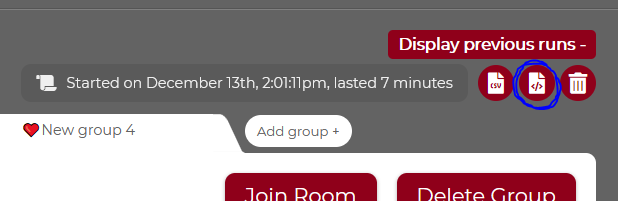
You can view a real example of a game status object by downloading the JSON of a previous run: