Synchronized gamepieces guide
Creating synchronized gamepieces involves passing a special set of props into the gamepiece component when being added into Canvas.jsx or CanvasGame.jsx:
getInteractiveProps(id)
... where id is collected from the game piece's data found in the simulation game parameters. An example with Connect4, found in CanvasGame.jsx:
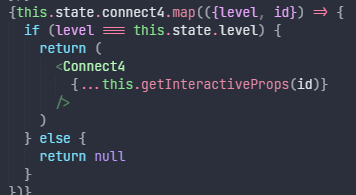
The extra props passed into the component are comprised of two variables:
-
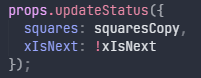
updateStatus, which is a function that can be called when you want to send data about a game piece's state to the server. It takes an object as its single argument. An example found inTicTacToe.jsx:
-
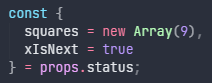
status, which is the game piece's state currently stored on the server. As other clients callupdateStatus, the status object is changed accordingly, with an empty object being its initial value. You can also listen for changes with theuseEffecthook. This example fromTicTacToe.jsxuses destructuring (with optional default values when the status has not yet been changed):
This is meant to function similarly to how a regular state hook would. Note that clients are also only synchronized when they are in the game; in edit mode, states are simply stored in memory.