PitLaunch 0.9.8 Beta

A new interface
PitLaunch has been rebuilt around a tighter, denser layout — and it now ships with its own typeface instead of borrowing the system font.
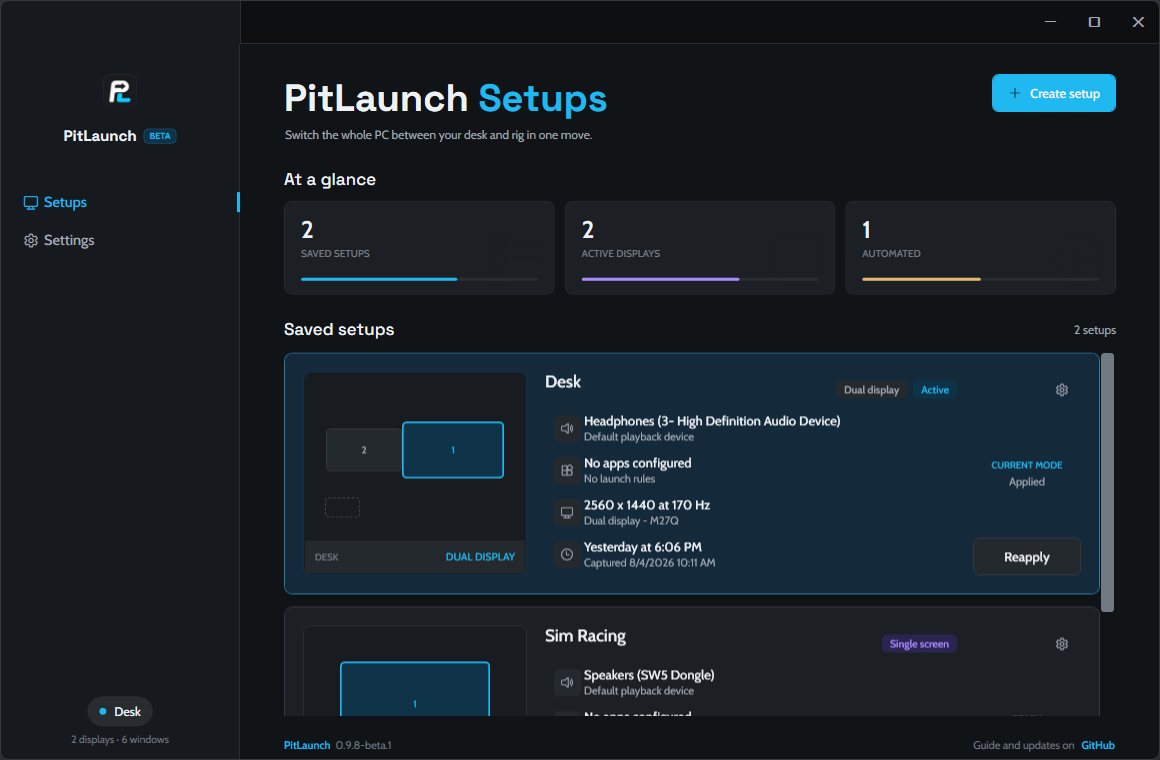
Sidebar — the product mark now heads the rail, destinations are full-bleed rows, and the active one is marked by an accent bar on the rail's content edge rather than a filled pill. The rail ends in a single quiet chip showing the active setup.
Typography — the UI is set in Cabin and Space Grotesk, embedded in the app so it looks the same on every machine. Page titles are larger and read PitLaunch <page>.
Sharper text — text was being rendered in a mode that snaps letter stems to whole pixels, which only looks right for fonts hinted for it and made everything else look chunky. Fixed. The app also declares per-monitor DPI awareness now, so Windows no longer bitmap-stretches the whole window on a display above 100% scaling.
Denser pages — grouped settings lost their card frames, rows are tighter, and controls line up on one right edge. Settings now commits through a full-width button pinned at the bottom of the page instead of a small one floating in the corner. A status strip along the bottom shows the version on every page.
One thing moved
Restore displays is no longer in the sidebar. It is unchanged in Settings → Safety → Restore every display, and the Ctrl+Alt+Shift+F12 shortcut still works from anywhere, including while the window is hidden.
Already have PitLaunch?
Nothing to download by hand. Open Settings → Updates → Check for updates → Install and restart, or click the Update available marker when it appears in the sidebar.
The update is a 0.54 MB patch, not a fresh 77 MB download — 5 files changed out of 468. Your setups live in %APPDATA%\PitLaunch, so updating never touches them.
New here?
Download PitLaunch-win-Setup.exe below. It installs in a few seconds with no admin prompt and no wizard, then opens itself.
SmartScreen will warn you on first run, because the app isn't code-signed. Choose More info → Run anyway, or verify the hash below first.
Verifying the download
Get-FileHash .\PitLaunch-win-Setup.exe -Algorithm SHA256| File | SHA256 |
|---|---|
PitLaunch-win-Setup.exe |
45CC73601877066C83E82BFE8F4A1B06CFECF5F16C2C1F319BE747FC5792F636 |
PitLaunch-win-Portable.zip |
4A21A6F007200CBD06A71F211D5E401C8E0156365203B2DCDA77BBD35D81E202 |
PitLaunch-0.9.8-beta.1-delta.nupkg |
6901893F223681D826CF03C9B19671AA9047E55B74F236BF1BF2F056687F7C67 |
The .nupkg, RELEASES and *.json assets are the update feed. The app fetches those on its own — there is no reason to download them yourself.