Releases: Cevzom/PitLaunch
Release list
PitLaunch 1.0

PitLaunch 1.0.0
The first public release of the whole-PC Desk <-> Rig switcher.
- Guided first-run setup with displays, audio, apps, hardware readiness, game presets, Discord, hotkeys, and Stream Deck.
- Manual switch confirmation; automatic game, hotkey, CLI, and Stream Deck paths remain prompt-free.
- Preflight, rollback, restart-safe Undo, mandatory-update safety gate, support bundles, and emergency display recovery.
PitLaunch is not code-signed yet. Windows SmartScreen may warn. Verify the SHA256 below before choosing More info > Run anyway.
SHA256
| Asset | Size | SHA256 |
|---|---|---|
PitLaunch-win-Setup.exe |
77.3 MB | 7840dbb050311f051aa16d0d08ebc56be87c3a4719a119a6bffca851f19f477b |
PitLaunch-win-Portable.zip |
67.0 MB | 77b93f62b09616c50c0ded091b3de1ac87e376fa71207e120935b5076c09484a |
com.cevzom.pitlaunch.streamDeckPlugin |
0.0 MB | 65939b78ca42d6bbafb168bc8230843803d8c691becaa1952cd30e200f1ad5fa |
PitLaunch-1.0.0-full.nupkg |
73.1 MB | 4187c4e9bd4aafdecc3dfdc62476ee329a05195b357c24d9f54ee317a916cf87 |
PitLaunch-1.0.0-delta.nupkg |
0.4 MB | 868fe0a959b55e0ef4db130fcd6b17341f9e9eb81a4b15a7f1460f4372f004e9 |
SHA256SUMS.txt contains hashes for every release-feed asset.
PitLaunch 0.9.9 Beta
Drag your screens into place.
The Arrangement dropdown offered three computed layouts and no way to say where a screen actually is. Recommended also quietly recentred a secondary display, so a captured setup could come back subtly different from the desk you captured it on.
New in this build
- Drag to place your screens. Grab a screen in the live layout and put it where it really sits. Edges snap to a neighbours sides, tops, bottoms and centre.
- Screens cannot overlap. Drop one on another and it slides clear along the way it came in, the same way Windows display settings behaves.
- A full-screen arrangement view. The panel in the setup guide is fine for reading a layout and small for building one, so the expand button lifts the same canvas onto a surface roughly seven times the size.
- Smoother throughout. Screens glide between arrangements instead of jumping, and lift under the cursor.
Fixed
- Losing focus mid-drag left a screen stuck lifted, and the next click resumed a drag you had abandoned.
- Escape, or a click beside the arrangement panel, closed a half-built setup instead of just the panel.
- Headings are now set in Archivo. Space Grotesk is gone.
Updating is automatic: installed copies show Update available in the sidebar and patch with a 0.5 MB download rather than the full installer. Or check manually under Settings, Updates.
SmartScreen still warns on first run because this beta is not code-signed. Choose More info, then Run anyway.
PitLaunch 0.9.8 Beta
A new interface
PitLaunch has been rebuilt around a tighter, denser layout — and it now ships with its own typeface instead of borrowing the system font.
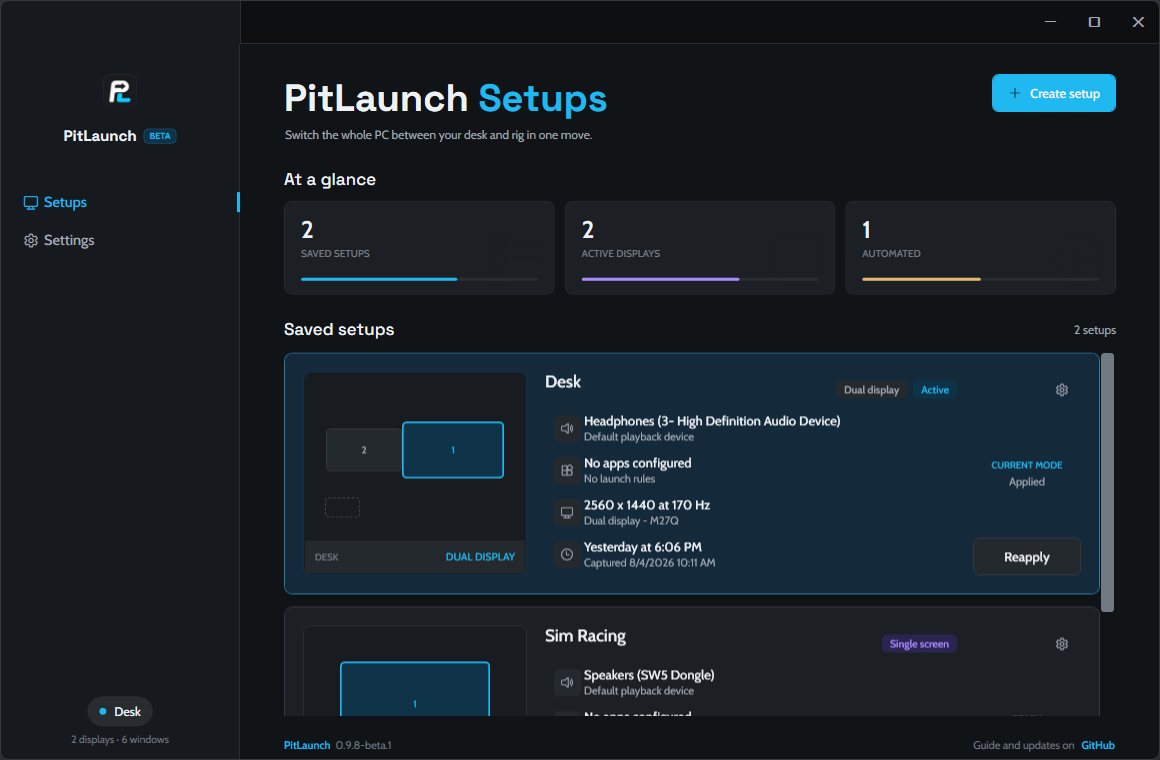
Sidebar — the product mark now heads the rail, destinations are full-bleed rows, and the active one is marked by an accent bar on the rail's content edge rather than a filled pill. The rail ends in a single quiet chip showing the active setup.
Typography — the UI is set in Cabin and Space Grotesk, embedded in the app so it looks the same on every machine. Page titles are larger and read PitLaunch <page>.
Sharper text — text was being rendered in a mode that snaps letter stems to whole pixels, which only looks right for fonts hinted for it and made everything else look chunky. Fixed. The app also declares per-monitor DPI awareness now, so Windows no longer bitmap-stretches the whole window on a display above 100% scaling.
Denser pages — grouped settings lost their card frames, rows are tighter, and controls line up on one right edge. Settings now commits through a full-width button pinned at the bottom of the page instead of a small one floating in the corner. A status strip along the bottom shows the version on every page.
One thing moved
Restore displays is no longer in the sidebar. It is unchanged in Settings → Safety → Restore every display, and the Ctrl+Alt+Shift+F12 shortcut still works from anywhere, including while the window is hidden.
Already have PitLaunch?
Nothing to download by hand. Open Settings → Updates → Check for updates → Install and restart, or click the Update available marker when it appears in the sidebar.
The update is a 0.54 MB patch, not a fresh 77 MB download — 5 files changed out of 468. Your setups live in %APPDATA%\PitLaunch, so updating never touches them.
New here?
Download PitLaunch-win-Setup.exe below. It installs in a few seconds with no admin prompt and no wizard, then opens itself.
SmartScreen will warn you on first run, because the app isn't code-signed. Choose More info → Run anyway, or verify the hash below first.
Verifying the download
Get-FileHash .\PitLaunch-win-Setup.exe -Algorithm SHA256| File | SHA256 |
|---|---|
PitLaunch-win-Setup.exe |
45CC73601877066C83E82BFE8F4A1B06CFECF5F16C2C1F319BE747FC5792F636 |
PitLaunch-win-Portable.zip |
4A21A6F007200CBD06A71F211D5E401C8E0156365203B2DCDA77BBD35D81E202 |
PitLaunch-0.9.8-beta.1-delta.nupkg |
6901893F223681D826CF03C9B19671AA9047E55B74F236BF1BF2F056687F7C67 |
The .nupkg, RELEASES and *.json assets are the update feed. The app fetches those on its own — there is no reason to download them yourself.
PitLaunch 0.9.7 Beta
Download
PitLaunch-win-Setup.exe - run it. No admin rights needed.
Already have PitLaunch installed? It will offer this update itself.
What's new
New look. PitLaunch has a new logo, and the app has been rebuilt around it: the accent colour is now the logo's cyan, surfaces moved from green-tinted to cool grey so the cyan sits properly, and category badges moved to violet so they stay readable next to it. New icon, new installer splash.
Nothing about how it works changed in this release. Your setups, hotkeys, games and controller lists are all untouched.
Verify your download
Not code-signed yet, so SmartScreen will warn on first run (More info -> Run anyway).
| File | SHA256 |
|---|---|
PitLaunch-win-Setup.exe |
80a211a0d63d452b28211a5dacf7a0c4c8ec36f5ba4f26d194e3e8bef66ae603 |
PitLaunch-0.9.7-beta.1-full.nupkg |
ad1890c5067313141fd0f89eee3213da56c7527c0f959e5617c9371840bbb96f |
PitLaunch-0.9.7-beta.1-delta.nupkg |
148d3382cbad596e0df14b5c449e0a435df59b1866cdf8c9d6b63372db7b4204 |
Get-FileHash .\PitLaunch-win-Setup.exe -Algorithm SHA256Recently, if you are coming from an older build
- Pick your game from a scanned list of what is installed, instead of typing a process name.
- Keep the screen awake during a session, because wheel input does not reset the Windows idle timer.
- A setup can tell you when the wheel or pedals are not plugged in.
- Game detection actually switches setups now; it used to be blocked by the confirmation prompt.
Reporting a problem
Include what you clicked, what happened, and %APPDATA%\PitLaunch\pitlaunch.log.
PitLaunch 0.9.6 Beta
Download
PitLaunch-win-Setup.exe - run it. No admin rights needed.
Already have PitLaunch? It will offer this update itself and download only the 359 KB that changed.
What's new
Pick your game from a list. Setting up game detection meant typing a process name and hoping you got it right. PitLaunch now reads your Steam and Epic libraries and shows your installed games with their icons - click one and it is added. Sim titles are listed first.
Not every game can be found automatically, so Choose custom path opens a file browser and adds whatever you point it at.
This also fixes something that would have bitten sim racers specifically: for several titles the obvious executable is a launcher that closes once the race loads, which would have switched you out of your rig setup mid-session. Assetto Corsa, BeamNG and GTA V are now pinned to the process that actually stays running.
The installer shows what it is doing. It used to install silently with nothing on screen, which read as "did that work?". There is now a splash with a progress bar.
Also in this release
- Keep the screen awake during a session. Wheel and pedal input does not reset the Windows idle timer, so a long stint could blank the screen mid-race.
- A setup can remember which controllers it expects, and tells you when the wheel or pedals are not plugged in.
--scan-gameswrites out everything PitLaunch can see, for when a game is not detected.
Verify your download
Not code-signed yet, so SmartScreen will warn on first run (More info -> Run anyway).
| File | SHA256 |
|---|---|
PitLaunch-win-Setup.exe |
7b4794d5a8b686272f00b95bf0ca7ae9c0837ba8f3d19fe5ff817111a8b50d9f |
PitLaunch-0.9.6-beta.1-full.nupkg |
9aa053525c730f3d5f39ebfa785b61edc6b3f1948c48d1f58ed34b90a4114994 |
PitLaunch-0.9.6-beta.1-delta.nupkg |
7c58653a18c44fc30a81bcd0d96e319d6e305dc2e79d72f61f9a01c94745a0ba |
Get-FileHash .\PitLaunch-win-Setup.exe -Algorithm SHA256Reporting a problem
Include what you clicked, what happened, and %APPDATA%\PitLaunch\pitlaunch.log.
PitLaunch 0.9.5 Beta
Download
PitLaunch-win-Setup.exe — run it. No admin rights needed. It installs quietly in a few seconds and opens itself; there is no setup wizard to click through.
Already on 0.9.4? Do nothing — PitLaunch will offer this update itself and download only the 321 KB that changed.
The other files are update data the app reads automatically; there is nothing to download by hand.
Verify your download
PitLaunch is not code-signed yet, so Windows SmartScreen will warn on first run (choose More info → Run anyway). Because of that, you can confirm the installer is the real one:
Get-FileHash .\PitLaunch-win-Setup.exe -Algorithm SHA256| File | SHA256 |
|---|---|
PitLaunch-win-Setup.exe |
76001beef4c1b3c09af6d846729ad73de38aec7c7469257a3f2752d4b6b95808 |
PitLaunch-0.9.5-beta.1-full.nupkg |
6662865d9aea8d4223208627ffab2c80e56cc5bbbcc76d598325682a71f7c01c |
PitLaunch-0.9.5-beta.1-delta.nupkg |
3f6374bb063ed56b46d3473b7c6d1ba11bae6de7f79802f514b56bfbac53842b |
What's new
- Keep the screen awake during a session. Wheel and pedal input does not reset the Windows idle timer, so a long stint can still blank the screen or sleep the machine mid-race. A setup can now hold the display awake for as long as it is active, and releases it the moment you switch away or close PitLaunch.
- Expected controller check. A setup can remember which game controllers it expects — wheelbase, pedals, handbrake, button box — and tells you when one is not plugged in, instead of you finding out once the game has loaded. Devices are matched by their real product name, because whether pedals are a separate device depends entirely on the hardware.
- Download links on the project page now resolve properly, and every release lists its SHA256.
- The project is now MIT licensed.
Fixed
- Controller detection queried Windows with an undersized structure and failed on every device, which would have reported "nothing connected" on every machine. Caught before release; the self-test now fails loudly rather than quietly reporting an empty list.
Still true from 0.9.4
Game detection switches setups when a game starts and switches back when it exits. Display layouts are validated with Windows before they are applied and rolled back if refused. Ctrl+Alt+Shift+F12 re-enables every connected monitor at any time.
Reporting a problem
Include what you clicked, what happened, and %APPDATA%\PitLaunch\pitlaunch.log.
PitLaunch 0.9.4 Beta
Download
PitLaunch-win-Setup.exe — run it. No admin rights needed. Installs for the current user, adds Start Menu and Desktop shortcuts, and updates itself from here on.
The other files below (RELEASES, assets.win.json, releases.win.json, the .nupkg) are update data the app reads automatically — nothing to download by hand.
PitLaunch is not code-signed yet, so Windows SmartScreen will warn on first run. Choose More info → Run anyway.
What's new
This release adds the update system itself, and fixes the bug that made game detection silently do nothing:
- Game detection actually works now. Launching a game switches setups; quitting it switches back. Previously, an automatic switch triggered the same "Confirm before switching?" dialog as a manual one — which popped PitLaunch's window over a fullscreen game, where it was never seen or clicked, so the switch never happened. Confirmation now only applies to switches you start yourself inside the window.
- Choose game file — pick a game's
.exestraight from disk to watch for, next to the existing running-apps picker. - Saving a setup that watches a game now turns on game detection automatically instead of silently requiring a separate toggle first.
- Self-updating installer. PitLaunch checks for updates in the background and shows a quiet Update available marker in the sidebar. Updating downloads only the files that changed — typically well under 1 MB, instead of the ~75 MB a fresh install costs.
- Settings gained an Updates section: current version, manual check, and install with one click.
Beta safety, unchanged from 0.9.1
- Every display layout is validated with Windows before it's applied, with rollback if Windows refuses it.
Ctrl+Alt+Shift+F12enables every connected monitor as an emergency reset, whether PitLaunch's window is open or hidden in the tray.- A missing display, audio device, app, or window is skipped with a warning instead of failing the whole switch.
Reporting a problem
Include what you clicked, what happened, and %APPDATA%\PitLaunch\pitlaunch.log from the affected machine.
PitLaunch 0.9.1 Beta
PitLaunch 0.9.1 Beta is the first public-ready source snapshot and Windows package.
Highlights:
- Capture and restore complete display profiles with Windows CCD.
- Restore playback, communications, and microphone devices.
- Remember window positions and launch per-profile apps.
- Startup chooser, tray menu, hotkeys, command-line triggers, and game detection.
- Confirmation, rollback, emergency display recovery, missing-device handling, and diagnostics.
This is beta software. Use the included restore controls if Windows rejects a saved display topology, and attach %APPDATA%\PitLaunch\pitlaunch.log when reporting a problem.