Releases: ChocoTorp/Shipwright-VR
Release list
Quest 3: OOT - v1.2.1

Quest 3: OOT - v1.2.1
The Legend of Zelda: Ocarina of Time, fully playable in VR, standalone on Meta Quest 3. No PC, no cable, no streaming: it runs on the headset itself.
What you get
- You are Link, in first person. Look around Hyrule with your own head, at full scale.
- Real motion controls. Swing your arm to swing the sword, raise your hand to block with the shield, and put your hands where the action is.
- Two-handed slingshot and bow. Bring your free hand to the string, pull back and let go. A landing marker shows exactly where the shot will hit, walls and enemies included.
- Grab and throw. Pick Deku Nuts and bombs out of the air in front of you and throw them for real.
- 3D item picker. Click the stick and your items float around your hand as little 3D models; flick toward one to equip it.
- Items in your hands. Zelda's Letter, the Cucco, the bottles and the trading items appear as real objects in your hand.
- Comfort options. Smooth or snap turning, whole-view fades between areas, and a settings menu you can use inside the headset with a laser pointer.
- Runs at the Quest's full 72 fps, even in Hyrule Field.
- Optional HD textures. Add Djipi's 3DS Experience pack and the game compresses it for the Quest automatically.
- Online co-op menus (Anchor) are included, untested on Quest so far.
Built on Ship of Harkinian (the PC port of Ocarina of Time) and Ship of Harkinian VR by ShinyWindow, ported to run standalone on the Quest.
How to install (step by step)
One-time Quest setup
- Create a free developer account at developers.meta.com.
- In the Meta Horizon phone app: Devices > Headset settings > Developer mode, turn it on, then restart the Quest.
- On a computer, install SideQuest (Advanced Installer) from sidequestvr.com.
- Plug the Quest in by USB, put it on, and choose Allow (tick "always allow") for USB debugging.
Install the game
- Download Quest3-OOT-v1.2.1.apk below.
- In SideQuest, click Install APK and pick that file. (Updating? It installs over earlier versions and keeps your saves.)
Copy your ROM to the Quest
- In SideQuest, click the folder icon in the top bar (manage files on the headset), double-click Download, and drag your Ocarina of Time ROM into it. Any file name works.
- (Windows: you can also use File Explorer, Quest 3 > Internal shared storage > Download.)
First launch
- In the headset: App Library > Unknown Sources > Quest 3: OOT.
- When it asks, check "allow access to edit files on device", then go back to the game.
- The first boot takes about 1 to 2 minutes, and you'll only see loading dots. Don't worry, it isn't frozen: it finds your ROM by itself and builds the game's data from it, which only happens once. Then it just starts.
Bonuses: 3D rooms and HD textures
Both come from one free download, Djipi's 3DS Experience (not included here; it's Djipi's work, made from Nintendo's textures).
Get the pack: click here to download djipi_s_3ds_experience_tot_fix.zip (655 MB), or on the GameBanana page scroll to the Files section at the bottom and click Manual Download under djipi_s_3ds_experience_tot_fix.zip:
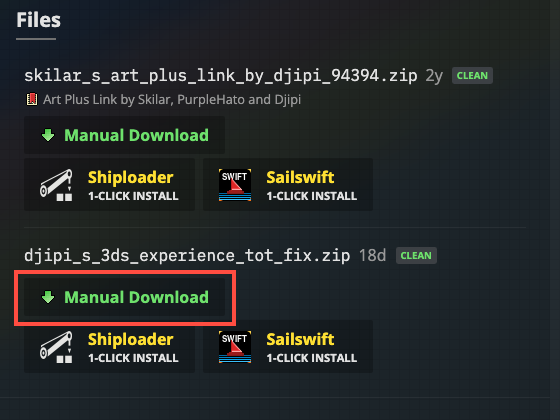
Unzip it (Mac: double-click; Windows: right-click, Extract All). You get 37 files.
Bonus 1: 3D rooms instead of green backdrops. Rooms like Link's house, the Market and the shops are flat pictures in the original game, so in VR they show as green backdrops. With SideQuest's file manager, drag these four files into SOHVR > mods: 26 Background 3DS, 27 Background Textures, 32 Background Full 3D (OPTIONAL) and 33 Background Full 3D Textures (OPTIONAL). Launch the game: that's it (mods are on by default). The easiest place to check is Link's house.
Bonus 2: HD textures (the 3DS look). Drag all 37 files into SOHVR > mods (this covers Bonus 1 too) and launch the game. The first time, it compresses the pack for the Quest in the background (about 3 minutes; progress in VR Settings > Performance > Texture Pack). When it says so, restart the game once.
Recommended settings
- Enhancements > Graphics > Increase Actor Draw Distance: 5x.
- VR Settings > Comfort & Movement: turning set to Smooth or Snap, your choice.
What's new in v1.2.1
- Smoother by default: the Stereo Render Divisor now defaults to 2 (the 3D world is redrawn every other frame and the headset fills in between, so busy areas stay smooth). Set it to 1 in VR Settings > Performance for fully smooth world animation.
- Includes everything from v1.2: 16 fixes from the latest Ship of Harkinian (crashes, audio, gameplay), plus the new name and icon.
More detail, controls and troubleshooting: README.
You need your own legally dumped copy of the game. No game assets are included. Fan project, not affiliated with Nintendo.
Ocarina of Time VR for Quest 3 - v1.0
The Legend of Zelda: Ocarina of Time VR (Quest Compatible) v1.0
Play Ocarina of Time in VR, standalone on Meta Quest 3. No PC or cable needed once it's installed.
Install
- Download ShipOfHarkinianVR-Quest3-v1.0.apk below.
- Install it on your Quest with SideQuest (Developer Mode required).
- Copy your own Ocarina of Time ROM into the Quest's Download folder.
- Launch Ship of Harkinian VR from App Library > Unknown Sources. The first launch builds the game data from your ROM (about 1 to 2 minutes of loading dots, once).
Full step-by-step guide: QUEST.md
Optional HD textures
Get Djipi's 3DS Experience, copy its .otr files into SOHVR/mods, turn on Settings > Mod Menu > Enable Mods. The game compresses the pack for the Quest automatically the first time you play with it (a few minutes), then restart.
Highlights
- Native stereo 3D with OpenXR, single-pass stereo, 72 fps in Hyrule Field
- Physical sword, shield, slingshot and bow, with a landing ring that shows where each shot will hit
- 3D item compass, 3D Deku Nuts and held items, in-headset settings menu, whole-view scene fades
- Automatic on-Quest compression for HD texture packs
See CHANGES.md for everything.
You need your own legally dumped copy of the game. No game assets are included. Fan project, not affiliated with Nintendo.
Built on Ship of Harkinian (HarbourMasters) and Ship of Harkinian VR (ShinyWindow), with the Android port by linkzenic.
Quest 3: OOT - v1.3
Quest 3: OOT - v1.3
The Legend of Zelda: Ocarina of Time, fully playable in VR, standalone on Meta Quest 3. No PC, no cable, no streaming: it runs on the headset itself.
- You are Link, in first person, at full scale.
- Real motion controls: swing to swing the sword, raise your hand to block, pull the slingshot and bow with both hands (a marker shows where the shot will land), grab and throw Deku Nuts and bombs.
- 3D items: pick items from a little 3D ring around your hand; letters, Cuccos and trading items appear as real objects in your hand.
- Comfortable: smooth or snap turning, whole-view fades between areas, and a settings menu you use inside the headset.
- Runs at the Quest's full 72 fps, even in Hyrule Field.
You need your own copy of the game (a ROM file). No game assets are included.
Install (4 steps)
1. Get ready (one time)
- Turn on Developer Mode: create a free account at developers.meta.com, then in the Meta Horizon phone app go to Devices > Headset settings > Developer mode and switch it on. Restart the Quest.
- Install SideQuest (Advanced Installer) on your computer: sidequestvr.com.
- Connect the Quest to your computer with a USB cable, put it on, and choose Allow when it asks about USB debugging.
2. Install the game
- Download Quest3-OOT-v1.3.apk at the bottom of this page.
- In SideQuest, click Install APK (top right) and pick that file.
3. Copy your ROM to the Quest
- In SideQuest, click the folder icon (top bar), open the Download folder, and drag your Ocarina of Time ROM into it. Any file name works.
4. Play
- In the headset: App Library > Unknown Sources > Quest 3: OOT.
- When it asks, check "allow access to edit files on device", then go back to the game.
- The first launch shows loading dots for 1 to 2 minutes. It isn't frozen: it finds your ROM by itself and builds the game from it. This only happens once. (If it can't find a ROM, a setup screen in the headset tells you what to do.)
That's it.
Bonuses (optional, after the game works)
Both come from one free download, Djipi's 3DS Experience.
Download it: click here (655 MB), or on the GameBanana page scroll to Files at the bottom and click Manual Download under djipi_s_3ds_experience_tot_fix.zip:
Unzip it. You get 37 files.
Bonus 1: 3D rooms. Some rooms (Link's house, the Market, the shops) are flat pictures in the original game, so in VR they show as green backdrops. In SideQuest's file manager, open SOHVR > mods and drag in these four files: 26 Background 3DS, 27 Background Textures, 32 Background Full 3D (OPTIONAL) and 33 Background Full 3D Textures (OPTIONAL). Launch the game. Done. Link's house is the easiest place to check.
Bonus 2: HD textures (the 3DS look). Drag all 37 files into SOHVR > mods (this includes Bonus 1) and launch the game. After about 30 seconds of play it starts compressing the pack for the Quest (about 3 minutes, progress in VR Settings > Performance > Texture Pack). When it says so, restart the game once.
Recommended: Enhancements > Graphics > Increase Actor Draw Distance: 5x.
What's new in v1.3
- Finds your ROM anywhere on the Quest, whatever it's called, and shows a setup screen in the headset if there isn't one.
- No more closing on relaunch (the game used to close itself when you reopened it right after quitting).
- Better default buttons: Y = pause, left grip = Z-target, right grip = shield, left stick click = L.
- Mod Menu shows your installed packs again, and texture compression starts gently after launch.
- New boot screen: a "ported by" signature between the libultraship and Nintendo 64 logos.
- Plus everything from v1.2.1: 16 Ship of Harkinian fixes, smoother default rendering, new name and icon.
Full guide, controls and troubleshooting: README.
Fan project, not affiliated with Nintendo. Built on Ship of Harkinian and Ship of Harkinian VR by ShinyWindow.
Quest 3: OOT - v1.2
Quest 3: OOT - v1.2
New
- New name and icon: the app is now called Quest 3: OOT in your App Library.
- 16 fixes from the latest Ship of Harkinian:
- Crashes: sky memory corruption, Flare Dancer, dying while steering a remote bombchu, old or unversioned save files, a menu dropdown that could break the menu.
- Audio: crashes with large custom music packs, music loops ending early, sound glitches.
- Gameplay: Gold Skulltula tokens overwriting the Bow slot, missing mirror reflections on some walls, cutscene skips leaving Link and the camera in the wrong place.
Install / update
Download Quest3-OOT-v1.2.apk below and install it with SideQuest (it installs over earlier versions and keeps your saves). New players: follow the step-by-step guide.
You need your own legally dumped copy of the game. No game assets are included. Fan project, not affiliated with Nintendo.
Ocarina of Time VR for Quest 3 - v1.1
Ocarina of Time VR for Quest 3 - v1.1
New
- 3D bombs: the bomb waiting in front of your chest is the real 3D bomb, like the Deku Nuts. Out of bombs or nuts, the model turns 30% see-through.
- 3D items in hand: Zelda's Letter, the eggs, the chickens and every trading-sequence item show as 3D models in your hand.
- Extra settings-menu button: the hamburger (left menu button) always opens the settings menu; you can add a second button in Settings > Controls or VR Settings > VR Inputs.
- Archery targeting switches: the landing target (ring and dot) and the flight path line have separate on/off settings in VR Settings > Items & Archery.
Install / update
Download ShipOfHarkinianVR-Quest3-v1.1.apk below and install it with SideQuest (it installs over v1.0 and keeps your saves). New players: follow the step-by-step guide.
You need your own legally dumped copy of the game. No game assets are included. Fan project, not affiliated with Nintendo.