Features
What Dandelion does today, with the honest caveats. Anything still missing is in Roadmap.
Each tab is a genuinely isolated WebContentsView — its own process, its own session partition, sandboxed and context-isolated.
-
Vertical or horizontal tab strip (
Ctrl+Shift+L/⌘⇧L). -
Pinned tabs, sleeping tabs (discard a tab's process, keep the row), tab groups with colours, drag reordering, muting, and reopening closed tabs (
Ctrl+Shift+T/⌘⇧T). - Hover previews show a live capture of the tab.
-
Tab search (
Ctrl+Shift+A/⌘⇧A) across everything open.
Caveats. Hover previews only render for tabs that are awake — sleeping and internal pages show a fallback glyph, and previews appear in the vertical sidebar only. Tabs can be assigned to a group from the right-click menu, but not by dragging into one.
Tile two tabs side by side (Ctrl+Shift+\ / ⌘⇧\).
Caveats. Panes are always divided equally — dividers aren't draggable yet. The UI splits two tabs; activating a tab outside the split exits it.
Profiles are the storage boundary: separate cookies, passwords, permissions and cache. Workspaces are Arc-style tab groupings layered on top, each with its own accent colour. Workspaces organise; profiles isolate.
URLs, search, history, bookmarks and tab switching with inline autocomplete — plus offline answers that need no network round trip:
-
Calculator —
12 * 7 -
Unit conversion —
20 miles in km,72f to c,1.5gb to mb -
Timezone conversion —
3pm in tokyo,9:30am est to pst,time in london. Cities, abbreviations and raw IANA zones all work, and DST is handled for the date in question. - Paste and go — open the omnibox with a URL on your clipboard and it's offered as the first result.
Each of these can be turned off individually in Settings → Search.
Ctrl+K / ⌘K. Every command and every open tab, fuzzy-searchable. If you learn one shortcut, learn this one — see Keyboard Shortcuts.
Strips a page down to its article text, with an adjustable font size.
Caveat. Extraction is a heuristic, so it won't find the article boundary on every page, and images with relative paths may not load. Reader closes when you navigate away, by design.
Request-level blocking that runs in the main process, before content ever reaches the page:
- Ad, tracker and fingerprinter blocking
- HTTPS upgrades (and an optional HTTPS-only mode)
-
DNTandSec-GPCheaders - Secure DNS (DNS-over-HTTPS)
- A per-tab shield report showing exactly what was blocked
Known bug. "Block third-party cookies" is on by default and currently strips cookies from the first request of a cross-site navigation, so some sites appear logged-out. There's a workaround in Troubleshooting.
Passwords are sealed with AES-256-GCM under a scrypt-stretched master password. The data key exists in memory only while the vault is unlocked, and is zeroed on lock — it never touches disk in plaintext.
Ctrl+/ / ⌘/. Bring-your-own-key providers (OpenAI · Anthropic · Google · local) with streaming chat and page actions like summarise, explain and translate. API keys are encrypted with the OS keychain via Electron's safeStorage.
No keys ship with the app — the assistant does nothing until you add your own in Settings. Conversations currently live for the session only and aren't saved to disk, and responses render as plain text rather than formatted markdown.
Snapshot the current set of tabs and restore it later.
Caveat. Restore reopens the tabs into their original workspace, but does not restore window bounds, tab layout, groups or pinned state precisely. Sessions aren't nameable yet — the list title comes from the lead tab.
- Downloads with pause/resume, and a toolbar bubble that opens by itself when a download starts, showing progress, speed and time remaining
- History timeline, grouped by day, with one-click clearing of a single day
- Bookmarks manager, plus a sidebar panel with folders and search for quick access
- Per-site zoom and per-site permissions
- Cookie manager
- MV3 extensions
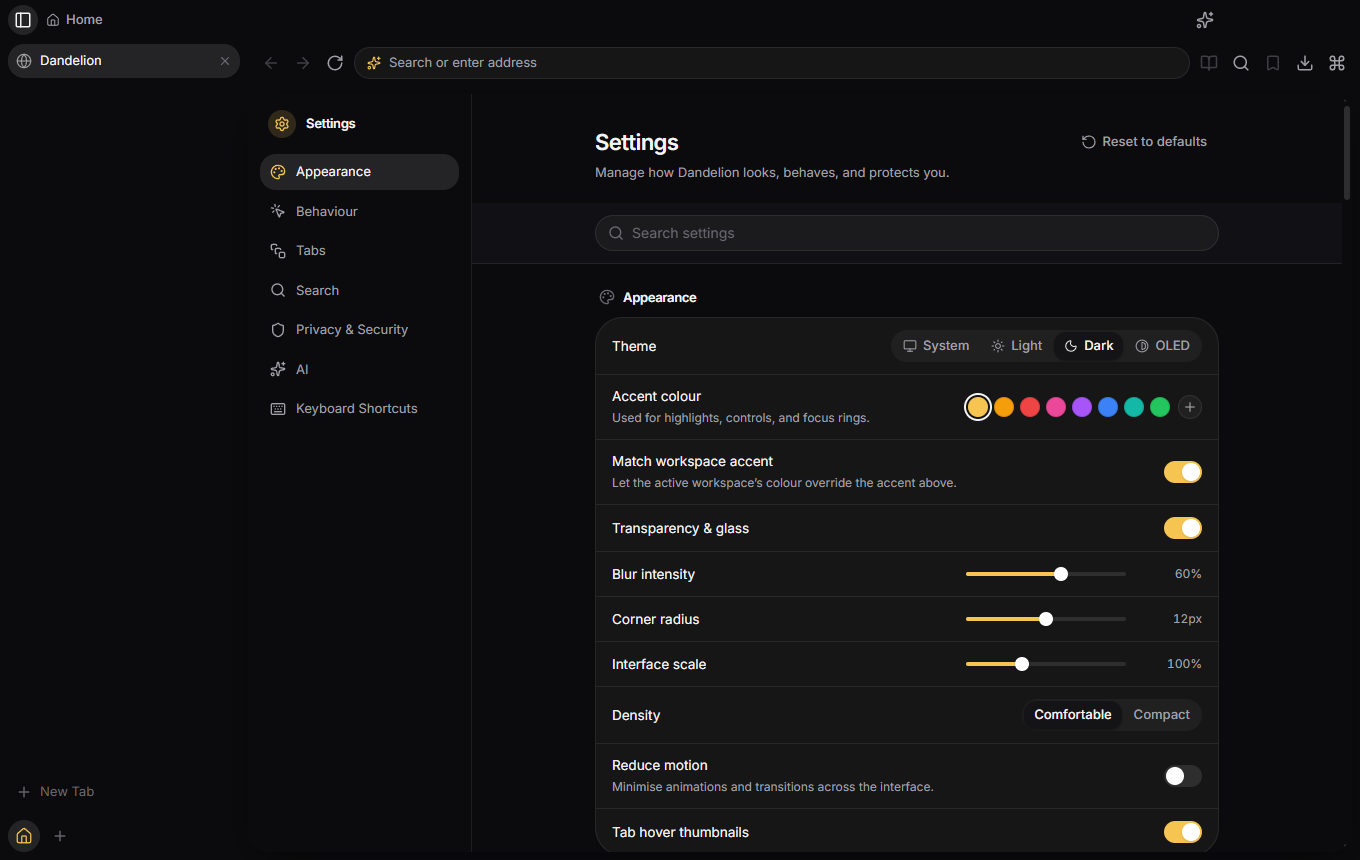
- Searchable settings, with System / Light / Dark / OLED themes and a live accent colour