Repository navigation
Releases: CrazyCoder/crossglyph
Release list
v0.10.0

 CrazyCoder
Serge Baranov
CrazyCoder
Serge Baranov
7c106a5
CrazyCoder
Serge Baranov
This release is about sharp text on the reader's screen. The preview can zoom in until you see every pixel the reader draws, it scores how cleanly the strokes of the text land on those pixels, and Fit to grid finds the point sizes that score best for your font.
New
See every pixel the reader draws
Turn on zoom under Device preview to enlarge the page in whole-pixel blocks, from 2× to 64×, so you can see exactly how each letter lands on the screen. A light grid marks the edges between pixels from 6× up, without dimming the ink. The zoomed page fills the panel it sits on, and stays on the same letters while you change settings.
- Drag to move around. Hold Alt and turn the wheel to zoom around the pointer, or double-click a spot.
- Hold Z to let the zoomed page fill the whole browser window, and let go to see the controls again. While Z is held, the wheel alone zooms.
- The button beside + moves the zoom into a window of its own, which you can put next to the browser or on another screen. It remembers where you left it.
- The copy button copies the zoomed view at its own size, with the grid if it is showing.
Know how sharp a size will look
The strip at the foot of the page shows its Grid Fit, a score from 0 to 100. A straight stroke that lands exactly on whole pixels is black to its edges, and one that lands between them gets a column of grey that reads as blur on e-ink. Grid Fit counts that grey along the upright strokes (X) and the flat ones (Y) of the text on the page. A small pill beside it shows how much your last change moved it, and pressing the score shows it for each style.
Check how sharp the strokes are
Let CrossGlyph pick the sharpest sizes
A quarter of a point can move a stem onto whole pixels or off them. Fit to grid, under the size boxes in Export, searches the sizes around each of yours for the one with the best Grid Fit, while keeping the number the reader shows in its Font Size list. Press Find sizes, compare a suggestion with your size in one press, untick any you do not want, and press Apply. Undo puts your sizes back.
To start a size list from scratch, choose Range, set where it starts, the step and how many sizes, and search those instead. Fill boxes writes a range into the size boxes as it is, with no search.
Improved
- Page: new word spacing and character spacing controls apply the reader's own settings of the same name, on top of the font.
- Export: select a size box to see the page at the size it holds. The box the page is showing is marked, and the Small, Medium, Large and Extra Large names are gone, since the reader lists sizes by number.
- Text: a Portuguese sample, and Portuguese in hyphenate as.
- Rendering: the preview draws with the drawing code of the current CrossPoint firmware, so the page matches what an up-to-date reader shows.
- Config: a new
max_ink_top = yessetting, in a family's.confor inall.conf, stores how far each style's tallest character reaches above the line. It is for firmware that uses it to keep tall accents from being cut off at the top of the screen. CrossPoint does not read it, so leave it off unless your firmware asks for it. It has no control in the preview.
Fixed
- A family whose own config file could not be read quietly used the shared settings in
all.conf, so its sizes and fallbacks changed with nothing on screen to say why. The Export panel lists every such file, the reason, and how to fix it.
Before you update
- Sizes 5 to 8 join the family's own size list unless a suffix is set. If a family has sizes there and no suffix in its config, its next build makes one family and removes the second family's
Modfiles. To keep two families, addmod_suffix = Modto the family's config, or type a suffix in Export.
v0.9.1
CrazyCoder
Serge Baranov
b8da3be
CrazyCoder
Serge Baranov
CrossGlyph 0.9.1
Changed
- Family configs now use
fallback_1andfallback_2for the two user fallback families. CrossGlyph rewritesfallback_regularandfallback2_regularautomatically when it reads an existing config, so existing workspaces need no manual edits. - The documentation is now organized around the browser workflow, with separate guides for preview controls, font settings, commands, updates, troubleshooting and internals. Current screenshots show the two-column and three-column layouts and the complete Tune, Page, Text, Device preview and Export controls.
- The README now covers compatible firmware forks that use CrossPoint's
.cpfontformat.
Fixed
- The guides now distinguish font settings used by builds from Page and device settings that affect only the browser preview.
- Launcher and startup instructions now match Windows, macOS and Linux behavior, including where foreground and background errors are reported.
v0.9.0
CrazyCoder
Serge Baranov
c58b2d4
CrazyCoder
Serge Baranov
CrossGlyph 0.9.0
New
- The preview now resamples the reader page by pixel area when it needs to grow or shrink. Enlarged pages keep hard stroke interiors and blend only their edges, while reduced pages preserve thin strokes at the right weight instead of dropping or doubling pixels.
- Each built family's
.crossglyph.jsonprovenance now records which FreeType version rendered its glyphs. FreeType is the library that turns font outlines into pixels, and its version sits alongside the CrossGlyph and.cpfontfile-format versions.
Fixed
- The preview now aligns the page on painted device pixels, which prevents stems from alternating between one and two pixels when a scaled page lands on a fractional CSS pixel.
- Preview controls that do not change the page or its size, such as changing the frame colour or hiding the frame, no longer resample it. They respond without paying for an unchanged redraw.
- The render core build now works on macOS as well as Windows and Linux. It measures output size portably and leaves generated files with stable permissions.
v0.8.0
CrazyCoder
Serge Baranov
5af637f
CrazyCoder
Serge Baranov
CrossGlyph 0.8.0
New
- Fallbacks now form a per-style chain, so bold and italic text uses matching fallback faces when they exist. The new
fallback_ordersetting can reorder the bundled set and add or remove families. - The preview's second size list can now add more sizes to the same family. Leave the second family suffix empty to merge those sizes, or set it to build a separate family.
- The bundled fallback set now covers Thai and Bengali and includes all four Noto Sans styles.
- Builds now report coverage presets that draw almost nothing and suggest the exact fix. Pass
--fail-on-warningto make any warning fail automation after the font files are written. - The preview adds a warning row for build problems, a darkest thresholds preset, and plain-language help for the font tuning controls.
Fixed
- The preview now uses the same fallback order and per-style faces as the build.
- Fetch now appears when the current text needs a missing face, including the large CJK face, and the preview renders with the fallback faces already present instead of refusing the page.
- Saving with every coverage preset unticked now keeps the base-only selection instead of restoring the default reading coverage.
- Builds now reject fonts that exceed the reader's character, range or kerning limits instead of writing a file the reader silently ignores.
- Coverage and glyph counts now include shaped Arabic forms, generated spaces and nearly empty script ranges correctly.
- Preview help now correctly explains that mono rasterizing disables grayscale hinting and refers to controls by name in every page layout.
v0.7.1
CrazyCoder
Serge Baranov
984c15a
CrazyCoder
Serge Baranov
Mostly one bug. On Windows, an install whose path holds a character above ASCII could not build a font at all.
What is fixed
A font file opens from a path with a character above ASCII in it. The install sits under your user name, so a single accented or Cyrillic letter there stopped every build and every render on the machine.
A refused render says which of five kinds of failure it hit, and names the file where it can.
What is new
CrossGlyph reads the variable font names the Google Fonts website writes, as GoogleSans-VariableFont_GRAD,opsz,wght.ttf with the italic as GoogleSans-Italic-VariableFont_GRAD,opsz,wght.ttf. A pair like that is one family with four slots and needs no config, the same as the bracketed spelling the fonts' own repositories use.
v0.7.0
CrazyCoder
Serge Baranov
1bf2107
CrazyCoder
Serge Baranov
Most of this release is device preview work. The frame is drawn at the device's own pixels, there is a button that gets an image out of the panel, the colour cast is adjustable, and holding shift on a stepper moves a knob by a whole unit.
What is new
In the default 1:1 scale, the frame is now drawn at 1:1 as well as the page. Each device ships a second render the size of the panel, so the body lands on whole device pixels at any display scaling instead of being scaled down from a render more than twice its size. That mode also loads less, since the frame it fetches is about a third the size of the one the other scales use.
The button beside the frame toggle copies the preview as a PNG, and downloads it instead if you hold shift. What comes out is a cut-out on a transparent background, the device with its body or the page on its own, composited from the 1:1 render whatever scale is on screen.
The device colour cast is adjustable. Two knobs move it: warm is how far red sits above blue, tint how far green sits above the mean of the two. Both ship at the cast measured off a real device, and most units are alike enough that you will never touch them. They are there for matching the one on your desk exactly.
Every device knob has a reset arrow now, the custom scale included. That control also moved up under the dropdown that turns it on, and its ruler is clipped to the panel.
Hold shift on a stepper and the knob moves by a larger step, in the unit that knob counts in: a whole point for size, a pixel for letter spacing, five pixels for margin. The value lands on a multiple of that step, so from 13.25 the size knob goes to 14, then 15.
In the Export panel, press a size box's title to draw the page at that size. It saves typing each size you are shipping into the size knob one at a time.
crossglyph stop and crossglyph status take --host and --port, naming which preview to act on. They reached only a preview that crossglyph start had left a state file for, so a second instance, or one started in the foreground, could be seen in a browser and by neither command. A port held by something that is not CrossGlyph is named and left alone. Starting a foreground preview on a held address now says what is there and offers a port nothing is listening on.
What is changed
fonts/conf/all.conf is yours. CrossGlyph neither tracks it nor ships it, and fonts/conf/all.conf.example is the template to copy from. A workspace works with no all.conf at all, so you need one only for settings you want shared across families.
An all.conf you already have is left exactly as it is. The release does not contain that file, so an update has nothing to write over it, and the example arrives only where there is no all.conf beside it.
The render core is rebuilt from the firmware's development branch. Its image decoding and ruby text fixes come with it.
What is fixed
The device frames are rendered from the official models. The black X3 frame has its own edge calibration, the white frames have their depth, and the page is tinted the colour the device is.
Opening the page keeps the device you chose. Stored page settings were overwriting it.
A copy that fails says so on screen.
The compare arrow and the Save button agree with each other. Setting a knob back to the value the config holds left Save dark, while switching fonts still warned that there were unsaved changes to lose.
A build report leaves out any count that is zero, so a build that rebuilt every size reports only what it built.
v0.6.0
CrazyCoder
Serge Baranov
720141a
CrazyCoder
Serge Baranov
CrossGlyph 0.6.0
Arabic is the headline. A modern Arabic face used to build into a page of blanks, and now it builds into joined text with no setting to find. Alongside it, the preview stopped being able to show you a page the built font would not carry, and the size boxes stopped accepting sizes you could never have looked at.
Arabic that comes out joined
Arabic is written joined up, so a letter takes a different shape depending on where it sits in a word. CrossPoint picks the shape and then looks it up by a codepoint of its own, because it has no room on the device for the rule engine a font's joining rules need. Fonts split into two camps on this. Older ones store every shape under its own codepoint, which is what the device expects. Newer ones, and most good Arabic faces today, store one shape plus the rules, and the device finds nothing where it looks. Scheherazade New and Readex Pro are in the second camp, and until now they drew a page of blanks.
The rules are run here instead, once, while the font is built, and each resulting shape is stored where the device will ask for it. It is automatic, there is no setting, and it works with any Arabic face. Where a face spells a letter as a base plus a separate mark, which is how the alef with hamza and the alef with madda are usually drawn, the pieces are combined into one picture first. Lam-alef is resolved as a pair as well as letter by letter, because the device asks for that ligature by its own codepoint and without it ordinary prose has a hole at every "wala".
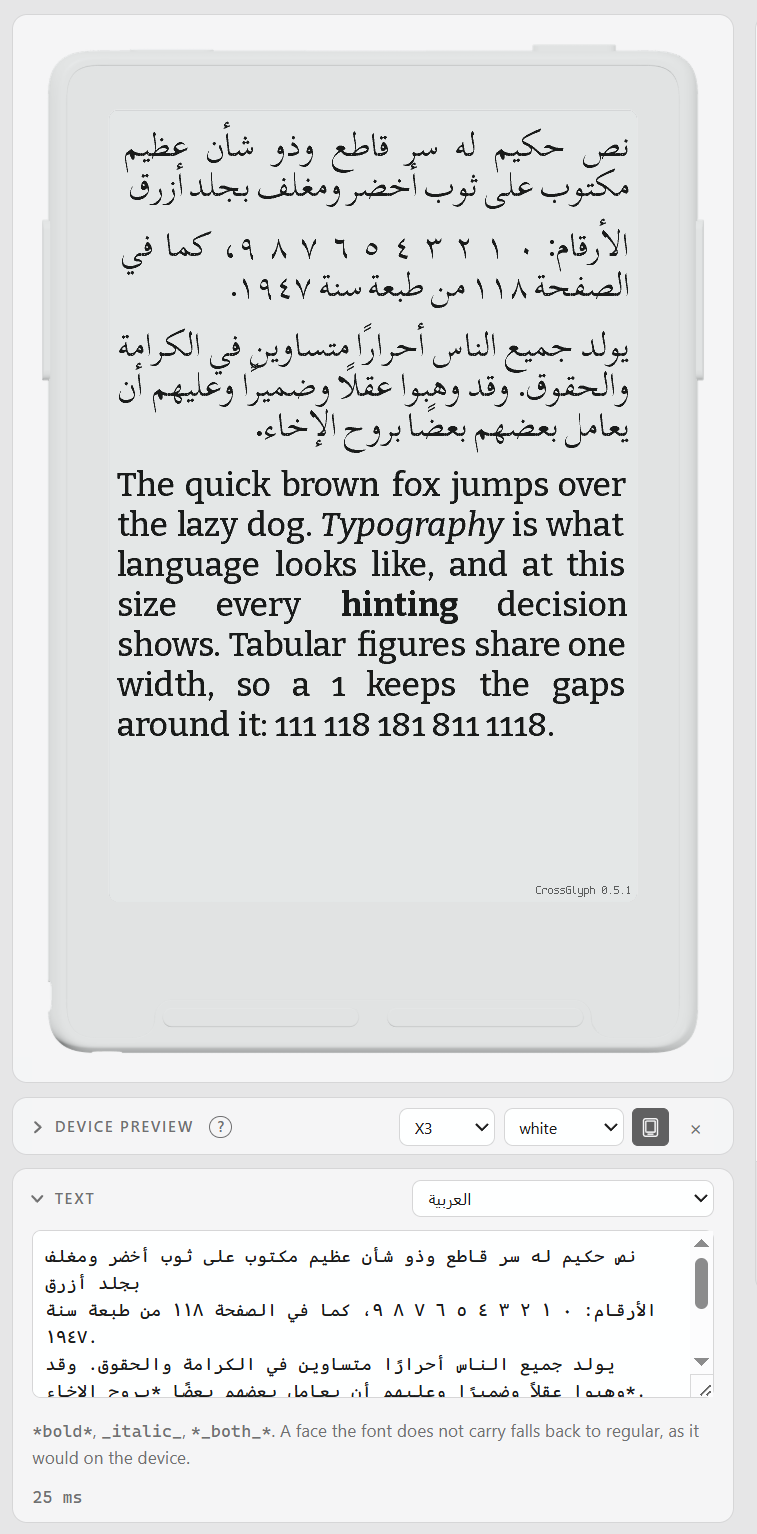
The one thing to do yourself is put arabic in intervals, exactly as you would for Greek or Cyrillic. It is the choice to carry Arabic at all and it costs file size, so it is not assumed, and reading on its own contains no Arabic whatsoever. Asking for the letters is enough: the shapes they are drawn by follow from the letters and are added for you. A face named in fallback 1 is repaired the same way, so a Latin family that borrows its Arabic from one still gets joined text.
The bundled fallback set gains Noto Sans Arabic, which makes thirteen faces. Upstream's folder does not carry one, so that face is fetched from the project that publishes it, and a workspace filled before this release has every other face and not this one; its absence is not an error. There is an Arabic sample in the text picker too, built the way every other preset is: the pangram the firmware itself shows under Settings > Font, then Article 1 of the Universal Declaration, then a paragraph of Arabic-Indic digits, because the English tail's digits are Latin and say nothing about whether a face carries the other ten.
A build records what it repaired, under synthesized in .crossglyph.json, so a font never carries shapes that nothing in the workspace explains.
The preview draws what a build of this coverage would draw
The page used to be sized to the text and nothing else, so it drew characters the built font would not carry. Untick a range, see no change, build, and find out on the device. That is the one thing a preview must not do. It is still sized to the text, which is what keeps it to a few dozen glyphs per keystroke, and it is now also narrowed to what the coverage would build, so the two cannot disagree.
A blank page needs an answer rather than an apology, so the note under the text counts the characters and names the preset that would carry them, and that preset's own tick is marked in the coverage row: the answer is where the answer gets applied. Nothing is ticked for you, since coverage decides what a build writes. The marks name every move in the chain one at a time, the coverage tick first, then bundled fallback faces, then Fetch when those faces are not on disk, and nothing is marked once the box is on and the faces are here, because no control on the panel fixes that. Naming a family in fallback 1 is offered throughout as the other answer.
The warning itself is louder: a filled mark, a ground and a rule. It lives inside the Text fold, and that fold is shut, so the folded heading now carries the same mark.
Fractional point sizes you can actually reach
A fractional size has built correctly for a long time: 13.25 is rasterized at 13.25 and shipped as Family_13, because the device parses the size out of the filename and cannot hold a fraction there. What was missing was every way of finding that out.
The export panel's size boxes were free text with no rules at all, so the size knob snapped to a quarter point and the box beside it took 13.3, or 13.256, or 200. They now take the same quarter points over the same 6 to 40 range, snapped when you leave the box rather than while you are still typing. Step the knob until 13.25 looks better than 13, then put 13.25 in the box.
A line under the boxes says what a fractional size will be called on the card, and turns into a warning when two of them land on the same name. Quarter points make that easy to walk into, since 13.5 and 13.75 are both 14. A comma is a decimal point in one of those boxes, because each holds a single size and that is what a Russian or German layout types; in more sizes, which is a list, it still separates one size from the next. On the command line, --list and the line each size prints as it is built now name the label when it differs from the size.
The export panel has a foot of its own
Both columns end in the same bar now. Build, Build all and a badge moved into the export panel's own foot, with the progress rule and one line of status inside it. A build used to shift the save bar down 53px; the foot measures 88px at every sample from the first press to the last, and only an error grows it. Save left the export tab, because a build writes the .conf before it starts and a second button for the first half of that is one to press by mistake. The tabs say what a lit Save used to: a dot on Tune for an unsaved knob, a dot on Export for an unsaved setting, and never about the panel you are looking at.
Fixed
- A glyph over 255 pixels on either side had nowhere to go in the
.cpfontformat, and the packer failed the whole family naming no codepoint. It is skipped with a warning that names the codepoint and its measured size instead. One glyph reaches this in practice: the bismillah at U+FDFD, an entire phrase drawn as one ornament, which passes the limit at about 12.6 pt. - Unsorted coverage packed without complaint into a file the render core rejects with nothing to say about why. The interval table is searched as though it ascends, so it is normalized on the way in.
- A face reaching the kern feature through mark attachment logged a line per subtable. Scheherazade has ninety-three of them and the preview rebuilds on every keystroke, so a render buried its own output. One Scheherazade render went from 107 lines to 14.
- Typing into the extra ranges field returned an error per keystroke, because the field holds half a range for as long as it takes to type one. A token that does not parse is simply not in force yet.
- Naming the preset that would carry a missing character cost 3.46 ms on every render of a page with nothing wrong with it, most of it listing the twenty thousand codepoints of a CJK block nobody had asked about.
- A size was spelled back with six significant digits, so a config saying 13.4999999 filled the box with 13.5 and a save moved the size. It now prints the shortest string that parses back to the same number.
- A coverage tick only redrew the page while the bundled faces were on, so the note said tick Arabic, you ticked Arabic, and the page sat there.
- Arabic supplied by a fallback face was left out of the provenance count, and a shaped advance is now rounded the way FreeType rounds, so Arabic is spaced like every other script in the same font.
Upgrading
Installs check for updates on their own; Check now in the island under the specimen does it immediately. Nothing in a workspace changes format, so an existing fonts folder and its configs are read as they were. Rebuild any family carrying Arabic to pick up the joined shapes.
v0.5.1
CrazyCoder
Serge Baranov
7f5525a
CrazyCoder
Serge Baranov
Fixed
- The preview no longer relies on the browser's image element to decode a rendered page. Pages are decoded directly from the render response and painted to the device canvas, which fixes the preview freezing on machines where that decoder stalls: knob changes that only appeared after Reset device preview, and press and hold sometimes staying on the untuned view until another knob moved.
- A page that cannot be decoded now says so over the sheet instead of silently keeping the previous page up.
- The Windows tool wrapper looks at its cache before it requires a download URL, which is what the Unix wrapper already did. An ordinary launch is unaffected, offline ones included: the launcher sets the URL whether or not anything is fetched.
v0.5.0
CrazyCoder
Serge Baranov
b576a16
CrazyCoder
Serge Baranov
New
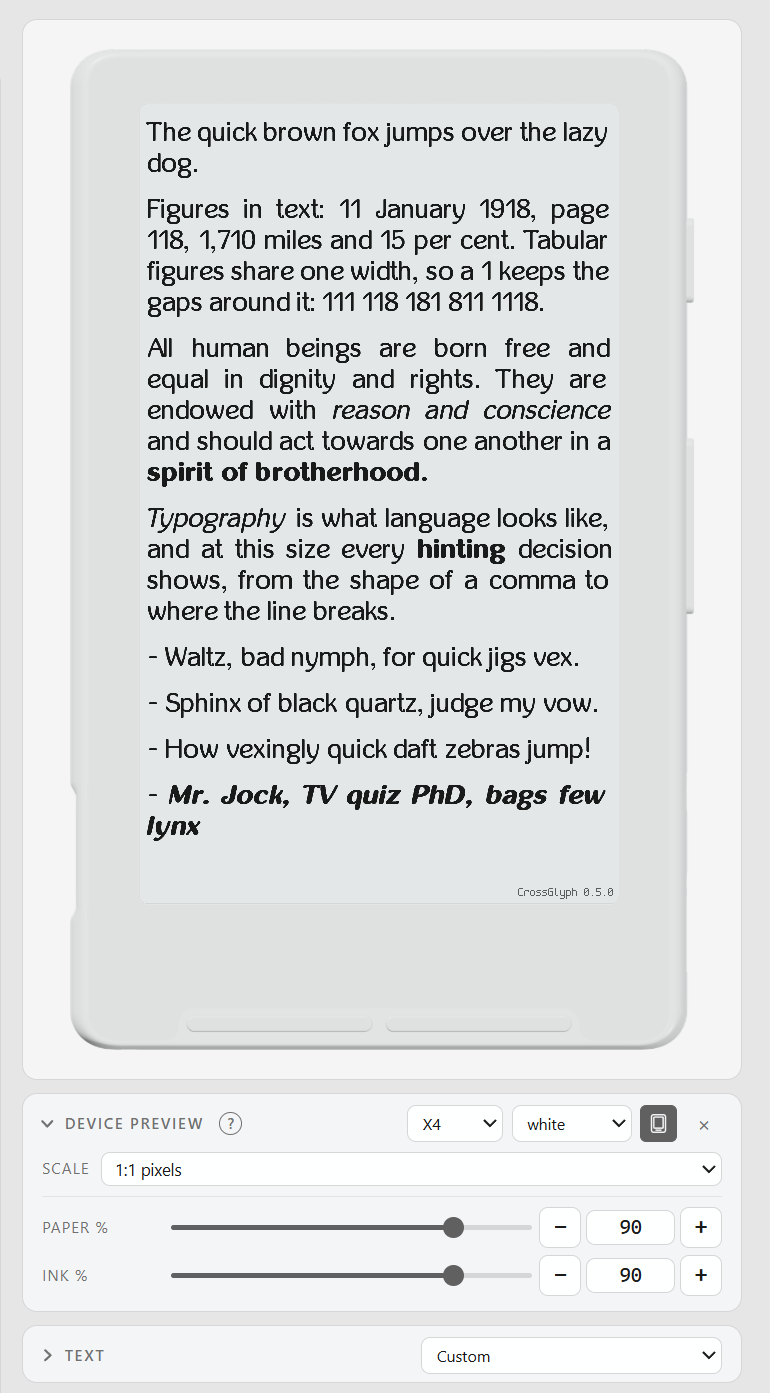
- Device preview places the rendered page inside an Xteink X3 or X4 body. Choose the body color, compare the native screen dimensions, remap paper and ink tones, or calibrate the reader to its physical size with a 100 mm ruler.
- Every rendered PNG carries its CrossGlyph version in the bottom-right corner, so a shared tuning result says which renderer produced it without changing the simulated framebuffer.
- The Text card folds while keeping its language picker available, leaving more room for the page when the specimen does not need editing.
Fixed
- Per-control comparisons stay set aside when Untuned is switched on and off, including numeric fields, selects, line height, and variable-font axes.
- Reader frames fit narrow and wide layouts without clipping, keep calibrated rulers scrollable at large scales, and repaint only the pixels that changed.
- Rapid redraws cannot let a superseded PNG or error body replace the newer page.
- Pinned optical-size coordinates survive saving and remain visible in variable-font face badges.
v0.4.0
CrazyCoder
Serge Baranov
8bfa5ac
CrazyCoder
Serge Baranov
Compare variable fonts against clear baselines
Numeric variable-font axes now use the same reversible comparison control as the tuning knobs. For a saved family, the reference is its saved configuration. Untuned uses the font's declared defaults. Neither comparison discards edits.
- Weight selectors remain face choices. They do not act as tuning comparisons.
- The comparison state refreshes immediately after a save, reset or return from Untuned.
- The preview remembers the selected font size separately from family tuning and page settings. Both reset actions keep the selected size.
Update without reopening CrossGlyph
The Update button can install a release and restart a local preview on the same address. The page reloads when the replacement server answers.
The automatic restart begins with the next update after v0.4.0. Installing v0.4.0 from an earlier release still requires closing and reopening CrossGlyph.
- The first startup can spend longer building its environment. The page waits instead of reporting failure early.
- The detached restart writes to
preview.log. If the process exits, the error names that file. - A second tab cannot start a duplicate download or restart while an update is already running.
- Remote previews and installations that cannot replace themselves keep the explicit close-and-open instructions.
Windows fixes
- Ctrl+C now ends a foreground
crossglyph.cmdpreview cleanly, without a Python traceback or theTerminate batch job (Y/N)?prompt. - Automatic restart preserves valid Windows path characters such as
&,^and%instead of lettingcmd.exereinterpret them.