Repository navigation
Releases: DRAZY/strata
Release list
Strata 2.0.3

Downloads
| Platform | File |
|---|---|
| macOS 11+, any Mac (Apple silicon + Intel) | Strata-2.0.3-universal.dmg |
| macOS, Apple silicon only (smaller) | Strata-2.0.3-arm64.dmg |
| Windows 10/11, x64 (portable) | Strata-2.0.3-windows-x64.zip |
Already using Strata? It offers this update by itself (or choose Help ▸ Check for Updates…).
macOS builds are signed and notarized. The Windows exe isn't code-signed yet: if SmartScreen appears, choose More info ▸ Run anyway.
Every file has a .sha256; the .app.zip files and latest.json are for the built-in updater.
What's changed
Added
- ⌘K ⌘B (Ctrl+K Ctrl+B on Windows) toggles the side bar too, as in
Sublime Text. ⌘\ still works.
Full changelog: v2.0.2...v2.0.3
Strata 2.0.2
Downloads
| Platform | File |
|---|---|
| macOS 11+, any Mac (Apple silicon + Intel) | Strata-2.0.2-universal.dmg |
| macOS, Apple silicon only (smaller) | Strata-2.0.2-arm64.dmg |
| Windows 10/11, x64 (portable) | Strata-2.0.2-windows-x64.zip |
Already using Strata? It offers this update by itself (or choose Help ▸ Check for Updates…).
macOS builds are signed and notarized. The Windows exe isn't code-signed yet: if SmartScreen appears, choose More info ▸ Run anyway.
Every file has a .sha256; the .app.zip files and latest.json are for the built-in updater.
What's changed
Fixed
- The Markdown preview follows the editor smoothly as you scroll. It used
to stand still until the editor's top line changed and then jump a whole
block, which looked like ghosting on 120 Hz displays. A block drawn for the
first time can no longer overlap the one below it for a frame.
Full changelog: v2.0.1...v2.0.2
Strata 2.0.1
Downloads
| Platform | File |
|---|---|
| macOS 11+, any Mac (Apple silicon + Intel) | Strata-2.0.1-universal.dmg |
| macOS, Apple silicon only (smaller) | Strata-2.0.1-arm64.dmg |
| Windows 10/11, x64 (portable) | Strata-2.0.1-windows-x64.zip |
Already using Strata? It offers this update by itself (or choose Help ▸ Check for Updates…).
macOS builds are signed and notarized. The Windows exe isn't code-signed yet: if SmartScreen appears, choose More info ▸ Run anyway.
Every file has a .sha256; the .app.zip files and latest.json are for the built-in updater.
What's changed
Fixed
- View ▸ Side Bar ▸ Toggle Side Bar works with no folder open. It used to
show only a status message; now the side bar lists your open files, with a
button that opens the current file's folder and Open Folder…. Toggle
Show Open Files lists even a single tab, and turning it on shows the side
bar. - Status messages show as a short notice at the bottom of the window while
the status bar is hidden or Distraction Free is on, so commands no longer
look like they did nothing. - Leaving full screen (the green button, Esc or the system) also leaves
Distraction Free, and showing the minimap, tabs, status bar, terminal,
Build Results, Markdown Preview or the AI panel from Distraction Free leaves
it so the panel appears. - Commands that did nothing now say why or do the expected thing: Find Next
with no matches, Quick Find and Use Selection for Find with only a caret
(they use the word under it), Build and Build With… for a file with no build
system (the Build Results panel explains), Next Modification outside Git,
Next Result before a build, Show Problems and Show Completions with nothing
to show, Backlinks outside a notes folder, and a minimap too narrow to draw. - Goto Anything with no folder open offers recent files.
- Commands the menu disables are refused with a reason from the command
palette and shortcuts too (for example Export as HTML on a file that isn't
Markdown). - Incremental Find is incremental: Return keeps the match and goes back to
the editor. - A ● REC marker shows in the status bar while a macro records.
- View ▸ Focus Group items are disabled for groups that don't exist, and the
Ruler, Word Wrap Column and whitespace check marks follow the current
file's own settings (from.editorconfigor syntax settings). - Open Recent ▸ Clear Items no longer empties Reopen Closed File.
Full changelog: v2.0.0...v2.0.1
Strata 2.0.0
Downloads
| Platform | File |
|---|---|
| macOS 11+, any Mac (Apple silicon + Intel) | Strata-2.0.0-universal.dmg |
| macOS, Apple silicon only (smaller) | Strata-2.0.0-arm64.dmg |
| Windows 10/11, x64 (portable) | Strata-2.0.0-windows-x64.zip |
Already using Strata? It offers this update by itself (or choose Help ▸ Check for Updates…).
macOS builds are signed and notarized. The Windows exe isn't code-signed yet: if SmartScreen appears, choose More info ▸ Run anyway.
Every file has a .sha256; the .app.zip files and latest.json are for the built-in updater.
What's changed
This release adds Obsidian-compatible notes (with runnable code blocks
and optional Git sync), Review Changes, language servers, clickable file
locations and Send to Terminal in the terminal, optional AI helpers, plugins,
and markers for hidden and direction-changing characters. Everything that
runs other programs or reaches the network is off, or asks, until you turn it
on; see Security below.
Added
- Notes: Obsidian-compatible notes on plain Markdown files. Open your notes
folder (an Obsidian vault or any folder of Markdown files) and
[[wikilinks]]work as in Obsidian, with headings, block references,
aliases and embeds, and ordinary Markdown links to notes too. Links are
underlined in the editor (dashed for a note that doesn't exist yet), and
⌘-click (Ctrl+click) or Notes: Follow Link opens them, offering to
create a missing note where Obsidian would put it. Strata reads the vault's
.obsidiansettings but never writes them, and notes use the network
only through Git sync, which you turn on per vault. See the new Notes page
in the manual. - Notes: typing
[[completes note names, aliases, headings and block ids,
and writes the link the way the vault's Obsidian settings ask. - Notes: a backlinks panel under each note lists the notes linking to it,
with the line that holds each link, and the note's tags. It's kept up to
date as Obsidian, a sync tool or Git changes files, and counts notes open
in tabs as they are, saved or not;notes_backlinkschooses when it
shows.#tagsand frontmatter tags are tinted, and Notes: Find Tag…
lists every tag with its notes. - Notes: Notes: Open Daily Note, Notes: New Note… and Notes: New
Note from Template… follow Obsidian's Daily notes and Templates settings,
filling in{{date}},{{time}}and{{title}}. - Notes: Notes: Rename Note… (also Rename… in the side bar) offers to
update every link to the note, showing each changed line first. Notes:
Undo Rename puts the links and the name back, all or nothing, and never
overwrites a file written meanwhile. - Notes: sync conflict copies (Syncthing, Dropbox, Nextcloud and ownCloud)
get a notice above the note with Compare, Open Copy and Move Copy
to Trash…; Notes: Compare with Conflict Copy does the same from the
keyboard. - Notes: the Markdown preview shows wikilinks you can click, tags,
frontmatter as a block of properties, and embedded images, notes, sections
and blocks (one level deep, images only from the vault). - Notes: runbooks you can click through. In the Markdown preview, fenced
bash,sh,zsh,fish,pwsh,powershell,cmd,python,node
(js) andrubyblocks have a ▶ Run button. Shell blocks go to the
current terminal tab the way Send to Terminal sends text; language blocks
start their REPL in a terminal tab of their own. Notes: Run Code Block
does the same for the block at the cursor, and Notes: Run Code Block and
Capture Output runs it in a separate process and puts what it prints in
anoutputblock under the code, as one edit Undo takes back (stopped
aftercode_block_timeout_seconds, 60 by default). Nothing runs when a
file opens or the preview draws. Before a file's first block runs, Strata
shows exactly what will run and where, and asks; Don't ask again for
this file is remembered in Strata's settings folder, never in the file,
and a different file at the same path, or a change made outside Strata,
asks again. Files outside the open folders ask every time, and a block
with invisible or text-reordering characters never runs. See Notes ▸ Running code blocks in the manual. - Notes: optional Git sync, off until you turn it on for a vault with
Notes: Enable Git Sync for This Vault… (which says first that the
repository's hooks, filters and credential helpers will run). Notes: Sync
Notes saves the vault's notes, commits what changed in the vault
(respecting.gitignore, with a message fromnotes_sync_message),
rebases onto the remote and pushes, never forced; an optional timer does the
same every few minutes and skips a vault with unsaved notes. Strata never
asks for a password: Git uses your credential helper or SSH agent. When a
note changed on both sides, nothing is pulled or pushed and your files stay
as they were; the notes in conflict are listed with Compare with
origin/main and Keep My Versions and Sync. No upstream, offline, a
refused sign-in or a replaced remote history change nothing and say so in
the status bar, which also shows the last sync. Turning sync on is tied to
that repository: a different one later at the same path is asked about
again before anything runs. Before Strata ever undoes a rebase Git
started, it backs up every file it touched (on disk and staged) to
sync-backupsin its settings folder, kept 30 days (Notes: Show Sync
Backups); a sync interrupted by quitting is only undone when you say so.
See Notes ▸ Git sync in the manual. - Optional AI helpers with a model you choose (Tools ▸ AI and the command
palette): Summarize Changes (the whole review or one file), Explain
Change, Flag Risks, Draft Commit Message and Explain
Selection. Providers: any OpenAI-compatible server (Ollama and LM Studio
on your computer or network, OpenRouter, OpenAI…), the Anthropic API, or
theclaudeandcodexcommand-line tools with your own login. Answers
stream into a panel as Markdown, can be cancelled, copied or opened in a new
tab, and never hold up the editor. See the new AI Helpers page in the
manual. - AI helpers are off until you turn them on in Settings ▸ AI Helpers
(ai_enabled). Local providers are used without asking. Before the first
request to any other provider, Strata shows exactly what it will send and
to which host, and asks (Allow Once, Always for This Provider,
Cancel); AI: Forget Allowed Providers asks again. Test
Connection checks a provider without sending any of your text. - AI helpers send only what they're about. Files that look like secrets
(.env, keys, anything in folders like.sshorsecrets), files Git
ignores, binary files and symbolic links are never sent, and a size limit
(ai_max_prompt_kb) says what was left out. API keys live in the macOS
Keychain or Windows Credential Manager, are only sent to the address they
were saved for, and never touchsettings.jsonor the log. - Plugins: extensions that are separate programs, in any language, which
Strata starts and talks to with JSON-RPC over their standard input and
output (the framing language servers use). A plugin can add commands to
the command palette and Tools ▸ Plugins, keys (never one Strata already
uses), status bar items (for every window, or for the file in front of
each), a Markdown panel and pick lists; read and edit open files (one
Undo takes back each edit); and read and write files in the side bar
folders. A plugin that crashes is restarted, and left stopped
after three crashes in five minutes; one that floods Strata with messages
or stops answering can't hold up the editor. Plugin settings go in
pluginsin settings.json. See the new Plugins page in the manual, with
the full API reference; two small examples are inexamples/plugins. - Plugins are installed from a folder or a zip (Tools ▸ Plugins ▸ Install
from Folder… / Install from Zip…) into Strata's settings folder;
there's no online directory. Zips with paths that would leave the package,
links, or sizes over the limits are refused. Plugins: Manage Plugins…
lists them, turns them on and off, starts and stops them, shows what they
may do and their log, and removes them. - A plugin asks before it first runs: Strata lists the permissions it wants
in plain words and remembers your answer for that exact package (by its
SHA-256), so any change to it asks again; it then runs from a read-only
copy of exactly that package, checked again right before it starts, with
the environment variables that load code from elsewhere (PYTHONPATH,
NODE_OPTIONS,DYLD_*…) removed. Every request a plugin makes is
checked against what you allowed, and its file access stays inside the
open folders, never following links or reaching hard-linked files. Text
from plugins shows hidden and direction-changing characters as markers.
Strata can't sandbox a plugin's own program, and the question says so:
running other programs and using the network are shown as things Strata
can't limit, and an interpreter's own libraries aren't part of the check. - Review Changes, for checking what a coding agent changed and keeping or
undoing each change (no AI involved). The Changes tab of the side bar
lists every file that differs from the last commit, or from a snapshot taken
with Start Review, with its status (modified, new, deleted, renamed) and
lines added and removed, and updates while the agent works. Clicking a file
opens its changes side by side with Keep and Revert for each change
or the whole file; reverting is an ordinary edit, so Undo brings the change
back and nothing is written until you save. Tick files off as reviewed; the
status bar counts the rest. F8 and Shift+F8 s...
Strata 1.0.2
Easier-to-read text, and update checks on your schedule.
On 1.0.1? Choose Help ▸ Check for Updates… (or just reopen Strata if your last check was over an hour ago). From 1.0.2 on, Strata checks every time it opens and then every 4 hours by default.
Downloads
| Platform | File |
|---|---|
| macOS 11+, any Mac (Apple silicon + Intel) | Strata-1.0.2-universal.dmg |
| macOS, Apple silicon only (smaller) | Strata-1.0.2-arm64.dmg |
| Windows 10/11, x64 (portable) | Strata-1.0.2-windows-x64.zip |
macOS builds are signed and notarized. The Windows exe isn't code-signed yet: if SmartScreen appears, choose More info ▸ Run anyway. Every file has a .sha256; the .app.zip files and latest.json are for the built-in updater.
What's changed
Changed
-
Update checks: with automatic updates on, Strata checks every time it opens,
then every 4 hours while it stays open. Choose 1, 2, 4, 6 or 12 hours in
Settings ▸ Help (update_check_interval_hours), or Manually only to check
just from Help ▸ Check for Updates…. A new version appears as a small notice
with Install and Relaunch, Later and Skip This Version. -
Easier-to-read interface text. The default interface size is now 14 pt (was
13); settings.json files that setui_font_sizekeep their size.
Descriptions, hints and shortcuts are a point smaller than the interface
size (they were about three-quarters of it) and never under 12 pt, and the
Settings window's descriptions andsettings.jsonkeys are larger and
darker. Secondary text now meets WCAG AA contrast (4.5:1) in every bundled
color scheme, and a test keeps it that way. -
View ▸ Interface Size offers Small (12 pt), Default (14 pt), Large
(16 pt) and Larger (18 pt); the Settings window and the welcome card offer
the same four. The Settings window opens larger to fit bigger text, and the
manual's contents, the command palette, the update notice and Compare's
header grow with the interface size.
Full changelog: v1.0.1...main
Strata 1.0.1
A small update to Strata 1.0: more timely update checks and Windows fixes.
Already using Strata 1.0.0? Choose Help ▸ Check for Updates… to install it in place. From 1.0.1 on, Strata checks by itself when it opens and every four hours (if automatic checks are on).
Downloads
| Platform | File |
|---|---|
| macOS 11+, any Mac (Apple silicon + Intel) | Strata-1.0.1-universal.dmg |
| macOS, Apple silicon only (smaller) | Strata-1.0.1-arm64.dmg |
| Windows 10/11, x64 (portable) | Strata-1.0.1-windows-x64.zip |
macOS builds are signed and notarized. The Windows exe isn't code-signed yet: if SmartScreen appears, choose More info ▸ Run anyway. Every file has a .sha256; the .app.zip files and latest.json are for the built-in updater.
What's changed
Changed
- Update checks: with automatic checks on, Strata now looks when it opens (if
the last check was over an hour ago) and every four hours while it stays
open, so a new release shows up during a working session. It's still a small
notice in the corner, never a pop-up.
Fixed
- Windows: crash reports and Help ▸ Report a Problem hide your user folder
(C:\Users\<name>) like they do on macOS. - Windows: Copy Relative Path uses
\separators. - Closing a window right after opening its terminal no longer leaves the
shell running in the background. - Updated the cryptography libraries that check update signatures
(ed25519-dalek 3, sha2 0.11).
Full changelog: v1.0.0...v1.0.1
Strata 1.0.0
Strata 1.0: a fast, open-source code and text editor for macOS and Windows. Native, written in Rust, built for the keyboard. No accounts, no telemetry.
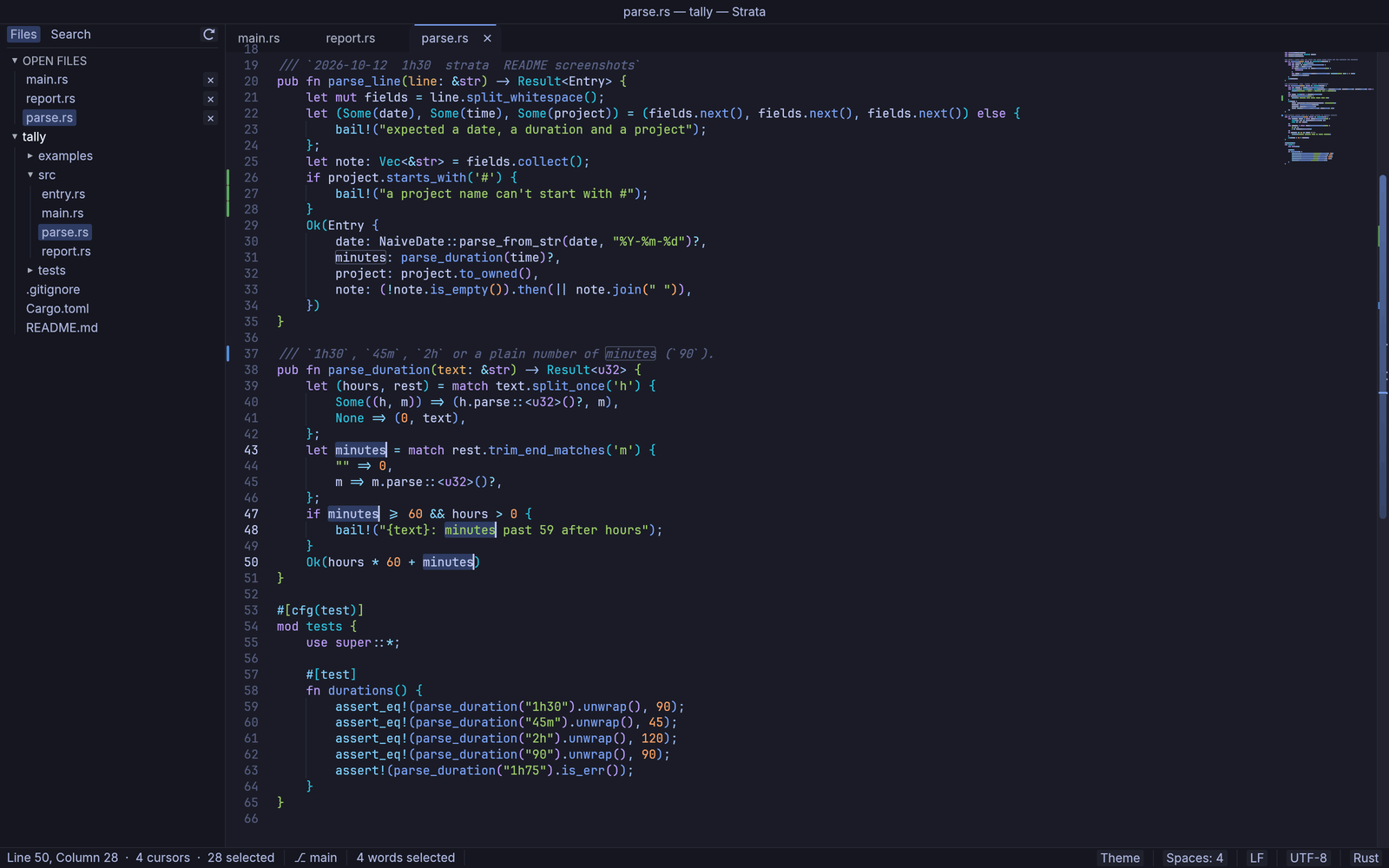
Downloads
| Platform | File |
|---|---|
| macOS 11+, any Mac (Apple silicon + Intel) | Strata-1.0.0-universal.dmg |
| macOS, Apple silicon only (smaller) | Strata-1.0.0-arm64.dmg |
| Windows 10/11, x64 (portable, nothing to install) | Strata-1.0.0-windows-x64.zip |
The .app.zip files and latest.json are for the built-in updater; you don't need them.
First launch
- macOS: signed with a Developer ID and notarized by Apple. Open the DMG and drag Strata to Applications.
- Windows: unzip anywhere and run
Strata.exe. The exe isn't code-signed yet, so SmartScreen may say "Windows protected your PC": choose More info ▸ Run anyway.
Already on 1.0.0-rc.1? Choose Help ▸ Check for Updates… to update in place.
Checksums: macOS shasum -a 256 -c <file>.sha256; Windows Get-FileHash <file> and compare with the .sha256.
Privacy: Strata only contacts GitHub to check for and download updates, and only if you allow it (it asks once). Nothing else is sent.
Known limitations
- Screen readers can't read the editor area yet (keyboard-only use is fully supported).
- Linux isn't an official platform yet (it builds from source).
- No complex-script shaping (Arabic, Hebrew, Devanagari); emoji are monochrome.
Strata 1.0, the first stable release: a fast, open-source code and text editor
for macOS and Windows. It contains everything in 1.0.0-rc.1 below, tested on
macOS and on Windows.
Changed since 1.0.0-rc.1
- The Windows build has been tried on real hardware.
- Release builds from CI refuse to publish unless they can be signed.
Highlights
- Multiple cursors, Goto Anything, the command palette, and find and replace
across whole projects with undo. - Split panes, multiple windows, several views of one file, and projects with
several folders. - A built-in terminal, live Markdown preview, side-by-side compare, build
systems, Git change bars and permalinks, spell check, printing and PDF. - About 190 languages, 35 color schemes, bundled coding fonts, EditorConfig
and per-language settings, and a Settings window. - Hot exit, atomic saves, crash recovery and fast large-file handling.
- Signed, opt-in updates from inside the app (Help ▸ Check for Updates…).
Full feature list: see CHANGELOG.md and the 1.0.0-rc.1 notes.
Strata 1.0.0-rc.1
The first release candidate of Strata, a fast, open-source code and text editor for macOS and Windows. Please try it and report anything that feels off (Help ▸ Report a Problem… fills in the details).
Downloads
| Platform | File |
|---|---|
| macOS, any Mac (Apple silicon + Intel) | Strata-1.0.0-rc.1-universal.dmg |
| macOS, Apple silicon only (smaller) | Strata-1.0.0-rc.1-arm64.dmg |
| Windows 10/11, x64 (portable) | Strata-1.0.0-rc.1-windows-x64.zip |
The .app.zip files and latest.json are used by the built-in updater; you don't need them.
First launch
- macOS: signed with a Developer ID and notarized by Apple, so it opens normally. Open the DMG and drag Strata to Applications.
- Windows: unzip and run
Strata.exe. The exe isn't code-signed yet, so SmartScreen may say "Windows protected your PC": choose More info ▸ Run anyway.
Checksums: every file has a .sha256. macOS: shasum -a 256 -c <file>.sha256. Windows: Get-FileHash <file> and compare.
Updates
Strata can tell you about new versions and install them with one click (signed and verified before anything is replaced). It asks once on first launch; you can change it under Settings ▸ Help or use Help ▸ Check for Updates…. Strata contacts GitHub only for this, only if you allow it, and sends no telemetry.
Known issues in this release candidate
- Windows is a release candidate in the truest sense: it builds and packages cleanly but hasn't been tested on real hardware yet, and the exe is unsigned.
- Screen readers can't read the editor area yet (keyboard-only use is fully supported).
- Linux isn't an official platform yet.
- egui doesn't shape complex scripts (Arabic, Hebrew, Devanagari), and emoji are monochrome.
The first public release candidate. Everything below is new.
Editing
- Multiple cursors and box (column) selection, Quick Add Next, Find All as
cursors, split selection into lines, and soft undo for cursor moves. - Auto-closing brackets, smart indentation, comment toggling, line moves,
duplicate, join, transpose, case conversion, sort/shuffle/unique lines, wrap
paragraph at the ruler, paste and indent, paste from history. - Word completions while typing, snippets in the
.sublime-snippetformat
(fields, mirrors, variables, transforms) with built-ins for common
languages. - Code folding, bookmarks, Emacs-style mark and yank, macros that you can save
and bind to keys. - Spell check for comments, strings and prose with bundled US and UK English
dictionaries, suggestions and a personal word list. - Text tools: JSON format and minify, Base64, URL and HTML encoding, UUIDs and
dates.
Navigation & Search
- Goto Anything for files, lines (
:42), symbols (@name) and text
(#text), and a command palette that lists every command with its shortcut. - Go to line, go to symbol, go to definition, and jump back and forward.
- Find and replace with regular expressions, whole word, In Selection and
Preserve Case. - Find in Files and Replace in Files across whole folders, respecting
.gitignore, with include and exclude patterns and an undo for the whole
replacement. - Search history: ↑ and ↓ in the find, replace and Find in Files fields.
Layout & Windows
- Tabs with preview tabs and drag to reorder; up to four split panes in
columns, rows or a grid. - Several views of one file, each with its own cursors, scroll and folds.
- Multiple windows, each with its own tabs, panes, folders and terminal.
- Projects: one or more folders in the side bar, saved as
.strata-project
files. - Distraction-free mode and full screen.
- Hot exit: quit at any time; every window, tab and unsaved change comes back.
Built-in tools
- Terminal panel with tabs, true color and the color scheme's palette.
- Live Markdown preview with GitHub-style tables, task lists, alerts,
footnotes and highlighted code, plus export to HTML. - Compare two files, a file with another tab, or a file with its last Git
commit, side by side and still editable. - Build systems (Cargo, Python, Node, Go, C/C++, Make and more) with clickable
errors, plus your own as JSON. - Git change bars in the gutter and the current branch in the status bar;
Copy Permalink (GitHub, GitLab, Bitbucket) and Copy Relative Path. - Printing and PDF export with syntax colors.
- A built-in manual (Help ▸ Documentation) with search, and a generated
Keyboard Shortcuts page. - Built-in updates (opt-in): Strata can tell you about new versions and
install them; Help ▸ Check for Updates…. It asks on first launch.
Appearance
- 35 color schemes (Strata Dark and Light, One Dark, Dracula, Nord,
Solarized, Gruvbox, Tokyo Night, Catppuccin, Rosé Pine and more) that can
follow the system's light or dark mode, each checked for WCAG AA contrast,
plus two high-contrast schemes. - Bring your own
.tmThemeand.sublime-color-schemefiles, or override
single colors insettings.json. - Bundled coding fonts (JetBrains Mono, Fira Code, IBM Plex Mono, Source Code
Pro) with ligatures, and Inter for the interface. - Minimap, indent guides, bracket pair colors, sticky scroll, rulers, color
swatches, visible whitespace and cursor styles. - A Settings window with search, applied live, and a short welcome card on the
first launch.
Languages
- About 190 languages highlighted, from syntect's defaults and bat's
collection, plus Strata's own PowerShell grammar. - Symbols, smart indentation and comment toggling for many of them.
- Add your own
.sublime-syntaxfiles. - EditorConfig support and per-language settings (
syntax_settings).
Files & Safety
- Large files: a 95 MB, 1.6 million-line file opens highlighted in about
0.6 s on an M-series Mac; minified one-line files stay responsive. - 40 encodings, detected on open (including legacy ones such as Shift_JIS,
GBK and KOI8), with Reopen with Encoding and Save with Encoding; LF and CRLF
line endings. - Optional auto save after a pause in typing.
- Images open in a preview, and other binary files in a read-only hex view.
- Atomic saves that keep symlinks and permissions and refuse text the chosen
encoding can't hold. - Files changed or deleted on disk are noticed and reloaded or flagged.
- Logs and crash reports stay on your computer; after a crash every unsaved
tab is kept and the next launch offers the report. - No telemetry. Strata contacts GitHub only to check for and download updates,
and only if you allow it.
Platform
- macOS 11 or later, as a universal (Apple silicon and Intel) or Apple
silicon DMG, signed with a Developer ID and notarized; native menu bar,
Finder Open With and Dock drops, recent files in the Dock menu, and a
stratashell command. - Windows (x64), as a portable zip with the app icon and version
details embedded inStrata.exe. - The
stratacommand opens files at a line and column, hands them to a
running Strata, and can wait for tabs to close (-w, for$EDITORand Git).
Known issues
- The Windows build has not yet been tested on real hardware, and
Strata.exeis not code-signed, so SmartScreen warns on first run (More
info ▸ Run anyway). - No screen-reader support in the editor area yet.
- Linux builds compile but are not officially supported or packaged.
- Coding ligatures draw one cell per character, and complex scripts (Arabic,
Indic and other shaped scripts) and right-to-left text are not fully laid
out.