Skip to content
Navigation Menu
Sign in
Products
Platform
GitHub
Repository hosting, code review, and collaboration
Copilot
AI coding agent for tasks, projects and automated work
Build & Ship
Actions
CI/CD and automation
Code Quality
Quality analysis, fixes, and enforcement
Codespaces
Cloud development environments
Secure
Code Security
Vulnerability detection and remediation
Secret Protection
Secret scanning and leak prevention
All Features
Developers
Learn
Documentation
Training
Certifications
Build
Build with Copilot
Customize Copilot
Integrations
Explore
Trending repos
GitHub Sponsors
Events
Changelog
Changelog
Your source for the latest features, improvements, and fixes across GitHub products, all in one place.
Businesses
By Stage
Enterprises
Team
Startups
Nonprofits
By Industry
Healthcare
Financial services
Manufacturing
Government
See all industries
Evaluate GitHub
Why GitHub
Customer Stories
Business insights
Trust Center
Add-ons
GitHub Advanced Security
Enterprise-grade code security
Copilot for business
Enterprise-grade AI features
Premium Support
Enterprise-grade 24/7 support
Resources
Learn & Connect
Documentation
Resource center
Blog
Events & webinars
Community Forum
Customer Stories
Integrations
Support
Customer support
Training
GitHub Status
Company
About
Partners
Changelog
GitHub Universe
GitHub Universe
The event for developers, by developers — talks, workshops, and what’s next for GitHub.
Pricing
Search
/
Sign in
Sign up
Appearance settings
You signed in with another tab or window.
Reload
to refresh your session.
You signed out in another tab or window.
Reload
to refresh your session.
You switched accounts on another tab or window.
Reload
to refresh your session.
Dismiss alert
{{ message }}
DeniseBischof
Unity_Introduction
Repository navigation
Code
Issues
Pull requests
Actions
Projects
Wiki
Security and quality
Insights
More
items
01. Installing Unity
Jump to bottom
Denise Bischof edited this page
Nov 14, 2022
·
3 revisions
How to install Unity:
Download Unity Hub:
https://unity3d.com/get-unity/download
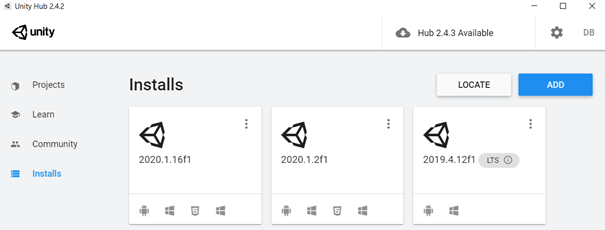
Install and open Unity Hub.
Go to Installs and click on ADD
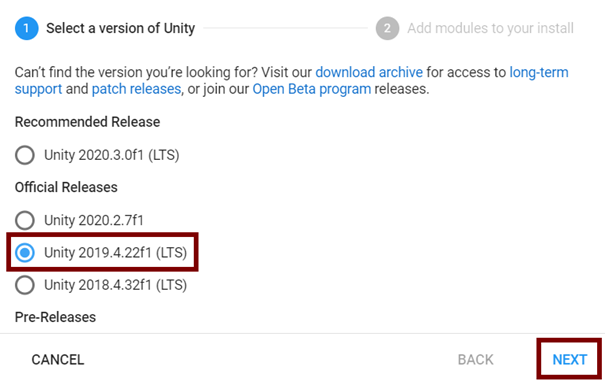
Choose the Unity newest (LTS) version and click next (2021.3.xx)
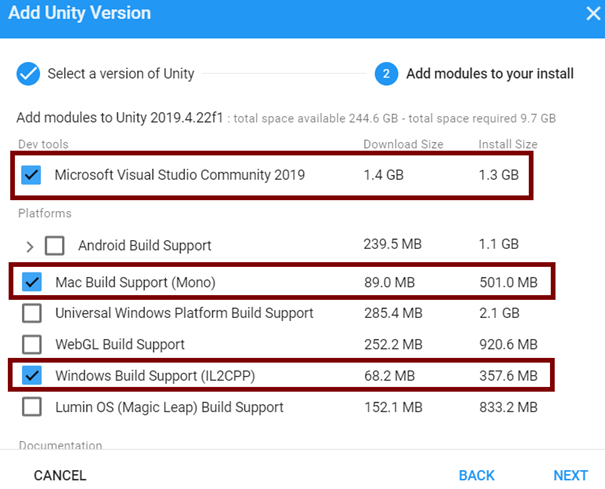
Add Build Support according to your operating system
(optional) add Visual Studio for coding
Confirm with DONE
After the installation is done, click on the settings wheel
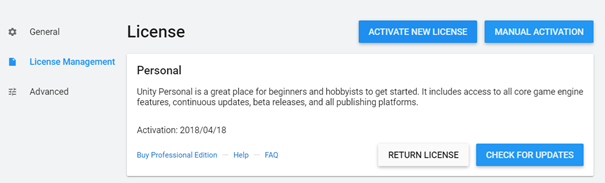
Go to License Management and click on ACTIVATE NEW LICENSE
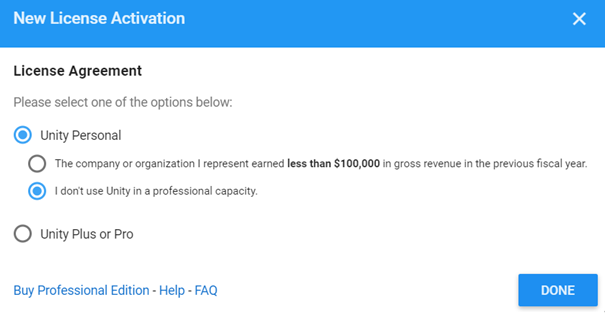
Choose Unity Personal and I don’t use Unity in a professional capacity and confirm with DONE
Creating a new project
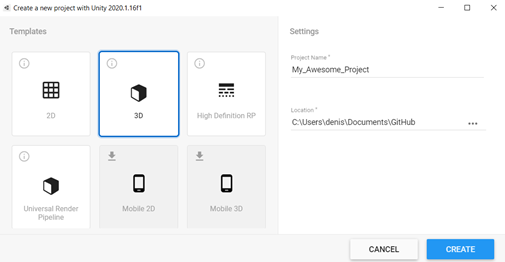
In Unity Hub go to Projects and click on NEW

Choose the type of project you want to make and click create (in our case a simple 3D project)
Unity will now create your new project folder
Wiki pages
Pages
12
Loading
Home
Uh oh!
There was an error while loading.
Please reload this page
.
Loading
01. Installing Unity
How to install Unity:
Creating a new project
Loading
02. Unity Interface
Uh oh!
There was an error while loading.
Please reload this page
.
Loading
03. Importing Packages
Uh oh!
There was an error while loading.
Please reload this page
.
Loading
04. Importing Assets
Uh oh!
There was an error while loading.
Please reload this page
.
Loading
05. Adding New Objects to a Scene
Uh oh!
There was an error while loading.
Please reload this page
.
Loading
06. Changing and Creating Materials
Uh oh!
There was an error while loading.
Please reload this page
.
Loading
07. Creating a new Skybox
Uh oh!
There was an error while loading.
Please reload this page
.
Loading
08. Easy 2D Animation
Uh oh!
There was an error while loading.
Please reload this page
.
Loading
09. Easy 3D Animation
Uh oh!
There was an error while loading.
Please reload this page
.
Loading
10. Adding Videos
Uh oh!
There was an error while loading.
Please reload this page
.
Loading
11. Add Particle Systems
Uh oh!
There was an error while loading.
Please reload this page
.
Clone this wiki locally
You can’t perform that action at this time.