Repository navigation
Prepare on phone
Some things are better finished on the phone: a message you want to send from your own account, an appointment for your calendar, a route to follow. SayOVA prepares them on your phone — filled in, one tap away — and you send, add or start them there. SayOVA itself never sends anything in your name.
This is the Prepare on phone watch feature. It needs no permission, only a phone paired with the watch.
 |
 |
"Text Lena on WhatsApp that I'm ten minutes late." · "Send Tom an SMS: see you at eight." · "E-mail anna@example.com that the report is ready." · "Write to the family group on Signal: dinner's at seven."
- SayOVA reads the message back and says whom it is for: "I'll write: 'Sorry, I'm running ten minutes late.' Shall I prepare it?"
- Change it if you like — "Make it fifteen" — or say yes.
- The message opens on your phone, ready to send:
- WhatsApp — the chat with that person, the text in the input field.
- SMS — your messages app, with number and text.
- E-mail — your mail app, with address, subject and text.
- Any other messenger (Signal, Telegram, Threema, …) — a page with the text and Share, to pick the app and the chat, or Copy.
- Tap send on the phone.
Whom to: with the Calls and contacts feature on, SayOVA looks the number up in your contacts (and completes it with your country code). Without it, the chat or contact picker opens on the phone and you choose there.
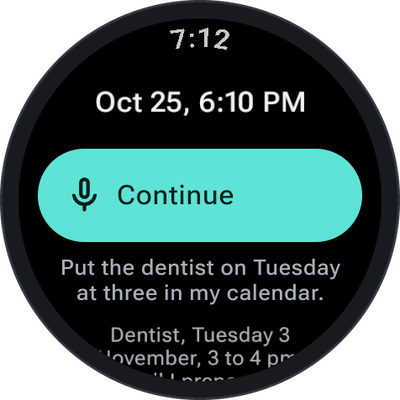
"Put the dentist on Tuesday at three in my calendar." · "Add a team lunch tomorrow from 12 to 1 at Luigi's." · "Block Friday as holiday."
SayOVA repeats the event — title, day, time, place — and after your yes, a page opens on your phone with the event and Add to calendar. That hands it to your own calendar app (Google Calendar, Samsung Calendar, Proton, Etar, …) as a standard calendar file, filled in, for you to save — if the phone asks, open the downloaded file with your calendar app. Use Google Calendar instead is there as well. Without an end time, an event lasts an hour; an event without a time is all-day.
To ask what is already in your calendar, see Calendar.
"Route to the central station." · "Show me the way to Hauptstraße 12 in Leipzig." · "Find the next petrol station on the map."
The place opens in your maps app on the phone (Google Maps, Organic Maps, OsmAnd, …), where you start the route — on foot, by car or by bike — with a tap.
While SayOVA prepares something, Opening on your phone… shows under the orb, then a note such as ✓ WhatsApp on phone · Lena, ✓ Event on phone · Dentist or ✓ Map on phone · Central station. SayOVA says that it is waiting on your phone — never that it was sent.
If the phone can't be reached (Bluetooth off, phone far away), SayOVA tells you; try again when the phone is back.
The message, event or place goes from the watch to your phone over the watch's connection to it. For
events and other messengers, the content travels in the link itself (after the #, which browsers
never send to a server): the page on pair.sayova.app turns it into the calendar file or the share
sheet right on your phone. Nothing of it is stored anywhere. See Privacy and security.