Recipe DroneGestureControl
This recipe will explain how control a Tello-drone using full-body gestures recorded by a webcam.
- A Webcam
- A Tello drone
- Python 3.9
- Python packages: - matplotlib - opencv-python - mediapipe - djitellopy - opencv-contrib-python
- Download and install Python version 3.9.x
- Install the required python packages using pip: ==pip install matplotlib opencv-python mediapipe djitellopy opencv-contrib-python==
- That's it!
Before we can do any coding, we need to make sure the drone is actually connected to the PC. To do that, power the drone on and connect to its Wifi (should be same same name as the name on the drone, something called Tello-XXXXXX).
When that is done, we can try connecting to the drone by code:
import  cv2
import numpy as  np
import  time
from  math  import  atan2,  degrees
from djitellopy import Tello
import mediapipe as  mp

class  GestureDroneController:
	def  __init__(self):
		self.tello  =  Tello()
		try:
			self.tello.connect()
			self.drone_connected  =  True
			printf("Drone connected!")
			self.tello.streamon()
		except  Exception  as  e:
			print("Drone not connected:",  e)
			self.drone_connected  =  False

if  __name__  ==  "__main__":
	controller  =  GestureDroneController()
	controller.run()
If this worked, you should be able to see "Drone connected!" in your terminal.
Next, we want to combine and output the webcam and the drone feed. Both videos should be displayed next to each other, so we can see where the drone is going while also being able to see the skeleton that is recognized by the pose model in the webcam feed. The reason why we will use the pose model on the webcam feed instead of that of the drone is that it would be rather impractical to perform gestures while the drone is flying around, since you would always have to move in front of it.
For this, we are going to create the run method in the GestureController class, which will essentially be the main loop of our apllication:
def  run(self):
	frame_read  =  None
	if  self.drone_connected:
	frame_read  =  self.tello.get_frame_read()

	while  True:
		ret,  webcam_frame  =  self.cap.read()
		if  not  ret:
			print("Webcam not accessible!")
			break
		if  self.drone_connected:
			drone_frame  =  frame_read.frame
			drone_frame_resized  =  cv2.resize(drone_frame,  (640,  480))
			webcam_frame_resized  =  cv2.resize(webcam_frame,  (640,  480))
			combined_frame  =  cv2.hconcat([webcam_frame_resized,  drone_frame_resized])
		else:
			combined_frame  =  webcam_frame

		cv2.imshow("Webcam and Drone Feed",  combined_frame)

		key  =  cv2.waitKey(1)  &  0xFF
		if  key  ==  27:  # ESC key
			break
Also, we need to extend the init method of our GestureController class:
self.cap = cv2.VideoCapture(0)
This code resizes both the webcam and drone feed to 640x480 pixels and then combines them to a single frame. If the drone is not connected, we will only see the webcam feed, which allows for more easy testing down the line.
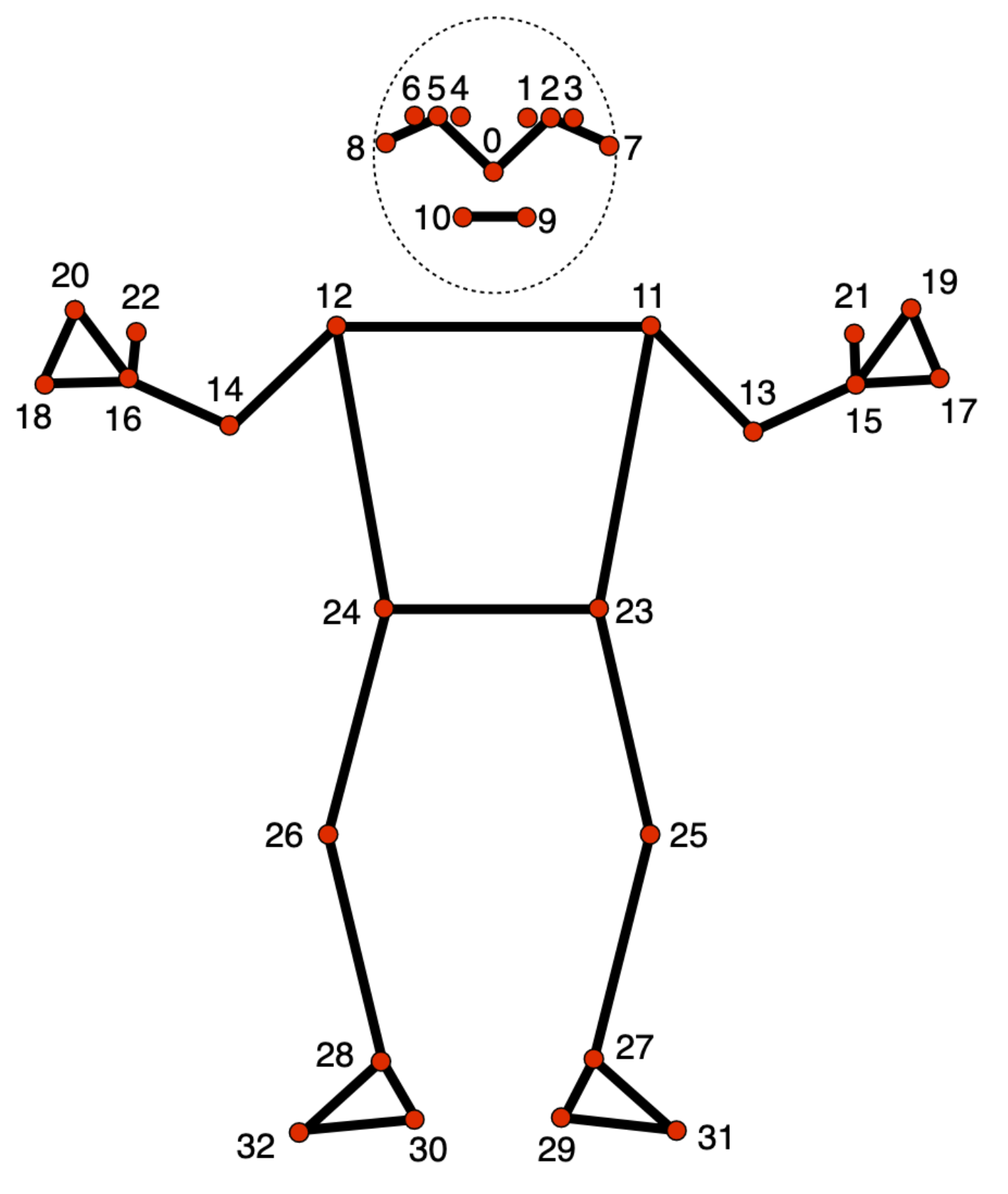
There are many open source models out there, like the OpenPose model, but not all of them perform equally. That's why we will be using Google's MediaPipe pose model, since it was released relatively recently and is very fast.
Quick note: I also tried an OpenPose model, but this performed very poorly in terms of framerate, while also providing less joints to detect the gestures.
class  SkeletonTracker:
	def  __init__(self,  threshold=0.1):
	self.pose  =  mp.solutions.pose.Pose(static_image_mode=False,  min_detection_confidence=threshold,  min_tracking_confidence=threshold)
	self.drawing_utils  =  mp.solutions.drawing_utils

	def  detect(self,  frame):
		rgb_frame  =  cv2.cvtColor(frame,  cv2.COLOR_BGR2RGB)
		results  =  self.pose.process(rgb_frame)
		points  =  [None]  *  33
		landmark_z  =  [0]  *  33

		if  results.pose_landmarks:
			for  i,  landmark  in  enumerate(results.pose_landmarks.landmark):
				points[i]  =  (int(landmark.x  *  frame.shape[1]),  int(landmark.y  *  frame.shape[0]))
				landmark_z[i]  =  landmark.z  # Store the Z-coordinate

		return  points,  landmark_z

	def  draw_skeleton(self,  frame,  points):
		results  =  self.pose.process(cv2.cvtColor(frame,  cv2.COLOR_BGR2RGB))
		if  results.pose_landmarks:
			self.drawing_utils.draw_landmarks(frame,  results.pose_landmarks,  mp.solutions.pose.POSE_CONNECTIONS)
		return  frame
The detect method takes the webcam frame as an input value and returns the x, y and z coordinates of the joints. I decided to split the z from the x and y coordinates here, since I only decided to use the z coordinates later, but you can also combine them. Now, we add a SkeletonTracker instance to our GestureController init function:
self.skeleton_tracker = SkeletonTracker()
We can now use this instance to detect and draw the joints with the webcam frame in the run method:
while  True:
	ret,  webcam_frame  =  self.cap.read()
	if  not  ret:
		print("Webcam not accessible!")
		break
	points,  landmark_z  =  self.skeleton_tracker.detect(webcam_frame)
	webcam_frame  =  self.skeleton_tracker.draw_skeleton(webcam_frame,  points)
Now, it's time to define the gestures we want to use to control the drone. I decided to model my gestures after a plane/bird:
- raise both arms to take off
- having arms raised in a 90 degree angle is the idle flying position, similar to a plane's wings
- raising the arms further than that lets the drone fly higher
- lowering them a bit makes it fly lower
- lowering them a lot makes it land
- raising one arm and lowering the other from the idle position makes the drone fly left/right
- putting both arms forward/backward on the z-axis (in idle position) makes the drone go forward/backward
- putting one arm forward and the other one back makes the drone turn left/right
Now that we have defined the gestures, we need to think about how to recognize them. We could use the positional values of the joints. But this is highly dependant on how far away a person is from the camera. A better approach is to calculate the angles between the joints. This way, we can ensure the drone behaves consistently, even when we move further away from the camera.
def  calculate_angle(self,  chest,  hand):
	dx  =  hand[0]  -  chest[0]
	dy  =  hand[1]  -  chest[1]
	angle  =  degrees(atan2(-dy,  dx))
	return  angle
With this function, we calculate the angle between chest and hand joint. We can now use this function to determine which command to execute (with a lot of if-conditions):
def  gesture_command(self,  points,  depth):
	if  not  points[11]  or  not  points[12]  or  not  points[15]  or  not  points[16]:
		return  None

	# Reference points
	left_shoulder  =  points[11]
	right_shoulder  =  points[12]
	left_hand  =  points[15]
	right_hand  =  points[16]

	left_shoulder_depth  =  depth[11]
	right_shoulder_depth  =  depth[12]
	left_hand_depth  =  depth[15]
	right_hand_depth  =  depth[16]

	left_angle  =  self.calculate_angle(left_shoulder,  left_hand)
	right_angle  =  self.calculate_angle(right_shoulder,  right_hand)

	if  not  self.took_off:
		if  10  >  left_angle  >  -20  and  (-170  >  right_angle  >  -180  or  160  <  right_angle  <  180):
			return  "takeoff_idle"
	if  not  self.took_off:
		return  "idle"
	if  left_angle  >  10:
		if  -180  <  right_angle  <  -150:
			return  "fly_right"
		elif  180  >  right_angle  >  90:
			return  "fly_higher"
	if  -60  <  left_angle  <  -20:
		if  -150  <  right_angle  <  -110:
			return  "fly_lower"
		if  90  <  right_angle  <  180:
			return  "fly_left"
	if  left_angle  <  -60:
		if  0  >  right_angle  >  -110:
			return  "land"
	if  left_hand_depth  <  left_shoulder_depth  -  0.25:
		if  right_hand_depth  <  right_shoulder_depth  -  0.25:
			return  "fly_forward"
		elif  right_hand_depth  >  right_shoulder_depth  +  0.15:
			return  "turn_left"
	elif  left_hand_depth  >  left_shoulder_depth  +  0.15:
		if  right_hand_depth  >  right_shoulder_depth  +  0.15:
			return  "fly_backward"
		if  right_hand_depth  <  right_shoulder_depth  -  0.25:
			return  "turn_right"
	return  "idle"
One thing worth noting here is that we don't actually use the angle for computing the depth values (forward and backward motion). However, this is not neccessary here, since MediaPipe already returns the estimated distance the from the camera to the joint. This means that the distance between chest and hand joints will not change depending on the distance from the camera to the tracked person, so we don't really need to calculate angles here.
To make the code a bit more readable, the drone will be controlled in a different function. It takes the string output by gesture_command and executes the corresponding command:
def  execute_command(self,  command):
	current_time  =  time.time()
	if  command  ==  "takeoff_idle":
		print("Command: Taking off!")
		if  self.drone_connected:
			self.tello.takeoff()
		self.took_off  =  True
		self.last_command_time  =  current_time
	elif  command  ==  "fly_higher"  and  current_time  -  self.last_command_time  >  2:
		print("Command: Flying higher!")
		if  self.drone_connected:
			self.tello.move_up(30)
		self.last_command_time  =  current_time
	elif  command  ==  "fly_lower"  and  current_time  -  self.last_command_time  >  2:
		print("Command: Flying lower!")
		if  self.drone_connected:
			self.tello.move_down(30)
		self.last_command_time  =  current_time
	elif  command  ==  "fly_left"  and  current_time  -  self.last_command_time  >  2:
		print("Command: Flying left!")
		if  self.drone_connected:
			self.tello.move_left(30)
		self.last_command_time  =  current_time
	elif  command  ==  "fly_right"  and  current_time  -  self.last_command_time  >  2:
		print("Command: Flying right!")
		if  self.drone_connected:
			self.tello.move_right(30)
		self.last_command_time  =  current_time
	elif  command  ==  "fly_forward"  and  current_time  -  self.last_command_time  >  2:
		print("Command: Flying forward!")
		if  self.drone_connected:
			self.tello.move_forward(30)
		self.last_command_time  =  current_time
	elif  command  ==  "fly_backward"  and  current_time  -  self.last_command_time  >  2:
		print("Command: Flying backward!")
		if  self.drone_connected:
			self.tello.move_back(30)
		self.last_command_time  =  current_time
	elif  command  ==  "turn_left"  and  current_time  -  self.last_command_time  >  2:
		print("Command: Turning left!")
		if  self.drone_connected:
			self.tello.rotate_counter_clockwise(30)
		self.last_command_time  =  current_time
	elif  command  ==  "turn_right"  and  current_time  -  self.last_command_time  >  2:
		print("Command: Turning right!")
		if  self.drone_connected:
			self.tello.rotate_clockwise(30)
		self.last_command_time  =  current_time
	elif  command  ==  "land":
		print("Command: Landing!")
		if  self.drone_connected:
			self.tello.land()
		self.took_off  =  False
		self.last_command_time  =  current_time
The function also does two other things: Firstly, it only executes a command every 2 seconds. We do this since the drone also needs some time to move, and if we executed the commands every frame, we would quickly have a queue with all sorts of commands that would prevent the drone from executing the command we actually just gave it. Secondly, if the drone is not connected to the pc, we just print a string with the name of the command. This makes testing much easier, since we don't always have to connect the drone whenever we want to test a command.
Of course, we now also have to add took_off and last_command_time variables to our init method:
class  GestureDroneController:
	def  __init__(self):
		self.tello  =  Tello()
		try:
			self.tello.connect()
			self.drone_connected  =  True
			self.tello.streamon()
		except  Exception  as  e:
			print("Drone not connected:",  e)
		self.drone_connected  =  False
		self.skeleton_tracker  =  SkeletonTracker()
		self.cap  =  cv2.VideoCapture(0)  # Webcam feed
		self.took_off  =  False
		self.last_command_time  =  time.time()
Now, we have everything we need to control the drone using gestures. We just need to run our functions in the scripts main function:
if  __name__  ==  "__main__":
	controller  =  GestureDroneController()
	controller.run()


