Releases: Dino-fly/Main_MiSTer
Release list
Classic Home v6 beta 2 — cheats in the menu, and a video mode per core

Classic Home v6 beta 2
Two things a v6 beta tester asked for, and one of them changed how the front-end talks
to a display — so read the honesty section at the bottom before you install this on a
machine you need working.
"really great interface, i would just add cheats to core settings and its 100% gold,
and if possible ability to change resolution per core like 720x480i for GBA for that
3x integer scale on CRT"
Both are in. Firmware only — menu.rbf and the SNAC-rebuilt cores are unchanged
since v5.
Cheats
MiSTer has loaded your games' cheats for years; the only door to them was the classic
OSD, which is the thing this front-end replaces. Now there is a Cheats row in
Options while a game is running — and no row at all on a game whose pack has nothing,
rather than a row you cannot press.

You need MiSTer's cheat packs on the card (the Cheats folder, from the Downloader).
A switches a cheat on and the game changes while you are looking at it. X keeps
the set for that game, so it comes back next time you play it; X twice takes it
back. Toggling on its own is temporary and is forgotten when you close the game, which
is how MiSTer has always behaved — a cheat you switched on to look at something should
not follow the game around for ever.
Twenty-five thousand cheats
Some packs are enormous. Fire Emblem's is 25,087 entries and Mega Man Battle Network's
is 31,128, and almost all of that is a handful of cheats numbered over and over — 160
"Afas Drops", 176 "Sword". Throwing the duplicates away was the obvious move and it is
wrong: 31,032 of those 31,128 files have different contents, so they are different codes
that share a label.
So where a name repeats it becomes one row saying how many are on out of how many exist,
and A opens it. Fire Emblem's 25,087 come out as 367 rows:

A pack of twelve is still a list of twelve. There is no second way to navigate — the
folding simply does not happen when there is nothing to fold.
A video mode per core
What resolution one core comes up in, kept separately from every other core.

The reason to want it is integer scaling, and the request states it exactly. A Game Boy
Advance draws 160 lines. At 720p MiSTer's integer scaler fits four of them into 720 and
leaves bars; at 480p it fits three into 480 exactly and fills the screen. Nothing here
scales anything — vscale_mode=1, "integer scale only", is already MiSTer's default. All
this does is hand the scaler a height that is a whole multiple of the core's, and the
footer tells you which you are choosing:

Two corrections to the request, said plainly. 480i is not available — MiSTer's
video_mode has no interlaced form at all, and 480p is the same 3×. And under
direct_video the setting does nothing whatever, because the core's own timing goes
straight out of the DAC; the screen says so rather than offering you a choice that
changes nothing.
Why this is safe to offer, when the settings screen refuses it
video_mode is one of a handful of settings Classic Home deliberately will not let you
edit, because a wrong value is a black screen and a card that has to come out and go into
a PC. That still stands for the global setting. Three things make the per-core one a
different question:
- Your shelf is never affected. The setting is scoped to one core's section, so the
menu always comes up in the machine's normal mode. Whatever a game looks like, you can
always get back to a screen you can read and change it. - Nothing is written until you have seen it work. Pressing A applies the mode and
starts a fifteen-second countdown reading "Can you see this?". Press A again and
it is saved. If you cannot see it — do nothing. After fifteen seconds the old mode comes
back and no file has been changed. - The list is seven standard 60 Hz modes, no 50 Hz and nothing exotic. The DE10-Nano's
EDID is empty, so nothing can ask your display what it accepts; a short list makes a lost
picture unlikely and the countdown makes it survivable when it happens anyway.
Automatic is the way back, and it takes the line out of MiSTer.ini rather than
blanking it.
The setting is written into a [<core>] section of your own MiSTer.ini — the same line
you could have typed yourself — so it keeps working with classicui=0, and the rest of
your file is copied through byte for byte with a backup kept as MiSTer.ini.bak.
Also in this build
- Where cover art comes from is written down.
ART.md,
shipped in the archive: the four places a cover can come from and why they are tried in
that order, what the two files inclassicui/remember and why, how a disc is matched
(by product number, exactly — a serial sent as a name is fuzzy-matched and answers
confidently wrong), and where to look when something is off. The short version people
keep asking for: the folder art is downloaded into is the same folder art is looked
for in. There is no separate cache. - Two settings that existed and were documented nowhere now have their lines in the
commentedMiSTer.ini:classicui_halfres— which defaults to on, so it is the mode
everybody boots into — andclassicui_ss_replace_pack. - Two menu-bar labels are shortened at 240p where they were being cut, on a handheld core
over analog.
Installing
ClassicHome-v6-beta2.zip unpacks to SD-CARD-ROOT, whose contents mirror your card.
Copy that folder's contents onto the card root and let it merge.
Back up MiSTer first — copy it beside itself as MiSTer.backup. That is your way
back, and it is also the only way to tell whether a problem is ours: turning a Classic
Home option off still leaves you running our binary.
If you are installing on a fresh card, take v5
first for menu.rbf and the SNAC cores, then this on top.
Firmware md5 98cadfa47dffdadb31df95f47a69104a — the same binary every test below ran
against.
What was tested, and what was not
This project's rule is that "tested" only ever describes checks that actually ran against
the binary being shipped. Everything else is named.
Automated: 3,238 host checks at zero failures, and 98 in the packaging suite. Nineteen
deliberate breaks were introduced and watched fail for their own reasons — the gate on the
cheats row, the folding, the refusal when a core is full, the two-press forget, re-applying
by name instead of by index, the countdown, the confirm, the section-aware ini writer, and
the rest. One of the nineteen came back green and had to be rewritten, which is the point
of doing it.
On hardware: the Cheats row on a real pack; Fire Emblem's 25,087 entries folding to 367
rows, the same number the host model computes from the same zip; opening a group and reading
its codes; switching a cheat on and off with the firmware's own log confirming the codes
reached the core both ways; and the Video Mode screen correctly refusing on a machine where
the setting would do nothing.
The video mode, end to end. An HDMI sink went on the test machine after the first build
of this release, and it immediately found a bug that would have made the whole feature
useless — so the binary above is not the one this release first carried. Changing the mode
reprograms the HDMI transmitter, the display re-asserts hotplug, and MiSTer's re-init put
the configured mode straight back about a second later. The countdown was still running
with nothing left to confirm, and no press could have kept it. That is not specific to one
display: moving the pixel clock is exactly what makes a sink re-assert HPD.
A mode set at runtime now survives that re-init, bounded by the same countdown. Verified on
hardware afterwards, from the firmware's own log:
- the mode applies and the front-end re-lays out at the new canvas;
- it survives the hotplug it caused;
- fifteen seconds with no press puts the configured mode back, which is the whole safety
argument; - a second press writes
video_mode=2into a[GBA]section — four lines appended to a
450-line file, with[MiSTer] video_mode=8untouched; - Automatic removes exactly that one line again.
And the scale the feature exists for, measured from the scaler's own header rather than by
eye: a 240×160 Game Boy Advance at 1080p is drawn 1440×960 — six times up, with 120
lines of black bars. At 720×480 it is drawn 720×480 — three times up on both axes, no
bars. That is the report's "3× integer scale", and the screen tells you so while you are
choosing it.
Still not tested on hardware, and you should know which:
- That a display actually shows it. The sink here is an EDID dongle, not a screen. The
modes are applied, the geometry is right and the countdown recovers — but nobody has
looked at one of these modes on a television or a CRT, which is the last mile and the
one the report was about. - That a cheat changes the running game. The pack loads and the core receives the codes —
that much is in the log, both directions — but nothing here got a game past its title
screen to photograph the difference. The hop past that point is MiSTer's...
Classic Home v6 beta — the Display screen shows your own game, and the picture stops wobbling
Classic Home v6 beta
Fifty-three commits since v5. The visible half is the Display screen, which is now a
proper picture of what each look does to your game rather than a shipped sample. The
other half is the front-end getting out of the way: on a 1080p display it was making the
picture wobble while a core ran behind it, and finding out why took the fabric's own
source to settle.
Firmware only. menu.rbf and the SNAC-rebuilt cores are unchanged since
v5 — if you are
installing on a fresh card, take v5 first for those, then this on top.
Installing
ClassicHome-v6-beta.zip unpacks to a folder called SD-CARD-ROOT whose contents mirror
your card. Copy that folder's contents onto the card root and let it merge:
SD-CARD-ROOT/
  MiSTer                            replaces the firmware in the card root
  classicui/disctitles.txt          the disc name table
  classicui/disctoc.txt             names the discs that carry no product code
  classicui/lookshots/              the Display screen's stand-in pictures
  linux/classic-home/               the update_all boot hook's worker
  Scripts/classic_home_protect.sh   installs the hook
  Scripts/classic_home_unprotect.sh removes it again
Back up MiSTer first — copy it beside itself as MiSTer.backup. That is your way back.
Then, in MiSTer.ini, under [MiSTer]:
classicui=1
The section matters as much as the line. MiSTer.ini is divided into sections, and on
a card that has been in use a while the file usually ends inside a core or video section
— so adding classicui=1 at the bottom scopes it to that one core and it looks like the
release simply does not work. Put it under [MiSTer].
The Display screen
One look large at the top with its description under it, and the choices as a centred row
of small pictures. Every one of them is your game, right now, run through that look's
own arithmetic — the same code the fabric runs — rather than a picture of somebody else's
game shipped in the zip. The stand-in pictures are still there for when nothing is running.
- Filtered at the size the television draws, then zoomed. The previous build magnified
the frame first and filtered the magnification, which is why Sharp looked nothing like
sharp pixels: it was a box-average of a blow-up. - The proportions come from the scaler. A core's frame is not square-pixel — the Super
Nintendo emits 512x224 for a 4:3 picture — so anything that assumed one scale for both
axes came out stretched sideways. - CRT looks are a tube and a signal: PVM, BVM, Trinitron and a consumer set, against
RGB, S-Video and composite. Plus Sharp and None, which turn everything off. - The handhelds drive the core's own screen, not an imitation of it: Game Boy, Game Boy
Color, GBA, Game Gear, Lynx, WonderSwan and Neo Geo Pocket Color set the core's palette
and screen-shadow options, and the LCD grid follows the magnification the scaler actually
settles on. A grid narrower than the phases a magnification visits darkens nothing at all,
which is why the GBA had no grid at 4x. - On an analog display the panel effects come off and the palette stays. A pixel grid
and a drop shadow on a CRT are not a Game Boy, they are a defect. - New defaults: integer scaling everywhere, Super Game Boy on the Game Boy looks, and
TrashUncle's PVM shadowmask for composite.
The menu over a running game
The still behind the menu is the picture the television is showing: the look is run over
it on the ARM, at the size and in the place the scaler puts the game, so the scanlines and
grids are the ones the game has rather than a resampled approximation of them.
Opening the menu now lands on the game you are playing, wherever you had browsed to before.
Speed, and the wobble
On a 1080p display with a core running behind the menu, the picture wobbled. It turned out
to be four separate costs, and the last one is not ours:
- The framebuffer is scanned out 60 times a second whether anything redrew it or not.
At 1920x1080x32 that is 8.1MB a frame — half a gigabyte a second of DDR3 the running core
is also using. The menu framebuffer is now RGB565 above a megapixel and a half, which
halves both the bytes and the number of read bursts per line. - A settled move on the shelf repaints the block and the cards, not the whole screen.
Measured: a one-card move changes 223 of 720 rows. - The scaler's geometry is read once a second and remembered, not mapped out of
/dev/memevery frame — and it is read while the game still owns the screen, because
once the framebuffer takes over the scaler describes the menu instead. - Nothing writes to the log on a timer any more. With
debug=2a log line is a write,
and a write while a game runs is DDR3 the framebuffer reader is competing for. The
repaint counters are still there;echo gfxstat > /dev/MiSTer_cmdprints them on demand.
What is left is in sys/, not here: with a game loaded, ascal keeps scaling that core's
video into DDR and throwing it away, its Avalon arbiter serves writes before reads, and in
a game core the framebuffer reader has 256-byte bursts with 512 bytes of prefetch —
N_BURST(2048) is compiled in only under MENU_CORE. One line in sys_top.v
(.freeze(freeze | LFB_EN)) would stop the waste, at the cost of every core being rebuilt.
Libraries, artwork and the shelf
- Twenty thousand games, and the cache is kept when it fills rather than thrown away —
a 15,000-game card used to settle at about 960 and freeze a refresh at 6,000. - Local artwork: the ScreenScraper / EmulationStation layout on the card is read
directly (media/box2d,gamelist.xml), so an offline collection needs no downloads. - Missing covers fill themselves in while nothing else is happening, behind the cards
you are actually looking at — and never while a game is paused under the menu. - Icons for Saturn and Game Gear, drawn as their own machines.
- X riffles the pile: a multi-file card's other versions cycle with a shuffle rather
than a cut, and the card that leaves files back in behind the others.
Fixes
- In-game saves land in every slot and wear the right picture — a save into slots 2 and 3
used to fail on the PlayStation, because a UI frame over 31ms starves that core's
savestate handshake. - The disc dialog keeps its place when the strip is open, and a blanked reopen can no
longer poison a slot's picture. physical_discrefreshed to upstream5ac97bc— the CD-DA streaming fixes.- Game Gear is a system of its own and loads into its own slot.
Known
- Opening the menu over a Super Nintendo game holds it still with a savestate, because that
core reports no pause. During an animated intro that can blank the core until the state
is restored — an upstream core issue, not this firmware's, but you may see it. - The Display screen takes a second or two to appear on a full-resolution 1080p canvas:
six previews, each run through the fabric's own arithmetic.
Classic Home v5 — physical CDs on five consoles, named and covered
Classic Home v5 — a games shelf for your TV, on your MiSTer, driven entirely by a controller. This is the first non-beta v5, 47 commits past beta 5.
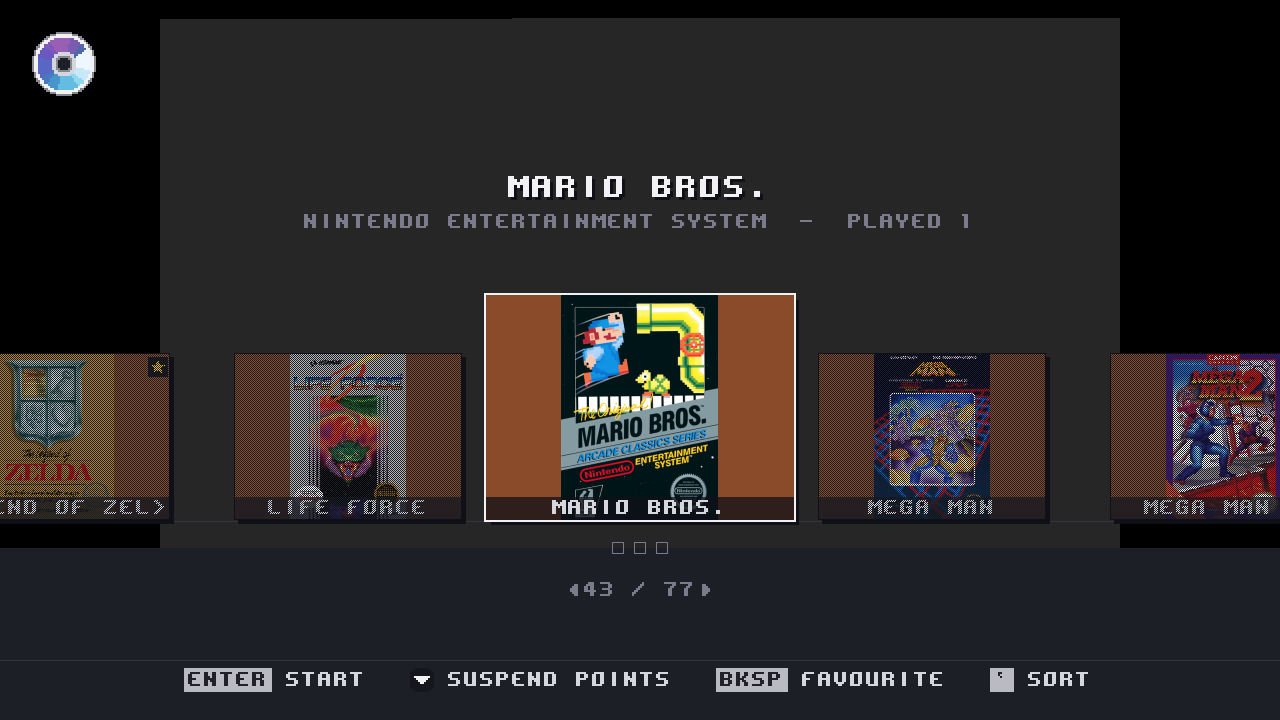
Firmware MiSTer md5 32e45f3e9f77eeda0376486a2c1d2549. That is the build these notes were tested on, byte for byte. Every screenshot below is a framebuffer capture off a real board, not a mock-up — several are 240p because that is what the front-end actually draws on a CRT.
Install
Merge the SD-CARD-ROOT folder in the zip onto the root of your SD card, keeping your existing MiSTer as MiSTer.backup first. Then run Scripts ▸ classic_home_protect.sh once, which teaches update_all to leave this firmware alone. classic_home_unprotect.sh undoes all of it.
Nothing is enabled without asking: classicui=1 in MiSTer.ini turns the front-end on. When you write that line, put it under a fresh [MiSTer] header — appending it to the end of the file lands it in whatever section happens to be last, where it is silently ignored.
Physical CDs
The headline of v5. Put a real disc in a drive attached to the board and the shelf shows it, names it, fetches its cover, and hands it to a core — for PlayStation, Saturn, Mega CD, PC Engine CD and Neo Geo CD.
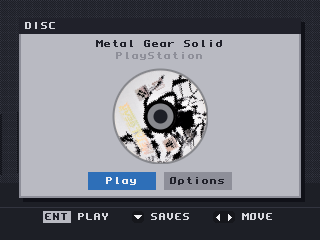
A pressed PlayStation disc: named from its Sony serial, with the disc scan fetched and cached on the card. Press A and the core is handed the drive.
Naming a disc turned out to be five different problems, one per console:
- PlayStation discs carry a Sony serial, which is an exact database key. It is now sent as a serial rather than as a title — sending it as a name returned confidently wrong covers, including "Beyblade Burst" for a Metal Gear Solid disc.
- Saturn and Mega CD discs carry a product code the database does not index, and a real title in their header. Measured across 37 discs: 30 of the header titles matched and none returned the wrong game, so the header title is what gets asked.
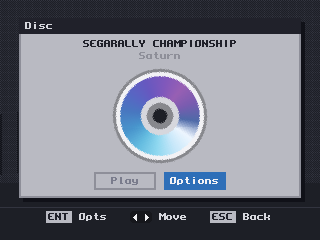
A Saturn disc named "SEGARALLY CHAMPIONSHIP" — read out of the disc's own header, because its product code MK-81207 is not in any database. The generated disc face is what you see until a scan arrives.
- PC Engine CD and Neo Geo CD discs carry no product code at all — a PCE disc has no filesystem, and a Neo Geo CD volume label is a house code (
SW2_CD01,DD_CD) as often as a name. These are identified by the shape of the disc's table of contents, matched against a table built from Redump: 595 shapes, 590 naming exactly one game. The five that are genuinely ambiguous are refused rather than guessed, because a wrong title feeds the artwork path and produces a confidently wrong cover.
A disc keeps that identity when a core takes the drive, so pausing a disc game shows the game, not the volume label. You can also copy a disc to the card from the disc dialog, named so that disc 2 does not overwrite disc 1:
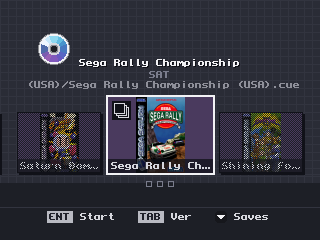
The same Saturn disc after copying it to the card: on the shelf with its cover, and the stack badge saying the folder holds more than one disc.
The badge in the top-left corner is the disc, and it appears the moment the drive reports something in it — before anything has been read:
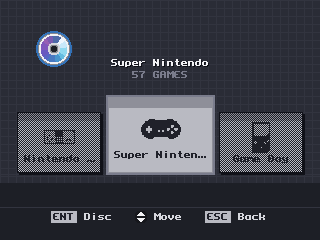
A disc in the drive while browsing systems. The badge is dim because the cursor is on the shelf — one cursor lights one thing.
Sorting, and the rest of the shelf
Six orders on the Select button, each with a line saying what it does:
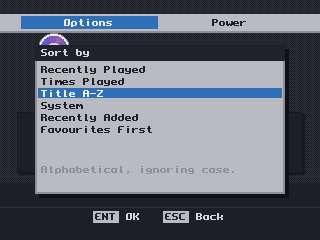
Favourites First is an order rather than a filter, so nothing disappears. Recently Played and Times Played are genuinely different orders now — an earlier note in the code claiming they could not be was simply wrong.
- Cover art comes from ScreenScraper first with libretro as a fallback, and the application's credentials are compiled in — you only need your own account if you want your own quota.
- Text that does not fit scrolls and is cut with a real ellipsis, and layout asks the font whether a string fits instead of counting characters.
Core options, without the keyboard
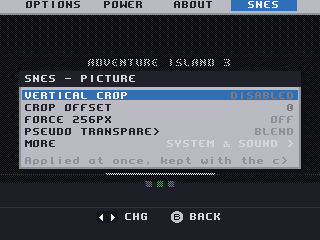
A core's own options, in the front-end, per game or per system. Saturn showed none at all before this release: the config string was being read from index 1, a slot the stock OSD skips.
Controllers
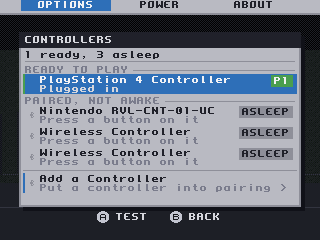
Which pads are awake, which are paired but asleep, and pairing a new one — without a keyboard.
- SNAC: a Settings row for the port, and the front-end says so when a core has no SNAC pad reader compiled in rather than leaving the pad silently dead. The
SNAC Adapterrow is the one row in Settings with no recommended value, because the right answer is a fact about your wiring. - Savestates: the suspend strip opens on the first filled slot, and the legend stops describing empty slots as though they held something.
Fixes worth naming
- The ScreenScraper password no longer reaches
/tmp/debug.txt. If you have run an earlier beta with an account configured, delete any logs you kept. - Nothing ever collected the child processes the front-end killed.
- The library scan did one whole system per frame where it meant to do one slice.
- Five arcade cores in the SNAC archive never loaded, because the build picked the wrong Quartus project.
Known and open
- One report of a whole-system reboot on a first SNAC launch, not reproduced across roughly fifteen attempts. If it happens to you, the log survives a restart now — please open an issue with it.
- On this card the Saturn core is region-locked to Japan, so Saturn discs need Region set before they boot. That is the core's default, not ours, and we ship upstream's default deliberately.
- Analog S-Video and composite output for the front-end needs an RTL change and is not fixed here.
- The disc badge now appears while the drive is still spinning a disc up, which it does by treating a busy drive as one holding a disc. That has been tested on one drive. If your drive reports itself busy while empty, you may see a disc badge with no disc in the tray — please open an issue if you do, with your drive model.
- There is no screenshot above of a PC Engine CD or Neo Geo CD disc named by its table of contents. The mechanism is proven on hardware for both — a Neo Geo CD disc resolved to Sonic Wings 2 ~ Aero Fighters 2 from shape
34:309854— but the capture was not taken, and a screenshot of something else would not be evidence of it.
Cores are not in this archive. PSX-over-SNAC cores are a separate release.
menu.rbf beta — colour on subcarrier boards
menu.rbf beta — colour on subcarrier boards
For testing on vga_mode=subcarrier hardware (SuperStation One and other
boards with their own encoder chip). One file, menu core only.
What this fixes
On a vga_mode=subcarrier machine the games are full colour but the Classic
Home shelf is black and white. A SuperStation One owner traced it to
sys/sys_top.v: the 3.58 MHz colour reference the external encoder needs is
gated with & ~vgas_en, and the shelf can only reach the analog pins through
the scaler — so the reference goes flat exactly when the front-end is on
screen. Games take the core path and never see the gate.
The reference is free-running (a phase accumulator on the core's video clock,
with an increment the ARM computed for that same clock), so it is correct
whatever the scaler is doing. This build drops the ~vgas_en term. The
subcarrier enable itself is only ever set by the firmware in subcarrier
mode, so rgb, ypbpr, svideo and cvbs configurations are provably unaffected —
for them the gate's first input is already 0.
What to expect
- The shelf, box art included, in colour on composite and S-Video.
- Games: unchanged (they never hit the gate).
- The in-game overlay runs the game core's framework, so it stays
monochrome until cores are rebuilt against the fixedsys/. Shelf first,
deliberately — one file to test, nothing else moved. - Worth watching: the colour reference is frame-locked to the menu core's
frames, not the scaler's output frames. If that matters in practice it
would show as chroma shimmer / dot-crawl on the shelf. Please report either
way.
Install
- Keep your current file:
cp /media/fat/menu.rbf /media/fat/menu.rbf.bak - Copy this release's
menu.rbfover/media/fat/menu.rbf - Reboot (or load the menu core). No firmware or ini change needed; works
with Classic Home v5 as released.
Roll back by restoring menu.rbf.bak.
Provenance
Upstream Menu_MiSTer commit 3c3634c (2026-06-03), with this fork's SNAC
framework patch and the one-line subcarrier change:
-    always @(posedge clk_vid) subcarrier_out <= ~(subcarrier & csync_en & ~ypbpr_en & ~forced_scandoubler & ~vgas_en) | sub_accum[39];
+    always @(posedge clk_vid) subcarrier_out <= ~(subcarrier & csync_en & ~ypbpr_en & ~forced_scandoubler) | sub_accum[39];
The gate is verbatim in mainline Template_MiSTer; once this is confirmed on
hardware we will raise it upstream.
Classic Home v5 beta 5 — every list scrolls, and the SNAC controls are where they belong
A firmware beta. The cores are unchanged — the FPGA side has not moved since
wave 3, so this does not
re-ship 322 MB of byte-identical .rbf files. If you are coming from beta 4 you already have them.
Installing
ClassicHome-v5-beta5.zip unpacks to SD-CARD-ROOT, whose contents mirror your card. Copy the
contents onto the card root and let it merge. Back up MiSTer first — copy it beside itself
as MiSTer.backup.
Every list scrolls now
Lists that grew past their panel used to just stop drawing. The row was still there and still
selectable — it simply never appeared. That is how Close Game came to be invisible at 240p, and
it was still true of the core options screen, where the PSX has 27 settings on one page and
about fifteen fit.
Both are fixed, and there is now a test that fails if any list at any screen size loses a row,
naming the screen. Both of the earlier cases were found by eye on a television, months apart.
The SNAC controls are in the core screen, with help
Pad1, Pad2 and SNAC MemCard used to be hidden — you had to leave Classic Home for the classic
OSD to get a light gun or real memory cards working. They are offered now, and each explains what
the selected value costs you, because that is where the difference lives:
Pad1 |
You get | You lose |
|---|---|---|
Dualshock (and every other non-SNAC value) |
Select+Start opens the menu; remappable | Light guns, wheels; memory cards are virtual |
SNAC-port1 |
GunCon, NeGcon, wheels, rumble, real memory cards | The pad cannot open the menu |
Who reads the SNAC port is no longer a setting of ours
snac_psx is gone, along with snac_psx_memcard and snac_psx_fallback. The core's own options
already said what you wanted, and we were overriding them — if you had deliberately set Pad1 to
GunCon, we stamped on it at every launch.
Now we read the port only when the running core has not claimed it, and that works for every
SNAC-capable core, not just PSX — the NES, Mega Drive, SNES, SMS and N64 each have their own SNAC
option, and turning any of them on hands that core the port. Changing your mind takes effect
immediately, with no relaunch.
If your card still has the old settings, the boot log names the replacement rather than ignoring
them quietly.
If something other than a PlayStation pad is on the SNAC port
Read this if you have a SuperDock and have used its bypass switch to route the SNAC bus to the
extension port, or have a SNES/Mega Drive/N64 adapter plugged in. We drive that port to read a
PlayStation pad, and on another console's adapter those pins land somewhere else:
snac_device=1 ; something other than a PlayStation pad is on the SNAC port
Nothing of ours will touch the port. We cannot detect this ourselves — nothing readable changes when
that switch moves. A wrong answer is not silent damage waiting to happen, though: a controller that
does not reply like a PlayStation pad is now refused rather than believed, where before it could
arrive as a pad with every button held down.
A fix worth calling out even though nothing on screen showed it
Core options whose bit spec the core writes in lowercase o form were read from, and written to,
the wrong place — 32 bits below where they live. So the row showed a value belonging to a
different setting, and changing the row changed that other setting instead. Silent in both
directions.
Affected rows you may actually have touched: Vertical Crop, Crop Offset, Orientation,
Flip Screen, Mapper, SMS BIOS, GG BIOS, Z80 Speed, SuperFX FastROM, VDPs,
PSGs, Gun Type. Making one of those a per-game setting was worse: it wrote over an unrelated
option's shared value, in a file you cannot inspect.
This was live in v4 and in every v5 beta before this one. If a core setting has ever behaved
oddly for you, this is a good candidate. Values written by the classic OSD were always correct —
it got this right and our screen did not.
Known limitations — please do not report these
- On S-Video and composite the menu is black and white. Games keep their colour; the colour
encoder sits only on the core's video path. RGB SCART and YPbPr are in full colour. - With an HDMI display attached the front-end leaves the analog output alone, so a CRT shows the
game rather than the menu. - No still picture behind the in-game menu over a disc game — you get black.
- Everything above 240p is verified in the test harness only. There is no HDMI display here.
- The SNAC ownership change is covered by tests but not yet confirmed on hardware — in
particularsnac_device=1and handing the port to the core mid-game. That is the thing most worth
reporting on.
Reporting a bug
Start with classicui/config-report.txt on the card. Then how your display is connected, whether
the set is PAL or NTSC, and what you saw. For a log, set debug=2 under [MiSTer] and copy
/tmp/debug.txt off the machine — note /tmp is a RAM disk inside the running MiSTer, not a folder
on the card.
If it goes wrong
Copy your MiSTer.backup over MiSTer. Or set classicui=0 for the stock menu with this firmware.
Classic Home v5 beta 4 — SNAC cores included, and a way to close a game
Classic Home v5 beta 4 — SNAC cores included, and a way to close a game
Still a beta. Beta 4 is beta 3's front-end with the SNAC-modified cores in the same
archive, a working Close Game, a faster menu on HDMI, and disc copying. If you run any v5
beta, take this one. If you want a quiet life, stay on v4.
Installing
ClassicHome-v5-beta4.zip unpacks to a folder called SD-CARD-ROOT whose contents mirror
your card. Copy that folder's contents into the card root and let it merge:
SD-CARD-ROOT/
  MiSTer                            replaces the firmware in the card root
  menu.rbf                          replaces the menu core - new in beta 4
  classicui/disctitles.txt          the disc name table - a new file, replaces nothing
  linux/classic-home/               the update_all boot hook's worker
  Scripts/classic_home_protect.sh   installs the hook
  Scripts/classic_home_unprotect.sh removes it again
  _Console/ _Computer/ _Arcade/     271 cores rebuilt with PSX-controller-over-SNAC support
Back up MiSTer first — copy it beside itself as MiSTer.backup. That is your way back,
and it is one copy.
Then turn it on in MiSTer.ini, under [MiSTer]:
classicui=1
The section matters as much as the line. MiSTer.ini is divided into sections, and on a
card that has been in use a while the file usually ends inside a core or video section — so
adding classicui=1 at the bottom scopes it to that one core and it looks like the release
simply does not work. Put it under [MiSTer].
Delete these six files before you merge
Six of the cores in this archive differ from the ones in earlier waves only in letter case.
A MiSTer card is case insensitive: copying NeoGeo_20260731.rbf over Neogeo_20260731.rbf
keeps the old spelling, and the core stays broken. The list is in CLEANUP_wave3.txt inside
the archive. Delete those files from the card first, then merge. This was proven on a real
exFAT card, not assumed.
Surviving update_all
Unchanged from beta 3, and still the thing that matters most. Run once:
/media/fat/Scripts/classic_home_protect.sh
update_all replaces MiSTer with the official build and puts yours in .MiSTer.old,
silently reverting the front-end. The hook puts yours back on the next boot. It only acts when
the installed firmware is not one of ours, so a newer build you copied on by hand is left alone
rather than quietly downgraded. classic_home_unprotect.sh removes it.
What changed since beta 3
The SNAC cores are in this archive now
Beta 3 shipped the firmware and told you to fetch the cores separately. In practice that meant
people installed Classic Home, plugged in a PlayStation pad over SNAC, and found it dead —
because the cores on the card were the stock ones. 271 rebuilt cores ship here, and the
front-end you install is the front-end that supports your pad.
The PSX core is deliberately not among them. SNAC on PSX has a problem nobody has looked
into yet, and shipping a broken PSX core would break disc playback — which does work. PSX stays
on the official build. Everything else on the card gets SNAC.
If you only want SNAC and not this front-end, the
wave 3 release is
still the download for you; nothing there has changed.
Close Game
There is now a Close Game row at the bottom of the in-game Options panel. Press it twice —
the row turns red and says so — and the core is put away.
It was written for beta 3 and nobody on a 240p television could reach it: the panel drew as
many rows as fitted and quietly dropped the rest, and Close Game was the eleventh of eleven. The
list scrolls now, with a bar down the side showing where you are, and the warning sentence under
it wraps instead of being cut off mid-word — that was clipped at every resolution, not only
the small one.
A faster menu on HDMI
Settings ▸ Menu Resolution, new, and set to Fast out of the box.
Fast draws the menu into a canvas half as wide and half as tall, so a quarter of the pixels. The
layout does not change — a 720p display keeps its five-card shelf, same sizes, same
positions — so what Fast costs is sharpness and nothing else. Games are not affected in any way;
this is the menu's own canvas.
Choose Sharp if you have a big panel and prefer crisp text to a smooth carousel. On a 240p
television the setting does nothing at all, by design: the request is refused below 320×240, so
analog output is byte-for-byte what it was.
The disc actually spins
The disc on the disc screen turned in 64 steps a turn and repainted about 16 times a
second — which read as a stutter, not a spin. It now turns in 256 steps and repaints 62
times a second at every resolution: a new angle on every single frame.
That is more drawing, not less, so it is paid for rather than wished for. A rotated disc is
expensive to compute, but a quarter turn is not — rotating about the point between pixels
rather than on one makes 90° an exact rearrangement of the same pixels. So one quadrant is
computed and the other three are quarter-turns of it, cached, and the cache is
byte-for-byte identical to computing every angle the slow way. That was checked, not
assumed, at every quadrant boundary.
It gives the CPU back when something else needs it. While a disc is being copied, the
library is being scanned, or cover art is still decoding, the disc steps only through angles
it already has cached — which cost nothing to draw. At the shipped default the whole turn is
cached, so there is nothing to give up and nothing changes. It goes back to full smoothness
within a frame or two of the other work finishing, not seconds later.
Copy a disc onto the card
With a disc in the drive, the disc screen's Options now offers Copy to PlayStation (or
Mega CD, or whichever system the disc belongs to). It writes a .cue and its tracks into that
system's games folder in the layout the core expects, and the copy appears on the shelf.
While it runs, the disc art fills the dialog and un-dims like a pie as the copy advances, with
the percentage under it. Unreadable sectors are counted and reported rather than hidden.
The row is only offered for systems that have somewhere to put the copy. A disc whose system has
no games folder configured gets no row, which is a real answer rather than a copy that lands
nowhere.
The CD consoles are systems of their own
Saturn, Mega CD, PC Engine CD and Neo Geo CD now appear in the systems list in their own right,
instead of being folded into their cartridge siblings. A folder of tracks — a .cue with its
.bin files beside it — is one card on the shelf, named after the folder, rather than a
shelf full of "Track 02" fragments.
Browsing by letter
The shoulder buttons L and R jump to the previous and next first letter, not the
previous and next page. Pages were small and jumping by them was barely faster than walking; in
a 900-game library, getting to M now takes one press per letter.
Typography
Three new rows in Settings, all live as you turn them:
- Font — pick a
.pffont off the card, or Built-in. Same glyph table the stock OSD uses. - Letter Spacing — −2 to +2. Positive spacing fits fewer words per line, and the help line
says so, because several panels were written to exactly the width the stock font gives. - Capital Letters — Off draws titles and labels as they are written. Worth having if you put
a font on the card for its lowercase.
One card per version
A title you own in several versions is one card wearing a stack of frames in its corner —
so you can see at a glance that there is more than one, and pick between them on the card
instead of hunting the shelf. A disc you copy merges into the card that was already there rather
than starting a second one.
Everything else from the
beta 2 notes still
applies — physical CDs, artwork from ScreenScraper, per-system core settings with Y. Read
those for what the front-end does.
Credit
Physical CD playback is Anime0t4ku's work, from
Main_MiSTer_Physical_Disc — the
streaming sector reader, the read-ahead worker, the drive-speed cap, the recovery when a USB
drive drops out, the disc swapping. Used here whole rather than rewritten, GPLv3 as this tree
is. None of the disc support would exist without that author; see
support/physical_disc/CREDITS.md.
Known limitations — please do not report these
- SNAC on the PSX core does not work, and that core is not in this archive for that reason.
Every other core here has it. - On S-Video and composite the menu is black and white. Games keep their colour. The colour
encoder in the shared FPGA framework sits only on the core's video path, not the one this menu
goes out through, so it cannot be fixed in firmware. RGB SCART and YPbPr are in full
colour. - With an HDMI display attached the front-end deliberately leaves the analog output alone,
so a CRT shows the game rather than the menu. Unplug HDMI to see the menu on a CRT. Making
that a choice is on the list, not in this build. - No still picture behind the in-game menu over a disc game — you get black. Mostly hidden
by the disc screen now. File-launched games are fine. - Everything above 240p is verified in the test harness only. There is no HDMI display here,
so the 720p and 1080p layouts have never been seen on a real panel. Still the single most
useful thing to report — including whether Fast looks acceptable to you on a big screen. - Mega CD, PC Engine CD and Neo Geo CD disc playback is untested on hardware. Saturn
likewise.
What was actually tested
**The front-end changes in this r...
PSX controllers over SNAC — wave 3 (273 cores, five fixed)
PSX controllers over SNAC — wave 3 (273 cores)
Use a real PlayStation controller on a MiSTer through a SNAC adapter, in every core and in
the menu. Wave 3 rebuilds all 273 cores and fixes five that never worked.
If you are on wave 1 or wave 2, this is worth taking. If you are on wave 2, read the
install order below before copying anything — six of the fixes change only the letter case
of a filename, and on a MiSTer's card that means copying alone will not fix them.
What is in this release
| Download | For |
|---|---|
snac-psx-pad-wave3-cores.zip |
the cores, and menu.rbf. Everyone needs this. |
SNAC-PSX-v3-firmware.zip |
the firmware, if you want SNAC without the Classic Home front-end |
If you want SNAC and Classic Home, take the cores archive from here and the firmware from
the Classic Home release instead — that
firmware contains SNAC too. The cores archive is the same either way.
Both zips unpack to a folder called SD-CARD-ROOT whose contents mirror your card, so
installing is copying that folder's contents into the card root and letting it merge.
Five cores that never loaded now do
A MiSTer arcade core is not chosen by name. The .mra file names a core, and the firmware
scans _Arcade/cores/ for files matching it — then keeps the lexicographically greatest
filename. Two ways that goes wrong, and wave 2 hit both:
- Nothing resolved them at all.
ATetris,GundamSDandRushnAttackwere named after
their source repositories, but their.mrafiles ask forataritetris,SDGundamPSand
rshnatk. No match, so those three games have been running the official build without SNAC
since wave 2 went out, with no error anywhere to say so. - Case beat the date. The comparison is case sensitive, so an upper-case letter always
loses to its lower-case twin.Freeze_20260731.rbflost to the official
freeze_20240526.rbf, andStarForce_20260731.rbftoStarforce_20260418.rbf— newer
builds, dead on the card.
Fixed:
AtariTetris_20260807.rbf     Atari Tetris
RshnAtk_20260807.rbf         Rush'n Attack
SDGundamPS_20260807.rbf      SD Gundam
freeze_20260731.rbf          Freeze
Starforce_20260731.rbf       Star Force
Three more were renamed for the same reason before they could bite: SVI328 was losing to the
official Svi328_20241016.rbf on case, which would have made a bootcore=Svi328 setting boot
the SNAC-less core, and Dcon, Orao and MemTest now follow the rule rather than winning by
luck.
The naming rule, for anyone building their own: copy the basename the official
distribution installs, in its exact case, and use a datecode strictly greater than upstream's.
Not the repository name, and not the Quartus revision — upstream renames the artifact after
compiling, and the distribution strips the Arcade- prefix when it installs.
Twelve cores rebuilt against newer upstream releases
Arcadia, Asteroids, DECOCassette, Gaplus, Qix, SGB, SNK6502, UK101, Salamander, and the three
renamed above. Upstream had released newer versions of these, which would otherwise shadow the
SNAC build and quietly take the feature away.
Installing — the order matters
1. Delete the old files first. MiSTer_SAM-style clean-up scripts cannot help here: they
remove names they installed, and none of these names existed before. The full list ships as
CLEANUP_wave3.txt in the archive. These six are the ones that must go before you copy:
_Arcade/cores/Dcon_20260731.rbf
_Arcade/cores/Freeze_20260731.rbf
_Arcade/cores/StarForce_20260731.rbf
_Computer/Orao_20260731.rbf
_Computer/SVI328_20260731.rbf
_Utility/MemTest_20260731.rbf
Why this is not optional: a MiSTer card is exFAT or FAT32, which is case insensitive.
Copying freeze_20260731.rbf onto a card that already holds Freeze_20260731.rbf overwrites
the contents but leaves the directory entry spelled the old way — so the file keeps losing
to upstream's freeze_20240526.rbf and the core stays exactly as dead as it was in wave 2.
Deleting first is the only order that works. This was confirmed on a real card, not assumed.
The other twelve entries in CLEANUP_wave3.txt are superseded datecodes and can go whenever
you like; leaving them costs disk and a duplicate in your core list, nothing more.
2. Back up menu.rbf, then copy the contents of SD-CARD-ROOT into your card root.
3. Turn it on in MiSTer.ini under [MiSTer]:
snac_pad=1
Select+Start acts as the menu button. See SNAC_PSX_PAD.md in the repository for the PSX-core
options (snac_psx, snac_psx_fallback, snac_psx_memcard).
Surviving update_all
update_all replaces MiSTer and menu.rbf with the official builds and puts ours in
.MiSTer.old, silently removing SNAC support. That is not a bug in the updater: those two
paths belong to the official distribution database, and no third-party database is permitted to
supply them.
The firmware zip carries a fix. Run it once:
/media/fat/Scripts/classic_home_protect.sh
It stores your firmware where the updater may never write (linux/, which is on the
downloader's forbidden list for every database, official one included) and installs a boot
hook that puts it back if update_all has replaced it. classic_home_unprotect.sh removes it
again. Despite the name it protects either firmware, SNAC-only or Classic Home. Your
MiSTer.ini is never touched by update_all.
Your cores are safe from the updater — they have their own filenames, so nothing overwrites
them. Only the firmware and menu.rbf need protecting.
Known limitations — please do not report these
menu.rbfoverwrites the official one, and cannot be made to lose gracefully. A core has
a datecode to compete on;menu.rbfdoes not. If you remove ours,update_allputs the
official one back and SNAC stops working in the menu while continuing to work in cores.- The firmware in this release has not been tested with a pad on this upstream base. It
merges 26 upstream commits that wave 2 did not have, so both published firmwares now sit on
the same upstream code. The SNAC pad path itself is unchanged, but nobody has put a
controller on the adapter and confirmed it since that merge. If you have an adapter, this is
the single most useful thing you can report. - Eleven console and computer cores appear twice in your core list because the official
distribution installs them under a different word —Intv/Intellivision,
Minimig-AGA/Minimig,Genesis/MegaDrive and so on. Both entries work; ours is the one with
SNAC. Renaming them would collide with cores we already ship. dorodonhas an.mrathat no.rbfsatisfies, ours or upstream's. That is a gap upstream,
not something this release caused.
Reporting a bug
Please say which core, which adapter, and whether the pad works in the menu as well
as in the game — those fail for different reasons. snac_pad=1 in the [MiSTer] section
rather than a core section, please; a setting in the wrong section silently does nothing.
If a specific arcade game ignores SNAC, the likely cause is filename resolution rather than the
pad: send ls /media/fat/_Arcade/cores/ | grep -i <game> and we can tell immediately.
If it goes wrong
Copy your backed-up menu.rbf and MiSTer back — that is the whole of it. Or set
snac_pad=0 to keep this firmware and turn the feature off.
Classic Home v5 beta 3 — same front-end, packaged properly
Classic Home v5 beta 3 — same front-end, packaged properly
Still a beta. Beta 3 is beta 2's front-end on current upstream firmware, packaged as an
SD-card structure rather than a loose file, and able to survive update_all. If you ran
beta 2, take this. If you want a quiet life, stay on v4.
Installing
ClassicHome-v5-beta3.zip unpacks to a folder called SD-CARD-ROOT whose contents mirror
your card. Copy that folder's contents into the card root and let it merge:
SD-CARD-ROOT/
  MiSTer                            replaces the firmware in the card root
  classicui/disctitles.txt          the disc name table - a new file, replaces nothing
  linux/classic-home/               the update_all boot hook's worker
  Scripts/classic_home_protect.sh   installs the hook
  Scripts/classic_home_unprotect.sh removes it again
MiSTer is the only file that overwrites anything, so back it up first — copy it beside
itself as MiSTer.backup. That is your way back, and it is one copy.
Then turn it on in MiSTer.ini, under [MiSTer]:
classicui=1
The section matters as much as the line. MiSTer.ini is divided into sections, and on a
card that has been in use a while the file usually ends inside a core or video section — so
adding classicui=1 at the bottom scopes it to that one core and it looks like the release
simply does not work. Put it under [MiSTer].
Surviving update_all
This is new, and it matters more than anything else in the release.
update_all replaces MiSTer with the official build and puts yours in .MiSTer.old,
silently reverting the front-end. That is not a bug in the updater: the MiSTer path belongs
to the official distribution database and no third-party database is permitted to supply it —
we checked the downloader's source rather than guessing.
Run this once:
/media/fat/Scripts/classic_home_protect.sh
It stores your firmware under linux/, which is on the downloader's forbidden list for every
database including the official one, and installs a boot hook that puts it back when
update_all has replaced it. It only acts when the installed firmware is not one of ours, so a
newer build you copied on by hand is left alone rather than quietly downgraded.
classic_home_unprotect.sh removes the hook and leaves the official firmware in place. Your
MiSTer.ini is never touched by update_all either — it is forbidden to every database.
What changed since beta 2
Current upstream firmware. 25 upstream commits, including the EDID/HDMI cold-boot fixes.
Both of this project's firmwares — this one and the SNAC-only build — now sit on the same
upstream base, so a bug report means the same thing whichever you run.
Packaged as a card structure. Beta 2's notes claimed "everything is one file", which was
never true: the release is the firmware and the disc title table, and now the two Scripts
entries as well.
Nothing else in the front-end changed. Everything in the
beta 2 notes
still applies — physical CDs, the lighter menu, the resized disc screen, artwork from
ScreenScraper, per-system core settings with Y. Read those for what the front-end does.
A custom font works, and always did. font=font/myfont.pf in MiSTer.ini changes every
glyph the shelf draws, because the front-end reads the same glyph table the stock OSD does.
Nobody knew because it was documented only in the generic ini block. The four arrow glyphs in
the button bar are the front-end's own and keep their shape. Note the stock 8x8 font is really
6 wide with two columns of bearing, so a font using all eight columns will read tighter.
Cross-folder title grouping — if you have a romset split into USA/ and Europe/ folders
and Batman (U).nes shows as a separate card from Batman (E).nes, you are on v4. Both v5
betas already group them. Grouping happens when the shelf is built rather than in the index
cache, so the new binary alone fixes it — no rescan needed.
PSX controllers over SNAC
This firmware carries SNAC support as well. If you want it, take
snac-psx-pad-wave3-cores.zip from the
wave 3 release —
that archive is the cores and menu.rbf, and it is the same download whichever firmware you
run. Read its install order before copying: six core fixes change only letter case, and a
card is case insensitive, so those files must be deleted before the merge or the fix does not
take.
You do not need the firmware from that release; this one already has SNAC in it.
Credit
Physical CD playback is Anime0t4ku's work, from
Main_MiSTer_Physical_Disc — the
streaming sector reader, the read-ahead worker, the drive-speed cap, the recovery when a USB
drive drops out, the disc swapping. Used here whole rather than rewritten, GPLv3 as this tree
is. None of the disc support would exist without that author; see
support/physical_disc/CREDITS.md.
Known limitations — please do not report these
- On S-Video and composite the menu is black and white. Games keep their colour. The colour
encoder in the shared FPGA framework sits only on the core's video path, not the one this menu
goes out through, so it cannot be fixed in firmware. RGB SCART and YPbPr are in full
colour. - With an HDMI display attached the front-end deliberately leaves the analog output alone,
so a CRT shows the game rather than the menu. Unplug HDMI to see the menu on a CRT. - No still picture behind the in-game menu over a disc game — you get black. Mostly hidden
by the disc screen now. File-launched games are fine. - Everything above 240p is verified in the test harness only. There is no HDMI display here,
so the 720p and 1080p layouts have never been seen on a real panel. Still the single most
useful thing to report. - Mega CD, PC Engine CD and Neo Geo CD disc playback is untested on hardware.
What was actually tested
On a real DE10-Nano over analog output, with this exact binary (md5 5526bbe1): the shelf with
cover art and badges, a carousel slide, and the disc screen showing a real disc's title from the
shipped table with its scanned artwork. The test harness runs 1457 checks with 0 failures, but
that is a host build — it has never caught an analog-output or device-lifecycle problem, which is
why the device pass matters.
Reporting a bug
Include your MiSTer.ini (remove your ScreenScraper password first), how your display is
connected and whether the set is PAL or NTSC, what you saw in your own words, and
/tmp/debug.txt after setting debug=2 and reproducing. Say whether it also happens with
classicui=0 — if it does, it is not this front-end.
If it goes wrong
Copy your MiSTer.backup over MiSTer. classicui/disctitles.txt can stay; nothing else
reads it. Or set classicui=0 for the stock menu with this firmware.
Classic Home v5 beta 2 — physical CDs, and a much lighter menu
Superseded by v5 beta 3. Same front-end on current upstream firmware, packaged as an SD-card structure, and able to survive
update_all. Please use it instead.
Classic Home v5 beta 2 — physical CDs, and a much lighter menu
Still a beta. Beta 1 shipped with two credential-handling bugs and a menu that
repainted the whole screen to move one card; both are fixed here. If you ran beta 1,
replace it. If you want a quiet life, stay on v4.
Installing. The archive unzips to a folder called SD-CARD-ROOT whose contents mirror
your card. Copy that folder's contents into the card root and let it merge:
SD-CARD-ROOT/
  MiSTer                     replaces the firmware in the card root
  classicui/disctitles.txt   the disc name table - a new file, replaces nothing
MiSTer is the only thing that overwrites anything, so back it up first — copy it beside
itself as MiSTer.backup. That is your way back.


Physical CDs
This is built on Anime0t4ku's work. Reading a real CD
on a MiSTer at all comes from
Anime0t4ku/Main_MiSTer_Physical_Disc
— the streaming sector reader, the read-ahead worker, the drive-speed cap, the recovery
when a USB drive drops out, the disc swapping. That code is used here whole rather than
rewritten, GPLv3 as this tree is, because every part of it is subtle: the one time it was
paraphrased smaller during this work it cost two frozen consoles. What follows is a
front-end built on top of it, and none of it would exist without that author. Credit and
the full division of labour are in support/physical_disc/CREDITS.md.
Put a game CD in a USB optical drive and the shelf notices it. The disc gets its own
screen — press up from the shelf — with the game's name, its artwork, and buttons to
Play it or send it to a different core with Options.
Four cores read a disc directly: PlayStation, Mega CD, PC Engine CD, Neo Geo CD. Only
PlayStation has been tested on real hardware. Set classicui_disc=1 to enable any of it;
it is off by default.
A disc is a game like any other. Its own save states, its own memory card, its own
per-game core settings, all filed under the disc's identity rather than shared between
every disc you own.
The name and the artwork. A pressed disc has no filename, so the front-end reads its
serial off the disc — SLES-01506 — and looks that up. The name comes from a table on the
card; the artwork is fetched, sized once, and cached. Both arrive while the disc spins, so
the screen is ready when you get there.
Swapping discs mid-game works on Mega CD and Neo Geo CD.
New in beta 2
The menu got much lighter
Moving one card used to repaint the entire screen every frame of the animation. Now a slide
repaints only the band the cards occupy — and the game title and button prompts hold still
until the shelf settles or you let go of the arrow, so a fast scroll stops redrawing text
nobody can read yet.
Measured over a 200-frame held scroll. These are host numbers from the test harness under
Docker, not from a DE10-Nano — treat the ratios as real and the microseconds as
indicative. Rows is the figure that matters on hardware, where the copy goes into an
uncached FPGA-shared mapping and is charged by the row:
| Canvas | Rows repainted | Compose | Copy to screen |
|---|---|---|---|
| 320×240 | 240 → 96 | 116 → 93 µs | 7 → 3 µs |
| 1280×720 | 720 → 304 | 679 → 427 µs | 100 → 39 µs |
195 of 200 frames take the light path. The saving in compose is smaller than the row
count suggests, and that is expected: the cards are the expensive part of a frame and the
cards are what stays in the band.
A decoded cover no longer forces a full repaint. One cover finishes decoding per frame,
so scrolling into shelf you had not visited yet was forcing a whole-screen redraw on most
frames of the scroll. On the shelf a new cover can only change a card's face, so that is
all it asks for now.
Two real bugs fell out of this. The shelf was coming to rest with the selected card one
pixel short of full height — invisible until something else asked for a frame — because the
animation's final snap sat in a branch that only ran on the next pass. And the animation
advanced by how many times it had been called rather than by elapsed time, so composing one
instant twice moved the shelf between the two composes.
The disc screen fits the screen
At 720p the disc dialog was covering 84% of the picture. It now takes 21%: the disc is
two fifths of the canvas height, capped so 1080p stops growing, and the panel is only as
wide as its own longest line. At 240p it deliberately keeps the full width — there is not
enough room there for anything else — and that layout is byte-for-byte the one beta 1 had.
A dark game no longer turns into a grey slab
The shade drawn behind a panel was a floor, not a dim: over a dark scene it forced half
the pixels to the same near-black value, so detail vanished rather than darkened. It now
multiplies, which keeps every ratio in the picture. Behind a panel the background is
slightly darker than before, so nothing drawn over it reads worse.
Artwork, and your account in the UI
Covers are looked for on your card first, then ScreenScraper, then the libretro
thumbnail pack. In beta 1 ScreenScraper was only consulted for discs; it now supplies any
missing cover, and it is asked before the libretro pack rather than after.
You no longer have to edit MiSTer.ini to switch it on: Options ▸ Online Covers has the
on/off, your account name and your password, typed with the on-screen keyboard, and writes
them into MiSTer.ini for you (keeping a copy of the file first).
Two credential bugs fixed. ScreenScraper's media URLs embed all four secrets — the
application's and yours — and they were reaching the log and the on-disk cache. They are now
scrubbed from both. Note the password still sits in MiSTer.ini in clear text, as MiSTer
options do, so use one you do not use anywhere else.
You need your own free ScreenScraper account for this: the application is registered and
compiled in, but the request quota is per player, and the guest pool everyone shares is a
few requests a day for the whole world.
Disc titles
Copy disctitles.txt from this release to /media/fat/classicui/disctitles.txt and discs
show their real names instead of a serial. Without it everything still works — you just see
SLES-01506 where a name would be.
It covers 12,761 releases across the four systems, built from Redump's own DAT files. To
build a fresher one: support/classicui/tools/disctitles.py --fetch.
Also
- A core setting for the whole system, from inside a game. In core options, changing a
value applies to that game only; Y promotes the setting under the cursor to every game
on that core, writing only that one option. - Bigger save-state pictures — roughly two and a half times the area, and long game
names are no longer cut short. - The disc icon is drawn at the screen's resolution rather than as a 32-cell sprite, and
breathes when it has focus. - Analog / CRT fixes: a scandoubler setting meant for VGA was forcing 31 kHz at 15 kHz
televisions, and the layout was computed for the wrong canvas shape on 640×240 outputs.
Options ▸ Best Settings now tells you what is wrong with an analog setup, and checks
that the front-end is switched on in the right section ofMiSTer.ini. - A frozen console, fixed: the disc detection helper was polling the drive underneath a
running game.
Known limitations — please do not report these
- On S-Video and composite the menu is black and white. Games keep their colour. The
colour encoder in the shared FPGA framework sits only on the core's video path, not the
one this menu goes out through, so it cannot be fixed in firmware — it needs a change to
sys/sys_top.vand every core rebuilt. RGB SCART and YPbPr are in full colour. - With an HDMI display attached, the front-end deliberately leaves the analog output
alone, so a CRT shows the game rather than the menu. Unplug HDMI to see the menu on a
CRT. By design, not a fault. - No still picture behind the in-game menu over a disc game — you get black instead of
the paused game. Mostly hidden by the disc screen itself now. File-launched games are fine. - Everything above 240p has been verified in the test harness only. There is no HDMI
display here, so the 720p and 1080p layouts — including the resized disc screen — have
never been seen on a real panel. This is the single most useful thing to report on. - Mega CD, PC Engine CD and Neo Geo CD disc playback is untested on hardware.
What we need tested
Most valuable first.
- A 720p or 1080p HDMI display. Does the disc screen look sensibly sized? Do panels,
the shelf and the bottom bar line up, with nothing overlapping? Is scrolling smooth? - Analog output on a CRT. The fixes above are reasoned from the source and nobody has
seen them on a television. With HDMI unplugged: does the menu appear and hold sync? Try
forced_scandoubler=1(should still be a 15 kHz picture) andmenu_pal=0versus1. - Mega CD, PC Engine CD or Neo Geo CD discs, if you own any. Does a disc identify,
launch and play? Does swapping discs mid-game work? - Fast scrolling. Hold an arrow through a long shelf: any torn or stale rows, any
smear at the top or bottom edge of the card band, any ...
Classic Home v5 beta — physical CDs
Superseded by v5 beta 2. That release fixes two credential-handling bugs and repaints far less of the screen. Please use it instead.
Classic Home v5 beta — physical CDs
This is a beta, for testing. It has had more hardware testing than any previous
release in one area and almost none in another, and the notes below say which is which.
If you want a quiet life, stay on v4.
Everything is one file, as before: copy MiSTer to the root of the SD card. There is
one optional second file this time — see Disc titles below.
Physical CDs
This is built on Anime0t4ku's work. Reading a real CD
on a MiSTer at all comes from
Anime0t4ku/Main_MiSTer_Physical_Disc
— the streaming sector reader, the read-ahead worker, the drive-speed cap, the recovery
when a USB drive drops out, the disc swapping. That code is used here whole rather than
rewritten, GPLv3 as this tree is, because every part of it is subtle: the one time it was
paraphrased smaller during this work it cost two frozen consoles. What follows is a
front-end built on top of it, and none of it would exist without that author. Credit and
the full division of labour are in support/physical_disc/CREDITS.md.
Put a game CD in a USB optical drive and the shelf notices it. The disc gets its own
screen — press up from the shelf — with the game's name, its artwork, and two buttons:
Play, and Options to send it to a different core.
Four cores read a disc directly: PlayStation, Mega CD, PC Engine CD, Neo Geo CD.
Only PlayStation has been tested on real hardware. Set classicui_disc=1 to enable any
of it; it is off by default.
A disc is a game like any other now. It has its own save states, its own memory
card, and its own per-game core settings, all filed under the disc's identity rather
than shared between every disc you own. Save a state in Metal Gear Solid, come back to
the shelf, and the disc's suspend points are there with your screenshot in slot 1.
The name and the artwork. A pressed disc has no filename, so the front-end reads its
serial off the disc — SLES-01506 — and looks that up. The name comes from a table on
the card; the artwork is fetched from ScreenScraper, sized once, and cached. Both arrive
while the disc spins, before you open the screen, so it is ready when you get there. If
the picture lands late it appears by itself.
Artwork from ScreenScraper
Off by default. To switch it on you need your own free ScreenScraper account — the
application is registered already, but the per-user request quota is tied to the person
using it, so an account of your own is what gets you a usable allowance instead of
sharing the guest pool. In MiSTer.ini, under [MiSTer]:
classicui_screenscraper=1
classicui_ss_user=yourname
classicui_ss_pass=yourpassword
classicui_artfetch=1
Two things to know. The password sits in MiSTer.ini in clear text, as MiSTer options
do. And one request at a time is the rule — the front-end never fetches in parallel, so
art fills in gradually rather than all at once, and it never blocks the menu.
Swapping discs mid-game works on Mega CD and Neo Geo CD.
Disc titles
Copy disctitles.txt from this release to /media/fat/classicui/disctitles.txt and
discs show their real names instead of a serial. Without it everything still works — you
just see SLES-01506 where a name would be.
It covers 12,761 releases across the four systems, built from Redump's own DAT files. To
build a fresher one yourself: support/classicui/tools/disctitles.py --fetch. Note the
/serial suffix on Redump's URLs is mandatory — without it the DAT contains no serials
at all and the table silently matches nothing.
Everything else
A core setting for the whole system, from inside a game. In the core options screen,
changing a value still applies to that game only. Y now promotes the setting under
the cursor to every game on that core. It writes only that one option — the other
overrides the running game happens to have stay its own, which is what made this
impossible before.
Bigger save-state pictures. The suspend strip was using about 60% of its width and
leaving a third of its height empty. The tiles are now roughly two and a half times the
area, and long game names are no longer cut short.
The disc icon is drawn at the screen's resolution rather than as a 32-cell sprite, so
at 720p it is a smooth 480-pixel disc instead of chunky blocks — and it breathes when it
has focus. When real disc artwork is available it replaces the drawn disc at the same
size, with the same edges, so the two do not clash.
Analog / CRT output. Two real bugs fixed: a scandoubler setting meant for a VGA
monitor was forcing a 31 kHz signal at 15 kHz televisions (no lock at all, which looks
like a scrambled mess), and the layout was computed for the wrong canvas shape on
640×240 outputs, overlapping the button bar. That second fix also covers direct_video,
where nobody had looked. Options ▸ Best Settings now tells you what is wrong with an
analog setup instead of leaving you guessing — see the Known limitations.
Setup help. Best Settings now also checks that the front-end is switched on in the
right section of MiSTer.ini — a classicui=0 left in a core or video section silently
turns it off for that one game while the shelf looks perfectly normal. The guide covers
analog output, the disc options and the title table.
A frozen console, fixed. The disc detection helper was polling the drive underneath a
running game, which is the documented cause of two frozen consoles during development.
It now stays out of the way once a core owns the drive.
Known limitations — please do not report these
- On S-Video and composite the menu is black and white. Games keep their colour. The
colour encoder in the shared FPGA framework sits only on the core's video path, not the
one this menu goes out through, so it cannot be fixed in firmware — it needs a change to
sys/sys_top.vand every core rebuilt. RGB SCART and YPbPr are in full colour. - With an HDMI display attached, the front-end deliberately leaves the analog output
alone, so a CRT shows the game rather than the menu. Unplug HDMI to see the menu on a
CRT. This is by design, not a fault. - No still picture behind the in-game menu over a disc game — you get black instead of
the paused game. Cosmetic; diagnosed, not yet fixed. File-launched games are fine. - Mega CD, PC Engine CD and Neo Geo CD disc playback is untested on hardware — no
media here to test with. It may not work at all.
What we need tested
Most valuable first.
- Analog output on a CRT. This is the big one — the fixes above are reasoned from the
source and nobody has seen them on a television. With HDMI unplugged: does the menu
appear, and does it hold sync? Tryforced_scandoubler=1(should now still be a 15 kHz
picture) andmenu_pal=0versus1(which holds on your set?). If you use
vga_scaler=1ordirect_video=1, are the cards roughly square with nothing
overlapping the bottom bar? - Mega CD, PC Engine CD or Neo Geo CD discs, if you own any. Does a disc identify,
launch, and play? Does swapping discs mid-game work? - Core settings promoted with Y — set an option for one game, promote it, switch to
another game on that core, and confirm it took. Then confirm the first game's other
overrides did not follow it. - Save states on a disc game, including starting a disc at a suspend point from the
shelf.
Reporting a bug
Please include:
- Your
MiSTer.ini— most of what goes wrong is configuration, and this is the single
most useful thing you can send. - How your display is connected — HDMI, RGB SCART, S-Video, composite, YPbPr, VGA — and
whether the set is PAL or NTSC. - What you saw, in the words you would use to describe it. "Scrambled black and white
with a rolling image" is a better bug report than "video is broken". /tmp/debug.txt, after settingdebug=2inMiSTer.iniand reproducing the problem.
That file names what the front-end was doing and is often decisive.- Whether it also happens with
classicui=0. If it does, it is not this front-end.
If it goes wrong
Keep your previous MiSTer binary and copy it back — the firmware is one file, so
rolling back is one copy. Or set classicui=0 in MiSTer.ini to get the stock menu back
while keeping this firmware.