Repository navigation

RCConfigurator 1.0, the first full release. It shows the right-click menu Windows builds for anything you click, and lets you change it.
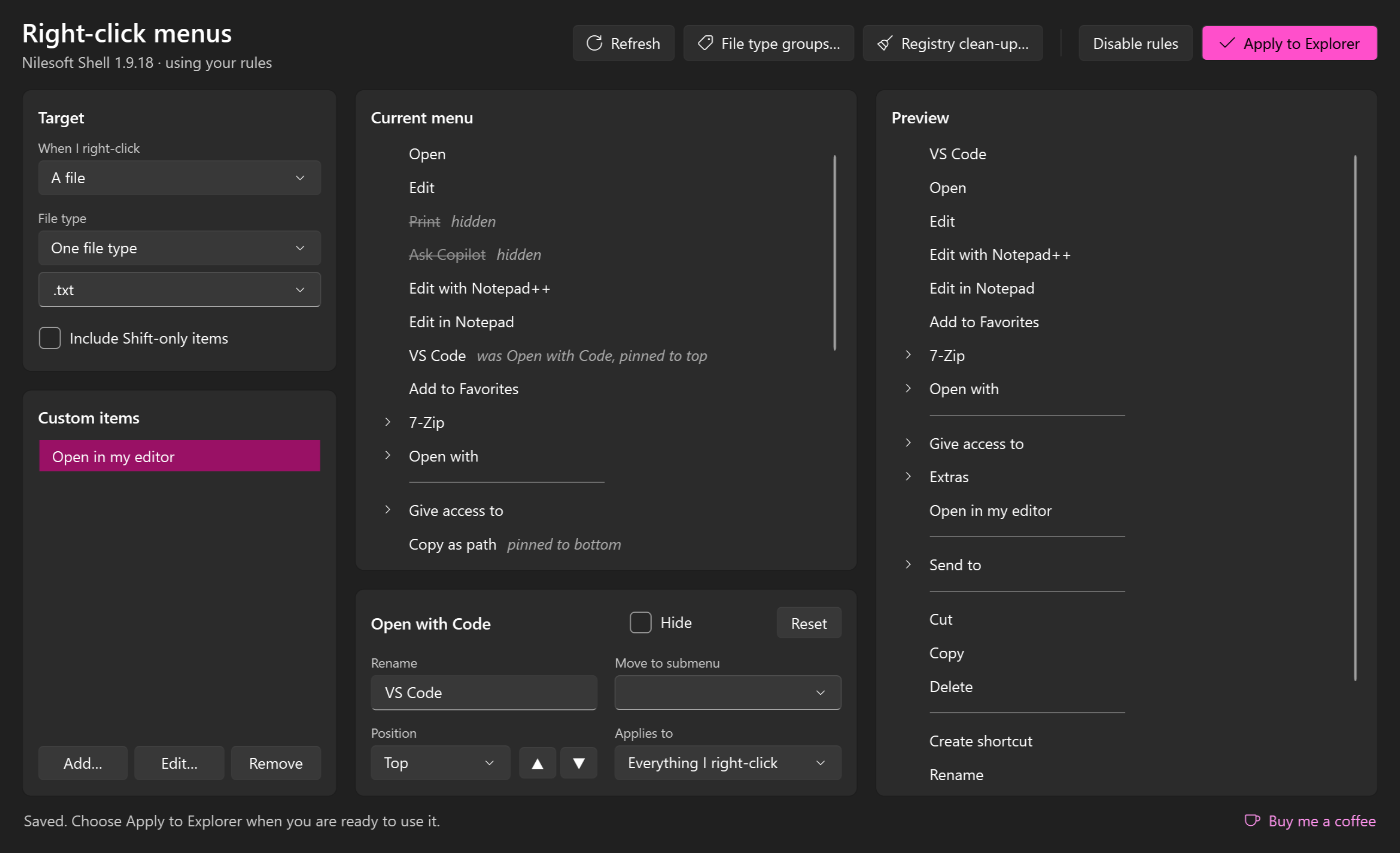
What it does
- Reads the real menu for a file, several files, a folder, a drive, or the empty space in a folder or on the desktop, including submenus and Shift-only items.
- Hides, renames, reorders and regroups items, and adds your own.
- Edits by context: one file type, a group of similar types such as Images or Code, every file type at once, one kind of target, only when several things are selected, or everything.
- Previews the result beside the menu Windows builds.
- Applies with one click and looks after Nilesoft Shell, the engine that makes the changes inside Explorer: it installs it, registers it and keeps it up to date. RCConfigurator itself never needs to run as administrator.
New since beta 4
Registry clean-up. Hiding an item only stops it being shown. When a program has been uninstalled but left its menu entries and file types behind, they can now be removed from the registry for good.
- Registry clean-up… lists each missing program with what it left: file types, menu items, menu extensions, and the links from file extensions that still point at them.
- An entry is listed only when it names a full path on a connected drive and no file is there. Entries of programs that are still installed are never offered.
- Everything removed is saved first as ordinary
.regfiles in%LOCALAPPDATA%\RCConfigurator\backups. Restore last backup puts the most recent clean-up back. - Windows asks for administrator permission only when the entries apply to the whole PC.
- A notice at start-up. The check runs each time the app opens. If it finds anything, a notice across the top of the window offers to review it, ignore those programs, or dismiss it for now.
A tidier window. The editor is laid out as panels: Target, Custom items, Current menu and Preview, with the commands in one row across the top. Some labels changed: Disable rules was "Stop using my rules", and File type groups… was "My groups of file types…".
Support. A Buy me a coffee link sits in the bottom corner of the window, for anyone who would like to support the project.
See the user guide for details.
Downloads
| File | For |
|---|---|
RCConfigurator-1.0.0-win-x64.zip |
Most PCs |
RCConfigurator-1.0.0-win-arm64.zip |
Windows on ARM, such as Snapdragon laptops |
Unzip and run RCConfigurator.exe. You do not need to install .NET.
What has and has not been tested
- Used on one Windows 11 PC on ARM: reading menus, editing, applying through Nilesoft Shell, groups and the every-type view, and a real registry clean-up with its backups.
- Both builds in this release were started and opened the editor, a group view and the clean-up window.
- The clean-up's removal, backup and restore are covered by automated tests that work on a scratch registry key. Restore last backup has not been used on entries that apply to the whole PC outside those tests; the backup files can also be imported by double-clicking them.
- Not yet checked against a live Nilesoft Shell: a rule scoped to a group of file types. It is written with the same file-type test that single-type rules use, joined with "or". If your menus stop changing after you apply a group rule, undo that change and please open an issue.
- The x64 build has only been run under emulation.
- The builds are not code-signed, so Windows SmartScreen may warn the first time you run one.