Releases: DorShaer/Husk
Release list
v2.10.1

What's new
Background agents
- Agents a chat starts are visible. A chat can send agents off to work on their own. The topbar now shows how many are running and how many are waiting on you, so you find them without having to know the feature exists. It stays quiet when there are none.
- Open an agent and keep talking. Press
Alt+A, pick an agent, and land in its conversation. Agents still running attach to their live session; finished ones reopen from their transcript. - Tell them apart at a glance. Agents inherit the title of the chat that started them, so the switcher groups them by state (needs you, running, finished) and shows what each one is doing right now, how long it has been going, and which is blocked on your input.
- Agents sit under the chat that started them. The Sessions list groups them under their parent chat instead of listing them beside it, so one conversation is one row again.
Model display
- The status panel names the model you selected. It reads your configured model rather than inferring one from whichever transcript happened to be newest, so a resumed chat no longer reports a model it is not running.
- Long context is its own entry. The long-context tier now appears as a distinct, selectable model in the orchestrator picker, with the same name and description shape as every other row.
Files and Autopilot
- One cursor in Files. Mouse and keyboard share a single cursor across the tree, the search list and the preview, arrow keys move between all three panes, and Escape backs out.
- Autopilot separates work from context. The usage headline reports the quantity its cap actually measures, and the context each agent loads before starting is counted and named separately.
Release artifacts
| Platform | File |
|---|---|
| Linux AppImage | husk-v2.10.1-linux-x86_64.AppImage |
| Linux (Debian / Ubuntu) | husk-v2.10.1-linux-amd64.deb |
| Linux (Fedora / RHEL) | husk-v2.10.1-linux-x86_64.rpm |
| macOS (Apple Silicon) | husk-v2.10.1-mac-arm64.dmg · .zip |
| macOS (Intel) | husk-v2.10.1-mac-x64.dmg · .zip |
| Windows | husk-v2.10.1-win-x64.exe · .zip |
Plus SHA256SUMS and auto-update metadata (latest*.yml).
Verifying a download
# Integrity (any platform with sha256sum / shasum)
sha256sum -c SHA256SUMS

# Sigstore build provenance (requires gh CLI 2.49+)
gh attestation verify <file> --repo DorShaer/Husk
Known limitations
- macOS code signing is still pending an Apple Developer ID. See the README's macOS first launch section for the Gatekeeper bypass.
- Background agents are available for agent tools that expose them. Tools without an agent concept show nothing rather than an empty panel.
v2.10.0
What's new
Every project gets a workspace
- A board of everything you work in. Pin a folder and it appears with its branch, uncommitted work, sessions and runs at a glance, grouped into what is active and what is quiet.
- Open one and stay there. A workspace view puts the project's run history, MCP servers and last commit in one place, so you stop guessing which folder the agent is standing in.
- Files follow the project. The file tree opens on the project the agent is working in rather than a saved root, and Sessions lists only real conversations instead of every background job that ever ran.
Workflows start from a pattern
- The page opens on the shapes worth copying. Fan work out to three reviewers, gate a release on the literal test output, or route to one specialist, each wired and ready to edit.
- A composer for every step. Opening a step gives it a prompt editor that wraps properly, its own settings beside it, and room to widen when a prompt gets long.
- The canvas says how it works. A legend covers adding, moving and removing a step, drawing and deleting a connection, and what happens when a drag is abandoned.
A skills library you can navigate
- Browse by source. Pick a folder on the left to see only its skills. Switch one on, or a whole source at once.
- See what just arrived. Recently added lists what was installed in the last two weeks, newest first, so a fresh skill is easy to find.
- Bring a skill you already have. Import points Husk at a file on disk and installs it into your library.
- An enabled skill is called automatically. The page now says so plainly: enabling a skill makes it available to the agent, which decides on its own when to use it.
Smaller things that were in the way
- Changes apply when you say so. Turning a skill or a plugin on offers Restart agent in the notice itself, instead of naming an action the page could not perform.
- Light mode reads properly. Drop targets, destructive buttons and the skills list keep their contrast when you switch themes.
- Typing goes to the chat you are looking at. Input routes to the live tab rather than relaunching the agent, and attachments no longer land in the terminal.
Release artifacts
| Platform | File |
|---|---|
| Linux AppImage | husk-v2.10.0-linux-x86_64.AppImage |
| Linux (Debian / Ubuntu) | husk-v2.10.0-linux-amd64.deb |
| Linux (Fedora / RHEL) | husk-v2.10.0-linux-x86_64.rpm |
| macOS (Apple Silicon) | husk-v2.10.0-mac-arm64.dmg · .zip |
| macOS (Intel) | husk-v2.10.0-mac-x64.dmg · .zip |
| Windows | husk-v2.10.0-win-x64.exe · .zip |
Plus SHA256SUMS and auto-update metadata (latest*.yml).
Verifying a download
# Integrity (any platform with sha256sum / shasum)
sha256sum -c SHA256SUMS

# Sigstore build provenance (requires gh CLI 2.49+)
gh attestation verify <file> --repo DorShaer/Husk
Known limitations
- macOS code signing is still pending an Apple Developer ID. See the README's macOS first launch section for the Gatekeeper bypass.
- Skills are read from the shared library on launch, so enabling or disabling one takes effect when the agent next starts.
v2.9.0
What's new
Workflows that run in front of you
Build a flow on the canvas, press Run, and watch it happen. Each step lights up as it starts, the connection fires to the next step as the baton passes, and the whole run plays out on the graph from the very first run (no reload needed). Every node keeps its own terminal, so you can click any step and read exactly what it did, live or long after it finished.
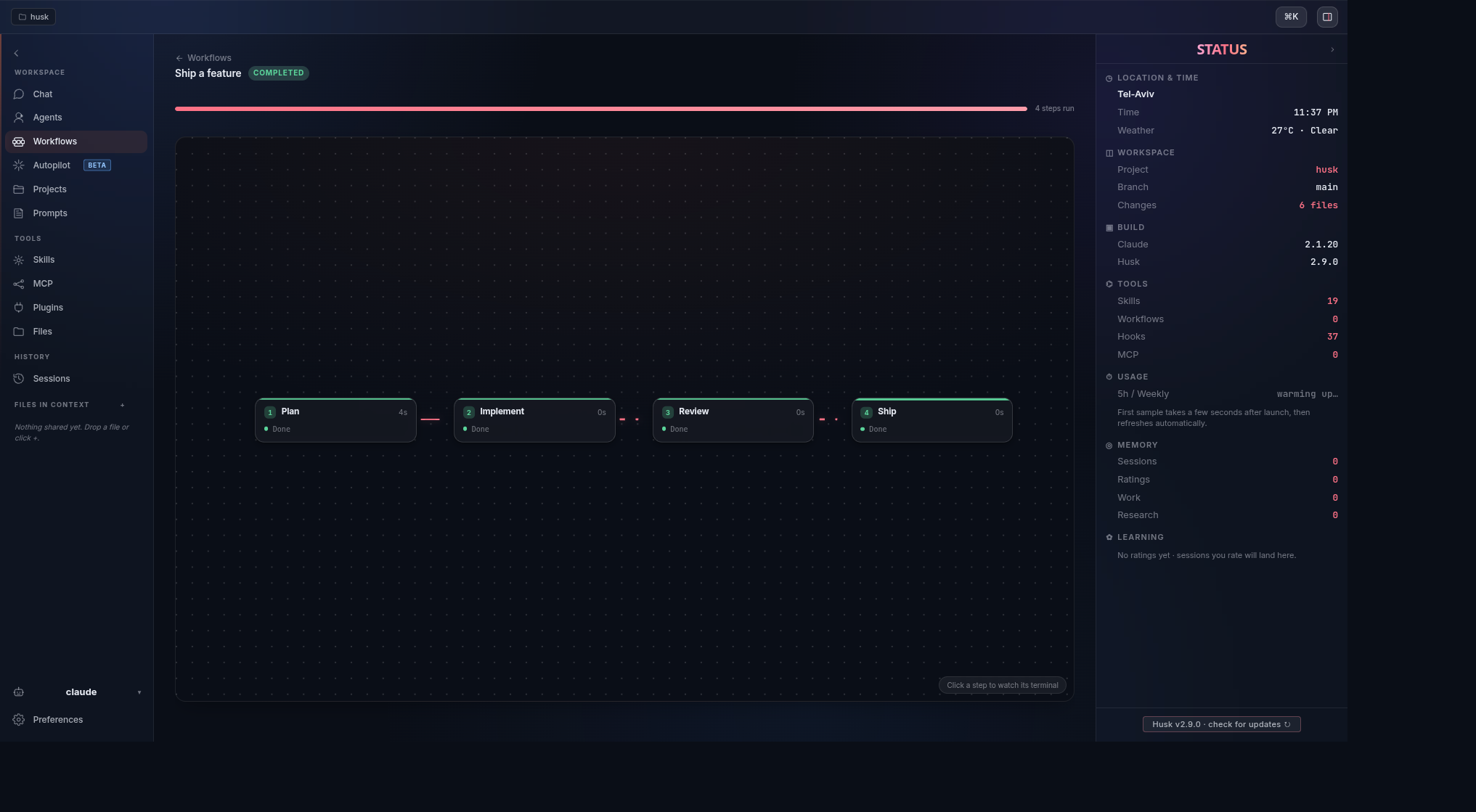
- Live on the graph. Steps change state as they run and each taken edge animates, so the run is something you watch, not something you wait on.
- A terminal per step. Open any node to follow its output during the run, and reopen it afterward from the saved history.
- Build and run in one place. Wire up Plan, Implement, Review, Ship (or whatever your flow needs), then run it without leaving the editor.
A cleaner Sessions list
Husk does some of its own work by talking to the agent in the background. Those background runs used to land in Sessions and Recent as extra rows, so a single conversation could look like many. Now the list keeps the chats you actually held, and one conversation is one entry.
- One conversation, one row. Background and automated runs no longer masquerade as chats.
- Recent stays yours. The sidebar surfaces the conversations you started, nothing else.
A Windows install that talks back
The one-line PowerShell installer used to download in silence and then wait on a setup window without telling you, so it looked stuck. It now shows download progress as it fetches Husk, and says clearly when the Setup window has opened and is waiting for you to click through it.
- Progress while it downloads. A live percentage instead of a frozen-looking terminal.
- No more guessing. A clear prompt when Setup needs you, including what to do if Windows SmartScreen appears.
Release artifacts
| Platform | File |
|---|---|
| Linux AppImage | husk-v2.9.0-linux-x86_64.AppImage |
| Linux (Debian / Ubuntu) | husk-v2.9.0-linux-amd64.deb |
| Linux (Fedora / RHEL) | husk-v2.9.0-linux-x86_64.rpm |
| macOS (Apple Silicon) | husk-v2.9.0-mac-arm64.dmg · .zip |
| macOS (Intel) | husk-v2.9.0-mac-x64.dmg · .zip |
| Windows | husk-v2.9.0-win-x64.exe · .zip |
Plus SHA256SUMS and auto-update metadata (latest*.yml).
Verifying a download
# Integrity (any platform with sha256sum / shasum)
sha256sum -c SHA256SUMS

# Sigstore build provenance (requires gh CLI 2.49+)
gh attestation verify <file> --repo DorShaer/Husk
Known limitations
- macOS code signing is still pending an Apple Developer ID. See the README's macOS first launch section for the Gatekeeper bypass.
- Windows builds are not code-signed yet, so SmartScreen may warn about an unknown publisher. Choose More info, then Run anyway.
- There is no native Windows on ARM build yet. The x64 build runs under the built-in emulation layer.
v2.8.9
Husk 2.8.9
Meet Kernel.
Husk has a character now. The pod cracks open on the welcome tour and the seed
inside climbs out, looks around, and follows your cursor. Click him and he goes
back into the husk. The logo, the app icon and the site were redrawn to match.
The installer was rebuilt end to end for Linux, macOS and Windows, and it now
survives the paths it used to fall over on: a machine with no gnupg, a fresh
Fedora, an arm64 laptop, a shell that is not bash. Checksums are verified and a
failed install rolls itself back.
Install updates from inside Husk now really does install and restart, instead of
quietly doing nothing.
-
Every agent shows the model it actually ran, with per-agent time, tokens, cost
and cache split. -
A Configure wizard sets Simple and Complex models per CLI, and the run log
explains every routing decision. Trivial jobs stop going to the expensive model. -
A progress governor halts idle or looping agents before they burn your budget.
-
A team's agents group into one history entry with combined files, tokens and spend.
-
Chat titles appear promptly again.
-
Gemini sessions carry history, naming and resume, alongside the other agents.
-
A new install opens in light. Every theme previews live in Preferences, and the
old one no longer flashes at startup. -
Agents installed through nvm are found instead of reported missing.
-
The app icon is sharp at every size, and an upgrade no longer deletes it.
-
Light mode is readable: diffs and dim text no longer wash out.
Linux and macOS:
curl -fsSL https://dorshaer.github.io/Husk/install.sh | bash
Windows:
irm https://dorshaer.github.io/Husk/install.ps1 | iex
Debian and Ubuntu can install from the signed apt repository and stay current
with apt upgrade.
v2.8.8
What's new
Install
- One line, any operating system.
curl -fsSL https://cdn.jsdelivr.net/gh/DorShaer/Husk@main/scripts/install.sh | bashinstalls Husk on Linux and macOS. On Debian and Ubuntu it wires up the signed apt repository; elsewhere it fetches the right build and verifies its checksum. apt install husk. Debian and Ubuntu users can add the signed Husk apt repository and install with apt, then stay current withapt upgrade. Setup is three copyable lines on the new install page at https://dorshaer.github.io/Husk.- Clearer install docs. The README now has separate Linux, macOS, and Windows sections with copyable commands, and the landing page mirrors them.
Agents
- Gemini support. Husk now runs the Gemini CLI alongside claude, copilot, codex, and aider, including its own MCP server configuration.
- The status panel adapts to the active agent. Usage, session, and model rows now reflect whichever agent you are running instead of assuming one.
- Friendly model names. The status panel shows a readable model name such as
Opus 4.8orGPT 5.4instead of the raw identifier.
Fixes
- Agent startup on Windows. Agents installed as an npm command shim now launch reliably instead of failing to start.
- Autopilot. Run exit codes are surfaced when a run ends, cancelling is guarded against accidental double taps, and the collapsed sidebar indicator renders correctly.
- Live model reporting. The status panel reports the model the current session is actually using rather than the configured default.
- Sharper file preview. Selected text in the file preview no longer renders blurry.
Release artifacts
| Platform | File |
|---|---|
| Linux AppImage | husk-v2.8.8-linux-x86_64.AppImage |
| Linux (Debian / Ubuntu) | husk-v2.8.8-linux-amd64.deb |
| Linux (Fedora / RHEL) | husk-v2.8.8-linux-x86_64.rpm |
| macOS (Apple Silicon) | husk-v2.8.8-mac-arm64.dmg · .zip |
| macOS (Intel) | husk-v2.8.8-mac-x64.dmg · .zip |
| Windows | husk-v2.8.8-win-x64.exe · .zip |
Plus SHA256SUMS and auto-update metadata (latest*.yml).
Verifying a download
# Integrity (any platform with sha256sum / shasum)
sha256sum -c SHA256SUMS

# Sigstore build provenance (requires gh CLI 2.49+)
gh attestation verify <file> --repo DorShaer/Husk
Known limitations
- macOS code signing is still pending an Apple Developer ID. See the README's macOS first launch section for the Gatekeeper bypass.
- The apt repository serves the amd64 build. Arm Linux and other distributions use the AppImage or a source install.
v2.8.7
What's new
Autopilot mission control
- Live thinking lanes, one per agent. Team runs show every agent's narration and tool calls streaming side by side, instead of a single merged log. Click a lane to expand it; scroll up to pause the stream and jump back to live with one click.
- Fleet status at a glance. Each agent has a status row: what it is doing now, its state (working, running a tool, quiet, done), elapsed time, spend, and files changed. Queued team members appear the moment the plan is ready.
- Readable run log. Lifecycle events (run started, team planned, goal delivered, first file change, completion, stop) are listed with timestamps and per-agent color markers.
- Run conclusions. When a run finishes, the review shows why it ended, the final numbers, and the agent's own closing report.
- Smarter completion detection. Runs end when the agent declares the goal complete, even in its own words, so finished agents are no longer prodded to continue.
- Stop means stop. Stopping a team run interrupts every agent the run spawned, including queued ones. Regular chat sessions are never affected.
A usage meter you can trust
- The token figure reports actual consumption. Loaded context is no longer counted as usage, so a run shows real numbers from the first second. The same rules apply to every agent CLI; approximate figures are clearly marked.
- Cleaner metrics display. Usage is a compact strip (time, tokens, spend against caps) with a warning color when any agent approaches a cap.
Run management
- Bulk delete. Select runs with real checkboxes (full-height click targets, select all, partial-selection state) and delete them in one action.
- Run history works across every run. Past runs are listed and clickable regardless of how they were started, with correct timestamps, and opening a changed file shows the actual diff at full width with horizontal scroll for long lines.
Navigation
- Back and forward everywhere. The mouse back and forward buttons and Alt+arrow keys move between pages like a browser, remember your place in lists, and step out of a run review layer by layer.
- Esc closes every dialog. Any open wizard or dialog dismisses with Esc, closing only the topmost layer at a time.
- Run review actions where you expect them. Back sits top left beside the title, run commands (Rerun, Start a new run) live in the header, and Apply, Discard, and Revert sit on the touched-files panel they act on.
Fixes
- Linux .deb and .rpm installs now launch. The packaged app aborted at startup on Linux because Chromium's sandbox helper was installed without its setuid bit, showing only a launcher icon and no window. The post-install script now sets it correctly. Thanks to L3vari for the report and fix.
- Session resume follows the session's owner. Resuming a past session always launches the agent that created it. Agents without a resume capability say so clearly instead of producing a broken command.
- Headless agent calls work across every supported CLI. Team planning and workflow steps invoke each agent CLI with its own non-interactive form, so planning no longer stalls or fails on CLIs with different flags.
- Cleaner startup for agents without transcripts. Husk detects that such an agent has started answering and stops its delivery retries early.
- Onboarding controls scope correctly. Theme and accent pickers in onboarding act only inside the onboarding overlay.
- Hardened file handling in the file preview and in run transcript reading, plus resolved code-scanning findings.
Release artifacts
| Platform | File |
|---|---|
| Linux AppImage | husk-v2.8.7-linux-x86_64.AppImage |
| Linux (Debian / Ubuntu) | husk-v2.8.7-linux-amd64.deb |
| Linux (Fedora / RHEL) | husk-v2.8.7-linux-x86_64.rpm |
| macOS (Apple Silicon) | husk-v2.8.7-mac-arm64.dmg · .zip |
| macOS (Intel) | husk-v2.8.7-mac-x64.dmg · .zip |
| Windows | husk-v2.8.7-win-x64.exe · .zip |
Plus SHA256SUMS and auto-update metadata (latest*.yml).
Verifying a download
# Integrity (any platform with sha256sum / shasum)
sha256sum -c SHA256SUMS

# Sigstore build provenance (requires gh CLI 2.49+)
gh attestation verify <file> --repo DorShaer/Husk
Known limitations
- macOS code signing is still pending an Apple Developer ID. See the README's macOS first launch section for the Gatekeeper bypass.
v2.8.6
What's new
Fixes
- Session resume follows the session's owner. Resuming a past session always launches the agent that created it. Agents without a resume capability now say so clearly instead of producing a broken command.
- Headless agent calls work across every supported CLI. Team planning and workflow steps invoke each agent CLI with its own non-interactive form, so planning no longer stalls or fails on CLIs with different flags.
- Cleaner startup for agents without transcripts. Husk now detects that such an agent has started answering and stops its delivery retries early.
- Onboarding controls scope correctly. Theme and accent pickers in onboarding act only inside the onboarding overlay.
Under the hood
- Tightened file handling in the file preview and in run transcript reading.
Release artifacts
| Platform | File |
|---|---|
| Linux AppImage | husk-v2.8.6-linux-x86_64.AppImage |
| Linux (Debian / Ubuntu) | husk-v2.8.6-linux-amd64.deb |
| Linux (Fedora / RHEL) | husk-v2.8.6-linux-x86_64.rpm |
| macOS (Apple Silicon) | husk-v2.8.6-mac-arm64.dmg · .zip |
| macOS (Intel) | husk-v2.8.6-mac-x64.dmg · .zip |
| Windows | husk-v2.8.6-win-x64.exe · .zip |
Plus SHA256SUMS and auto-update metadata (latest*.yml).
Verifying a download
# Integrity (any platform with sha256sum / shasum)
sha256sum -c SHA256SUMS

# Sigstore build provenance (requires gh CLI 2.49+)
gh attestation verify <file> --repo DorShaer/Husk
Known limitations
- macOS code signing is still pending an Apple Developer ID. See the README's macOS first launch section for the Gatekeeper bypass.
v2.8.5
What's new
Autopilot mission control
- Live thinking lanes, one per agent. Team runs now show every agent's narration and tool calls streaming side by side, instead of a single merged log for one agent. Click a lane to expand it; scroll up to pause the stream and jump back to live with one click.
- Fleet status at a glance. Each agent gets a status row: what it is doing right now, its state (working, running a tool, quiet, done), elapsed time, spend, and files changed. Queued team members appear the moment the plan is ready.
- Readable run log. Lifecycle events (run started, team planned, goal delivered, first file change, completion, stop) are listed with timestamps and per-agent color markers.
- Run conclusions. When a run finishes, the review shows why it ended, the final numbers, and the agent's own closing report.
- Smarter completion detection. Runs end when the agent declares the goal complete, even when it phrases completion in its own words, so finished agents are no longer prodded to continue.
- Stop means stop. Stopping a team run interrupts every agent the run spawned, including queued ones. Regular chat sessions are never affected.
A usage meter you can trust
- The token figure now reports actual consumption. Loaded context is no longer counted as usage, so starting a run shows real numbers from the first second. The same rules apply to every agent CLI; approximate figures are clearly marked.
- Cleaner metrics display. Usage is a compact text strip (time, tokens, spend against caps) with a warning color when any agent approaches a cap.
Run management
- Bulk delete. Select runs with real checkboxes (full-height click targets, select all, partial-selection state) and delete them in one action.
- Run history works across every run. Past runs are listed and clickable regardless of how they were started, with correct timestamps, and opening a changed file shows the actual diff at full width with horizontal scroll for long lines.
Navigation
- Back and forward everywhere. The mouse back and forward buttons and Alt+arrow keys move between pages just like a browser, remember your place in lists, and step out of a run review layer by layer.
- Esc closes every dialog. Any open wizard or dialog dismisses with Esc, closing only the topmost layer at a time.
- Run review actions where you expect them. Back sits top left beside the title, run commands (Rerun, Start a new run) live in the header, and Apply, Discard, and Revert sit on the touched-files panel they act on.
Release artifacts
| Platform | File |
|---|---|
| Linux AppImage | husk-v2.8.5-linux-x86_64.AppImage |
| Linux (Debian / Ubuntu) | husk-v2.8.5-linux-amd64.deb |
| Linux (Fedora / RHEL) | husk-v2.8.5-linux-x86_64.rpm |
| macOS (Apple Silicon) | husk-v2.8.5-mac-arm64.dmg · .zip |
| macOS (Intel) | husk-v2.8.5-mac-x64.dmg · .zip |
| Windows | husk-v2.8.5-win-x64.exe · .zip |
Plus SHA256SUMS and auto-update metadata (latest*.yml).
Verifying a download
# Integrity (any platform with sha256sum / shasum)
sha256sum -c SHA256SUMS

# Sigstore build provenance (requires gh CLI 2.49+)
gh attestation verify <file> --repo DorShaer/Husk
Known limitations
- macOS code signing is still pending an Apple Developer ID. See the README's macOS first launch section for the Gatekeeper bypass.
v2.8.4
What's new
A redesigned workspace
- A calmer layout. A collapsible labeled sidebar (toggle between icons and icons + names), a framed chat surface, and a quieter overall look.
- Six themes. Dark, Light, Midnight, Nord, Dracula and Sepia, each with a matching terminal palette. Pick one in Preferences or during the welcome tour.
Getting started and updates
- A guided first run. A short welcome tour lets you choose your CLI and your look, then drops you straight into the app.
- A What's new page. After an update, Husk shows a short What's new page once, so you can see what changed without going through the tour again.
Reliability
- One session per conversation. Continuing a chat no longer splits it into many separate sessions in the list.
- Trust a folder in one click. When the agent has not yet trusted your working folder, Husk offers a one-click action so your saved permissions actually apply.
- Add files to context from the chat header, and attach a file to your next message instead of a separate prompt.
Fixes
- Workflow steps now run in your working directory, so codex steps work on macOS.
- Menus, dialogs, and the command palette stay opaque and readable on every theme.
- The command palette keeps the highlighted row in view while you arrow through it.
Release artifacts
| Platform | File |
|---|---|
| Linux AppImage | husk-v2.8.4-linux-x86_64.AppImage |
| Linux (Debian / Ubuntu) | husk-v2.8.4-linux-amd64.deb |
| Linux (Fedora / RHEL) | husk-v2.8.4-linux-x86_64.rpm |
| macOS (Apple Silicon) | husk-v2.8.4-mac-arm64.dmg · .zip |
| macOS (Intel) | husk-v2.8.4-mac-x64.dmg · .zip |
| Windows | husk-v2.8.4-win-x64.exe · .zip |
Plus SHA256SUMS and auto-update metadata (latest*.yml).
Verifying a download
# Integrity (any platform with sha256sum / shasum)
sha256sum -c SHA256SUMS

# Sigstore build provenance (requires gh CLI 2.49+)
gh attestation verify <file> --repo DorShaer/Husk
Known limitations
- macOS builds are not code-signed yet (no Apple Developer ID), so macOS cannot auto-install updates. On macOS, "Check for updates" sends you to the dmg download; after installing, run this once so Gatekeeper will open it:
xattr -dr com.apple.quarantine /Applications/Husk.appv2.8.3
What's new
First-run onboarding
- A guided first launch. Husk now opens with a three-step setup: a welcome screen, a step that detects the AI CLIs on your machine and lets you pick the one to launch by default (installing any that are missing right there), and a preferences step for theme, accent color, and the sidebar default. You can replay the whole tour any time from Preferences under Appearance.
Chat and status
- One statusline, not two. The agent's own inline statusline is now silenced inside Husk, so the right-side STATUS panel is the single place your session, usage, and learning figures live. Your other agent settings are left untouched.
- The STATUS panel shows everything. The header sits higher so every section (location, build, tools, usage, memory, learning) stays visible without scrolling.
- A framed chat surface. The terminal is now a rounded panel with a clear focus state, so it reads as a crafted workspace rather than a raw edge.
- Your draft survives navigation. Text you have typed but not sent is kept when you switch to another page (Skills, MCP, Files) and come back, instead of being cleared.
MCP
- Rename a server in place. You can now rename an MCP server from the editor for both the Claude and Copilot configurations, with a check that the new name does not collide with an existing one.
Fixes
- The active model stays visible. The STATUS panel no longer goes blank for sessions that have not yet bound a transcript; it falls back to the latest known session so the model row stays populated.
- Workflow steps run in your working directory. Multi-step workflows now run each agent in your working directory instead of the app's install location, so codex steps on macOS no longer fail with a directory trust error.
Release artifacts
| Platform | File |
|---|---|
| Linux AppImage | husk-v2.8.3-linux-x86_64.AppImage |
| Linux (Debian / Ubuntu) | husk-v2.8.3-linux-amd64.deb |
| Linux (Fedora / RHEL) | husk-v2.8.3-linux-x86_64.rpm |
| macOS (Apple Silicon) | husk-v2.8.3-mac-arm64.dmg · .zip |
| macOS (Intel) | husk-v2.8.3-mac-x64.dmg · .zip |
| Windows | husk-v2.8.3-win-x64.exe · .zip |
Plus SHA256SUMS and auto-update metadata (latest*.yml).
Verifying a download
# Integrity (any platform with sha256sum / shasum)
sha256sum -c SHA256SUMS

# Sigstore build provenance (requires gh CLI 2.49+)
gh attestation verify <file> --repo DorShaer/Husk
Known limitations
- macOS code signing is still pending an Apple Developer ID. See the README's macOS first launch section for the Gatekeeper bypass.