v2.9.0

What's new
Workflows that run in front of you
Build a flow on the canvas, press Run, and watch it happen. Each step lights up as it starts, the connection fires to the next step as the baton passes, and the whole run plays out on the graph from the very first run (no reload needed). Every node keeps its own terminal, so you can click any step and read exactly what it did, live or long after it finished.
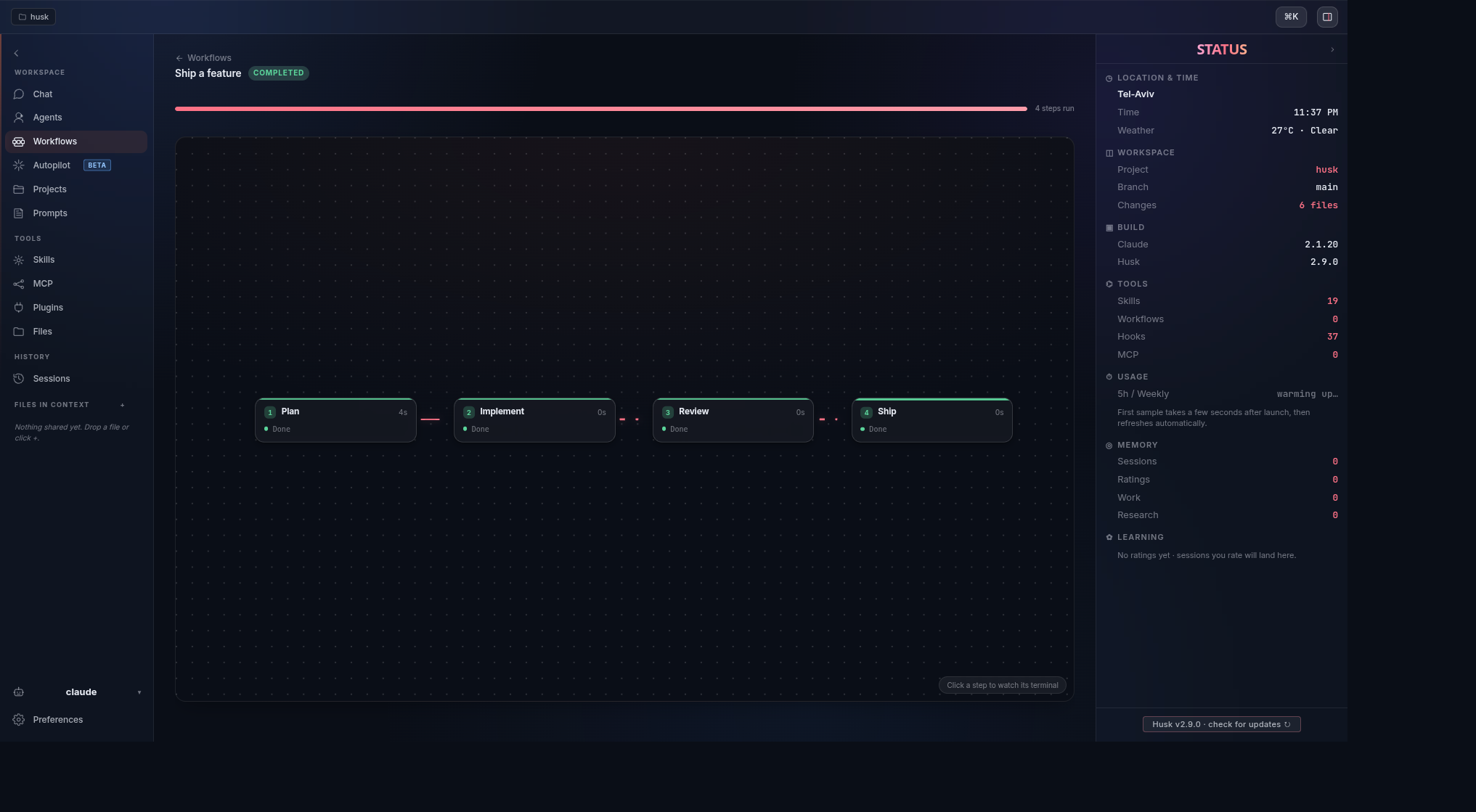
- Live on the graph. Steps change state as they run and each taken edge animates, so the run is something you watch, not something you wait on.
- A terminal per step. Open any node to follow its output during the run, and reopen it afterward from the saved history.
- Build and run in one place. Wire up Plan, Implement, Review, Ship (or whatever your flow needs), then run it without leaving the editor.
A cleaner Sessions list
Husk does some of its own work by talking to the agent in the background. Those background runs used to land in Sessions and Recent as extra rows, so a single conversation could look like many. Now the list keeps the chats you actually held, and one conversation is one entry.
- One conversation, one row. Background and automated runs no longer masquerade as chats.
- Recent stays yours. The sidebar surfaces the conversations you started, nothing else.
A Windows install that talks back
The one-line PowerShell installer used to download in silence and then wait on a setup window without telling you, so it looked stuck. It now shows download progress as it fetches Husk, and says clearly when the Setup window has opened and is waiting for you to click through it.
- Progress while it downloads. A live percentage instead of a frozen-looking terminal.
- No more guessing. A clear prompt when Setup needs you, including what to do if Windows SmartScreen appears.
Release artifacts
| Platform | File |
|---|---|
| Linux AppImage | husk-v2.9.0-linux-x86_64.AppImage |
| Linux (Debian / Ubuntu) | husk-v2.9.0-linux-amd64.deb |
| Linux (Fedora / RHEL) | husk-v2.9.0-linux-x86_64.rpm |
| macOS (Apple Silicon) | husk-v2.9.0-mac-arm64.dmg · .zip |
| macOS (Intel) | husk-v2.9.0-mac-x64.dmg · .zip |
| Windows | husk-v2.9.0-win-x64.exe · .zip |
Plus SHA256SUMS and auto-update metadata (latest*.yml).
Verifying a download
# Integrity (any platform with sha256sum / shasum)
sha256sum -c SHA256SUMS

# Sigstore build provenance (requires gh CLI 2.49+)
gh attestation verify <file> --repo DorShaer/Husk
Known limitations
- macOS code signing is still pending an Apple Developer ID. See the README's macOS first launch section for the Gatekeeper bypass.
- Windows builds are not code-signed yet, so SmartScreen may warn about an unknown publisher. Choose More info, then Run anyway.
- There is no native Windows on ARM build yet. The x64 build runs under the built-in emulation layer.