Use your mouse as a shortcut controller during Anki review.
Mouse Answer allows you to review cards faster by assigning actions to mouse buttons instead of relying on the keyboard.
Originally created for my own daily study sessions to make reviews smoother and more comfortable — and later shared with the community.
- Review cards entirely with your mouse
- Configure right click
- Configure middle click
- Configure scroll wheel up / down
- Configure right double-click
- Supports extra mouse buttons (Back / Forward)
- Separate actions for:
- Question side
- Answer side
- Available actions:
- Show Answer
- Again
- Hard
- Good
- Easy
- Do Nothing
- Toggle addon on/off during review
- Optional answer feedback
- Works with gaming and multi-button mice
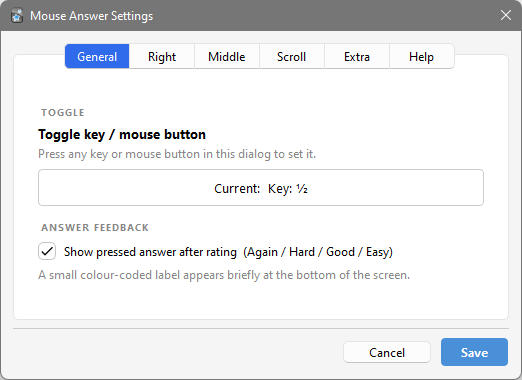
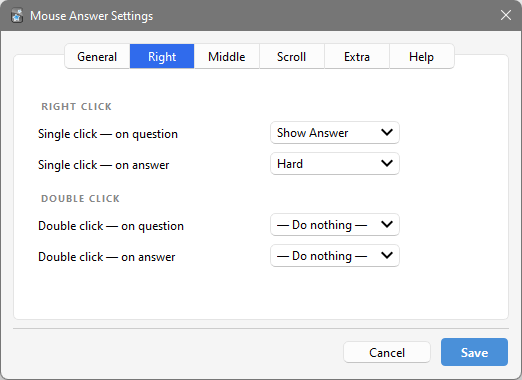
- Open:
Tools → Mouse Shortcuts
-
Configure your preferred mouse actions
-
Start reviewing
-
Trigger actions directly with your mouse
Question side:
Right Click → Show Answer
Answer side:
Scroll Up → Easy
Scroll Down → Again
Review without touching the keyboard.
Download directly from:
https://ankiweb.net/shared/info/418106886
- Download ZIP
- Extract files
- Move addon folder into:
C:\Users\YOUR_NAME\AppData\Roaming\Anki2\addons21\
~/Library/Application Support/Anki2/addons21/
~/.local/share/Anki2/addons21/
- Restart Anki
Found a bug or have an idea?
Open an issue:
https://github.com/Doummar/Mouse_Answer/issues
I built Mouse Answer because I wanted reviewing to feel faster and more natural during long study sessions.
I still use it in my own studies every day, and many improvements come directly from real study situations and user feedback.
If you discover a better workflow or have suggestions, feel free to share them.
Study smarter, click less, and review on! - Adel