Repository navigation
Contacts and DAV
Inboxora keeps contacts in first-party address books and publishes them over CardDAV, so the same contacts appear in DAVx5, Thunderbird, iOS and Android. Calendars work the same way over CalDAV.
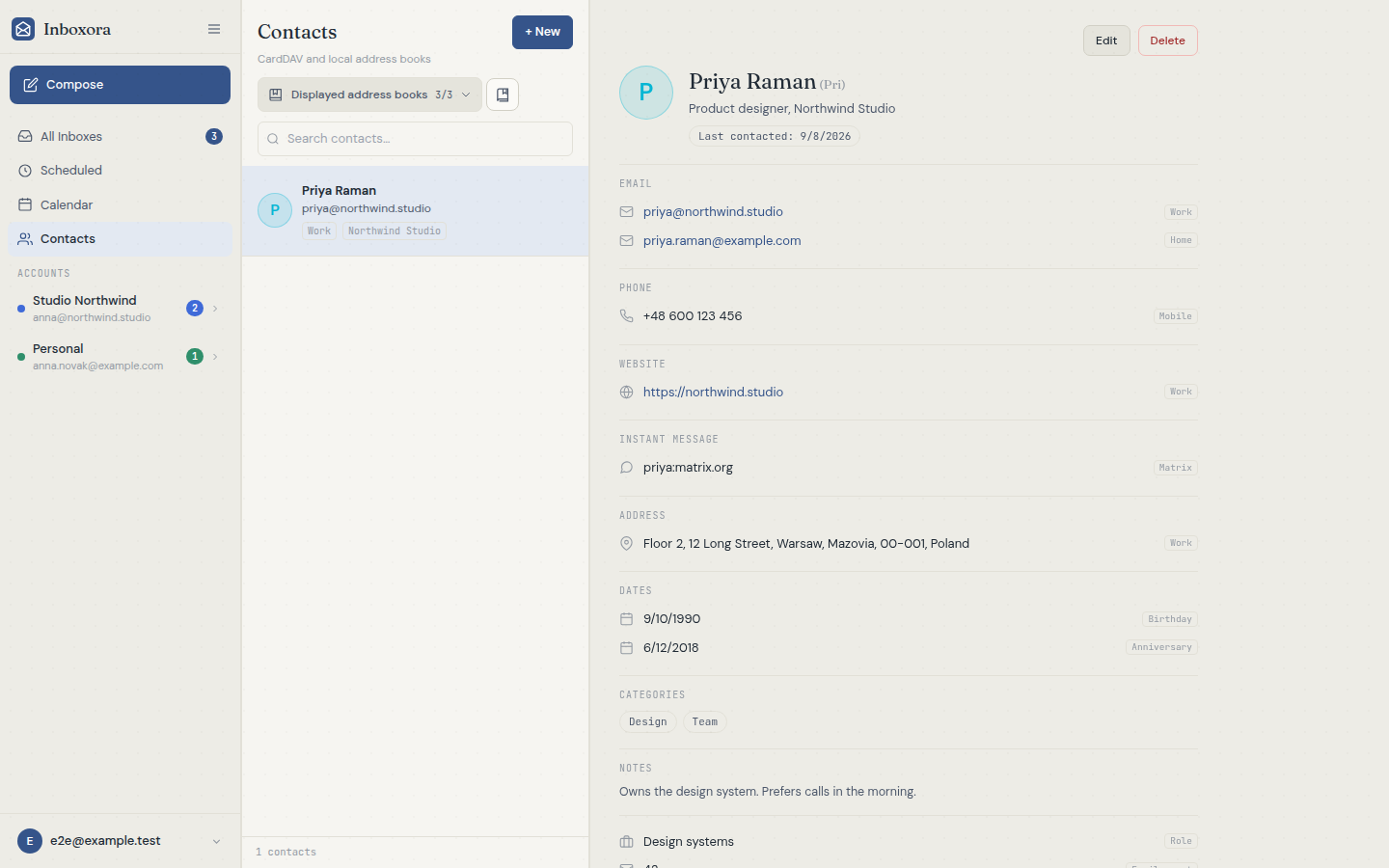
Local and remote address books, Google-pulled and CardDAV-synced ones, are independent of each other. The provider integrations do not migrate, adopt or remove a CardDAV account or a local book: they add their own book beside them, and the CardDAV adapter keeps writing to its own. A Google account connected for contacts is likewise not a reason for anything else to change. A book pulled from a provider or from an external CardDAV server arrives read-only and can be made editable per book by enabling write-back for it (see Writing changes back); an account you only imported from never becomes the local book's writer, and the local book stays yours.
- Create, rename, recolour, hide or delete local address books. At least one local book remains.
- Rename a book from the book menu next to the book picker: it opens a dialog prefilled with the current name, so "Personal" can become "Prywatne" or anything else. Naming is a real dialog with the server's validation in place — a name is required and 120 characters is the limit; a duplicate name is refused without losing what you typed.
- Address books appear as scrollable tabs above the search field. All visible respects the visibility filter, and a hidden book can still be selected explicitly.
- Switching books keeps your current search; results from a previous book can never replace the ones you are looking at.
- Contacts discovered automatically from received mail are marked auto.
- A pulled book (a CardDAV import or a provider collection) cannot be renamed or edited locally until write-back is enabled for it, because its name and contents belong to the server it syncs from.
The book menu holds book creation, visibility, Google CSV import into local books, and Google CSV / Outlook CSV / vCard export.
Contacts support the standard vCard fields:
| Group | Fields |
|---|---|
| Names | Display name, first name, last name, nickname |
| Work | Organisation, job title, role |
| Contact | Multiple typed emails and phones, websites, instant messages |
| Addresses | Structured addresses with type, PO box, street, second line, city, region, postal code, country |
| Dates | Birthday, anniversary, name day and custom labelled dates |
| Other | Categories, notes, photo |
- The first email is the primary one used for avatars and autocomplete.
- Dates are stored as
YYYY-MM-DD, and dates without a year are stored as--MM-DDand repeat every year. - Birthday and anniversary dates appear automatically in the read-only Contact dates calendar described in Calendar.
- If a rich field is empty, Inboxora falls back to the stored vCard, so fields written by a DAV client appear without re-importing.
| Direction | Format | Notes |
|---|---|---|
| Import | Google CSV | Into a local book; re-importing updates matching contacts instead of duplicating them. |
| Import | vCard (.vcf) |
Into a local book; a file with many cards is supported, and re-importing updates the contacts that share a UID instead of duplicating them. |
| Export | Google CSV | Per address book. |
| Export | Outlook CSV | Per address book. |
| Export | vCard 3.0 | Per address book. |
Exported CSV values that would start a spreadsheet formula are prefixed so they cannot execute.
Search matches the display name, primary email, organisation, and every stored email address and phone number. Results are paginated as you scroll, and contacts you email often are ordered first. Hidden books are excluded unless you select them.
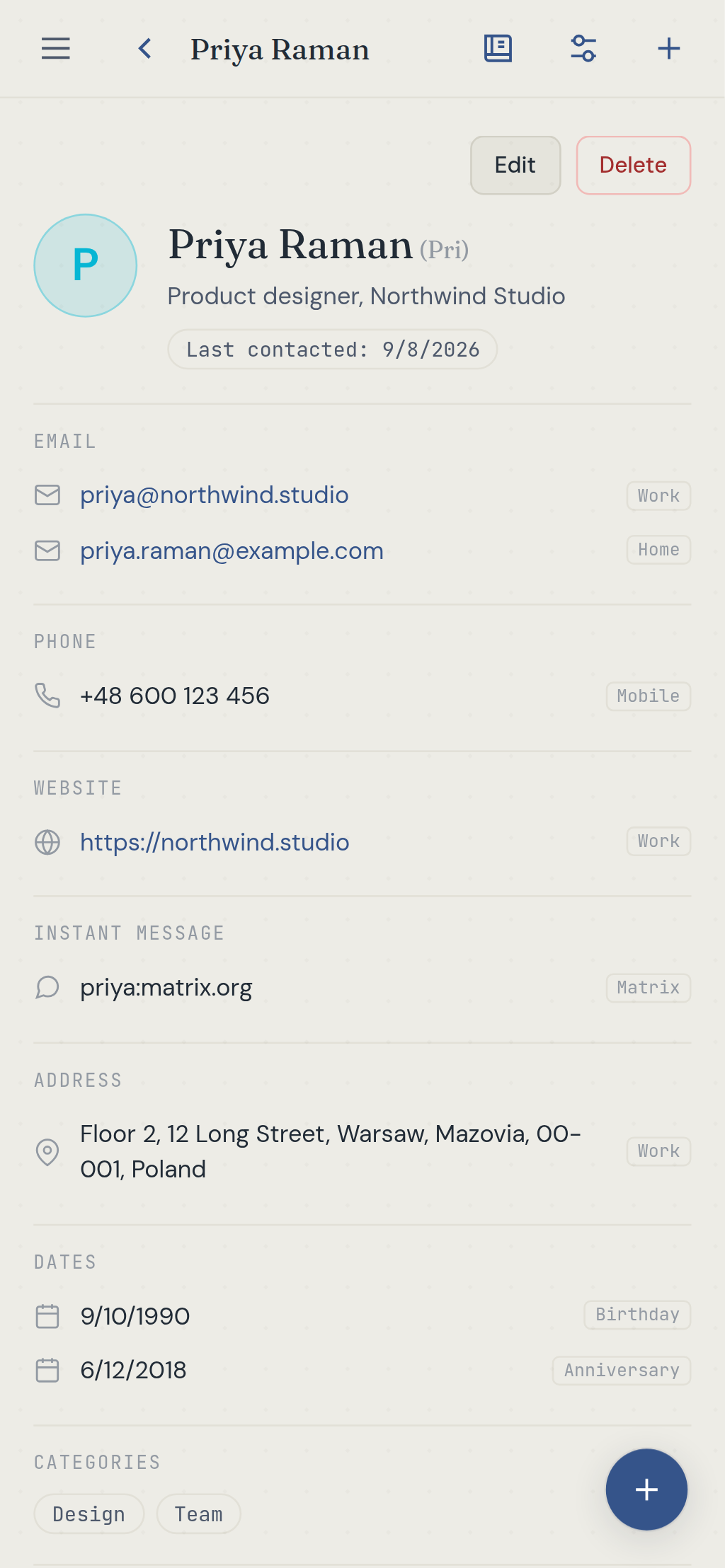
On wide screens the list and the contact details sit side by side; on tablets and phones selecting a contact opens its details with an in-app Back action.
- Selecting an email address opens the composer with that recipient already filled in.
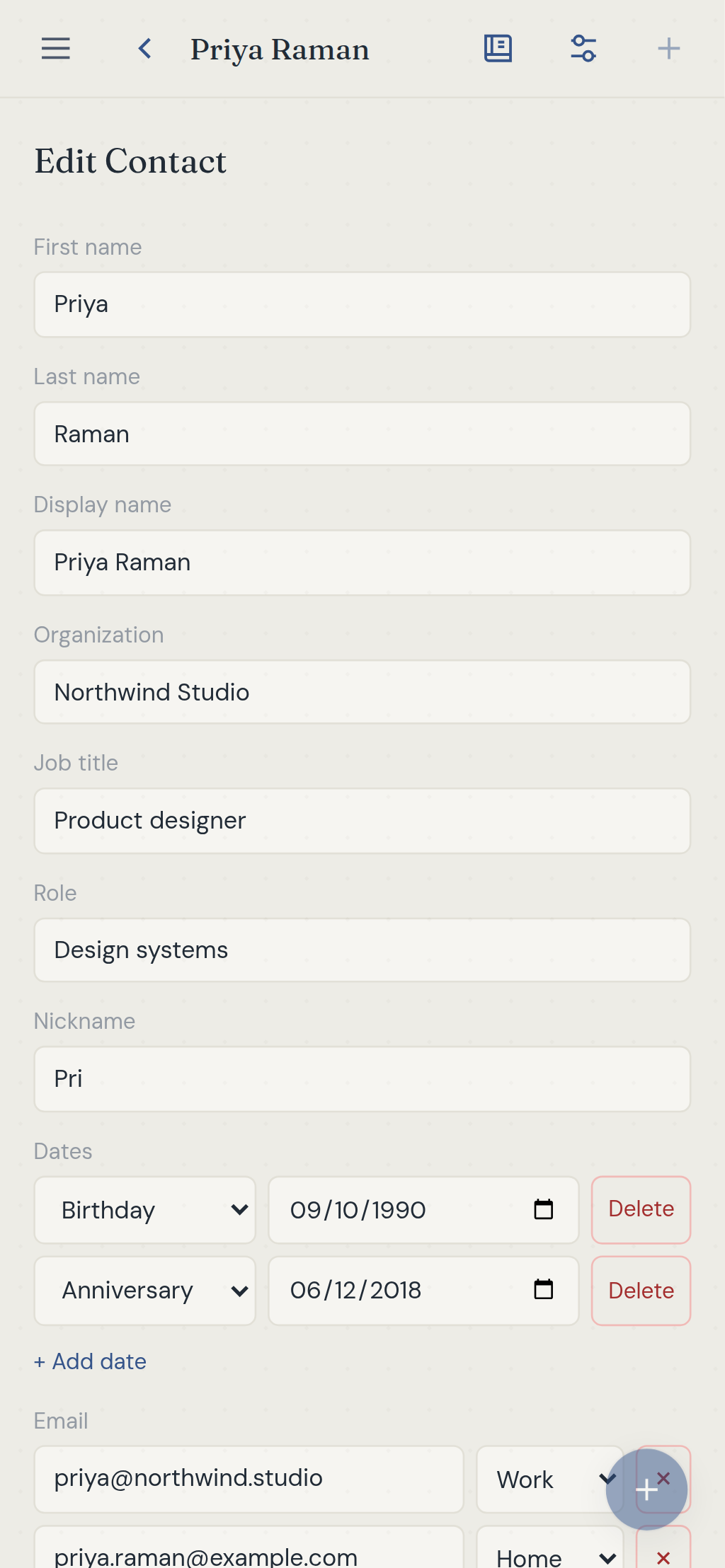
- Edit opens the full editor with all rich fields, including multiple emails, phones, addresses and dates.
- A contact in a pulled book is edited or deleted locally only once write-back is enabled for that book; before that, the change is refused with a reason rather than reverted by the next sync.
| Contacts on a phone | Editor on a phone |
|---|---|
 |
 |
| Protocol | Endpoint | Discovery |
|---|---|---|
| CardDAV | /carddav |
/.well-known/carddav |
| CalDAV | /caldav |
/.well-known/caldav |
Both support HTTP Basic authentication and HTTP Digest challenge authentication, including Baikal-style MD5/qop=auth, and support discovery, queries, multi-get, incremental sync with sync tokens, and conditional updates. Private HTTP sources wait for a server challenge before sending credentials; public HTTP and disallowed private hosts remain rejected. Conflict handling is real: a write with a stale version tag is rejected rather than overwriting somebody else's change, and a client that presents an unknown sync token is told to resynchronise from scratch.
Conditional requests are enforced, not advisory. If-Match and the WebDAV If header are both
honoured on writes, including entity-tag conditions and state-token conditions compared against
the collection's sync token, so a client cannot lose its protection by using one form instead of
the other. A condition the server cannot evaluate fails the request rather than being ignored: a
malformed header is a 400, and an unmet (or unevaluable) condition is a 412.
Events that Inboxora owns because invitations were sent for them are protected from being silently modified by a DAV client.
A pulled calendar or address book — from Google, Microsoft or an external CalDAV/CardDAV server — is read-only until you enable write-back for that specific collection. Enabling it is a per-collection decision, taken in the collection's own menu, and it is offered only where a write can actually reach the source:
- a Google or Microsoft collection can then be edited over the web interface;
- an external CalDAV/CardDAV collection can be edited over the web interface and from a DAV client:
a
PUTorDELETEis forwarded to the server the collection came from, keeping the client'sIf-Match/If-None-Matchprecondition, so a change made on a phone is no longer only local; - a collection the provider reports as read-only (a calendar shared with you as a reader) cannot be made writable, and the switch says so;
- an ICS subscription has no write channel and stays read-only.
The local copy changes only after the source confirms. A refusal leaves it untouched, and an ambiguous source answer is parked rather than retried, so nothing is reported as saved unless it was.
Sharing is decided per calendar and per address book, not globally. Open a calendar's actions menu in the calendar sidebar (name/colour dialog) and set DAV access:
| Mode | Effect |
|---|---|
| Disabled | The collection is not listed in discovery and every direct URL for it answers 404. Knowing an old link does not bypass this. |
| Read only | Devices can read and synchronise it; every write from DAV is refused with 403. |
| Read and write | Devices may create, change and delete — but never more than the collection itself allows. A calendar read-only at its source stays read-only, and a collection synced from another server is only written through its own adapter. |
The same choice is available for address books through the address-book API/UI, and a collection created by connecting an external CalDAV/CardDAV source starts disabled, so adding a remote source never publishes it to your devices implicitly.
The mode is a ceiling, not a grant: a device application password can only narrow it further, and
the server advertises exactly the privileges it will enforce in current-user-privilege-set.
DAV clients never use your Inboxora login password. Inboxora primary-login credentials are not DAV credentials; DAV clients must use a revocable application password. This is what makes CardDAV and CalDAV work on accounts protected by TOTP or SSO.
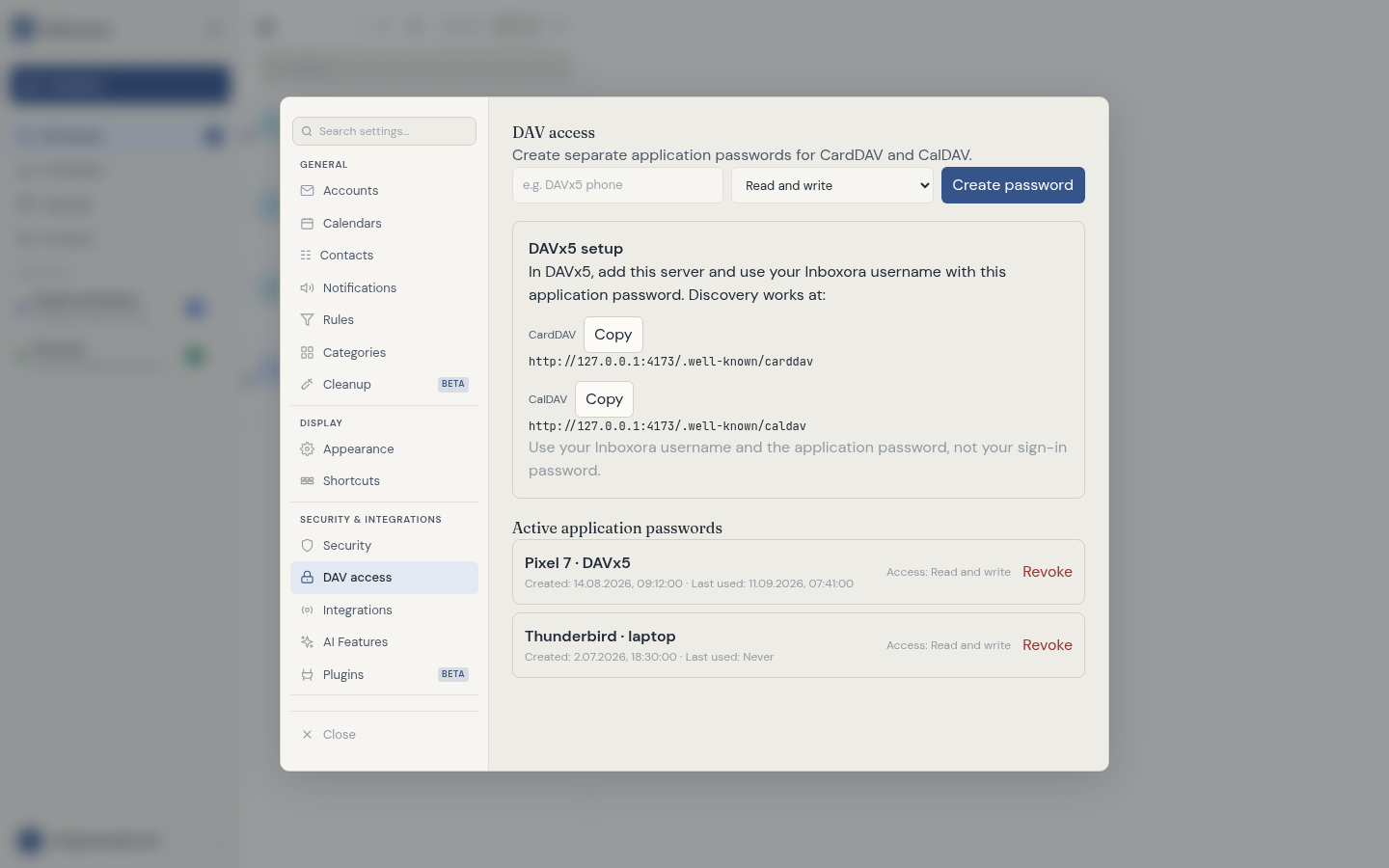
Create one under Settings → DAV access:
- Give the credential a name you will recognise later (for example Pixel 7 · DAVx5).
- Choose its Access ceiling: Read and write for a device that should be able to change data, or Read only for a viewer (a tablet showing the calendar, a dashboard).
- Choose Create password.
- Copy the password immediately — it is displayed exactly once and only its hash is stored.
- Use it with your normal Inboxora username in the DAV client.
The list shows when each password was created, when it was last used, and its access ceiling. Revoke disables one device without affecting the others, your login, or any other application password.
The per-password ceiling is intersected with each collection's own DAV access: a Read only password cannot write even to a calendar set to Read and write, and a credential never widens a collection. Giving a device less access than your own is the point — a shared tablet should not be able to delete your events.
- Install DAVx5 and choose Add account → Login with URL and user name.
-
Base URL — your Inboxora URL, for example
https://mail.example.com. - User name — your Inboxora username.
- Password — the application password you just created.
- DAVx5 discovers both CardDAV and CalDAV automatically; select the address books and calendars you want on the device.
Use the same values, or the explicit endpoints:
https://your-domain/.well-known/carddav
https://your-domain/.well-known/caldav
Inboxora can also act as a client: connect a remote CardDAV server (for example Nextcloud) under Settings → General → Accounts. The remote credentials are verified before saving and encrypted at rest, address books are discovered automatically, and they appear locally as read-only books.
Duplicate handling is configurable — keep separate entries, merge them, or skip imported duplicates. Disconnecting removes the locally synced read-only books and contacts; the remote data is untouched.
Public remote servers must use HTTPS. Cleartext HTTP is accepted only for private or local hosts, and only when the administrator allows private connections.
Once a Google account is connected, Inboxora can read that account's personal Google contacts (the People API connections — not the organization directory and not “Other contacts”). They are projected into one local address book per connection, named Google Contacts.
- A contact is identified by its Google resource name, never by its e-mail address, so renaming a contact, sharing one address between people, or having a contact with no address never merges or duplicates a record.
- A contact removed in Google is removed here too; the link is kept as a tombstone so it is not re-created by a later sync.
- The book starts with DAV access: Disabled and with write-back off, so it is not published to your devices and edits are refused rather than silently reverted by the next sync. Enabling write-back for the book sends changes to Google first (see Writing changes back).
- Synchronisation is incremental: the first pass reads everything and stores a cursor, later passes only read what changed. If Google rejects the stored cursor, the next pass rebuilds the book from a fresh baseline instead of failing.
The in-app control for this sync is the Sync Google contacts action in the Contacts page's
address-book menu, which appears once a Google account is connected. An automatic refresh follows
the same rule as calendars: a book you have already pulled is refreshed on a schedule (every 15
minutes by default, configurable or disableable by an administrator with
PROVIDER_SYNC_INTERVAL_MINUTES), while connecting an account never starts an import by itself.
Once a Microsoft account is connected through the Graph authorization flow, Inboxora reads every Outlook contact folder, and each one lands in its own local address book:
- The mailbox's default contact folder becomes the book named after it (usually Contacts). Inboxora reads it first, and if it cannot, the run reports the failure: the mailbox's own contacts are not something to fail silently about.
- Every other top-level folder, and the folders nested one level inside them — which is how Outlook nests contact folders — become books of their own, named from the folder's display name. Each has its own synchronisation position and its own Enabled and write-back switches, so a folder can be pulled, disabled or published to devices independently.
- A failure in one of those additional folders is reported in the run's result and the remaining folders still synchronise; one unreadable folder does not hide the others.
The folders are looked up in your mailbox before anything is read. There is no folder name
Inboxora could assume: Microsoft's contact-folder resource has no well-known-name property, so the
old request for a folder called contacts was asking for something that does not exist. If the
folder list cannot be read at all, the run reports an upstream failure instead of guessing.
- A contact is identified by its Outlook contact id, never by its e-mail address, so two contacts sharing an address, or a contact with none, never merge or duplicate.
- Synchronisation uses Outlook's delta feed: the first pass reads everything and stores a delta link, and later passes read only what changed. A contact deleted in Outlook is removed here too, and the link is kept as a tombstone so it is not re-created.
- If Outlook rejects the stored delta link (it expires when the mailbox goes untouched for long enough), that book is rebuilt from a baseline and reconciled: contacts the baseline no longer lists are removed locally, which a plain re-read would miss.
- Like the Google book, it arrives with DAV access: Disabled and with write-back off; enabling write-back for it sends changes to Outlook first.
The connector is reachable from the interface: Settings → Integrations → Email providers on the
Microsoft card offers Connect Microsoft contacts, which authorizes Microsoft Graph for contacts
only and never changes or migrates your mailbox. Once connected, the Contacts page's address-book
menu shows Sync Microsoft contacts next to Sync Google contacts, and each run reports what
it changed for that account. Once pulled, these books are refreshed on the same schedule as the
Google ones (every 15 minutes by default, PROVIDER_SYNC_INTERVAL_MINUTES; 0 disables it), and the
two providers are refreshed independently — an account configured for one is never affected by the
other.
Manage source credentials and service switches in General → Accounts, and books/import/export in General → Contacts. Complete validated discovery can retire a missing remote book’s local projection while preserving contacts still belonging to another book. Partial pages, failures or revoked access never count as proof of deletion. A newer complete listing can restore a book retired by discovery, but not a confirmed user deletion.
Eligible secondary Microsoft and writable DAV books expose a separately confirmed remote Delete action. Primary/shared/unverified resources stay protected. Google People does not have a deletable book container: Inboxora does not replace that operation with deleting all contacts. Existing per-contact editing remains available with write-back permission.