Repository navigation
Migrating from MailFlow
Inboxora began as a fork of MailFlow. This page explains how to move an existing MailFlow deployment to Inboxora without losing data: your mail, folders, accounts, rules, contacts and preferences are preserved.
Only MailFlow 3.3.0 is supported as a migration source. That is the single version this upgrade path is built and verified against. Newer MailFlow versions have not been tested — see Why only 3.3.0.
| Data | Preserved |
|---|---|
| Messages, folders, unread counts, stars, drafts, snooze records | |
| Accounts | IMAP/SMTP servers, credentials (with the same ENCRYPTION_KEY), aliases, signatures |
| Rules and block list | Per-user rules and blocked senders |
| Contacts | Address books and contacts, including rich vCard fields |
| Preferences | Theme, fonts, layout, panel widths, language, notification and shortcut settings |
| Sessions | Not preserved; everyone signs in again (sessions live in Redis) |
What is new and therefore starts empty: calendars, calendar sources, DAV application passwords, and the conversation view of existing mail. See After the upgrade.
The upgrade is a schema change, and MailFlow and Inboxora share one migration history:
- MailFlow 3.3.0 ships 50 migrations, numbered
0001–0050. - Inboxora ships 85: those same 50, plus 35 of its own.
-
All 50 shared migration files are byte-for-byte identical between the two projects, so
nothing that was already applied is rewritten. The 35 additional migrations only add — new
tables and new nullable columns — and never touch your mail, accounts, folders or contacts. (The
few
DELETE/TRUNCATEstatements among them target conversation-engine tables that do not exist in a MailFlow database and are therefore empty.)
That guarantee holds for 3.3.0 and only for 3.3.0. A newer MailFlow release adds its own
migrations, and migration numbers are reused for different changes: MailFlow's 0051 is a
folder-status change, while Inboxora's 0051 is the conversation engine. A database from a newer
MailFlow therefore has a migration history that means something different on each side, and no one
has checked the result. Upgrading from a newer version is unsupported — migrate from 3.3.0, or
install Inboxora fresh and import your mail.
(Inboxora itself also reuses a number across different files, for example three separate 0072_*
migrations. That is safe because the migration runner tracks the full file name, not the number —
but it is one more reason the two histories cannot be mixed by number.)
-
Back up the database and
.env. This is not optional:# adjust the DB user/name if you changed them in .env docker compose exec -T postgres pg_dump -U mailflow mailflow > mailflow-$(date +%F).sql cp .env .env.mailflow-backup
-
Write down your current
ENCRYPTION_KEY. It is not stored in the database. If you do not carry it across, every stored mail password, OAuth token and DAV credential becomes unreadable and users must re-enter them. -
Note your project directory and database names, because both decide whether Inboxora finds your data. You will need them in the next section.
This keeps your existing volumes, so the data never moves. The safest form is to change as
little as possible: keep your current directory and your current docker-compose.yml, and change
only the image references.
-    image: ghcr.io/maathimself/mailflow-frontend:${MAILFLOW_VERSION:-latest}
+    image: ghcr.io/dragonk/inboxora-frontend:${INBOXORA_VERSION:-latest}

-    image: ghcr.io/maathimself/mailflow-backend:${MAILFLOW_VERSION:-latest}
+    image: ghcr.io/dragonk/inboxora-backend:${INBOXORA_VERSION:-latest}
Everything else in that file already works with Inboxora, because the compose service names are
identical (frontend, backend, postgres, redis, caddy) and the volume names are
identical (postgres_data, redis_data, caddy_data, caddy_config).
In .env, two things need attention:
# 1. The image version variable was renamed. MAILFLOW_VERSION is no longer read.
INBOXORA_VERSION=4.0.1

# 2. Keep your ORIGINAL database name and user. Do not copy Inboxora's defaults here.
DB_NAME=mailflow
DB_USER=mailflow
Then start the stack and watch the migrations run:
docker compose pull
docker compose up -d
docker compose logs -f backend
Indexes and tables are created on the first start; the log ends with the service listening. Give it a moment on a large mailbox — the new indexes are built over the existing message table.
If you changed your database name or user in
.envbefore, keep those values. The rule is: use the sameDB_NAMEandDB_USERyou have today.
If you would rather start from Inboxora's docker-compose.ghcr.yml, you must tell Compose to
reuse the old volumes and database. Skipping this step is the single most common way to end up
with what looks like an empty instance.
# In .env:
COMPOSE_PROJECT_NAME=mailflow   # the project whose volumes hold your data
DB_NAME=mailflow
DB_USER=mailflow
INBOXORA_VERSION=4.0.0
Then bring the stack up from the directory that holds your existing volumes, or explicitly attach the old volumes as external ones. Two defaults in that file will bite you otherwise:
| Default in Inboxora's compose | Why it is a problem after MailFlow |
|---|---|
DB_NAME: ${DB_NAME:-inboxora}, DB_USER: ${DB_USER:-inboxora}
|
Your existing volume holds a database called mailflow. PostgreSQL only uses POSTGRES_DB when it initialises an empty data directory, so it will not create inboxora on your existing volume — the backend then fails to connect with database "inboxora" does not exist. |
container_name: inboxora-* and network inboxora
|
Cosmetic for your data, but the Compose project name is not: it prefixes the volume names. Run the new file from a new directory and Compose creates brand-new empty volumes. |
docker compose config --volumes and docker volume ls show which volumes a stack will use
before you start it.
If the existing host is being rebuilt, or you want a clean slate, move the data explicitly. This avoids every naming trap above.
# On the MailFlow host
docker compose exec -T postgres pg_dump -U mailflow mailflow > mailflow.sql

# Copy mailflow.sql and .env to the new host, then on the Inboxora host:
docker compose up -d postgres
docker compose exec -T postgres psql -U inboxora -d inboxora < mailflow.sql
docker compose up -d
Keep DB_NAME/DB_USER as Inboxora's defaults (inboxora) in this route — the dump creates its
own tables. Carry ENCRYPTION_KEY across exactly as before.
- Sign in. Sessions are not migrated, so everyone logs in again.
- Check the basics. Folder list, unread counts and a few messages should look exactly as before. If the instance looks empty, the database or volume was not reused — stop and revisit the section above rather than re-importing.
- Group the existing mail into conversations. The conversation engine is new to a MailFlow database, so historical messages have no conversation yet. New mail is grouped automatically as it syncs; for the backlog, use the rebuild button — see Grouping existing mail.
- Turn threading on if you want it. The threaded list and the conversation reader are both off by default, so nothing about your reading experience changes until you enable them under Settings → Appearance.
- Create DAV application passwords for each phone and desktop client under Settings → DAV access. They did not exist in MailFlow; see Contacts and DAV.
- Add your calendars. Local calendars start empty and CalDAV/ICS sources must be added under the calendar panel — see Calendar and External calendars.
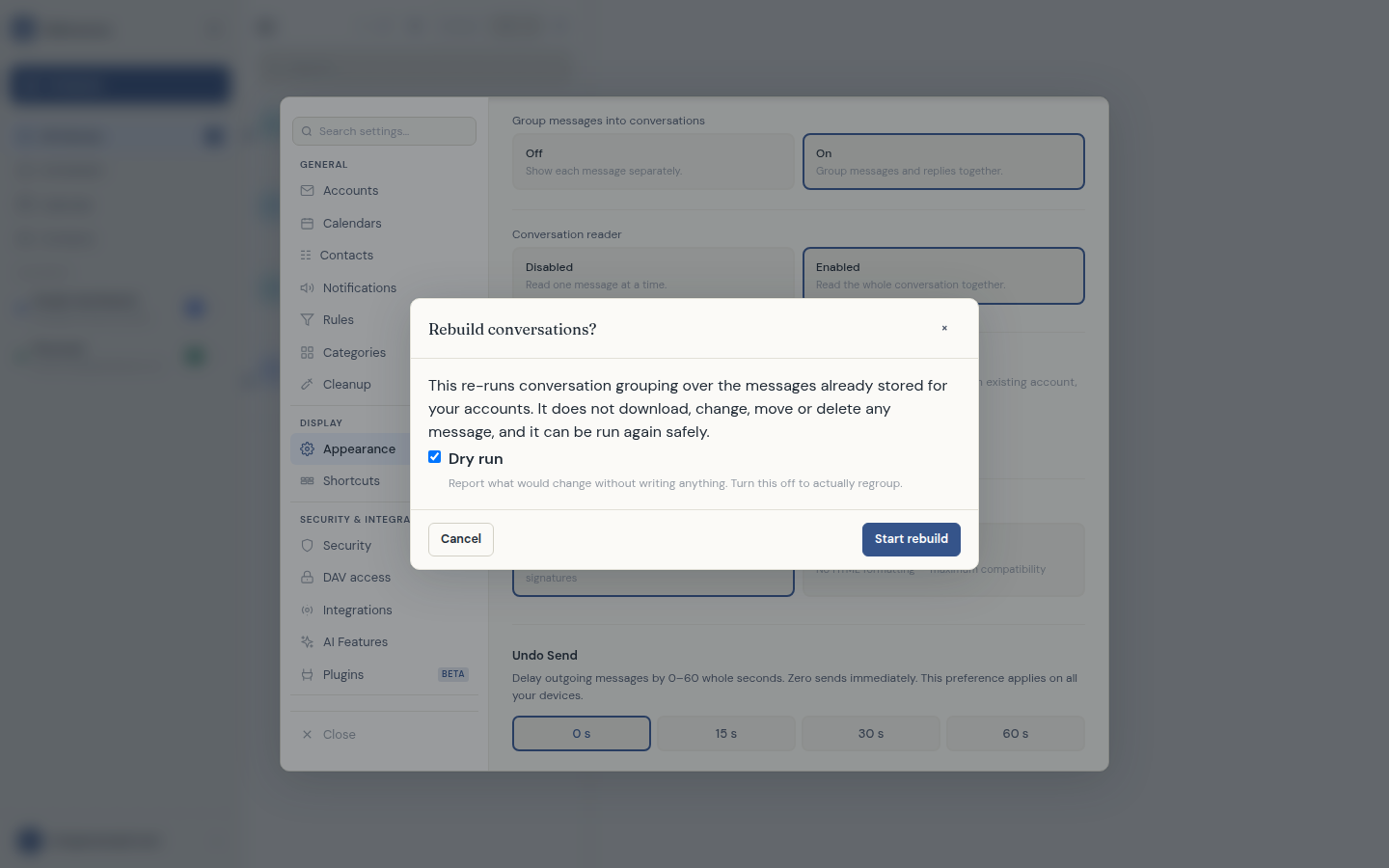
Historical messages arrive from MailFlow without a conversation, because the conversation engine did not exist when they were stored. New mail is grouped automatically as it syncs; the backlog is grouped by a rebuild, which re-runs threading over the messages already in the database. It never downloads, changes, moves or deletes a message, and it is safe to run again.
- Open Settings → Appearance → Layout.
- Find Rebuild conversations, under the two threading switches.
- Choose Rebuild conversations to open the confirmation, then Start rebuild.
The dialog starts with Dry run ticked, so the first run is a report: it tells you how many messages were checked and how many would change, and writes nothing. Clear the tick and start it again to regroup for real:
| Dry run | What happens |
|---|---|
| Ticked (default) | Checked 12,480 messages — 3,102 would change. Nothing was written. |
| Cleared | Checked 12,480 messages — 3,102 regrouped. |
The action is per user: it only ever touches the accounts of the person running it, so on a multi-user instance each person rebuilds their own mail. A rebuild is limited to two starts a minute; if you hit that, the dialog says so and you can retry after a minute.
The rebuild also appears in settings search — searching for migration, MailFlow, rebuild or regroup finds it.
For scripted migration, or to rebuild one account at a time, call the endpoint directly. It runs
as the signed-in user, so it needs that user's session cookie (connect.sid); read it from the
browser under Application → Cookies.
COOKIE='connect.sid=s%3A...'   # for the user whose mail you are rebuilding

# 1. Dry run first: reports what would change and writes nothing.
curl -X POST https://your-domain/api/mail/conversations/rebuild \
  -H 'Content-Type: application/json' -H "Cookie: $COOKIE" \
  -d '{"dryRun": true}'

# 2. Apply it.
curl -X POST https://your-domain/api/mail/conversations/rebuild \
  -H 'Content-Type: application/json' -H "Cookie: $COOKIE" \
  -d '{"dryRun": false}'
The response is 202 with a jobId; poll progress with
GET /api/mail/conversations/rebuild/<jobId>. Body options:
| Option | Effect |
|---|---|
dryRun |
true by default — an accidental call without a body changes nothing. |
accountId |
Rebuild a single account instead of every account the user owns. |
limit |
Cap how many messages are processed in the job. |
force |
Re-evaluate messages that already have a conversation. |
Grouping is a convenience, not a prerequisite: mail syncs and reads normally without it, and new
mail is grouped automatically as it arrives. Repeat the call per user (or let each person use the
button) — the endpoint only ever touches the caller's accounts. Every run is recorded in
conversation_rebuild_audit.
Bring the MailFlow images back and restart. Because the upgrade only adds, the older code can still read the database it knows:
docker compose down
# restore the MailFlow image references in docker-compose.yml
docker compose up -d
If you would rather return to the exact previous state, restore the dump from Before you start.
-
Retained legacy names. Inboxora deliberately keeps several MailFlow identifiers so
in-place upgrades keep working:
mailflow_browser-storage keys (your preferences),mailflow-CSS classes and drag types (email rendering), theMAILFLOW_CI secret names, and the outboundX-MailFlow-Image-Opt-Inheader.docker-compose.yml(the build-from-source variant) also still usesmailflow-*container names andmailflowdatabase defaults. The full list and the reasoning are indocs/technical-identifier-audit.md. -
Environment variables. No MailFlow 3.3.0 variable was removed; Inboxora only adds optional
ones. The single rename is the image version pin,
MAILFLOW_VERSION→INBOXORA_VERSION. - Nothing to run by hand. Schema migrations run automatically on backend start under an advisory lock, are forward-only, skip what is already applied, and are safe to re-run. A restart on an up-to-date database applies nothing.
- Checksums. Inboxora records a checksum per applied migration and refuses to start if a migration file changes after it was applied. Your existing 50 MailFlow migrations are unaffected because they are identical in both projects.
The 3.3.0 upgrade path was exercised end to end rather than assumed:
- A PostgreSQL 16 database was built by applying all 50 MailFlow 3.3.0 migrations in order.
- It was populated with a user, an IMAP account, folders, a three-message thread and a contact.
-
Inboxora's real migration runner was pointed at that database: it applied
0051–0082(50 → 85 tracked migrations) with no error, kept every row intact, and backfilled checksums for the previously applied migrations. - Running the runner again applied nothing (85 → 85), confirming the restart path is a no-op.
The same procedure against a newer MailFlow revision is what exposed the reused 0051 number
described in Why only 3.3.0. That is also why the project restricts the
supported source to 3.3.0.
- Upgrading — the ordinary upgrade path between Inboxora releases.
- Installation — deployment requirements and environment reference.
- Troubleshooting — when something does not come across.