EQBuddy v1.68.0

The big one: nine features, one update
Everything built since 1.60 lands together. EQBuddy is a beta — this page is long because players kept talking to us. Please keep doing that. Every feature below gets better with your reports: open a Discussion or use ⚙ → Help → Send feedback right from the widget.
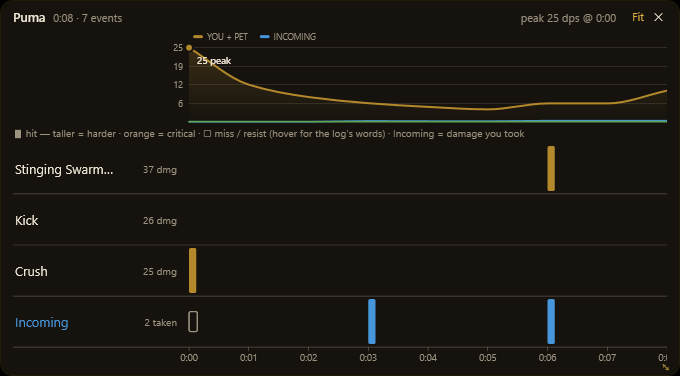
New
- ⧗ Fight timeline — the whole pull on one canvas: a lane per skill, hollow marks for misses/resists with the log's own words on hover ("a gnoll pup ripostes"), pet and incoming lanes, DPS-over-time with the peak flagged. Scroll zooms, drag pans, live fights keep drawing. Click ⧗ on the Combat card.
- 🐌 Slow alert with the cure attached (discussion #94, thanks @Frankthetankk) — an attack-speed debuff lands on you and a chip shows the honest % and counters, a voice announces it once, and the tooltip lists the strongest cures per cast. 34 slows built in; raid-only mode available.
- ⏳ Buff timers that learn — countdowns start from casts landing on you, labeled
estuntil a natural fade teaches your character's real duration (ranks and AAs lengthen buffs; your Spell Casting Reinforcement rank is read from your AA ledger). Optional quiet mode: only show buffs about to fade. - 🐉 Raid targets — every raid target from the game's own achievements list, with kills your log witnessed (dates included) and old clears via the achievements import. No difficulty-tier badges yet — neither the log nor the dump names the tier. If you know a log line that reveals it, tell us.
- Level & AA progress charts — per character in Session History: every ding at its exact time.
- Rules from recent log lines — Options → Watch rules → "+ From a recent log line…": click a line that just happened, it becomes a rule.
Improved
- Per-skill miss rates inline and hit ranges on hover; both DPS models labeled (in-combat · wall-clock) — pick the one that matches your question.
- Watch card sorting (manual / a–z / total / recent) with ▲▼ arrangement (#105, thanks @wizen).
- Minimize/restore hotkey (#100, thanks @jlcrisp).
- Options reorganized into tabs; the ⚙ menu got shelves; every card you leave visible now always shows (empty ones say what will fill them); the hotkey recorder explains itself; spoken alerts no longer arrive late on their first outing.
For macOS players
v1.60.0's CrossOver fixes (thanks @quasarj) are included: widgets stay above the fullscreen game, and the Options window resizes.
Verify your download: Get-FileHash -Algorithm SHA256 EQBuddySetup.exe and compare with the published .sha256. EQBuddy reads only your log — never game memory, never other players.
Contributors


quasarj, wizen, and 2 other contributors