Notifications
Between its two gates, the plan approval and the milestone check, PA3 works without stopping to ask. It needs you only at a handful of moments, and at each one it tries to reach you where you are: a toast on your Windows desktop, a flag on the statusline, and a push on your phone if you set that up.
- A plan to approve. The planner has drafted the next phase; the router shows you its summary in the question picker and waits for your answer: approve, show the full plan first, or changes.
- Review decisions. A task marked for review has results. The review agent turns them into numbered decisions, each with a recommended answer, and the router asks them in the picker. The task closes on your word.
- A question. The critic could not settle a change to the plan on its own, so the router brings you its brief with a recommended answer.
- A permission prompt. A command falls outside the allow rules, and Claude Code asks whether to run it.
- The close question. When the last task is done, the router asks once whether there is anything else before it closes the phase.
Two more reach you the same way: a turn that stopped on an error, and a /discuss partner that has finished.
PA3's hooks raise a Windows toast at each of those moments.
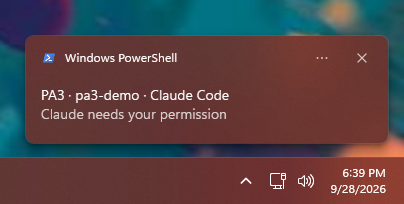
A permission prompt. A question in the picker raises the same toast: Claude Code reports both as "Claude needs your permission".
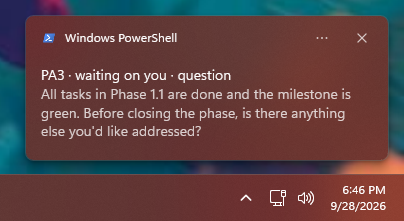
A question the router ends its turn with carries its text, here the close question.
The toasts come from Windows PowerShell, which PA3 uses to raise them, so Windows lists them under that name. No window opens and the focus stays where it was. Under WSL they appear on the Windows desktop as well. On Linux and macOS PA3 raises none of its own; the statusline and the phone push still reach you there, and Claude Code has terminal notifications of its own.
The statusline shows the same wait on its alert line: a yellow ⚑ waiting on you: question, or REVIEW.md for a
review.
If no toast appears, open Windows Settings > System > Notifications and check that notifications are on, Do not disturb is off, and Windows PowerShell is allowed.
Each repository sets its level in .claude/pa.json. The hooks read it at every event, so a change needs no restart.
-
"toast": "waiting", the default: only the moments above, a turn that stopped on an error, and a finished/discuss. -
"toast": "all": also at the end of other turns (at most one every 20 seconds) and for PA3's notices, such as a model fallback. -
"toast": "off": none.
To turn PA3's toasts off on a machine for every repository, set "notify": {"toast": false} in
~/.claude/usage-ledger/config.json.
Phone pushes come from Claude Code, not from PA3. Remote Control connects your terminal session to the Claude app, and
Claude Code pushes to the phone when the session needs you. It skips the push while you are typing in or looking at the
terminal, so pushes arrive once you have stepped away. Two switches in /config decide what pushes:
- Push when actions required: permission prompts and questions, which covers the picker (plan approvals, review decisions, the critic's question).
- Push when Claude decides: Claude chooses to push on its own, for example when a long task finishes. PA3's agents do not use it; your other Claude Code sessions can.
A question the router types at the end of a turn, such as the close question, always raises the desktop toast; whether it also reaches the phone is up to Claude Code.
You need a Pro, Max, Team or Enterprise plan, signed in to Claude Code with your claude.ai account; an API key cannot use Remote Control. On Team and Enterprise, an Owner first turns Remote Control on in the Claude Code admin settings.
The machine install has already turned on the three settings involved, unless you had set them yourself, in
~/.claude/settings.json: remoteControlAtStartup (Remote Control in every session), inputNeededNotifEnabled (Push
when actions required) and agentPushNotifEnabled (Push when Claude decides). The rest happens on the phone:
- Install the Claude app for iOS or Android.
- Sign in with the account and organization you use for Claude Code.
- Allow notifications when the phone asks.
- In Claude Code, run
/configand check that Enable Remote Control for all sessions, Push when actions required and Push when Claude decides are on. - Start
claudein your repository. While Remote Control is connected the terminal shows/rc active, and the session appears in the Claude app, where you can follow it and reply.
If pushes do not arrive:
-
/configshows No mobile registered: open the Claude app so it refreshes its push token. The warning clears the next time Remote Control connects. - On iOS, Focus modes and notification summaries can hold pushes back (Settings > Notifications > Claude).
- On Android, exempt the Claude app from battery optimization.
Claude Code's Remote Control documentation has the details.