CROM Exporter
In the package io.framed.exporter you'll find a CromExporter that exports a FRaMED.io project to CROM.
Here, crossecore is used as the Ecore TypeScript/JavaScript library. Also, CROM code has been generated with the crossecore-generator and has been transpiled to JavaScript, bundled and released here as CROM.js.
The CROM exporter implements a model transformation, that maps the model of FRaMED.io to the CROM metamodel via a transformation table.
Currently, the implementation of an XMI export is still missing. CROM serialization to XMI is still under development and the CROM model is only printed to the developer console.
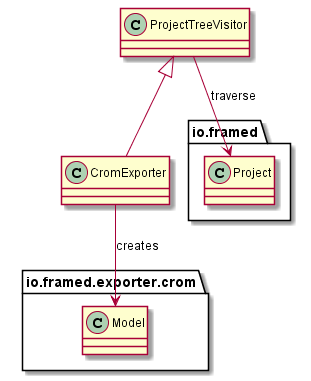
The CromExporter works in a way, that the FRaMED.io project tree is traversed, while equivalent CROM ModelElements are created. The traversal itself has been abstracted through the abstract ProjectTreeVisitor, that only handles the traversal elements. This ProjectTreeVisitor has been implemented by a CromExporter class, that only manages the model transformation. So, traversal and model transformation are implemented independently and can be replaced.
Class diagram of the exporter:
Some ModelElements either have a Type or use ModelElements that have Types, so those Types have to be initialized beforehand. The CromExporter ensures exactly that by splitting traversal in three phases. Below, there is a table that shows the mapping of the ModelElements to the traversal phases.
| Phase | Traversed Elements |
|---|---|
| 1: Types | - Compartment - Class - Connections - Event - Package - ReturnEvent - RoleType - Scene |
| 2: TypedElements | - Attribute - Method - Parameter |
| 3: Connections | - Aggregation - Composition - CreateRelationship - DestroyRelationship - Fulfillment - Inheritance - Relationship |
Therefore, the three of the ModelElements will be traversed two times and afterwards all Relations are traversed.
Each FRaMED.io ModelElement is transformed into a CROM ModelElement. The following table compares both models and show the differences.
| FRaMED.io | CROM | Comment |
|---|---|---|
| Compartment | CompartmentType | |
| Scene | CompartmentType | |
| Attribute | Attribute | |
| Method | Operation | |
| Parameter | Parameter | |
| Class | NaturalType | |
| RoleType | RoleType | |
| Event | - | |
| ReturnEvent | - | |
| Package | Group | |
| Inheritance | Inheritance | In CROM, there are several types of Inheritance: DataInheritance, NaturalInheritance, RoleInheritance and CompartmentInheritance |
| Relationship | Relationship | In CROM, only within CompartmentTypes allowed. In FRaMED.io, this is not enforced, so incompatibilities may occur. |
| Aggregation | Relationship | In Addition, a ParthoodConstraint is added to the Relationship with kind = Parthood.SharablePart. In CROM, only within CompartmentTypes allowed. In FRaMED.io, this is not enforced, so incompatibilities may occur. |
| Composition | Relationship | In Addition, a ParthoodConstraint is added to the Relationship with kind = Parthood.ExclusivePart. In CROM, only within CompartmentTypes allowed. In FRaMED.io, this is not enforced, so incompatibilities may occur. |
| CreateRelationship | - | |
| DestroyRelationship | - | |
| Fulfillment | Fulfillment | In CROM: only between RoleTypes and RigidTypes (DataType, CompartmentType, NaturalType). In FRaMED.io, this is not enforced, so incompatibilities may occur. |
In each traversal phase and for each traversed element, the equivalent CROM elements are created according to the transformation table, that is displayed above.
The CROM modelelements are created programatically during traversation. For that, crossecore is used as the Ecore TypeScript/JavaScript library. The CROM code has been generated with the crossecore-generator and has been transpiled to JavaScript, bundled and released as CROM.js.
The syntax itself is defined by CrossEcore and is strongly influenced by EMF. An example can be found here:
val factory = Crom_l1_composedFactoryImpl.Crom_l1_composedFactoryImpl()

val datatype = factory.createDataType()
dataType.name = "String"

val cromAttribute = factory.createAttribute()

cromAttribute.name = "Foo"
cromAttribute.type = datatype

val cromParent = factory.createRoleType()
cromParent.name = "Parent"

cromAttribute.owner = cromParent
cromParent.attributes.add(cromAttribute)
CROM.js has been added to the index.html of FRaMED.io to make the code available. In addition, so-called "external classes" have been generated out of the TypeScript definitions of CROM.js through the tool Dukat. This is needed, to access the JavaScript code from Kotlin in a typesafe way.
!! Dukat is still somehow in beta state and therefore contains some bugs. The Dukat-generated definitions may be wrong in parts of the code that hasn't been executed yet. If you plan to extend the functionality, please be aware that those definitions may produce errors and then have to be debugged manually (e.g. via the browser JS developer console).
Another problem here is, that the Kotlin code needs to mirror the JavaScript structures instead of the TypeScript structures, a fact, that can lead to strange things. E.g. prototype objects, as they are in JS, have to be faked in Kotlin (as you can see in the
InternalFactoryImplclass). Also, to call some constructors from JS, they instantiated objects have to be inner classes of the class they are called from (so, theXmiResourceclass is an inner class ofCromJs). If you have better solutions for those problems: Feel free to contribute! :)
When a new version of CROM.js is needed (either because CrossEcore is updated, new features are wanted or because of bugfixing of the bundling with webpack) please follow these steps to update CROM.js:
- Re-bundle CROM.js with this tutorial here
- Copy the
crom.jsfile in thedistfolder (that has been generated in Step 1) to the CROM.js repository folder intosrc/main/resources/external/public - If needed: Regenerate the Kotlin declarations from the CROM.js type definitions (can be found in the
dist/out-tscdirectory of the CROM.js repository) or manipulate them by hand. ATTENTION: Only replace those, that have actually changed because Dukat will generate errors, that have been fixed by hand beforehand. - Use the code 😄