Repository navigation
Orbit v1.5.0 — your own watch face

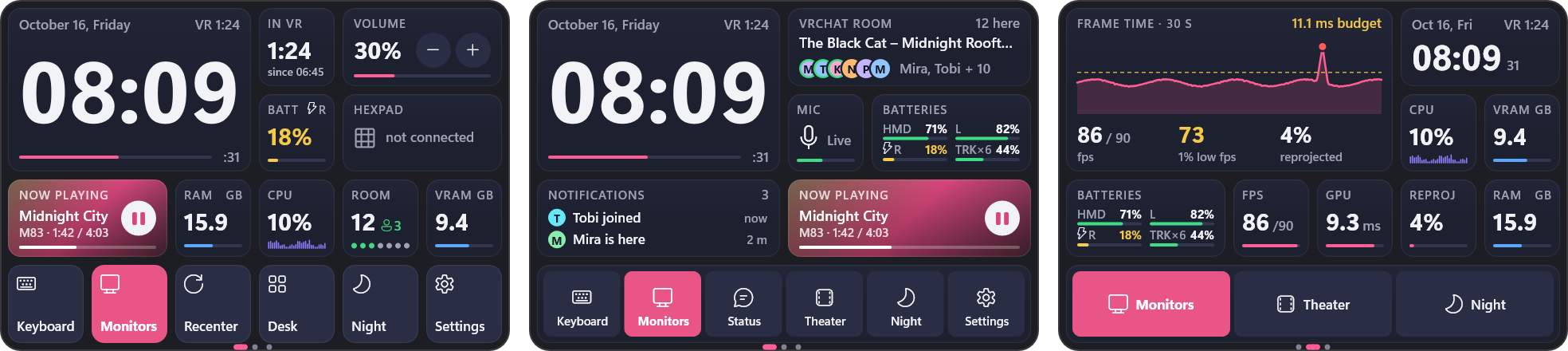
New: a custom watch face of widgets. Settings > Wrist > Watch face: Custom, then Edit layout.
- Put widgets anywhere on a 6 x 4 grid: time, date, calendar, analog clock, timer, stopwatch, time in VR,
batteries, now playing, volume, performance gauges, frame graph, CPU, memory, and every watch button -
most in several sizes. Drag to move, drag the corner to resize, or start over from your old face or "Corners". - Tap a widget to open it big, with more to see and to control: cover, controls and volume; every battery;
the month; timer presets; lap times; the frame graph with averages; CPU history. - Modern style: values drawn as orbits in your accent colour, widgets cascade in when you look at the watch,
open with a spring, digits roll. Windows 95 style: little 95 windows on a teal desktop. - Your current watch face is unchanged until you pick Custom.
Update from Settings > General > Check for updates, or download OrbitSetup.exe below.