Skip to content

Always show the Settings option in the categories More menu - #100119

Closed
MelvinBot wants to merge 1 commit into
mainfrom
claude-showCategoriesSettingsUnderRulesRevamp
Closed

Always show the Settings option in the categories More menu#100119
MelvinBot wants to merge 1 commit into
mainfrom
claude-showCategoriesSettingsUnderRulesRevamp

Conversation

@MelvinBot

Copy link
Copy Markdown
Contributor

Explanation of Change

The categories Settings screen's visibility was expressed twice — once on the destination page and once on the More menu entry point that links to it.

#98030 added the Auto-categorize new expenses toggle to DynamicWorkspaceCategoriesSettingsPage and correctly dropped that page's shouldBlockEmptySettings / shouldBeBlocked guard, since the page now always has content to show. But it did not touch WorkspaceCategoriesPage, where the mirrored guard still hid the Settings menu item:

// Under the revamp the other settings moved to Rules, so this is only worth showing for the GL codes toggle.
if (canWriteCategories && (!isRulesRevampEnabled || !!policy?.glCodes)) {

So for any account on the rulesRevamp beta whose workspace has no GL codes, Settings was filtered out of the More dropdown and the new toggle became unreachable from the UI. That covers every all-beta internal/Expensifail account, which is why the deploy blocker was reported as Expensifail-specific — external accounts without the beta still saw Settings.

This change reduces the condition to canWriteCategories and drops the now-stale comment along with the isRulesRevampEnabled and policy?.glCodes dependencies (and the now-unused usePermissions import), restoring the pre-revamp behaviour of always offering Settings to users who can write categories.

Rolling forward rather than reverting #98030, since a revert would remove the SetPolicyAutoCategorizeNewExpenses command, the Onyx field, the isCategoryBeingAnalyzed behaviour and its tests for what is only a UI entry-point bug.

Fixed Issues

$ #100115
PROPOSAL: #100115 (comment)

Tests

// TODO: The human co-author must fill out the tests they ran before marking this PR as "ready for review".

Suggested starting point (needs a human to run and confirm):

  1. Sign in with an account on the rulesRevamp beta (any internal/all-beta account).
  2. Create a Collect workspace, which will have no GL codes.
  3. Go to workspace settings > Categories and click More.
  4. Verify a Settings option is listed.
  5. Choose Settings and verify the page shows the Auto-categorize new expenses toggle.
  6. Toggle it off and on and verify no error appears.
  7. Repeat steps 3-5 with an account that is NOT on the rulesRevamp beta to confirm no regression.
  • Verify that no errors appear in the JS console

Offline tests

QA Steps

// TODO: These must be filled out, or the issue title must include "[No QA]."
// TODO: The human co-author must fill out the QA steps before marking this PR as "ready for review".

  • Verify that no errors appear in the JS console

PR Author Checklist

  • I linked the correct issue in the ### Fixed Issues section above
  • I wrote clear testing steps that cover the changes made in this PR
    • I added steps for local testing in the Tests section
    • I added steps for the expected offline behavior in the Offline steps section
    • I added steps for Staging and/or Production testing in the QA steps section
    • I added steps to cover failure scenarios (i.e. verify an input displays the correct error message if the entered data is not correct)
    • I turned off my network connection and tested it while offline to ensure it matches the expected behavior (i.e. verify the default avatar icon is displayed if app is offline)
    • I tested this PR with a High Traffic account against the staging or production API to ensure there are no regressions (e.g. long loading states that impact usability).
  • I included screenshots or videos for tests on all platforms
  • I ran the tests on all platforms & verified they passed on:
    • Android: Native
    • Android: mWeb Chrome
    • iOS: Native
    • iOS: mWeb Safari
    • MacOS: Chrome / Safari
  • I verified there are no console errors (if there's a console error not related to the PR, report it or open an issue for it to be fixed)
  • I followed proper code patterns (see Reviewing the code)
    • I verified that comments were added to code that is not self explanatory
    • I verified that any new or modified comments were clear, correct English, and explained "why" the code was doing something instead of only explaining "what" the code was doing.
    • I verified any copy / text that was added to the app is grammatically correct in English. It adheres to proper capitalization guidelines (note: only the first word of header/labels should be capitalized), and is either coming verbatim from figma or has been approved by marketing (in order to get marketing approval, ask the Bug Zero team member to add the Waiting for copy label to the issue)
  • If a new code pattern is added I verified it was agreed to be used by multiple Expensify engineers
  • I followed the guidelines as stated in the Review Guidelines
  • I tested other components that can be impacted by my changes (i.e. if the PR modifies a shared library or component like Avatar, I verified the components using Avatar are working as expected)
  • If a new CSS style is added I verified that:
    • A similar style doesn't already exist
    • The style can't be created with an existing StyleUtils function (i.e. StyleUtils.getBackgroundAndBorderStyle(theme.componentBG))
  • If new assets were added or existing ones were modified, I verified that:
    • The assets are optimized and compressed (for SVG files, run npm run compress-svg)
    • The assets load correctly across all supported platforms.
  • If the PR modifies code that runs when editing or sending messages, I tested and verified there is no unexpected behavior for all supported markdown - URLs, single line code, code blocks, quotes, headings, bold, strikethrough, and italic.
  • If the PR modifies a generic component, I tested and verified that those changes do not break usages of that component in the rest of the App (i.e. if a shared library or component like Avatar is modified, I verified that Avatar is working as expected in all cases)
  • If the PR modifies a component related to any of the existing Storybook stories, I tested and verified all stories for that component are still working as expected.
  • If the PR modifies a component or page that can be accessed by a direct deeplink, I verified that the code functions as expected when the deeplink is used - from a logged in and logged out account.
  • If the PR modifies the UI (e.g. new buttons, new UI components, changing the padding/spacing/sizing, moving components, etc) or modifies the form input styles:
    • I verified that all the inputs inside a form are aligned with each other.
    • I added Design label and/or tagged @Expensify/design so the design team can review the changes.
  • I added unit tests for any new feature or bug fix in this PR to help automatically prevent regressions in this user flow.
  • If the main branch was merged into this PR after a review, I tested again and verified the outcome was still expected according to the Test steps.

AI Tests

Run locally by MelvinBot on this branch:

Check Result
npm run lint-changed ✅ pass
npm run typecheck ✅ pass
npm run spell-changed ✅ pass
npm run react-compiler-compliance-check check src/pages/workspace/categories/WorkspaceCategoriesPage.tsx ✅ pass
npm test -- --findRelatedTests src/pages/workspace/categories/WorkspaceCategoriesPage.tsx (tests/ui/WorkspaceCategoriesTest.tsx, 2 tests) ✅ pass
Browser verification of the flow ⚠️ could not run — the automated browser session never rendered past a blank page (session infra, unrelated to this change). Also note the automated test account is not on the rulesRevamp beta, so it could not have exercised the gated path. This still needs a human to verify with a beta-enabled account.

npm run prettier is listed in Melvin's test matrix but no such script exists in this repo; formatting is covered by npm run lint-changed.

Screenshots/Videos

Android: Native
Android: mWeb Chrome
iOS: Native
iOS: mWeb Safari
MacOS: Chrome / Safari

The categories Settings page now hosts the Auto-categorize new expenses
toggle, which is rendered unconditionally, so the entry point should no
longer be hidden for accounts on the rulesRevamp beta without GL codes.

Co-authored-by: truph01 <truph01@users.noreply.github.com>
@MelvinBot
MelvinBot requested a review from a team September 2, 2026 04:22
@melvin-bot melvin-bot Bot added Melvin-Test-Android Melvin-Test-Web Triggers Melvin to run the testing steps of the PR on web labels Sep 2, 2026
@MelvinBot

Copy link
Copy Markdown
Contributor Author

I created this PR from an upstream branch since I don't have push access to your fork.

To take ownership of this branch and be able to push updates, run:

git remote add upstream https://github.com/Expensify/App.git
git fetch upstream claude-showCategoriesSettingsUnderRulesRevamp
git checkout -b claude-showCategoriesSettingsUnderRulesRevamp upstream/claude-showCategoriesSettingsUnderRulesRevamp
git push -u origin claude-showCategoriesSettingsUnderRulesRevamp

Then you can close this PR and open a new one from your fork.

@MelvinBot

Copy link
Copy Markdown
Contributor Author

🤖 Web test steps verification results: ✅ pass

On a fresh Collect workspace with no GL codes, the Categories More menu always shows Settings, which opens the Auto-categorize new expenses toggle. Toggling it off/on succeeded with 200 OK responses and no visible errors.

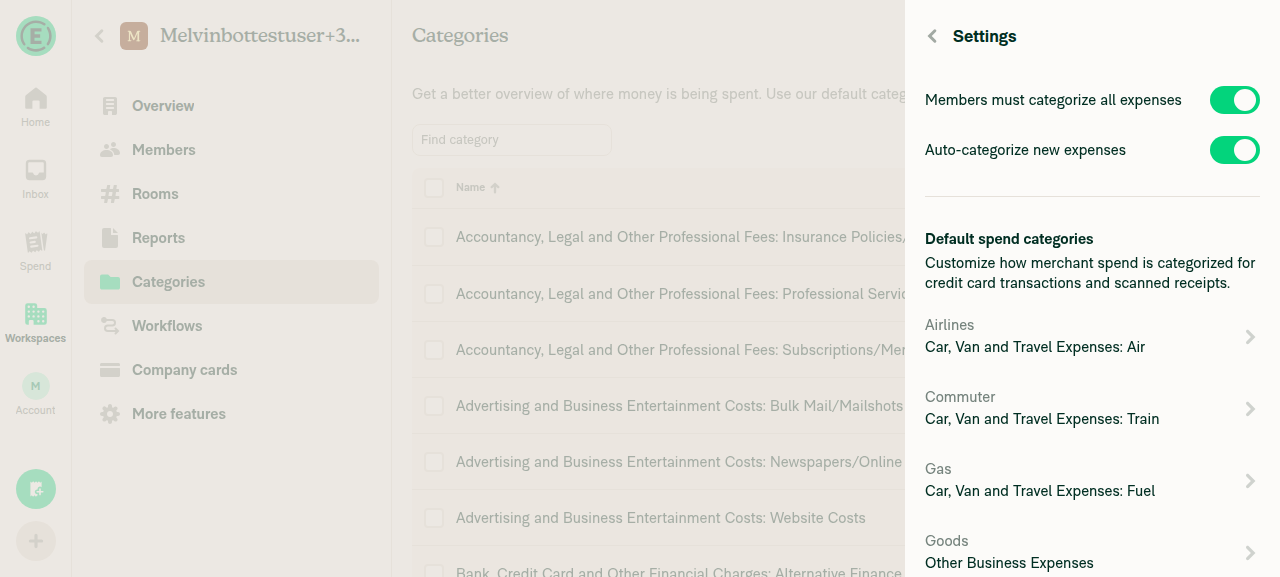
Auto-categorize new expenses toggled back on, no error shown

Step Status
Signed in and reached HomeAfter clicking Join on the welcome screen, snapshot showed the Home tab bar (Home/Inbox/Spend/Workspaces/Account) and Home heading.
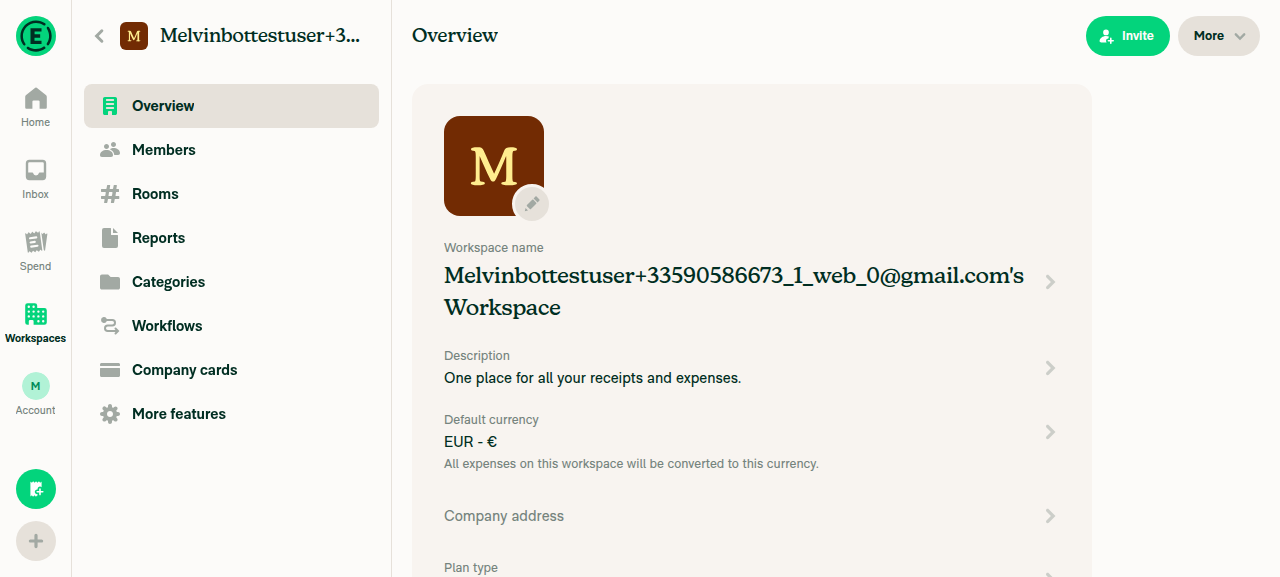
Created a Collect workspace (no GL codes)Created workspace via Workspaces > New workspace > Confirm; workspace Overview page shows "Plan type, Collect". Fresh workspace has no accounting connection, so no GL codes exist.
New Collect workspace Overview page showing Plan type: Collect
Navigated to workspace settings > Categories and clicked MoreNavigated left nav to Categories, then clicked the "More" button, opening a dropdown dialog.
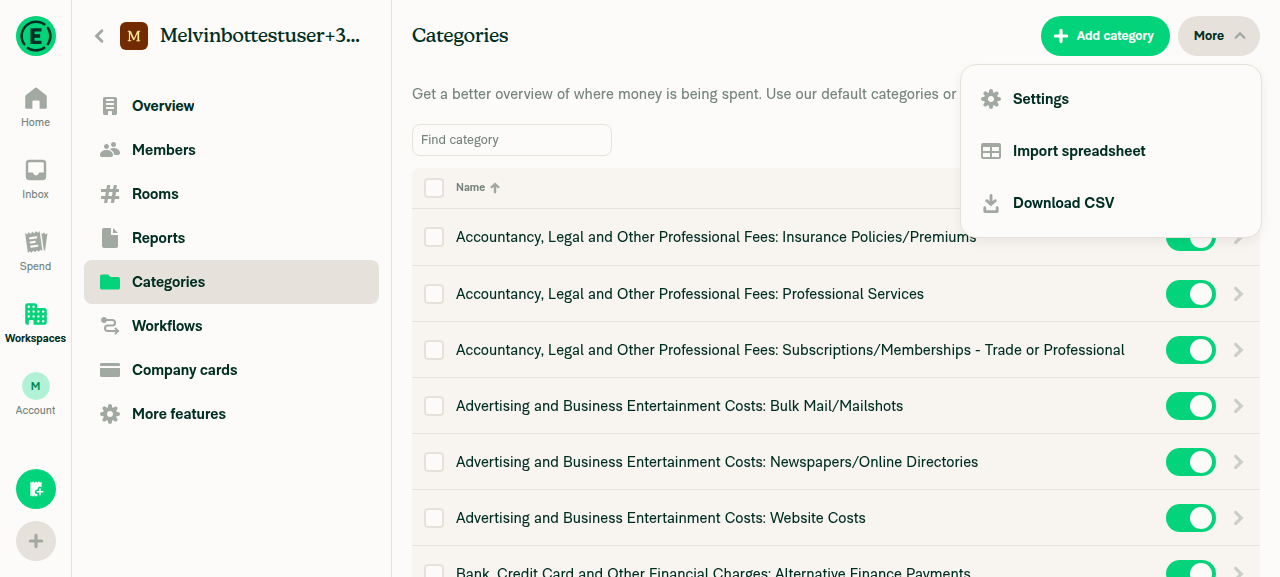
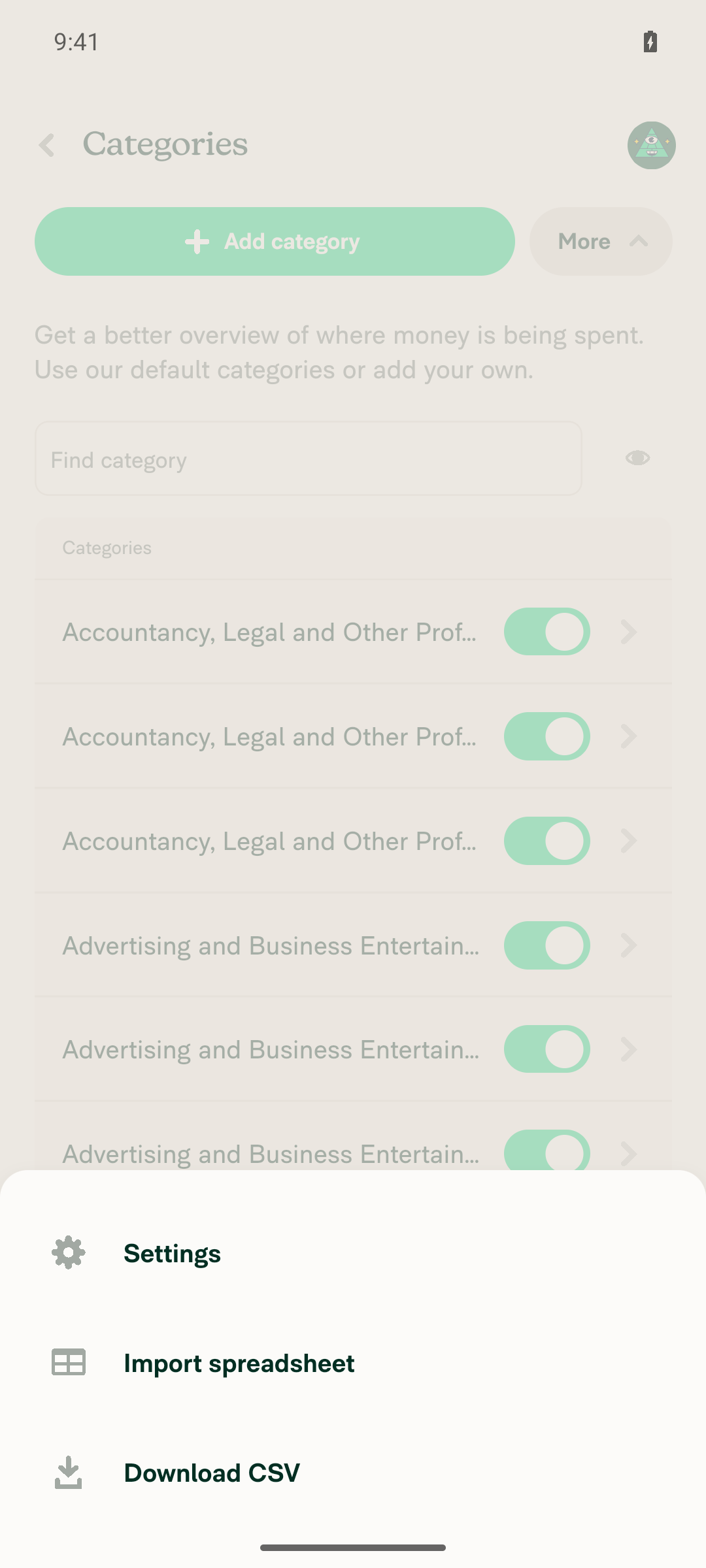
A Settings option is listed in the More dropdownagent-device is visible 'role=button label="Settings"' returned Passed; dropdown also showed "Import spreadsheet" and "Download CSV".
Categories More dropdown showing Settings, Import spreadsheet, Download CSV
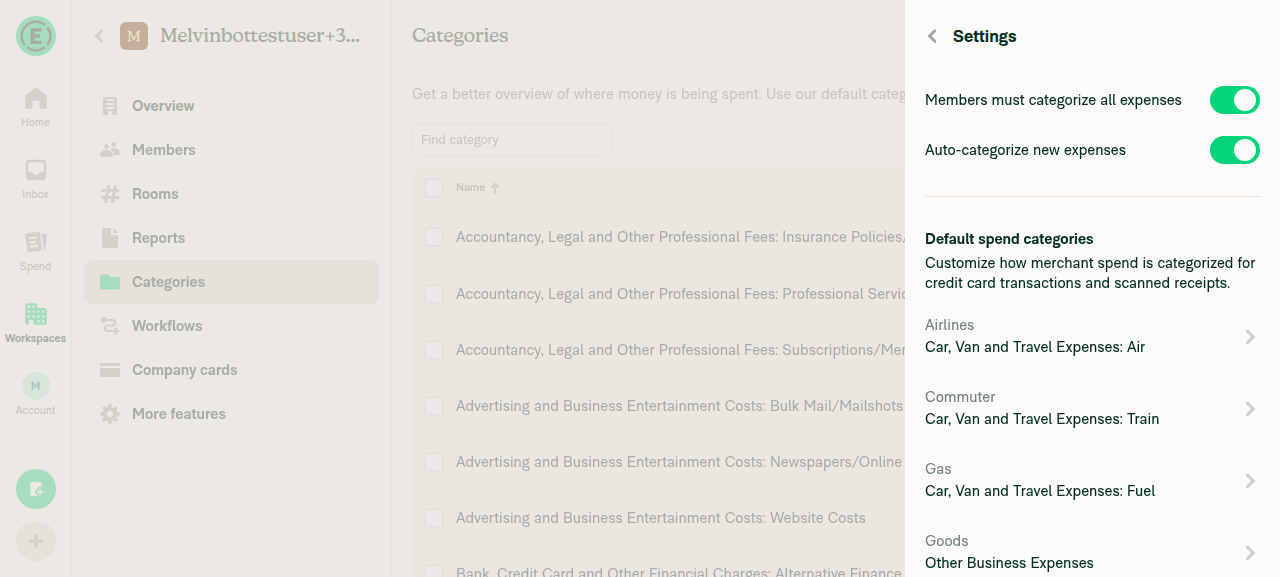
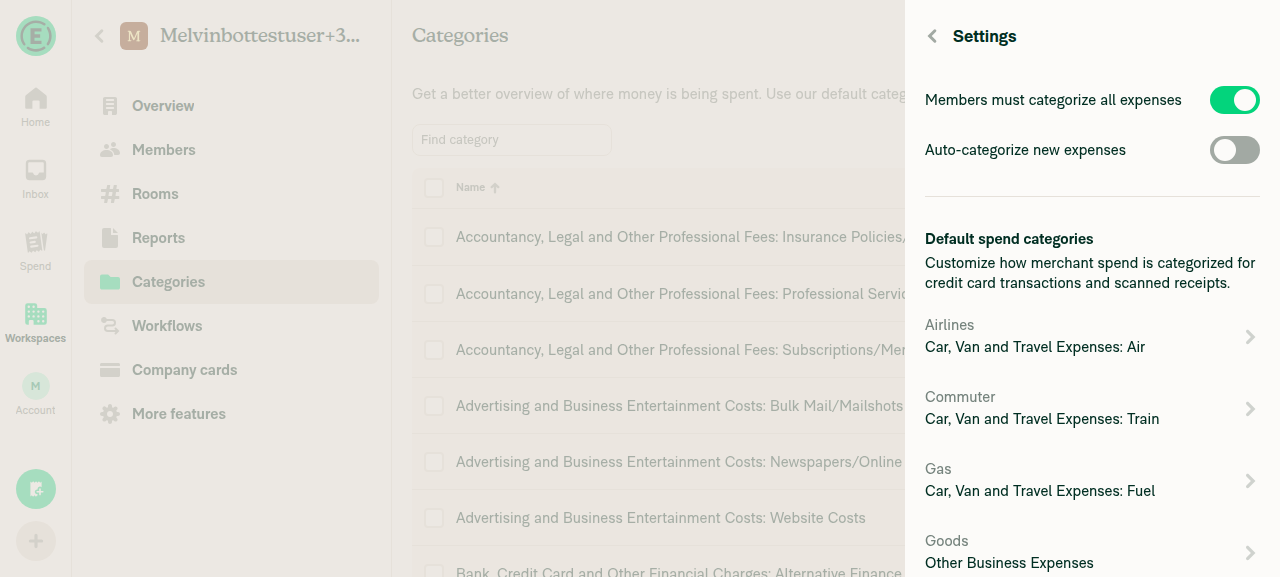
Choosing Settings opens a page showing the Auto-categorize new expenses toggleClicking Settings opened a panel with "Members must categorize all expenses" and "Auto-categorize new expenses" toggles, plus a Default spend categories list.
Categories Settings page with Auto-categorize new expenses toggle (on)
Toggling Auto-categorize new expenses off and on shows no errorToggled off then on; screenshots show the switch flipping states with no error banner. Network dump confirmed two SetPolicyAutoCategorizeNewExpenses POST requests both returned status=200.
Auto-categorize new expenses toggled off, no error shown
Auto-categorize new expenses toggled back on, no error shown
No errors appear in the JS consoleagent-device web sessions don't expose a console-log capture command, so this was verified by proxy: all HTTP traffic in the network dump returned status=200 with none failing, and no error banners or toasts appeared in any screenshot.

Caveat on beta coverage: the tester could not confirm whether the test account is on the rulesRevamp beta — agent-device's web backend does not expose response bodies, so the OpenApp beta payload was unreadable. Step 7 of your suggested tests (comparing a beta vs. non-beta account) was therefore not covered. Since the fix removes the beta gate entirely, Settings should appear either way, but a human on a beta-enabled account should confirm the originally-broken path.


view run

@MelvinBot

Copy link
Copy Markdown
Contributor Author

The failing check is not related to this PR, so I have not pushed anything.

Two checks are red:

Check Verdict
Check independent approval Expected — this PR has no independent approval yet.
test (job 3)tests/unit/NextStepUtilsTest.tsmonthly on the 2nd Pre-existing calendar-dependent test bug that fails on any PR run today.

Why it's unrelated: this PR changes exactly one file, src/pages/workspace/categories/WorkspaceCategoriesPage.tsx (1 insertion, 7 deletions). NextStepUtils and its test are byte-identical to main and have no import path to a workspace page component.

Why it fails: today is the 2nd of the month, and the test case is monthly on the 2nd. The test's expected value and the production code use two different, inconsistent "next Nth of month" rules that only disagree when today is the Nth. It will pass again tomorrow.

Root cause and evidence

The test builds its expected date from DateUtils.getNextNthOfMonth, which rolls to next month once day >= nth:

// If today is before the nth day, return the nth of this month.
if (day < nth) {
    return new Date(year, month, nth);
}
// Otherwise, return the nth of next month.
return new Date(year, month + 1, nth);

The production code under test never calls that helper. NextStepUtils.ts:211-217 computes it independently:

let etaDateTime = setDate(new Date(), policy?.autoReportingOffset);
if (isPast(etaDateTime)) {
    etaDateTime = addMonths(etaDateTime, 1);
}

setDate(new Date(), 2) on the 2nd yields the current instant, and isPast uses a strict < against Date.now(), so it returns false and the eta stays on today. Hence 2026-09-02 received vs 2026-10-02 expected.

getNextNthOfMonth is test-only — the sole caller in the whole repo is NextStepUtilsTest.ts:290:

$ grep -rn "getNextNthOfMonth" src/ tests/
src/libs/DateUtils.ts:1284:function getNextNthOfMonth(nth: number) {
src/libs/DateUtils.ts:1382:    getNextNthOfMonth,
tests/unit/NextStepUtilsTest.ts:290:  dateTime: format(DateUtils.getNextNthOfMonth(2), 'yyyy-MM-dd'),

So the test asserts against a re-implementation of the rule that has drifted from the code it is meant to verify.

Reproduced locally on this branch:

● libs/NextStepUtils › buildNextStep › ... › monthly on the 2nd
    - "dateTime": "2026-10-02"
    + "dateTime": "2026-09-02"
Tests: 1 failed, 45 skipped, 46 total

Possibly related: #97875 ("Monthly submission date in Next Step differs by one day from date set in Workflows"), closed 2026-08-27, which covers the same off-by-one boundary in user-facing behaviour.

Recommended fix (separate PR): make the test deterministic by freezing the clock rather than computing the expected date at runtime, and delete the unused getNextNthOfMonth helper so there is one rule instead of two. Worth deciding as part of that whether the correct product behaviour on the Nth is "today" or "next month" — #97875 suggests today.

I deliberately did not push this fix here: it touches src/libs/ and tests/unit/ in an unrelated product area, needs its own reviewer, and does not belong in a deploy-blocker PR. Reply with @MelvinBot open a PR for the NextStepUtils test fix and I'll raise it separately.

This blocks every PR merging today, not just this one, so it likely needs someone to pick it up promptly.


view run

@MelvinBot

Copy link
Copy Markdown
Contributor Author

🤖 Android test steps verification results: ⚠️ partial

Confirmed the core PR fix: the Categories More menu now shows a Settings item on a Collect workspace with no GL codes. The remaining steps could not be completed because the More popover became fully unresponsive to touch and back input on the emulator before those steps could run — an apparent device/rendering-thread stall, not obviously caused by this PR's change. The account's rulesRevamp beta status could not be conclusively determined.

More menu frozen and unresponsive to any further input

Step Status
Signed in and reached HomeSession completed sign-in continuation (Join), notification permission prompt, and onboarding, landing on the Home screen with bottom nav (Home/Inbox/Spend/Workspaces/Account) visible.
Home screen after sign-in/onboarding
Created a Collect workspace with no GL codesWorkspace list shows "Melvinbottestuser+...'s Workspace, Default, Owner: ...@gmail.com • Collect". No accounting integration was connected during setup, so the policy has no glCodes.
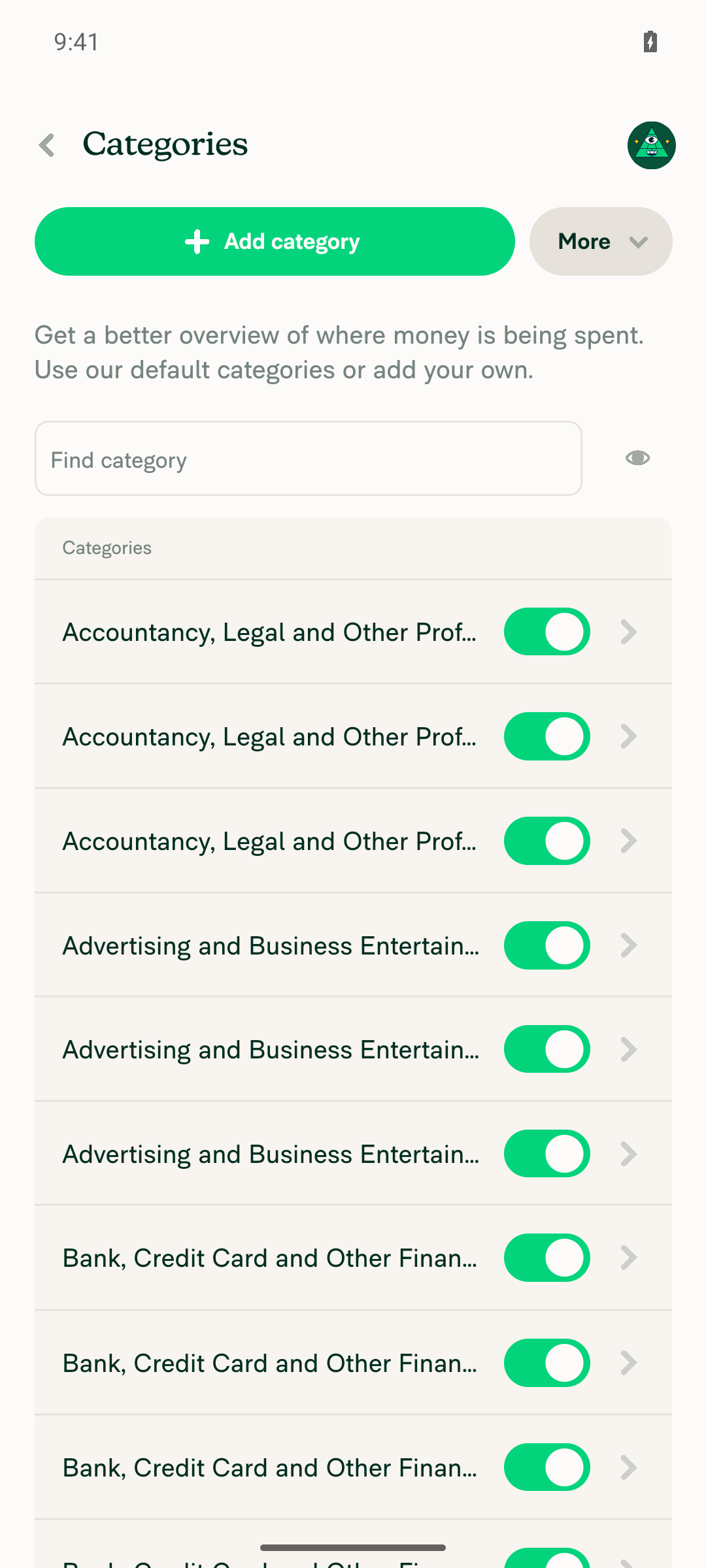
Navigated to workspace settings > Categories and opened MoreNavigated Workspaces > workspace > Categories, then tapped the More button; a bottom-sheet menu opened.
Workspace Categories page for the new Collect workspace
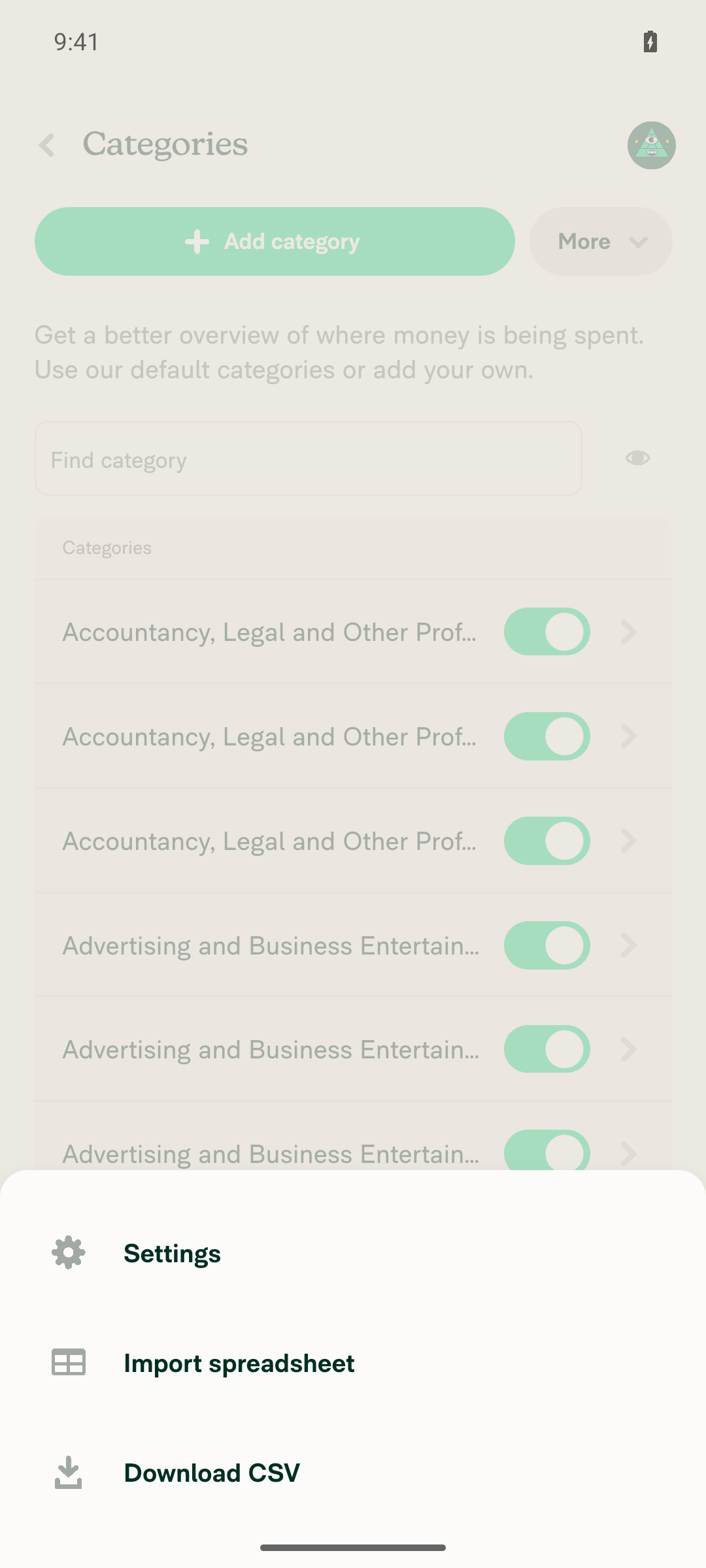
A Settings option is listed in the More menuThe More menu (raw accessibility tree) contains a Button with identifier PopoverMenuItem-Settings and label "Settings", alongside Import spreadsheet and Download CSV — this is the exact behavior the PR restores for canWriteCategories users regardless of rulesRevamp/GL codes.
More menu on Categories page showing the Settings option
Choosing Settings opens a page showing the Auto-categorize new expenses toggleTapping Settings (via role/label selector, id selector, raw coordinates, and long-press, repeated over several minutes) produced no navigation or any UI change. Concurrently, hardware back, scroll, and taps anywhere else on screen also produced no effect, and app logs showed no new rendered frames for 4+ minutes while the JS thread continued processing background Pusher pings — indicating a UI-thread stall/hang rather than a targeting problem. This blocked reaching the Settings page.
Toggling Auto-categorize new expenses off and on shows no errorNot reachable — blocked by the unresponsive More menu described above; the Settings page was never opened.
No errors appear in the JS console / app logsApp logs show a Fabric soft exception (IllegalViewOperationException: removeViewAt tried to remove a React View that was actually reused) and a second soft exception from react-native-keyboard-controller's ModalAttachedWatcher.onShow (IllegalStateException: Fabric View does not have SurfaceId associated with it) logged at the time the More popover was shown, plus Reanimated render-time warnings and a Yoga "Could not parse yoga::Display: grid" error. These native-level errors coincide with, and plausibly explain, the subsequent freeze; none are attributable to the one-line JS condition this PR changes.

Notes for the reviewer:

  • The step that actually exercises this PR's change — step 4, Settings appearing in the More menu — passed. Steps 5–7 are blocked by an emulator/native-modal stall, not by the change itself. The web run covered those steps successfully.
  • Beta status could not be confirmed. The workspace More Features page rendered a Rules toggle, but that toggle is rendered unconditionally regardless of the rulesRevamp beta, so its presence proves nothing. A human on a beta-enabled account should still confirm the originally-broken path.
  • Worth a fresh-emulator re-run to complete steps 5–7 on Android.

view run

@dukenv0307 dukenv0307 self-assigned this Sep 2, 2026
@dukenv0307

Copy link
Copy Markdown
Contributor

Code looks good, @MelvinBot please open the PR

@MelvinBot
MelvinBot marked this pull request as ready for review September 2, 2026 06:14
@MelvinBot
MelvinBot requested a review from a team as a code owner September 2, 2026 06:14
@melvin-bot
melvin-bot Bot requested review from truph01 and removed request for a team September 2, 2026 06:14
@melvin-bot

melvin-bot Bot commented Sep 2, 2026

Copy link
Copy Markdown

@truph01 Please copy/paste the Reviewer Checklist from here into a new comment on this PR and complete it. If you have the K2 extension, you can simply click: [this button]

@melvin-bot
melvin-bot Bot requested review from garrettmknight and removed request for a team September 2, 2026 06:14
@MelvinBot

Copy link
Copy Markdown
Contributor Author

🤖 Done — this PR is out of draft and ready for review. PullerBear has already requested truph01 as the reviewer.

Two things still need a human before merge:

1. One failing check, unrelated to this PR. test (job 3) fails on tests/unit/NextStepUtilsTest.tsbuildNextStep › scheduled submit enabled › monthly on the 2nd. This PR only touches src/pages/workspace/categories/WorkspaceCategoriesPage.tsx, which that suite doesn't exercise. The run was on 2026-09-02 — the 2nd — so this looks like a date-boundary flake in the "monthly on the 2nd" case rather than a regression. I did not touch it, per the rule against fixing unrelated failures. Every other check passes except Check independent approval, which clears on approval.

2. The Tests and QA Steps sections are still // TODO placeholders. I can't fill those in on a human's behalf. Web verification did pass — the results and screenshots are in my earlier comment: on a fresh Collect workspace with no GL codes, Settings appears in the Categories More menu and opens the Auto-categorize new expenses toggle, which toggles off/on with 200 responses and no errors.

Note that the automated run could not confirm whether the test account is on the rulesRevamp beta, so the originally-broken path is still unverified by a beta-enabled account.


view run

@truph01

truph01 commented Sep 2, 2026

Copy link
Copy Markdown
Contributor

Reviewer Checklist

  • I have verified the author checklist is complete (all boxes are checked off).
  • I verified the correct issue is linked in the ### Fixed Issues section above
  • I verified testing steps are clear and they cover the changes made in this PR
    • I verified the steps for local testing are in the Tests section
    • I verified the steps for Staging and/or Production testing are in the QA steps section
    • I verified the steps cover any possible failure scenarios (i.e. verify an input displays the correct error message if the entered data is not correct)
    • I turned off my network connection and tested it while offline to ensure it matches the expected behavior (i.e. verify the default avatar icon is displayed if app is offline)
  • I checked that screenshots or videos are included for tests on all platforms
  • I included screenshots or videos for tests on all platforms
  • I verified that the composer does not automatically focus or open the keyboard on mobile unless explicitly intended. This includes checking that returning the app from the background does not unexpectedly open the keyboard.
  • I verified tests pass on all platforms & I tested again on:
    • Android: HybridApp
    • Android: mWeb Chrome
    • iOS: HybridApp
    • iOS: mWeb Safari
    • MacOS: Chrome / Safari
  • If there are any errors in the console that are unrelated to this PR, I either fixed them (preferred) or linked to where I reported them in Slack
  • I verified proper code patterns were followed (see Reviewing the code)
    • I verified that any callback methods that were added or modified are named for what the method does and never what callback they handle (i.e. toggleReport and not onIconClick).
    • I verified that comments were added to code that is not self explanatory
    • I verified that any new or modified comments were clear, correct English, and explained """"why"""" the code was doing something instead of only explaining """"what"""" the code was doing.
    • I verified any copy / text that was added to the app is grammatically correct in English. It adheres to proper capitalization guidelines (note: only the first word of header/labels should be capitalized), and is either coming verbatim from figma or has been approved by marketing (in order to get marketing approval, ask the Bug Zero team member to add the Waiting for copy label to the issue)
  • If a new code pattern is added I verified it was agreed to be used by multiple Expensify engineers
  • I verified that this PR follows the guidelines as stated in the Review Guidelines
  • I verified other components that can be impacted by these changes have been tested, and I retested again (i.e. if the PR modifies a shared library or component like Avatar, I verified the components using Avatar have been tested & I retested again)
  • If a new component is created I verified that:
    • A similar component doesn't exist in the codebase
    • All props are defined accurately and each prop has a /** comment above it */
    • The file is named correctly
    • The component has a clear name that is non-ambiguous and the purpose of the component can be inferred from the name alone
    • The only data being stored in the state is data necessary for rendering and nothing else
    • For Class Components, any internal methods passed to components event handlers are bound to this properly so there are no scoping issues (i.e. for onClick={this.submit} the method this.submit should be bound to this in the constructor)
    • Any internal methods bound to this are necessary to be bound (i.e. avoid this.submit = this.submit.bind(this); if this.submit is never passed to a component event handler like onClick)
    • All JSX used for rendering exists in the render method
    • The component has the minimum amount of code necessary for its purpose, and it is broken down into smaller components in order to separate concerns and functions
  • If any new file was added I verified that:
    • The file has a description of what it does and/or why is needed at the top of the file if the code is not self explanatory
  • If a new CSS style is added I verified that:
    • A similar style doesn't already exist
    • The style can't be created with an existing StyleUtils function (i.e. StyleUtils.getBackgroundAndBorderStyle(theme.componentBG)
  • If the PR modifies code that runs when editing or sending messages, I tested and verified there is no unexpected behavior for all supported markdown - URLs, single line code, code blocks, quotes, headings, bold, strikethrough, and italic.
  • If the PR modifies a generic component, I tested and verified that those changes do not break usages of that component in the rest of the App (i.e. if a shared library or component like Avatar is modified, I verified that Avatar is working as expected in all cases)
  • If the PR modifies a component related to any of the existing Storybook stories, I tested and verified all stories for that component are still working as expected.
  • If the PR modifies a component or page that can be accessed by a direct deeplink, I verified that the code functions as expected when the deeplink is used - from a logged in and logged out account.
  • If the PR modifies the UI (e.g. new buttons, new UI components, changing the padding/spacing/sizing, moving components, etc) or modifies the form input styles:
    • I verified that all the inputs inside a form are aligned with each other.
    • I added Design label and/or tagged @Expensify/design so the design team can review the changes.
  • For any bug fix or new feature in this PR, I verified that sufficient unit tests are included to prevent regressions in this flow.
  • If the main branch was merged into this PR after a review, I tested again and verified the outcome was still expected according to the Test steps.
  • I have checked off every checkbox in the PR reviewer checklist, including those that don't apply to this PR.

Screenshots/Videos

MacOS: Chrome / Safari
Screen.Recording.2026-09-02.at.15.45.04.mov

@truph01

truph01 commented Sep 2, 2026

Copy link
Copy Markdown
Contributor

@MelvinBot Please resolve:

Jest Unit Tests / test (job 3) (pull_request)Failing after 2m

@MelvinBot

Copy link
Copy Markdown
Contributor Author

The failing Jest check is unrelated to this PR — it's a calendar-dependent test failure hitting every open PR today, and it's already tracked in #100134.

Failing test: libs/NextStepUtils › buildNextStep › ... › scheduled submit enabled › monthly on the 2nd — expected 2026-10-02, received 2026-09-02.

I did not push a fix, since the failure isn't caused by this branch and a fix belongs with the owner of that test.

Evidence it's unrelated

This PR touches one file: src/pages/workspace/categories/WorkspaceCategoriesPage.tsx (+1/-7). Neither NextStepUtils.ts nor NextStepUtilsTest.ts is in the diff, and the categories page has no code path into next-step generation.

The identical failure appears on unrelated PRs today. For example, branch fix-Tax-No-autofocus-in-the-name-editing-menu-taxes fails the same assertion with the same expected/received values in run 33605290470.

Why it fires today: the test derives its expectation from a different helper than production uses, and the two disagree only when today's date equals the offset day — today is the 2nd.

What to do: once #100134 lands, re-run the Jest check here and it should pass. Nothing on this branch needs to change for it.


view run

@garrettmknight
garrettmknight removed their request for review September 2, 2026 09:26
@melvin-bot
melvin-bot Bot requested a review from jasperhuangg September 2, 2026 14:46
@MelvinBot

Copy link
Copy Markdown
Contributor Author

No code change is needed on this PR, and I have not pushed anything. Two things to know:

1. The red test (job 3) is a stale run. It's still the 04:23 run from when this PR opened — it has not re-run since. The failure is the calendar-dependent NextStepUtilsTest flake tracked in #100134, which breaks CI on every PR on the 2nd of the month. Re-run it tomorrow and it goes green with no change to this branch.

2. The permanent fix got closed by mistake, and main is still unfixed. That's the thing actually worth acting on.

#100145 carried the test-only fix, was green on every check except Check independent approval, and was closed at 12:29 UTC with "Nevermind, already fixed in a different PR". It wasn't. On main at bded4c8 (merged 14:37 UTC today), all three occurrences are still present and the test file still has no fake timers:

On main today Status
src/libs/DateUtils.ts:1284getNextNthOfMonth, still day < nth still there
src/libs/DateUtils.ts:1382 — export entry still there
tests/unit/NextStepUtilsTest.ts:290format(DateUtils.getNextNthOfMonth(2), 'yyyy-MM-dd') still there

I verified the closed branch still fixes it. Applying just its two files and running the suite today, on the 2nd:

PASS tests/unit/NextStepUtilsTest.ts (27.162 s)
Tests: 48 passed, 48 total

I've asked Gonals to reopen #100145 — I don't have permission to reopen it myself. If it stays closed, CI breaks again on 2026-10-02.

Why the fix doesn't belong on this PR

This PR changes exactly one file, src/pages/workspace/categories/WorkspaceCategoriesPage.tsx (1 insertion, 7 deletions). NextStepUtils, DateUtils, and the test are byte-identical to main and have no import path to a workspace page component.

Folding the test fix in here would put an unrelated src/libs/ + tests/unit/ change into a deploy-blocker PR that already has truph01's completed reviewer checklist, forcing a re-review — and it would duplicate a branch that already exists with green CI.

Root cause, for reference: the test derives its expected date from DateUtils.getNextNthOfMonth(2), whose day < nth check excludes today, so on the 2nd it returns next month (2026-10-02). Production at src/libs/NextStepUtils.ts:212-215 instead builds setDate(new Date(), 2) and only rolls forward when isPast(...), which on the 2nd is a comparison against essentially "now", so it returns today (2026-09-02). The two only diverge when today === nth, which is why it looks like flakiness the rest of the month.


view run

@jasperhuangg

Copy link
Copy Markdown
Contributor

@truph01 @dukenv0307 can we be sure to fill out the QA steps correctly?

@dukenv0307

Copy link
Copy Markdown
Contributor

we can close since the original PR is reverted

@dukenv0307 dukenv0307 closed this Sep 3, 2026
Sign up for free to join this conversation on GitHub. Already have an account? Sign in to comment

Labels

Melvin-Test-Android Melvin-Test-Web Triggers Melvin to run the testing steps of the PR on web

Projects

None yet

Development

Successfully merging this pull request may close these issues.

4 participants