Skip to content

fix: keep Search Router results above offline indicator - #97211

Open
nabi-ebrahimi wants to merge 22 commits into
Expensify:mainfrom
nabi-ebrahimi:97182-search-router-offline-scroll
Open

fix: keep Search Router results above offline indicator#97211
nabi-ebrahimi wants to merge 22 commits into
Expensify:mainfrom
nabi-ebrahimi:97182-search-router-offline-scroll

Conversation

@nabi-ebrahimi

@nabi-ebrahimi nabi-ebrahimi commented Jul 28, 2026

Copy link
Copy Markdown
Contributor

Explanation of Change

On native devices, Search Router can open during the initial keyboard animation before its available height is settled. If results appear during this timing window, the list may use the full-screen height, place the offline indicator behind the keyboard, and incorrectly disable scrolling.

This change limits the native Search Router to the visible area above the keyboard. The limit updates during keyboard transitions and orientation changes and is removed when the keyboard closes.

Fixed Issues

$ #97182
PROPOSAL:

Tests

Cold-start offline scrolling

  1. Copy type: to the clipboard.
  2. Force-stop and reopen the app.
  3. Enable forced offline mode.
  4. Open Search Router.
  5. Immediately paste type: into the search input.
  6. Try to scroll through the results without closing or reopening the keyboard.

Expected: The results scroll immediately on the first attempt.

  • Verify that no errors appear in the JS console

Offline tests

Same as Tests.

QA Steps

Same as Tests.

// TODO: These must be filled out, or the issue title must include "[No QA]."

  • Verify that no errors appear in the JS console

PR Author Checklist

  • I linked the correct issue in the ### Fixed Issues section above
  • I wrote clear testing steps that cover the changes made in this PR
    • I added steps for local testing in the Tests section
    • I added steps for the expected offline behavior in the Offline steps section
    • I added steps for Staging and/or Production testing in the QA steps section
    • I added steps to cover failure scenarios (i.e. verify an input displays the correct error message if the entered data is not correct)
    • I turned off my network connection and tested it while offline to ensure it matches the expected behavior (i.e. verify the default avatar icon is displayed if app is offline)
    • I tested this PR with a High Traffic account against the staging or production API to ensure there are no regressions (e.g. long loading states that impact usability).
  • I included screenshots or videos for tests on all platforms
  • I ran the tests on all platforms & verified they passed on:
    • Android: Native
    • Android: mWeb Chrome
    • iOS: Native
    • iOS: mWeb Safari
    • MacOS: Chrome / Safari
  • I verified there are no console errors (if there's a console error not related to the PR, report it or open an issue for it to be fixed)
  • I followed proper code patterns (see Reviewing the code)
    • I verified that comments were added to code that is not self explanatory
    • I verified that any new or modified comments were clear, correct English, and explained "why" the code was doing something instead of only explaining "what" the code was doing.
    • I verified any copy / text that was added to the app is grammatically correct in English. It adheres to proper capitalization guidelines (note: only the first word of header/labels should be capitalized), and is either coming verbatim from figma or has been approved by marketing (in order to get marketing approval, ask the Bug Zero team member to add the Waiting for copy label to the issue)
  • If a new code pattern is added I verified it was agreed to be used by multiple Expensify engineers
  • I followed the guidelines as stated in the Review Guidelines
  • I tested other components that can be impacted by my changes (i.e. if the PR modifies a shared library or component like Avatar, I verified the components using Avatar are working as expected)
  • If a new CSS style is added I verified that:
    • A similar style doesn't already exist
    • The style can't be created with an existing StyleUtils function (i.e. StyleUtils.getBackgroundAndBorderStyle(theme.componentBG))
  • If new assets were added or existing ones were modified, I verified that:
    • The assets are optimized and compressed (for SVG files, run npm run compress-svg)
    • The assets load correctly across all supported platforms.
  • If the PR modifies code that runs when editing or sending messages, I tested and verified there is no unexpected behavior for all supported markdown - URLs, single line code, code blocks, quotes, headings, bold, strikethrough, and italic.
  • If the PR modifies a generic component, I tested and verified that those changes do not break usages of that component in the rest of the App (i.e. if a shared library or component like Avatar is modified, I verified that Avatar is working as expected in all cases)
  • If the PR modifies a component related to any of the existing Storybook stories, I tested and verified all stories for that component are still working as expected.
  • If the PR modifies a component or page that can be accessed by a direct deeplink, I verified that the code functions as expected when the deeplink is used - from a logged in and logged out account.
  • If the PR modifies the UI (e.g. new buttons, new UI components, changing the padding/spacing/sizing, moving components, etc) or modifies the form input styles:
    • I verified that all the inputs inside a form are aligned with each other.
    • I added Design label and/or tagged @Expensify/design so the design team can review the changes.
  • I added unit tests for any new feature or bug fix in this PR to help automatically prevent regressions in this user flow.
  • If the main branch was merged into this PR after a review, I tested again and verified the outcome was still expected according to the Test steps.

Screenshots/Videos

Android: Native
Screen_Recording_20260728_191133_New.Expensify.Dev.mp4
Android: mWeb Chrome
iOS: Native
Screen.Recording.2026-07-28.at.7.02.04.PM.mov
iOS: mWeb Safari
MacOS: Chrome / Safari
Screen.Recording.2026-07-28.at.6.58.49.PM.mov

@codecov

codecov Bot commented Jul 28, 2026

Copy link
Copy Markdown

Codecov Report

✅ Changes either increased or maintained existing code coverage, great job!

Files with missing lines Coverage Δ
src/components/Search/SearchAutocompleteList.tsx 93.30% <100.00%> (+0.03%) ⬆️
...rch/SearchRouter/SearchRouterPage/index.native.tsx 16.66% <26.66%> (+16.66%) ⬆️
... and 9 files with indirect coverage changes

@nabi-ebrahimi
nabi-ebrahimi marked this pull request as ready for review July 28, 2026 14:46
@nabi-ebrahimi
nabi-ebrahimi requested review from a team as code owners July 28, 2026 14:46
@melvin-bot
melvin-bot Bot requested review from flaviadefaria and marufsharifi and removed request for a team July 28, 2026 14:46
@melvin-bot

melvin-bot Bot commented Jul 28, 2026

Copy link
Copy Markdown

@marufsharifi Please copy/paste the Reviewer Checklist from here into a new comment on this PR and complete it. If you have the K2 extension, you can simply click: [this button]

@melvin-bot
melvin-bot Bot removed the request for review from a team July 28, 2026 14:46
@marufsharifi

marufsharifi commented Jul 28, 2026

Copy link
Copy Markdown
Contributor

Reviewer Checklist

  • I have verified the author checklist is complete (all boxes are checked off).
  • I verified the correct issue is linked in the ### Fixed Issues section above
  • I verified testing steps are clear and they cover the changes made in this PR
    • I verified the steps for local testing are in the Tests section
    • I verified the steps for Staging and/or Production testing are in the QA steps section
    • I verified the steps cover any possible failure scenarios (i.e. verify an input displays the correct error message if the entered data is not correct)
    • I turned off my network connection and tested it while offline to ensure it matches the expected behavior (i.e. verify the default avatar icon is displayed if app is offline)
  • I checked that screenshots or videos are included for tests on all platforms
  • I included screenshots or videos for tests on all platforms
  • I verified that the composer does not automatically focus or open the keyboard on mobile unless explicitly intended. This includes checking that returning the app from the background does not unexpectedly open the keyboard.
  • I verified tests pass on all platforms & I tested again on:
    • Android: HybridApp
    • Android: mWeb Chrome
    • iOS: HybridApp
    • iOS: mWeb Safari
    • MacOS: Chrome / Safari
  • If there are any errors in the console that are unrelated to this PR, I either fixed them (preferred) or linked to where I reported them in Slack
  • I verified proper code patterns were followed (see Reviewing the code)
    • I verified that comments were added to code that is not self explanatory
    • I verified that any new or modified comments were clear, correct English, and explained "why" the code was doing something instead of only explaining "what" the code was doing.
    • I verified any copy / text that was added to the app is grammatically correct in English. It adheres to proper capitalization guidelines (note: only the first word of header/labels should be capitalized), and is either coming verbatim from figma or has been approved by marketing (in order to get marketing approval, ask the Bug Zero team member to add the Waiting for copy label to the issue)
  • If a new code pattern is added I verified it was agreed to be used by multiple Expensify engineers
  • I verified that this PR follows the guidelines as stated in the Review Guidelines
  • I verified other components that can be impacted by these changes have been tested, and I retested again (i.e. if the PR modifies a shared library or component like Avatar, I verified the components using Avatar have been tested & I retested again)
  • If a new component is created I verified that:
    • A similar component doesn't exist in the codebase
    • All props are defined accurately
    • The component has a clear name that is non-ambiguous and the purpose of the component can be inferred from the name alone
    • The only data being stored in the state is data necessary for rendering and nothing else
    • The component has the minimum amount of code necessary for its purpose, and it is broken down into smaller components in order to separate concerns and functions
  • If a new CSS style is added I verified that:
    • A similar style doesn't already exist
    • The style can't be created with an existing StyleUtils function (i.e. StyleUtils.getBackgroundAndBorderStyle(theme.componentBG)
  • If the PR modifies code that runs when editing or sending messages, I tested and verified there is no unexpected behavior for all supported markdown - URLs, single line code, code blocks, quotes, headings, bold, strikethrough, and italic.
  • If the PR modifies a generic component, I tested and verified that those changes do not break usages of that component in the rest of the App (i.e. if a shared library or component like Avatar is modified, I verified that Avatar is working as expected in all cases)
  • If the PR modifies a component related to any of the existing Storybook stories, I tested and verified all stories for that component are still working as expected.
  • If the PR modifies a component or page that can be accessed by a direct deeplink, I verified that the code functions as expected when the deeplink is used - from a logged in and logged out account.
  • If the PR modifies the UI (e.g. new buttons, new UI components, changing the padding/spacing/sizing, moving components, etc) or modifies the form input styles:
    • I verified that all the inputs inside a form are aligned with each other.
    • I added Design label and/or tagged @Expensify/design so the design team can review the changes.
  • For any bug fix or new feature in this PR, I verified that sufficient unit tests are included to prevent regressions in this flow.
  • If the main branch was merged into this PR after a review, I tested again and verified the outcome was still expected according to the Test steps.
  • I have checked off every checkbox in the PR reviewer checklist, including those that don't apply to this PR.

Screenshots/Videos

Android: HybridApp
Screen_Recording_20260728_200323_Expensify.Dev.mp4
Android: mWeb Chrome
iOS: HybridApp
Screen.Recording.2026-07-28.at.8.27.06.PM.mov
iOS: mWeb Safari
MacOS: Chrome / Safari
Screenshot 2026-07-28 at 7 24 09 PM

@carlosmiceli

Copy link
Copy Markdown
Contributor

@nabi-ebrahimi woudl your fix also take care of this blocker? #97248

@marufsharifi

Copy link
Copy Markdown
Contributor

@nabi-ebrahimi, could you please check this. thanks.

RF-1.mp4

@nabi-ebrahimi

This comment was marked as outdated.

@marufsharifi

Copy link
Copy Markdown
Contributor

@nabi-ebrahimi, could you please check lint? thanks.

@nabi-ebrahimi

Copy link
Copy Markdown
Contributor Author

@nabi-ebrahimi, could you please check lint? thanks.

Still testing, thanks

Comment thread src/components/Search/SearchRouter/SearchRouter.tsx Outdated
Comment thread src/components/Search/SearchList/ListItem/TextWithIconCell.tsx
@nabi-ebrahimi

Copy link
Copy Markdown
Contributor Author

@marufsharifi and @carlosmiceli please check this comment, thanks.

@carlosmiceli

Copy link
Copy Markdown
Contributor

@marufsharifi and @carlosmiceli please check this comment, thanks.

Gotcha, but even if the original PR didn't break this, we should revert if it surfaced it. Do you think this PR will cover all the blockers linked to it? If it's going to take another hour or so, we should just revert the original and we can try again tomorrow.

@nabi-ebrahimi

Copy link
Copy Markdown
Contributor Author

@carlosmiceli the only blocker directly related to our changes is the clipped Spend context at large font sizes. I addressed it separately in #97281, which is ready for review. The other reported issues were reproducible on main with both navigation PRs reverted, as documented in each issue. I’m happy to proceed with your preferred direction.

@carlosmiceli

Copy link
Copy Markdown
Contributor

@nabi-ebrahimi oh, gotcha! That's great, reviewing now.

@carlosmiceli

Copy link
Copy Markdown
Contributor

@nabi-ebrahimi merged and asked to CP #97281

Let's get this one ready to review next 💪

@nabi-ebrahimi

Copy link
Copy Markdown
Contributor Author

@marufsharifi can you please review the PR, thanks.

Comment thread src/components/Search/SearchRouter/SearchRouterPage/index.native.tsx Outdated
@marufsharifi

Copy link
Copy Markdown
Contributor

@nabi-ebrahimi, could you please take a look at the above comments. thanks.

@nabi-ebrahimi

Copy link
Copy Markdown
Contributor Author

@nabi-ebrahimi, could you please take a look at the above comments. thanks.

All done from my side, thanks for the review!

Comment thread src/components/Search/SearchRouter/SearchRouterPage/index.native.tsx Outdated
Comment thread src/components/Search/SearchAutocompleteList.tsx
@nabi-ebrahimi

Copy link
Copy Markdown
Contributor Author

Working on the comments

@nabi-ebrahimi

Copy link
Copy Markdown
Contributor Author

@marufsharifi thanks for the review, all done.

@trjExpensify

Copy link
Copy Markdown
Contributor

@marufsharifi will you review this today?

@marufsharifi

Copy link
Copy Markdown
Contributor

I am reviewing. thanks.

Comment thread tests/unit/SearchAutocompleteListTest.tsx
Comment thread src/components/Search/SearchRouter/SearchRouterPage/index.native.tsx Outdated
Comment thread tests/unit/SearchAutocompleteListTest.tsx Outdated
Comment thread tests/unit/SearchAutocompleteListTest.tsx
@marufsharifi

Copy link
Copy Markdown
Contributor

@MelvinBot Review

@MelvinBot

Copy link
Copy Markdown
Contributor

Review — looks correct, prior change requests appear resolved ✅

I reviewed the current state of the diff and traced the layout math end-to-end. The substantive concerns from earlier review rounds are now addressed, and I verified the web-observable part on dev NewDot web.

Verdict: The implementation is sound. The remaining items are minor/NAB.

Prior review concerns — status in current code
  • Scope to offline → Resolved. isKeyboardOverlapping = isOffline && isKeyboardActive means the maxHeight cap is never applied on the online path.
  • keyboardHeight vs keyboardActiveHeight scale mismatch → Resolved. keyboardHeight is already normalized in withKeyboardState (set via getKeyboardHeight(e.height, bottom) on keyboardDidShow), and the fallback branch getKeyboardHeight(keyboardActiveHeight, bottomInset) applies the same normalization to the raw active height — so both branches of the || are on the same scale. No layout hop.
  • Clearing the offline indicator → Handled as two concerns: the height cap keeps the router above the keyboard, and the OFFLINE_INDICATOR_HEIGHT clearance is added separately via useBottomSafeSafeAreaPaddingStyle on the list's contentContainerStyle.
  • Use StyleUtils.getMaximumHeight → Done.
  • "Why" comment + test coverage → Comment added; getAvailableHeight is exported and all four branches (no-overlap, settled height, animation fallback, negative clamp) are unit-tested, plus an offline-padding test on the list.
Correctness check on the height formula

availableHeight = max(windowHeight − keyboardHeight − paddingTop, 0), applied as maxHeight on a flex1 wrapper inside a ScreenWrapper that already applies includePaddingTop.

This does not double-subtract paddingTop: the wrapper sits below the top padding, so its available visible region runs from paddingTop down to windowHeight − keyboardHeight, i.e. exactly windowHeight − keyboardHeight − paddingTop. Bottom safe area isn't subtracted, but it lives underneath the keyboard, so that's fine. It's a maxHeight cap on a flex1 view, so it only prevents the full-screen case — it doesn't force a fixed height.

Shared-component blast radius

SearchAutocompleteList is only consumed (directly or via DeferredSearchAutocompleteList) by SearchRouter, which renders through SearchRouterModal (web/desktop/mWeb) and SearchRouterPage/index.native (native) — not the full-page Search. The added offline padding is further gated on isOffline && ScreenWrapperOfflineIndicatorContext.addSafeAreaPadding, so online rendering is unchanged. Blast radius is contained to the Search Router.

Non-blocking:

  • The one-line comment fusing goal + ownership + clamp behavior, and the compact keyboardHeight || getKeyboardHeight(...) ternary, are both readability NABs — the author's decision to keep them is reasonable.
  • The per-render [styles.flex1, ...] array allocation is a genuine but negligible cost on a single page wrapper (not a list row); fine to leave.

Web verification (dev NewDot)

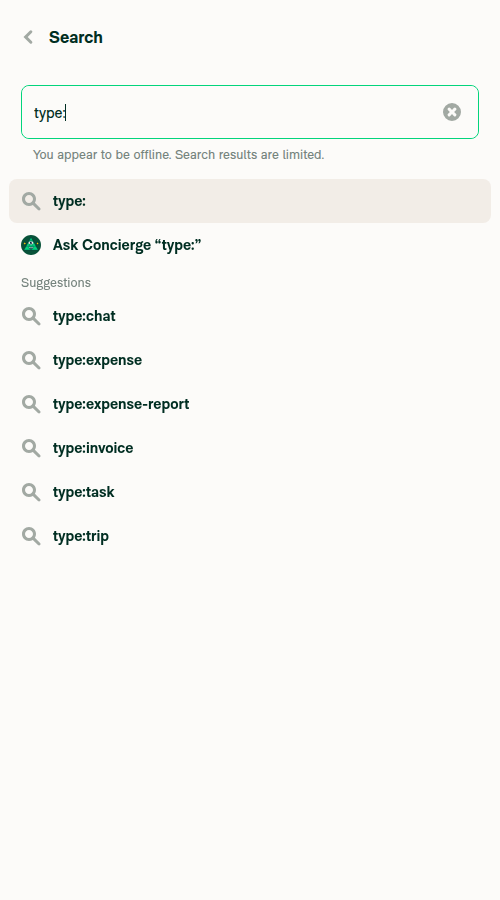
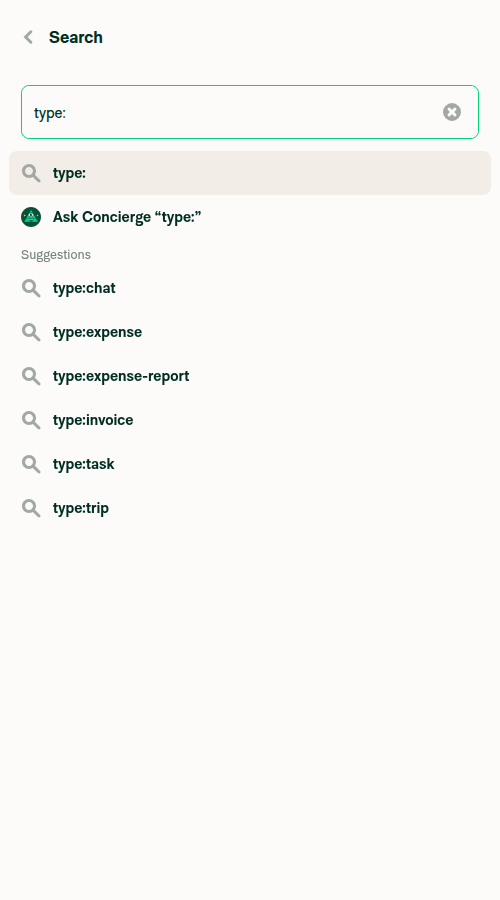
I drove the Search Router on web to confirm the shared SearchAutocompleteList change — the only part observable on web. Populated an 8-row type: results list, toggled offline via Troubleshoot → Force offline, and compared to online:

  • Offline: the offline notice renders and the last row (type:trip) is fully visible with clearance below it — no clipping.
  • Online: notice disappears, type:trip shifts up by exactly the notice-line height (~28px) — a normal shift, no abnormal gap.

Note: this only exercises the web offline-padding path. The native maxHeight/keyboard-race fix (index.native.tsx) can't run on web — trust the author's Android/iOS recordings for that, since it's the core of the PR.

Search Router offline: last row (type:trip) clears the offline indicator

Search Router offline: last row clears the offline indicator

Search Router online: normal spacing, no offline notice

Search Router online: normal spacing, no offline notice

@nabi-ebrahimi

Copy link
Copy Markdown
Contributor Author

@marufsharifi All done from my side, thanks for the review.

@marufsharifi

Copy link
Copy Markdown
Contributor

@nabi-ebrahimi, could you please merge the main. thanks.

Sign up for free to join this conversation on GitHub. Already have an account? Sign in to comment

Labels

None yet

Projects

None yet

Development

Successfully merging this pull request may close these issues.

5 participants