VPP Interconnecting_vRouters_with_VPP
- 1 Setup the environment
- 2 Create TRUNK ports
- 3 Create ACCESS ports
- 4 Edit virsh xrv9k XML file
- 5 Bring up your vRouters
- 6 Apply basic config
- 7 Connectivity check
- 8 Next Steps
- You need at least libvirt version 1.2.18+ and Qemu 2.2 to run this example
- Edit /etc/default/grub to enable PCI pass-thru support
- Change /etc/libvirt/qemu.conf to tell KVM where guests will create memory backing
- Modify /etc/sysctl.conf to reserve HugePages and give the KVM group access to them
- Make hugepages available to KVM by editing /etc/default/qemu-kvm
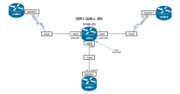
Interconnecting xrv9k routers with VPP
Setup vhost-user sockets to connect "trunk" ports (xrv9k-1, xrv9k-2) to VPP. Create subinterfaces for 802.1q encapsulated frames with VLAN 200. Bridge these ports in VPP.
create vhost socket /var/run/vpp/sock0.sock server
create vhost socket /var/run/vpp/sock1.sock server
set interface state VirtualEthernet0/0/0 up
set interface state VirtualEthernet0/0/1 up
create sub VirtualEthernet0/0/0 200
create sub VirtualEthernet0/0/1 200
set interface state VirtualEthernet0/0/0.200 up
set interface state VirtualEthernet0/0/1.200 up
set interface l2 bridge VirtualEthernet0/0/0.200 200
set interface l2 bridge VirtualEthernet0/0/1.200 200
Setup vhost-user socket to connect the "access" port (xrv9k-3) to VPP. Make sure you tag the frames with VLAN 200 in VPP. Add this port to the bridge domain created.
create vhost socket /var/run/vpp/sock2.sock server
set interface state VirtualEthernet0/0/2 up
set interface l2 bridge VirtualEthernet0/0/2 200
set interface l2 tag-rewrite VirtualEthernet0/0/2 push dot1q 200
vpp# show bridge 200 detail
  ID   Index   Learning   U-Forwrd   UU-Flood   Flooding   ARP-Term     BVI-Intf
 200     1        on         on         on         on         off          N/A

           Interface           Index  SHG  BVI        VLAN-Tag-Rewrite
   VirtualEthernet0/0/0.200      12    0    -               none
   VirtualEthernet0/0/1.200      13    1    -               none
     VirtualEthernet0/0/2        14    0    -         push-1 dot1q 200
vpp#
Add the following to your xrv9000 XML definitions. The example is for xrv9k-3. Make sure you point to the corresponding socket and avoid duplicated MAC addresses
  <qemu:commandline>
    <!-- vhost-user -->
    <qemu:arg value='-chardev'/>
    <qemu:arg value='socket,id=char0,path=/var/run/vpp/sock2.sock'/>
    <qemu:arg value='-netdev'/>
    <qemu:arg value='vhost-user,id=mynet2,chardev=char0'/>
    <qemu:arg value='-device'/>
    <qemu:arg value='virtio-net-pci,netdev=mynet2,mac=52:54:00:01:00:33'/>
    <qemu:arg value='-object'/>
    <qemu:arg value='memory-backend-file,id=mem,size=16384M,mem-path=/run/hugepages/kvm,share=on'/>
    <qemu:arg value='-numa'/>
    <qemu:arg value='node,memdev=mem'/>
    <qemu:arg value='-mem-prealloc'/>
  </qemu:commandline>
nleiva@ubuntuKVM:~$ sudo virsh define xrv9k3.xml
Domain xrv9k3 defined from xrv9k3.xml

nleiva@ubuntuKVM:~$
nleiva@ubuntuKVM:~$ sudo virsh start xrv9k3
Domain xrv9k3 started

nleiva@ubuntuKVM:~$
RP/0/RP0/CPU0:xrv9k-2# show run int g0/0/0/1.200
Wed May 11 15:04:00.674 UTC
interface GigabitEthernet0/0/0/1.200
 ipv6 address 2001:db8:c::22/64
 encapsulation dot1q 200
RP/0/RP0/CPU0:xrv9k-2#show ver
Wed May 11 15:04:03.095 UTC

Cisco IOS XR Software, Version 6.0.0
Copyright (c) 2013-2015 by Cisco Systems, Inc.
<snip>

RP/0/RP0/CPU0:xrv9k-2#
RP/0/RP0/CPU0:xrv9k-3#show run int g0/0/0/1
Wed May 11 14:44:44.476 UTC
interface GigabitEthernet0/0/0/1
 ipv6 address 2001:db8:c::33/64
RP/0/RP0/CPU0:xrv9k-3#show ver
Wed May 11 14:44:47.687 UTC

Cisco IOS XR Software, Version 6.0.1
Copyright (c) 2013-2016 by Cisco Systems, Inc.
<snip>

RP/0/RP0/CPU0:xrv9k-3#
RP/0/RP0/CPU0:xrv9k-3# ping 2001:db8:c::11 r 1
Wed May 11 14:51:17.761 UTC
Type escape sequence to abort.
Sending 1, 100-byte ICMP Echos to 2001:db8:c::11, timeout is 2 seconds:
!
Success rate is 100 percent (1/1), round-trip min/avg/max = 4/4/4 ms
RP/0/RP0/CPU0:xrv9k-3#
vpp# trace add vhost-user-input 10
vpp# show trace
------------------- Start of thread 0 vpp_main -------------------
Packet 1

11:16:43:958441: vhost-user-input
  VirtualEthernet0/0/2 virtqueue 1
11:16:43:958452: ethernet-input
  IP6: 52:54:00:01:00:33 -> 52:54:00:01:00:01
11:16:43:958458: l2-input
  l2-input: sw_if_index 14 dst 52:54:00:01:00:01 src 52:54:00:01:00:33
11:16:43:958461: l2-input-vtr
  l2-input-vtr: sw_if_index 14 dst 52:54:00:01:00:01 src 52:54:00:01:00:33 data 81 00 00 c8 86 dd 60 00 00 00 00 3c
11:16:43:958464: l2-learn
  l2-learn: sw_if_index 14 dst 52:54:00:01:00:01 src 52:54:00:01:00:33 bd_index 1
11:16:43:958466: l2-fwd
  l2-fwd:   sw_if_index 14 dst 52:54:00:01:00:01 src 52:54:00:01:00:33 bd_index 1
11:16:43:958468: l2-output
  l2-output: sw_if_index 12 dst 52:54:00:01:00:01 src 52:54:00:01:00:33
11:16:43:958469: VirtualEthernet0/0/0-output
  VirtualEthernet0/0/0.200
  IP6: 52:54:00:01:00:33 -> 52:54:00:01:00:01 vlan 200
  ICMP6: 2001:db8:c::33 -> 2001:db8:c::11
    tos 0x00, flow label 0x0, hop limit 60, payload length 60
  ICMP header truncated

Packet 2

11:16:43:959583: vhost-user-input
  VirtualEthernet0/0/0 virtqueue 1
11:16:43:959585: ethernet-input
  IP6: 52:54:00:01:00:01 -> 52:54:00:01:00:33 vlan 200
11:16:43:959586: l2-input
  l2-input: sw_if_index 12 dst 52:54:00:01:00:33 src 52:54:00:01:00:01
11:16:43:959587: l2-learn
  l2-learn: sw_if_index 12 dst 52:54:00:01:00:33 src 52:54:00:01:00:01 bd_index 1
11:16:43:959588: l2-fwd
  l2-fwd:   sw_if_index 12 dst 52:54:00:01:00:33 src 52:54:00:01:00:01 bd_index 1
11:16:43:959594: l2-output
  l2-output: sw_if_index 14 dst 52:54:00:01:00:33 src 52:54:00:01:00:01
11:16:43:959594: VirtualEthernet0/0/2-output
  VirtualEthernet0/0/2
  IP6: 52:54:00:01:00:01 -> 52:54:00:01:00:33
  ICMP6: 2001:db8:c::11 -> 2001:db8:c::33
    tos 0x00, flow label 0x0, hop limit 64, payload length 60
  ICMP echo_reply checksum 0x3d95

vpp#
RP/0/RP0/CPU0:xrv9k-2#ping 2001:db8:c::11 r 1
Wed May 11 15:05:33.081 UTC
Type escape sequence to abort.
Sending 1, 100-byte ICMP Echos to 2001:db8:c::11, timeout is 2 seconds:
!
Success rate is 100 percent (1/1), round-trip min/avg/max = 3/3/3 ms
RP/0/RP0/CPU0:xrv9k-2#
vpp# clear trace
vpp# trace add vhost-user-input 10
vpp# show trace
------------------- Start of thread 0 vpp_main -------------------
Packet 1

11:30:59:834123: vhost-user-input
  VirtualEthernet0/0/1 virtqueue 1
11:30:59:834134: ethernet-input
  IP6: 52:54:00:01:00:03 -> 52:54:00:01:00:01 vlan 200
11:30:59:834141: l2-input
  l2-input: sw_if_index 13 dst 52:54:00:01:00:01 src 52:54:00:01:00:03
11:30:59:834145: l2-learn
  l2-learn: sw_if_index 13 dst 52:54:00:01:00:01 src 52:54:00:01:00:03 bd_index 1
11:30:59:834147: l2-fwd
  l2-fwd:   sw_if_index 13 dst 52:54:00:01:00:01 src 52:54:00:01:00:03 bd_index 1
11:30:59:834150: l2-output
  l2-output: sw_if_index 12 dst 52:54:00:01:00:01 src 52:54:00:01:00:03
11:30:59:834152: VirtualEthernet0/0/0-output
  VirtualEthernet0/0/0.200
  IP6: 52:54:00:01:00:03 -> 52:54:00:01:00:01 vlan 200
  ICMP6: 2001:db8:c::22 -> 2001:db8:c::11
    tos 0x00, flow label 0x0, hop limit 60, payload length 60
  ICMP header truncated

Packet 2

11:30:59:835241: vhost-user-input
  VirtualEthernet0/0/0 virtqueue 1
11:30:59:835242: ethernet-input
  IP6: 52:54:00:01:00:01 -> 52:54:00:01:00:03 vlan 200
11:30:59:835243: l2-input
  l2-input: sw_if_index 12 dst 52:54:00:01:00:03 src 52:54:00:01:00:01
11:30:59:835244: l2-learn
  l2-learn: sw_if_index 12 dst 52:54:00:01:00:03 src 52:54:00:01:00:01 bd_index 1
11:30:59:835245: l2-fwd
  l2-fwd:   sw_if_index 12 dst 52:54:00:01:00:03 src 52:54:00:01:00:01 bd_index 1
11:30:59:835245: l2-output
  l2-output: sw_if_index 13 dst 52:54:00:01:00:03 src 52:54:00:01:00:01
11:30:59:835246: VirtualEthernet0/0/1-output
  VirtualEthernet0/0/1.200
  IP6: 52:54:00:01:00:01 -> 52:54:00:01:00:03 vlan 200
  ICMP6: 2001:db8:c::11 -> 2001:db8:c::22
    tos 0x00, flow label 0x0, hop limit 64, payload length 60
  ICMP header truncated

vpp#
Configure and verify an IGP (IS-IS)
RP/0/RP0/CPU0:xrv9k-3#sh run router isis
Wed May 11 15:21:17.715 UTC
router isis 7922
 is-type level-2-only
 net 49.0001.0000.0000.0003.00
 address-family ipv6 unicast
  metric-style wide
 !
 interface GigabitEthernet0/0/0/1
  address-family ipv6 unicast
  !
 !
!
RP/0/RP0/CPU0:xrv9k-3#show isis adjacency
Wed May 11 15:49:12.156 UTC

IS-IS 7922 Level-2 adjacencies:
System Id      Interface        SNPA           State Hold Changed  NSF IPv4 IPv6
                                                                       BFD  BFD
xrv9k-1        Gi0/0/0/1        5254.0001.0001 Up    29   00:25:45 Yes None None
xrv9k-2        Gi0/0/0/1        5254.0001.0003 Up    23   00:28:59 Yes None None

Total adjacency count: 2
RP/0/RP0/CPU0:xrv9k-3#
RP/0/RP0/CPU0:xrv9k-1#show isis ipv6 topology
Wed May 11 15:23:35.007 UTC

IS-IS 7922 paths to IPv6 Unicast (Level-2) routers
System Id       Metric  Next-Hop        Interface       SNPA
xrv9k-1         --
xrv9k-2         10      xrv9k-2         Gi0/0/0/1.200   5254.0001.0003
xrv9k-3         10      xrv9k-3         Gi0/0/0/1.200   5254.0001.0033
RP/0/RP0/CPU0:xrv9k-1#