wiring
There are two ways to connect your STM32F103C8T6 board to your FlashFloppy drive and your ST mainboard
Just follow the guide on Hardware connections on the flashfloppy-osd wiki page and make connections to your ST mainboard.
I personally don't like all kinds of loose wires that quickly look like a pile of spaghetti. That's why i have designed a small pcb that has just one connector with 8 pins allowing you to use a 2x4 "Dupont" connector. To place the STM32 board on top of the pcb i had just not enough space in the FlashFloppy drive so i saw a small corner out of the FlashFloppy PCB.
You can find and order the PCB in the shopping list or download the Eagle project with the gerber files.
The examples below are made on my Atari 1040STFM mainboard. This mainboard has a Modulator that outputs a kind of TV signal. Your ST may have the connections on another place!
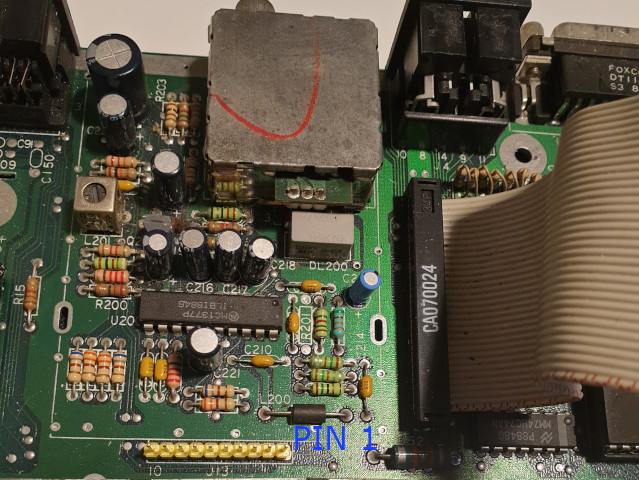
Because there are multiple different ST mainboards you will have to find the right places for the connections yourself. The best way to do is to find the schematics that fits the most with your mainboard.
Lot of ST schematics can be found here. Find your Revision number on your mainboard.
On the schematic find the the video output connector and look for the pins R, G and B and look where these tracks go to. Each part on the mainboard has a number, eg C16 or R35. This number is also visble on your mainboard so that you can find a part to solder a wire on. You can also use a multimeter to see if the part indeed is straight connected to the pin of the Video output port. Repeat this for the Horizontal and Vertical Sync signals.
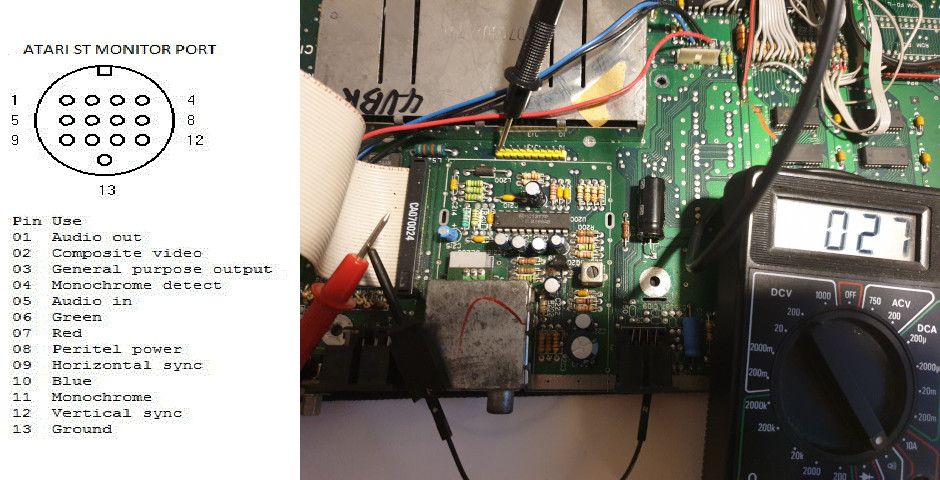
On the image you see that i check the connections from the monitor port. i was lucky because this STFM had a place where i could solder a 10 pin header (the yellow one) which gave me a connection for Red, Green, Blue, Horizontal Sync and Vertical Sync.