Auto fix Guide
A lot of what the validators find can be fixed with one click. The rest needs a person, either because the right answer is not obvious from the asset alone or because getting it wrong would cost you real work.
Warning: Without source control, some of these fixes cannot be taken back. Check the files out in Perforce, or commit what you have in Git, before you run a big batch.
A fixable row in the panel has a Fix button, showing the proposed value where there is one. From the Content Browser, right-click the asset and use Fix Issues, which lists the issue types found on your selection.
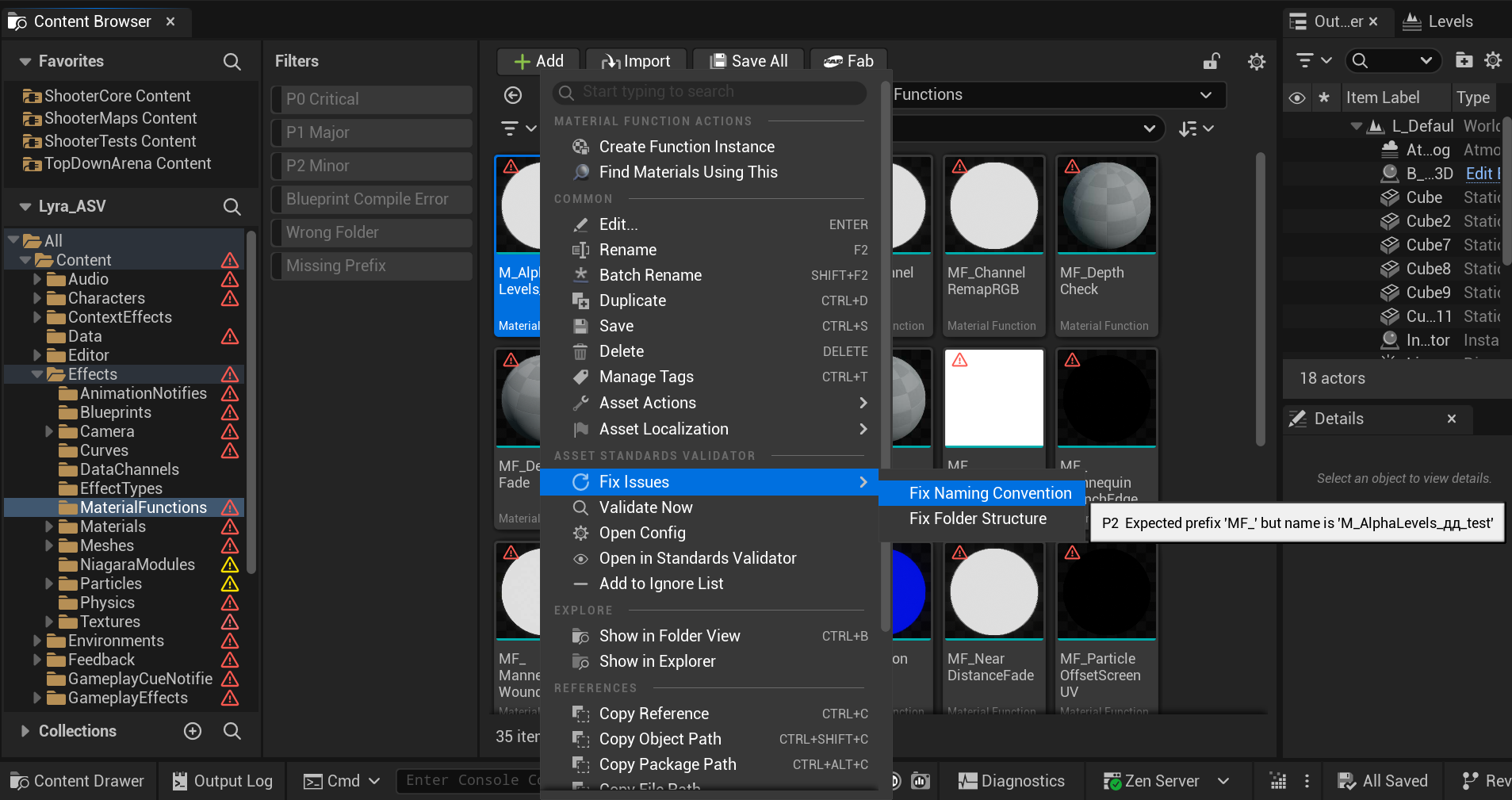
The asset is renamed where it stands, and the engine leaves a redirector at the old path so nothing that references it breaks.
| Rule | What the fix does |
|---|---|
missing_prefix |
Adds the correct prefix. Example: MyTexture → T_MyTexture. If the name would collide with an existing asset, a numeric suffix is appended. |
duplicate_prefix |
Removes the extra prefix. Example: BP_BP_MyActor → BP_MyActor. |
missing_suffix |
Appends the required suffix. Example: SC_Ambient (SoundConcurrency) → SC_Ambient_SC. |
missing_allowed_suffix |
Appends the first allowed suffix for the class. Example for World assets: L_Town → L_Town_P. |
wrong_case |
Capitalizes the first letter of each name segment after the prefix. Example: T_cross_fire → T_Cross_Fire. |
junk_name |
Strips the junk word and applies the correct prefix to what remains. Only fixes when a meaningful name part exists after the junk word. Example: New_BossEnemy → BP_BossEnemy. |
| Rule | What the fix does |
|---|---|
wrong_folder |
Moves the asset to the best matching allowed folder under the current scan root. Example: a Material in /Game/Characters/ moves to /Game/Materials/. Creates redirectors at the old path. |
These change the texture's import settings and save the asset.
| Rule | What the fix does |
|---|---|
texture_wrong_srgb |
Sets the sRGB flag to the correct value for the detected texture type (on for color, off for data). |
texture_wrong_compression |
Sets CompressionSettings to the expected value for the texture type (e.g. TC_NormalMap for _N textures). |
texture_wrong_group |
Sets LODGroup to the expected LOD group for the texture type (e.g. TEXTUREGROUP_UI for _UI textures). |
| Rule | What the fix does |
|---|---|
mesh_nanite_policy |
Enables or disables Nanite on the mesh according to the configured NanitePolicy. Saves the asset. |
| Rule | What the fix does |
|---|---|
stale_redirector |
Runs UE's Fix Up Redirectors on the redirector asset, the same thing you get by right-clicking it in the Content Browser and choosing Fix Up Redirectors. Deletes the redirector and updates all references to point to the new path. |
Three of the Blueprint rules fix themselves by renaming the variable:
| Rule | What the fix does |
|---|---|
bp_bool_no_prefix |
Adds b prefix to the boolean variable name. Example: IsAlive → bIsAlive. |
bp_bool_is_pattern |
Removes the redundant verb prefix. Example: bIsDead → bDead. |
bp_var_not_pascal_case |
Capitalizes the first letter of the variable name. Example: health → Health. |
Warning: A variable rename updates every reference inside that same Blueprint. It does not touch other Blueprints or C++ that read the variable by name. Those you fix yourself, and the compiler will not always tell you.
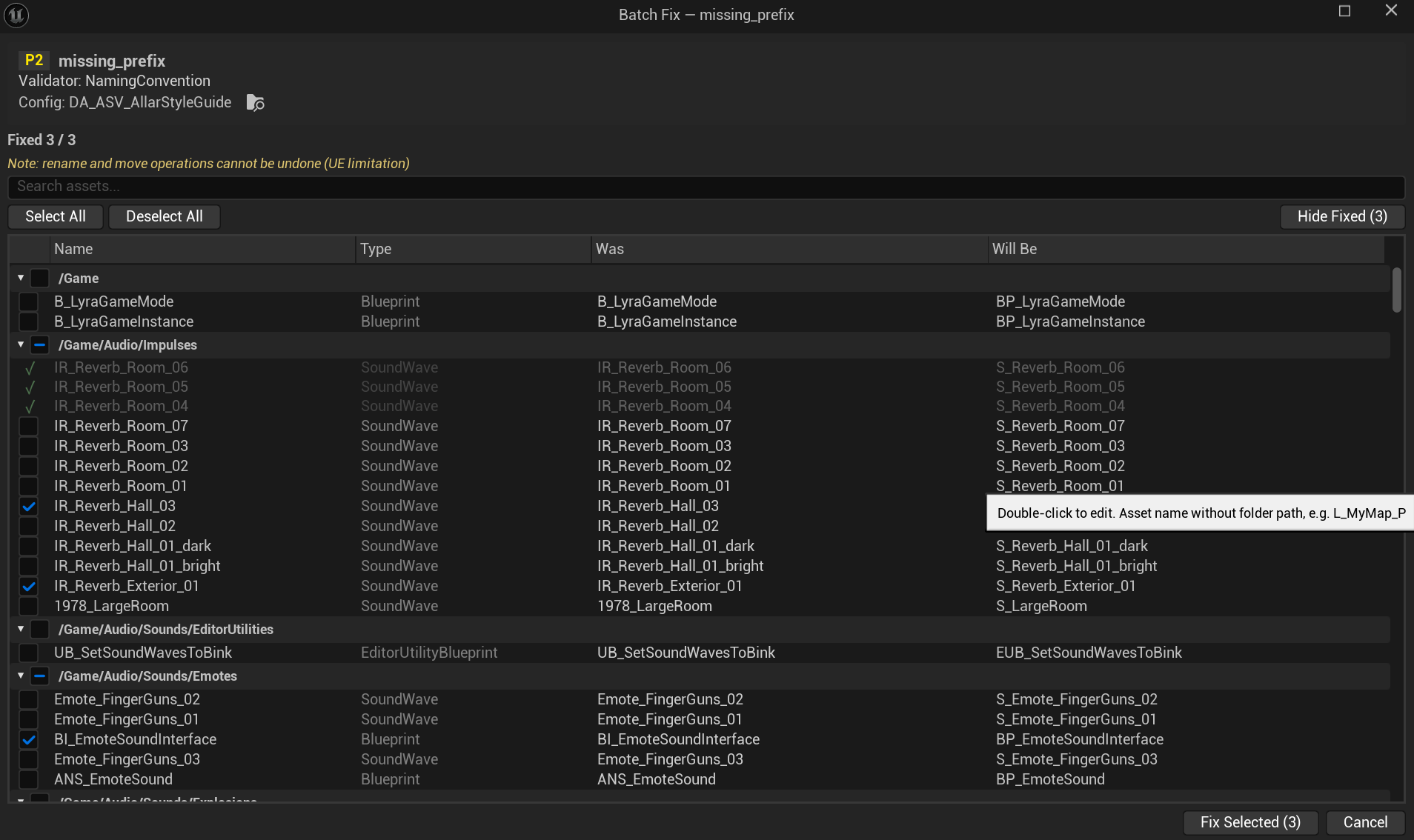
Clicking Fix on two hundred rows is not a plan. Batch Fix applies one rule's fix to everything currently visible in the panel, in one pass, with a review step first.
The Fix All button in the panel toolbar becomes active when:
- All visible (filtered) results share exactly one Rule ID
- At least 2 of those results are auto-fixable
Use the rule filter dropdown to narrow results to a single rule, then click Fix All.
Before the dialog opens, ASV scans for potential conflicts and marks affected rows:
- Name collision. Something with the target name is already sitting at the destination.
- Path collision. For a move, the destination folder already holds that asset.
- Unsaved changes. The package has edits that are not on disk yet. Save it first.
A row in conflict turns orange and its checkbox goes dead; hover it to see why. The whole check runs again right before anything is written, so a conflict that appears while you were reading the dialog still gets caught.
The Batch Fix dialog shows all selected assets in a scrollable list:
- Results grouped by folder, and each folder header collapses
- Every row carries a checkbox, a status icon, the asset name with its full path on hover, the current value and the proposed one
- Search field to filter rows by asset name
- Select All / Deselect All buttons above the list
- Fix Selected stays disabled while nothing is ticked, and counts what is: Fix Selected (12)
Fixes apply one per frame. Each row updates its icon in real time (✓ = fixed, ✗ = failed). The button label tracks progress: Fixing… 12 / 47.
At the end you get a line in the dialog, Fixed 44 / 47, 3 skipped, and a toast. Closing the dialog refreshes the panel.
Undo behavior depends on the type of fix:
-
Property fixes, meaning texture sRGB, compression, LOD group and Blueprint variable renames, all go into one UE transaction. One
Ctrl+Ztakes the whole batch back. - Renames and moves touch the disk and do not undo with Ctrl+Z. The engine leaves a redirector at the old path, so references survive, but the rename itself stands. Source control is your undo here.
| Rule | Why no auto-fix | How to fix |
|---|---|---|
name_pattern_mismatch |
There is no single correct name here, and the tool cannot guess what you meant | Rename in Content Browser |
non_ascii_name |
Transliteration is locale-dependent | Rename to an ASCII name |
folder_contains_unicode |
Same reason. Renaming a folder moves everything inside it. | Rename folder |
folder_not_pascal_case |
Same | Rename folder |
folder_disallowed_name |
Correct target folder depends on project structure | Rename/reorganize folder |
folder_in_developers |
Decision where to move it requires human judgement | Move asset to production folder |
texture_not_power_of_two |
Requires reimport from source at correct size | Reimport texture at power-of-two dimensions |
texture_exceeds_max_size |
Requires reimport or texture editor change | Reduce texture dimensions in the source and reimport |
bp_editable_missing_tooltip |
A meaningful tooltip can't be generated | Add tooltip in Blueprint variable details |
bp_editable_missing_range |
Valid range depends on game logic | Set ClampMin/ClampMax in variable metadata |
bp_var_config_flag |
Removing Config may break runtime behavior | Remove Config flag from variable properties |
bp_vars_uncategorized |
Categories are project-specific | Add categories to editable variables in Blueprint |
bp_var_atomic_type_name |
New name depends on variable meaning | Rename variable (e.g. ScoreFloat → Score) |
bp_var_redundant_context |
Which part of the name to remove depends on intent | Rename variable to remove class context |
var_array_not_plural |
Pluralization rules are language-specific | Rename array variable to plural form |
var_missing_type_name |
Correct type suffix depends on variable purpose | Rename variable to include type (e.g. HitResult) |
blueprint_compile_error |
Error must be understood and fixed in Blueprint editor | Open Blueprint, fix compilation errors, save |
blueprint_compile_warning |
Somebody has to look at it in the Blueprint editor. Usually a deprecated node. | Open Blueprint, review compile warnings, save |
mesh_no_collision |
Collision type and shape depend on gameplay use | Add collision in Static Mesh Editor |
mesh_no_lods |
LOD settings depend on performance budget | Set up LODs in Static Mesh Editor or via auto-LOD |