Repository navigation

Ammonite as a plugin: VST3 and CLAP for Windows (64-bit), with the same engine, panel and screen as the hardware.
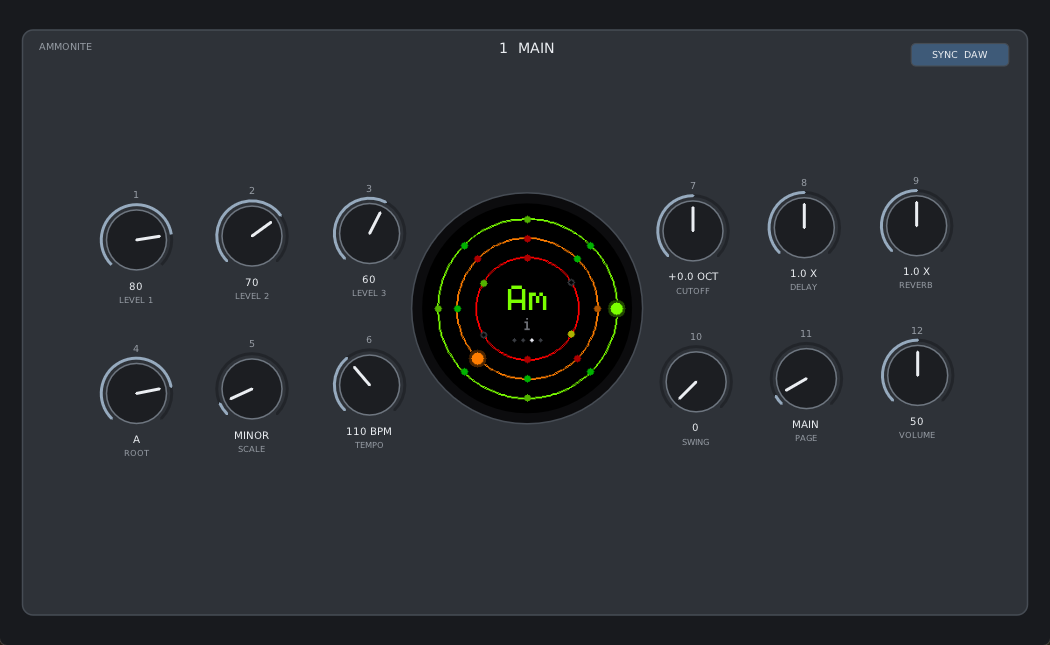
Install: download Ammonite-0.2.0-win64.zip and unzip it. Copy the Ammonite.vst3 folder into C:\Program Files\Common Files\VST3, and/or Ammonite.clap into C:\Program Files\Common Files\CLAP. Rescan plugins in your DAW and load Ammonite on an instrument track.
- Plays by itself as soon as it is loaded, like the hardware.
- SYNC DAW (the default) follows the DAW's tempo and bars: patterns and chord progressions line up with the song and follow the playhead. SYNC FREE runs on its own TEMPO knob.
- The panel: 12 knobs over nine pages and the round screen, drawn by the same code as the hardware display. Drag a knob (Shift: fine), scroll, or double-click it for its default.
- Every knob of every page is an automatable parameter (169 in all), saved with the project. Turning a knob on the panel records automation.
- Any number of instances; 44.1 to 192 kHz; no extra runtime to install.
The plugin's engine is a copy of the firmware's, checked bit for bit against it by the test suite. Tested in FL Studio 2025.
Good to know: bars are always 4/4, and Ammonite ignores MIDI notes, so a DAW's channel mute (which works by holding back notes) does not silence it: mute its mixer track instead.
The firmware (ammonite.bin) and the owner's manual are unchanged since 0.1.0 and attached again here, so this release is complete.
Licenses: Ammonite is MIT. The plugin is built with DPF (ISC) and DaisySP (MIT); its reverb, ReverbSc, is LGPL-2.1, with its full source in this repository (plugin/engine). The notices are in the zip.