
Vandal Hearts — PC Port v1.6.2
A native PC port of Vandal Hearts (US, SLUS_004.47). You must supply your own
legally-owned disc image (.bin); the download does nothing without it.
A small maintenance release, prompted by the first user bug report after release. No gameplay
changes; normal mode remains byte-for-byte the retail game.
Fixed
- A damaged disc image no longer hangs the game silently. A
.binthat was truncated
(interrupted copy/download) or carried garbage sectors (bad rip) used to pass the quick boot
check and then freeze the game — typically right after the[HD] pack detectedconsole line,
with no error at all. The port now validates the image three ways: the file size must be a whole
number of raw CD sectors at startup, and every sector read during play is checked for the CD
sync pattern and its own embedded sector address. A damaged image now stops with a clear message
naming the exact broken sector (see
troubleshooting.md) instead of hanging. Intact
images are unaffected — the checks are structural, so any valid dump still works, and their cost
is unmeasurable (a 15-byte compare on data already being read).
What it looks like
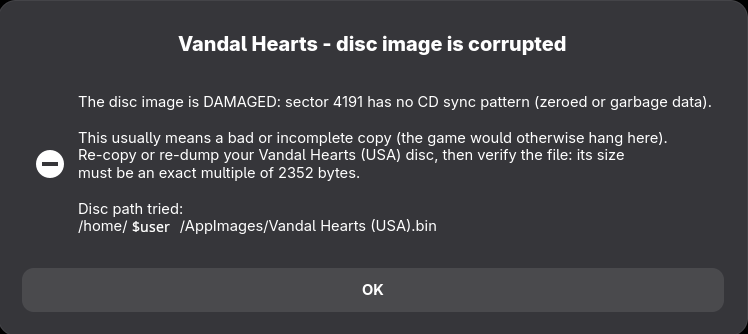
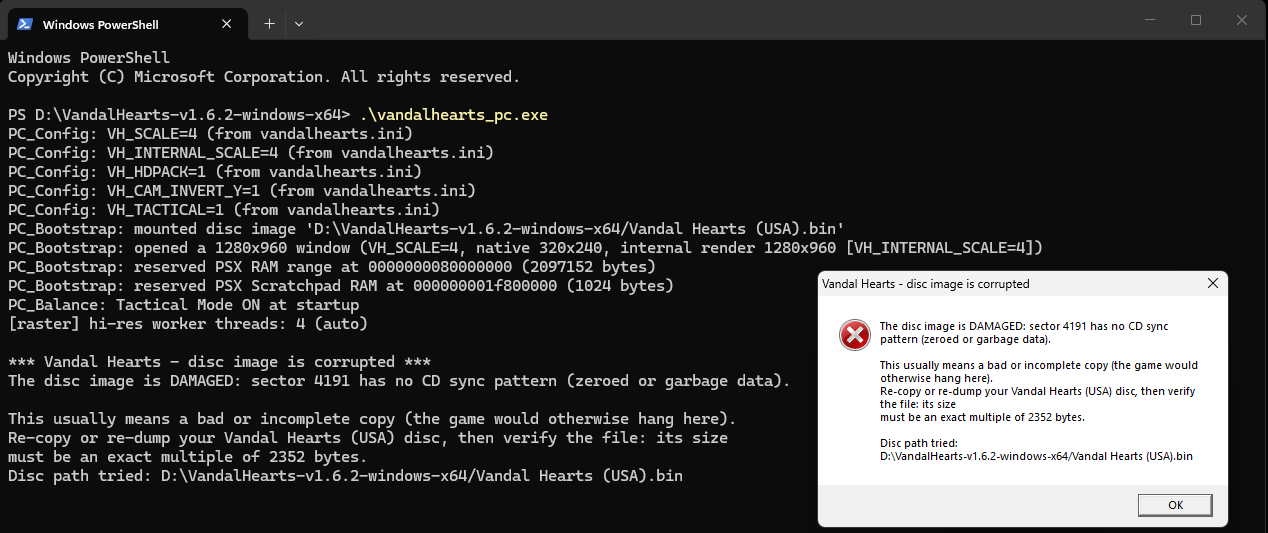
Instead of freezing, a damaged disc image now stops immediately and says exactly what is wrong —
including the sector that failed — on both platforms.
Linux: the message now also appears as a dialog, so a double-clicked AppImage no longer just closes
without explanation.
Windows: the console output and the message box carry the same detail.
Downloads
| Platform | File | How to run |
|---|---|---|
| Windows 10/11 | VandalHearts-v1.6.2-windows-x64.zip |
Unzip; put your disc in a game\ folder next to vandalhearts_pc.exe; run it. |
| Linux (glibc ≥ 2.34) | VandalHearts-v1.6.2-linux-x86_64.AppImage + vandalhearts.ini |
Put both together; put your disc in a game/ folder beside the .AppImage; chmod +x and run. Needs FUSE2. |
| Any | VandalHearts-v1.6.2-Manual.pdf |
The Player Manual: setup, controls, features, troubleshooting. |
| Optional | VandalHearts-v1.6.2-hdpack.zip |
HD backgrounds + movies. Unzip so hdpacks/ sits beside the executable. Unchanged since v1.6.1 — keep yours if you have it. |
Config: edit vandalhearts.ini next to the executable (window scale, audio, etc.).
Note on contents
A release binary embeds a portion of game-derived data (the executable's static
data segment, a small BIOS-derived font, reconstructed tables) so the port can
run — © Konami / © Sony, no ownership claimed. It is a fraction of the game; the
bulk loads from your own disc at runtime. See NOTICE/DISCLAIMER.
Verify downloads against SHA256SUMS.txt.
Optional HD pack
VandalHearts-v1.6.2-hdpack.zip — higher-resolution backgrounds + re-encoded FMV movies.
Optional; the game runs identically without it. The pack is identical to the v1.6.1 one
(same file, same checksum), so if you already have it installed there is nothing to re-download.
Unzip so hdpacks/ sits next to the executable, then enable HD PACK in the Select+Start options
(see docs/hd-pack.md).
This is upscaled derivative art (© Konami), provided for convenience and also buildable from your
own disc — see NOTICE / DISCLAIMER.