Nativune 0.1.34

Nativune 0.1.34
Nativune is an unofficial, native Windows desktop app for YouTube Music. It shows the official YouTube Music website in its own window and adds native controls such as a Compact mini player, tray and taskbar buttons. It is not affiliated with, endorsed by or sponsored by Google or YouTube, and it does not download media or use a private playback API. It blocks ads only if you turn that on yourself (off by default).
Unsigned build. The installer is not yet Authenticode-signed, so Windows may show Unknown Publisher or a Microsoft Defender SmartScreen warning. Download only from this page and check the SHA-256 before running it.
What's new
-
OBS overlay: early preview. Nativune can show the playing song's title, artist, artwork and progress as a "now playing" widget in OBS Studio, added as a Browser source. It is off by default; turn it on in Settings › OBS or with the OBS overlay button on the toolbar. See the OBS overlay guide.
This is a preview, so things will change. Themes, options, link formats and saved looks may change in later versions, and the Overlay designer's live preview uses noticeable extra CPU while it is open. When the overlay is off, none of it runs.
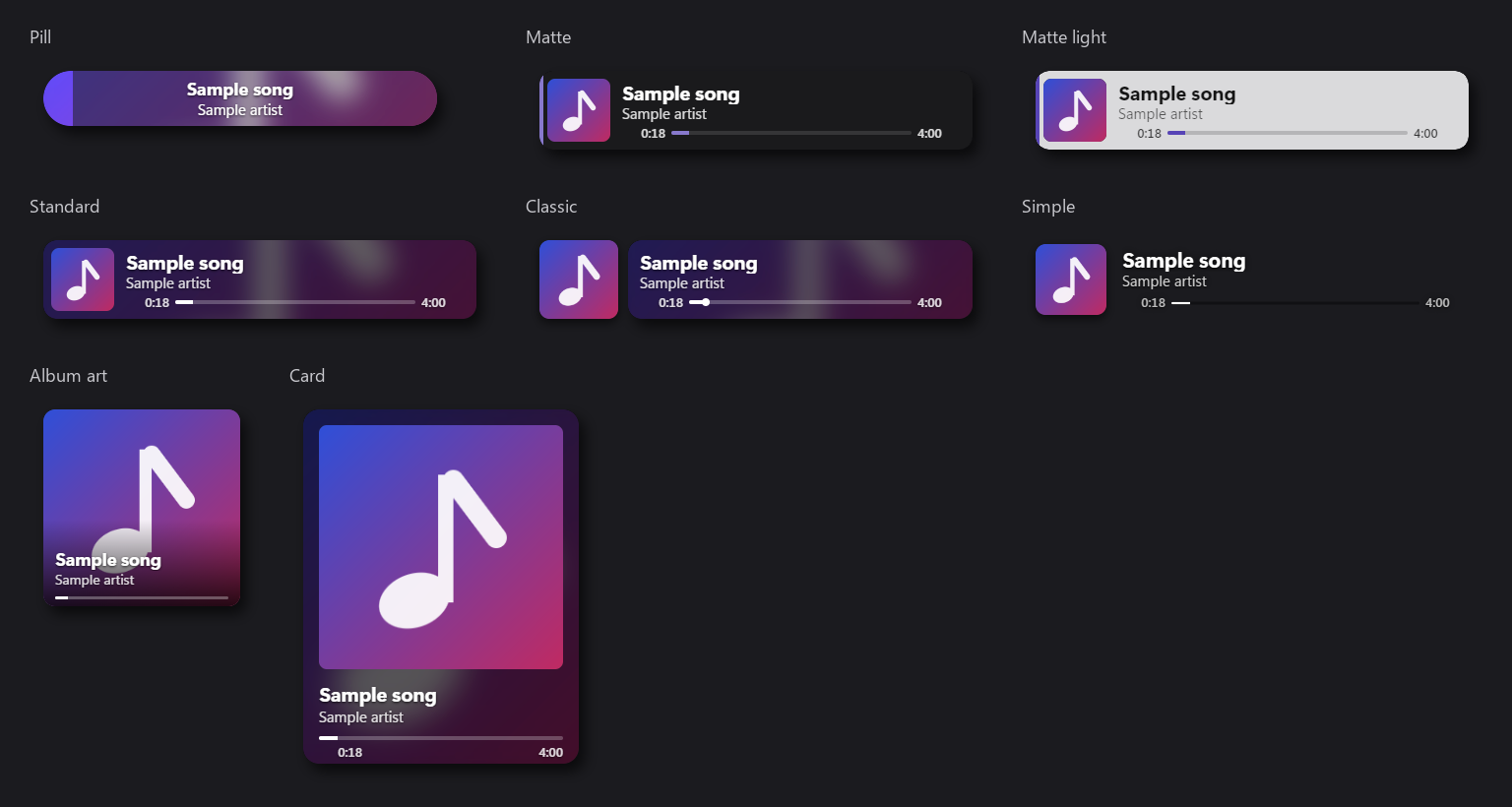
- Eight themes: Pill, Matte, Matte light, Standard, Classic, Simple, Album art and Card.
- Saved looks: keep up to 16, each with its own OBS link, so different scenes can use different looks.
- Overlay designer: a native window (Settings › OBS › Open Overlay designer…) with a live, isolated preview. Change the theme, font, size, width, alignment, colours, what is shown, paused behaviour, show/hide animations, background blur and progress/background brightness, then Save look. Unsaved changes never reach OBS.
- Privacy: while it is on, apps on this PC can read the song title, artist, artwork and playback time at
http://localhost:47813/. Other PCs and websites cannot. Nativune downloads the artwork from YouTube's image servers and passes it to OBS; no YouTube link or video ID is included.
Quick update
Setup is unchanged (version 1.0.3), so updating from 0.1.33 is a quick update: only the changed app files are downloaded.
Install
- Download
Nativune-Setup.exeandSHA256SUMS.txtfrom this release. - In PowerShell run
Get-FileHash .\Nativune-Setup.exe -Algorithm SHA256and compare it withSHA256SUMS.txt. Expected:b3c963d18bb670aa593db2589c28be586b8b2d08115c8bb1cc9f2e9807728408. - Run Setup. It checks for the Microsoft .NET 10 Runtime, Windows App SDK, VC++ runtime and WebView2, and asks before installing any that are missing or out of date. Default location:
%LOCALAPPDATA%\Nativune. Upgrades keep your profile and settings.
If you already have Nativune 0.1.10 or later, the update button in the toolbar offers this version.
Build and known limits
Built by CI run 37373876985 from commit 493b9d9. The files here are that run's output, checked again after download. Windows x64 only. Setup version 1.0.3.
Before release, these passed:
- the app self-check and
native-fixtureon the release build, and its check that test-only and benchmark code is removed; - the overlay's end-to-end tests on disposable profiles: Settings, the toolbar toggle, saved looks, the designer (open, save, discard, overlay turned off and on again), artwork caching and retry, text and progress, and every theme's frames;
- real-OBS runs (OBS Studio 32.2.2) of all eight themes and the guide images.
Known limits of this preview: with the designer open, its live preview adds roughly 0.4–2.4 percentage points of CPU (budget 0.5), which will be improved later. Not tested: Narrator, high contrast, 200% text scaling, a second monitor at a different scaling, signed-in or Premium playback, and the in-app quick update to this version.