







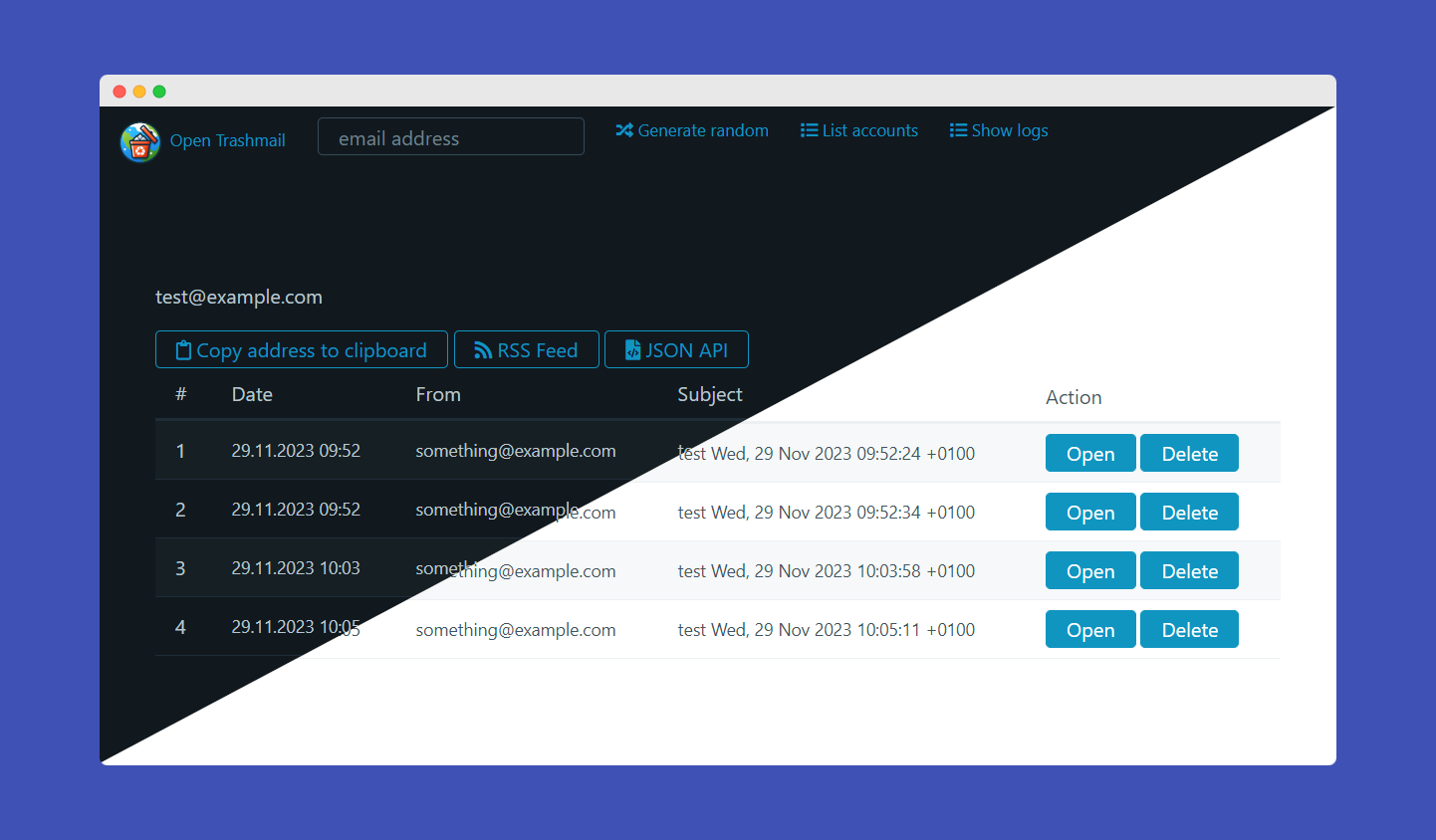
- Python-powered mail server that works out of the box for any domain you throw at it
RSS feedfor every email addressJSON APIfor integrating it in your own projects. Can be used to automate 2fa emailsWebhookswith per-email configuration and customizable JSON payloads- Handles attachments
- Supports
Plaintext,STARTTLSandTLS on connect - Web interface
- Automatic dark/light mode switcher
- Download attachments
- Delete emails
- Generate random email addresses
- View server logs and list all accounts as admin
- 100% file based, no database needed
- Can be used as Email Honeypot or to programmatically solve 2fa emails
- No need to pre-create email addresses. Any valid email address can be sent to
| Endpoint | Explanation | Example output |
|---|---|---|
/rss/[email-address] |
Renders RSS XML for rss clients to render emails | 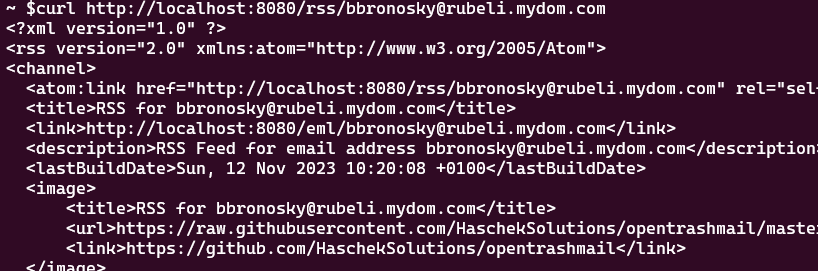 |
/api/raw/[email-address]/[id] |
Returns the raw email of the address. Warning: Output can be as large as the email itself so might be up to 20mb for mails with large attachments | 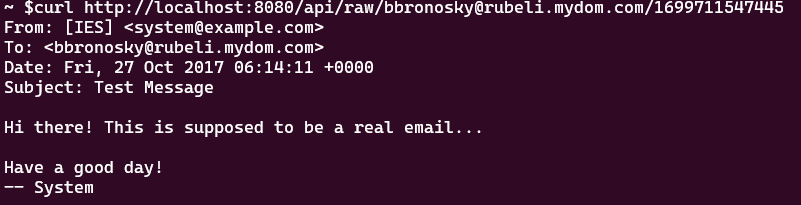 |
/api/attachment[email-address]/[attachment-id] |
Returns the attachment with the correct mime type as header | |
/api/delete/[email-address]/[id] |
Deletes a specific email message and their attachments | |
/api/deleteaccount/[email-address] |
Deletes all messages and attachments of this email account | |
/api/webhook/get/[email-address] |
Get webhook configuration for an email address | |
/api/webhook/save/[email-address] |
Save webhook configuration for an email address | |
/api/webhook/delete/[email-address] |
Delete webhook configuration for an email address |
| Endpoint | Explanation | Example output |
|---|---|---|
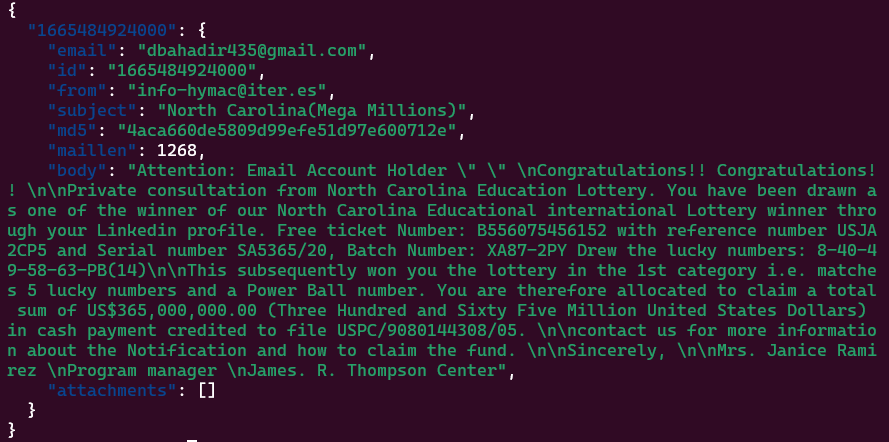
/json/[email-address] |
Returns an array of received emails with links to the attachments and the parsed text based body of the email. If ADMIN email is entered, will return all emails of all accounts |
 |
/json/[email-address]/[id] |
To see all the data of a received email, take the ID from the previous call and poll this to get the raw and HTML body of the email. Can be huge since the body can contain all attachments in base64 | 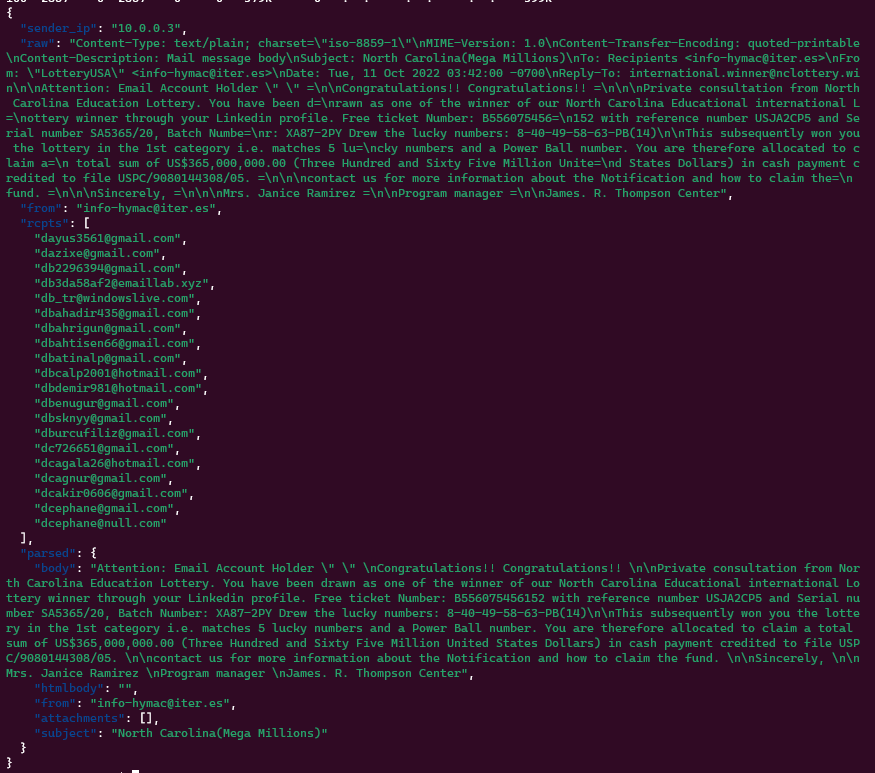 |
| /json/listaccounts | If SHOW_ACCOUNT_LIST is set to true in the config.ini, this endpoint will return an array of all email addresses which have received at least one email |
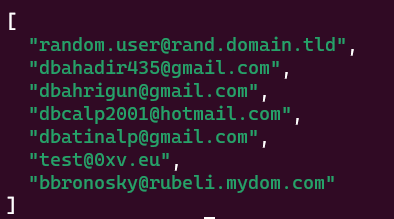 |
Just edit the config.ini You can use the following settings
URL-> The url under which the GUI will be hosted. No tailing slash! example: https://trashmail.mydomain.eu. Can contain a path if the UI is hosted in a sub folder behind a reverse proxy (eg.https://mydomain.eu/trashmail)DOMAINS-> Comma separated list of domains this mail server will be receiving emails on. It's just so the web interface can generate random addressesMAILPORT-> The port the Python-powered SMTP server will listen on.Default: 25ADMIN-> An email address (doesn't have to exist, just has to be valid) that will list all emails of all addresses the server has received. Kind of a catch-allDATEFORMAT-> How should timestamps be shown on the web interface (moment.js syntax)PASSWORD-> If configured, site and API can't be used without providing it via form, POST/GET variablepasswordor http headerPWD(eg:curl -H "PWD: 123456" http://localhost:8080/json...)ALLOWED_IPS-> Comma separated list of IPv4 or IPv6 CIDR addresses that are allowed to use the web UI or APITRUSTED_PROXIES-> Comma separated list of CIDR ranges of reverse proxies whoseX-Forwarded-For/CF-Connecting-IPheaders are trusted forALLOWED_IPS. Proxies in private networks are always trusted. Only needed if a public proxy (eg. Cloudflare) connects directly to OpenTrashmailSMTP_HOSTNAME-> Hostname the mail server uses in its greeting and EHLO response. Should be the name your MX record points to (eg.mail.example.com). Defaults to the first domain inDOMAINSATTACHMENTS_MAX_SIZE-> Max size for each individual attachment of an email in BytesMAILPORT_TLS-> If set to something higher than 0, this port will be used for TLSC (TLS on Connect). Which means plaintext auth will not be possible. Usually set to465. NeedsTLS_CERTIFICATEandTLS_PRIVATE_KEYto workTLS_CERTIFICATE-> Path to the certificate (chain). Can be relative to the /python directory or absoluteTLS_PRIVATE_KEY-> Path to the private key of the certificate. Can be relative to the /python directory or absoluteWEBHOOK_URL-> Global webhook URL. If set, will send a POST request to this URL with the JSON data of the email as body for all emails (unless overridden by per-email webhook)ADMIN_ENABLED-> Enables the admin menu. DefaultfalseADMIN_PASSWORD-> If set, needs this password to access the admin menuNOTICE-> Optional text shown on top of every page, eg. to tell your users that emails are deleted after 30 days. Use\nfor line breaks
In Docker you can use the following environment variables:
| ENV var | What it does | Example values |
|---|---|---|
| URL | The URL of the web interface. Used by the API and RSS feed | http://localhost:8080 |
| DISCARD_UNKNOWN | If true the mail server rejects recipients on domains that are not in DOMAINS. Strongly recommended on public servers, with false the server accepts mail for any domain which looks like an open relay to blacklist operators |
true, false |
| DOMAINS | The whitelisted Domains the server will listen for. If DISCARD_UNKNOWN is set to false, this will only be used to generate random emails in the webinterface | |
| SHOW_ACCOUNT_LIST | If set to true, all accounts that have previously received emails can be listed via API or webinterface |
true,false |
| ADMIN | If set to a valid email address and this address is entered in the API or webinterface, will show all emails of all accounts. Kind-of catch-all | test@test.com |
| DATEFORMAT | Will format the received date in the web interface based on moment.js syntax | "MMMM Do YYYY, h:mm:ss a" |
| SKIP_FILEPERMISSIONS | If set to true, won't fix file permissions for the code data folder in the container. Useful for local dev. Default false |
true,false |
| PUID / PGID | Run the web server and mail server as this user/group id instead of 100/101. Use the owner of your mounted data and logs folders, eg. for network shares |
1000 / 100 |
| NOTICE | Text shown on top of every page. \n for line breaks |
Emails are deleted after 30 days |
| PASSWORD | If configured, site and API can't be used without providing it via form, POST/GET variable password or http header PWD |
yousrstrongpassword |
| ALLOWED_IPS | Comma separated list of IPv4 or IPv6 CIDR addresses that are allowed to use the web UI or API | 192.168.5.0/24,2a02:ab:cd:ef::/60,172.16.0.0/16 |
| TRUSTED_PROXIES | CIDR ranges of public reverse proxies whose client IP headers are trusted for ALLOWED_IPS (proxies in private networks are always trusted) |
173.245.48.0/20,103.21.244.0/22 |
| SMTP_HOSTNAME | Hostname used in the SMTP greeting and EHLO response. Set it to the host your MX record points to. Defaults to the first domain in DOMAINS |
mail.example.com |
| ATTACHMENTS_MAX_SIZE | Max size for each individual attachment of an email in Bytes | 2000000 = 2MB |
| MAILPORT_TLS | If set to something higher than 0, this port will be used for TLSC (TLS on Connect). Which means plaintext auth will not be possible. Usually set to 465. Needs TLS_CERTIFICATE and TLS_PRIVATE_KEY to work |
465 |
| TLS_CERTIFICATE | Path to the certificate (chain). Can be relative to the /python directory or absolute | /certs/cert.pem or cert.pem if it's inside the python directory |
| TLS_PRIVATE_KEY | Path to the private key of the certificate. Can be relative to the /python directory or absolute | /certs/privkey.pem or key.pem if it's inside the python directory |
| WEBHOOK_URL | If set, will send a POST request to this URL with the JSON data of the email as body. Can be used to integrate OpenTrashmail in your own projects | https://example.com/webhook |
| ADMIN_ENABLED | Enables the admin menu. Default false |
false / true |
| ADMIN_PASSWORD | If set, needs this password to access the admin menu | 123456 |
Set URL to the full address including the path (eg. https://example.com/trashmail). All links, API calls and inline images will use that path. Your reverse proxy should strip the path before passing requests to OpenTrashmail, eg. for nginx:
location /trashmail/ {
    proxy_pass http://opentrashmail:80/;
}The "Generate random" button builds addresses from the word lists in wordlists/adjectives.txt and wordlists/nouns.txt (one word per line, only a-z, 0-9 and - are used). To use your own words in Docker, mount your files over them:
-v /path/to/nouns.txt:/var/www/opentrashmail/wordlists/nouns.txt:roSince v1.3.0 TLS and STARTTLS are supported by OpenTrashmail.
Be aware there are two ways to use TLS with email
- STARTTLS
- TLS on Connect (TLSC)
STARTTLS does not require a specific port as it starts out as plaintext and then upgrades to TLS if the server advertises the "STARTTLS" command (which OpenTrashmail does automatically if the Certificate and key settings are configured). Since it's run on the default MAILPORT you don't need to open other ports for it to work.
TLS on connect is wrapping TLS around the exposed ports so it's not possible to talk to it in plaintext and therefore it needs a different port to work. Usually port 465 is used for this.
For TLS to work you first need a certificate that corresponds with the hostname of the SMTP server. This can be done using Lets'encrypt and even works with wildcard certificates.
For testing environments you can create a certificate by running the following command from inside the python folder:
openssl req -x509 -newkey rsa:4096 -keyout key.pem -out cert.pem -days 365 -nodes -subj '/CN=localhost'You then need to set the settings for MAILPORT_TLS (not needed if you only want to support STARTTLS), TLS_CERTIFICATE and TLS_PRIVATE_KEY.
The /docs/Dev.md file contains a few hints on how to debug and test TLS and TLSC connections. It uses the tool swaks which should be avaialable in every package manager.
- Mail server
- Storing received mails in JSON
- Storing file attachments
- Docker files and configs
- Web interface
- Choose email
- Get random email address
- Download attachments safely
- Display Text/HTML
- API so all features from the site can also be automated and integrated
- Automatically check for new emails while on site
- Admin overview for all available email addresses
- Option to show raw email
- Delete messages
- Make better theme
- Secure HTML, so no malicious things can be loaded
- Display embedded images inline using Content-ID
- Configurable settings
- Choose domains for random generation
- Choose if out-of-scope emails are discarded
- Automated cleanup of old mails
- Optionally secure whole site with a password
- Optionally allow site to be seen only from specific IP Range
- Honeypot mode where all emails are also saved for a catchall account (implemented with the ADMIN setting)
In your DNS panel create a MX record for your domain pointing to the IP of the server hosting OpenTrashmail.
The following example will allow you to send emails to example.com
mail.example.com.	IN	A		93.184.216.34
example.com.    14400   IN      MX      10      mail.example.com.
This advanced example will allow you to use a wildcard domain:
mail.example.com.	IN	A		93.184.216.34
*.example.com.    14400   IN      MX      10      mail.example.com.
This in combination with the configuration option "DOMAINS" (eg docker parameter -e DOMAINS="*.example.com") will allow you to use any address with any subdomain of example.com (eg test@robot.example.com, john@lynn.example.com, etc..)
Simple start with no persistence
docker run -it -p 25:25 -p 80:80 -e URL="https://localhost:80" hascheksolutions/opentrashmail:1Saving data directory on host machine
docker run -p 80:80 -p 25:25 -e URL="https://localhost:80" -v /path/on/host/where/to/save/data:/var/www/opentrashmail/data hascheksolutions/opentrashmail:1Complete example with running as daemon, persistence, a domain for auto-generation of emails, acceptng only emails for configured domains, cleanup for mails older than 90 days and auto restart
docker run -d --restart=unless-stopped --name opentrashmail -e "DOMAINS=mydomain.eu" -e "SMTP_HOSTNAME=mail.mydomain.eu" -e "DATEFORMAT='D.M.YYYY HH:mm'" -e "DISCARD_UNKNOWN=true" -e "DELETE_OLDER_THAN_DAYS=90" -p 80:80 -p 25:25 -v /path/on/host/where/to/save/data:/var/www/opentrashmail/data hascheksolutions/opentrashmail:1The heart of Open Trashmail is a Python-powered SMTP server that listens on incoming emails and stores them as JSON files. Every address on your domains works without creating it first, the server will just catch everything it receives. You only have to expose port 25 to the web and set an MX record of your domain pointing to the IP address of your machine.
Many websites refuse addresses from known trashmail domains. These lists are mostly built by crawling public trashmail sites and by probing mail servers. Out of the box OpenTrashmail:
- Greets like a regular mail server (
220 mail.example.com ESMTP) instead of announcing the software it runs on - Rejects recipients on foreign domains during the SMTP dialog (with
DISCARD_UNKNOWN=true) so it doesn't look like an open relay - Answers temporary errors with
451so senders retry instead of bouncing, and never leaks internal error messages - Tells search engines not to index the web UI, API and RSS feeds (
robots.txt,X-Robots-Tagheader and meta tags) - Sends
Referrer-Policy: no-referrerso websites don't see your trashmail URL when you click a link in an email - Hides the nginx and PHP versions
What you should do yourself:
- Host the web interface on a different domain than the ones you receive mail on, so visiting your mail domain doesn't lead to a trashmail site. Optionally protect it with
PASSWORDorALLOWED_IPS - Set
SMTP_HOSTNAMEto the name your MX record points to and set a matching reverse DNS (PTR) record for your server's IP - Configure
TLS_CERTIFICATEandTLS_PRIVATE_KEYso senders can use STARTTLS. A mail server without TLS looks unusual these days - Don't share addresses from your domain publicly (e.g. in forums), and use a domain that's not used by many people
OpenTrashmail supports both global and per-email webhooks for maximum flexibility:
- Via Web UI: Click "Configure Webhook" on any email address page
- Via API:
POST /api/webhook/save/email@example.comwith your configuration
- Custom endpoint URL for each email address
- Customizable JSON payloads with template placeholders
- Automatic retry with exponential backoff (max 10 attempts)
- HMAC-SHA256 signature for security
- Simple web interface configuration
| Placeholder | Description | Example |
|---|---|---|
{{to}} |
Recipient email | test@example.com |
{{from}} |
Sender email | sender@domain.com |
{{subject}} |
Email subject | Hello World |
{{body}} |
Plain text body | Email content... |
{{htmlbody}} |
HTML body | <p>Email content...</p> |
{{sender_ip}} |
Sender's IP | 192.168.1.100 |
{{attachments}} |
Attachment array | [{"filename":"doc.pdf","size":1024}] |
{
  "email": "{{to}}",
  "from": "{{from}}",
  "subject": "{{subject}}",
  "body": "{{body}}",
  "attachments": {{attachments}}
}
Note: {{attachments}} outputs a JSON array - don't wrap it in quotes.
| Endpoint | Method | Description |
|---|---|---|
/api/webhook/get/[email] |
GET | Get webhook configuration |
/api/webhook/save/[email] |
POST | Save webhook configuration |
/api/webhook/delete/[email] |
DELETE | Delete webhook configuration |
curl -X POST http://localhost:8080/api/webhook/save/test@example.com \
  -d "enabled=true" \
  -d "webhook_url=https://myapi.com/webhook" \
  -d 'payload_template={"email":"{{to}}","subject":"{{subject}}"}' \
  -d "max_attempts=5" \
-d "secret_key=your-secret-key"When a secret key is configured, OpenTrashmail includes an X-Webhook-Signature header with each request containing the HMAC-SHA256 signature of the request body.
PHP:
$payload = file_get_contents('php://input');
$signature = $_SERVER['HTTP_X_WEBHOOK_SIGNATURE'] ?? '';
$expected = hash_hmac('sha256', $payload, 'your-secret-key');

if (!hash_equals($expected, $signature)) {
    http_response_code(401);
    exit('Invalid signature');
}
Python:
import hmac
import hashlib

def verify_webhook(request):
    payload = request.body
    signature = request.headers.get('X-Webhook-Signature', '')
    expected = hmac.new(
        b'your-secret-key',
        payload,
        hashlib.sha256
    ).hexdigest()

    if not hmac.compare_digest(expected, signature):
        return HttpResponse('Invalid signature', status=401)
Node.js:
const crypto = require('crypto');

function verifyWebhook(req, res) {
    const signature = req.headers['x-webhook-signature'];
    const expected = crypto
        .createHmac('sha256', 'your-secret-key')
        .update(req.rawBody)
        .digest('hex');

    if (signature !== expected) {
        return res.status(401).send('Invalid signature');
    }
}Use the included test script for quick verification:
# Simple test
python3 tools/test_webhook.py test@example.com --send-email

# With signature verification
python3 tools/test_webhook.py test@example.com --secret "your-secret-key" --send-email- Webhook URLs cannot point to localhost or private IP ranges (SSRF protection)
- Maximum 10 retry attempts to prevent resource exhaustion
- Payload templates must be valid JSON
- All placeholders are properly escaped to prevent JSON injection