Repository navigation
Sprint 1
The students at Los Andes University who lose personal belongings on campus often need to physically visit the Lost and Found office without knowing whether their item has already been recovered. The process also offers limited ways to report items, receive updates, and verify ownership securely. This creates unnecessary trips, uncertainty, and inefficient record keeping.
This problem was confirmed as our final one for the semester based on the interviews and Journey Map (see Journey Map), which showed repeated visits to the office, no status visibility, and no reliable way to verify ownership.
Our solution is a mobile app that lets students report, search, and track lost and found items on campus, without needing to visit the Lost and Found office for every step.
The app will let a student:
- Report a lost item digitally with its type, location, date, and distinguishing details, avoiding an initial in-person visit.
- Browse a catalog of found items registered by the office or by other students, to check remotely if their item has turned up.
- Track the status of their report (reported, found, ready to pick up) instead of visiting repeatedly.
- Receive a notification when a found item matches something they reported lost, closing the loop automatically.
To make the process more efficient, the app will include smart features such as automatic matching of lost and found reports (by location, date, object type, and description) and, in a later iteration, image recognition to compare photos. Ownership will be verified through private questions provided by the student who reports the item, adding security beyond a simple description match.
This solution responds directly to the pain points found in our interviews and Journey Map: unnecessary trips, uncertainty about an item's status, and no secure way to verify ownership.
Our solution will use an annual institutional subscription model. The university will pay a yearly fee to use the Lost and Found platform, while students and university staff will have access to the application without any individual payment.
The annual subscription would include:
- Access to the student and staff applications.
- Lost and found item registration and management.
- Notifications and item status tracking.
- Ownership verification and claim traceability.
- Analytics and reports for university administrators.
- Maintenance, updates, and technical support.
The subscription could be priced according to factors such as the number of campuses or the size of the university.
An annual model was selected instead of charging users directly because the university is the organization that receives the operational benefits of the platform. It also provides predictable recurring revenue while keeping the service free and accessible for students.
Our solution provides universities with a centralized and traceable way to manage lost and found items while giving students an easier way to report, search for, and recover their belongings.
Unlike the current process, where students may need to repeatedly visit the Lost Items Office without knowing whether their item has arrived, the application allows them to report lost items digitally, check possible matches, receive notifications, and track the status of their report.
For university staff, the platform provides a structured inventory of found items, ownership verification, claim records, and analytics that improve the organization and traceability of the process.
A safer and more efficient way for universities to connect lost items with their owners, reducing uncertainty for students and providing staff with a centralized, traceable, and data-driven Lost and Found process.
| Persona | Problem | Alternative | Solution |
|---|---|---|---|
| Nicolas Martinez – Student who lost an item | He does not know if his lost item has already arrived at the Lost Items Office, so he may waste time going several times. | He goes physically to the office and asks if the item has arrived. If it is not there, he returns another day. | Allow students to check the status of their report and receive a notification when a possible match is found. |
| Nicolas Martinez – Student who lost an item | He has no easy way to report a lost item immediately after noticing that it is missing. | He asks friends, retraces his steps, and later explains what happened when he visits the Lost Items Office. | Allow students to create a digital lost-item report with the item type, description, location, date, and time. |
| Nicolas Martinez – Student who lost an item | He cannot easily know if one of the objects already found by the University could be his. | He visits the office and describes the object so an employee can manually search for a similar item. | Provide a catalog of found items with general information so he can check possible matches before going to the office. |
| Nicolas Martinez – Student who lost an item | Similar items can make it difficult to prove that a specific object really belongs to him. | He answers questions about the color, brand, model, or location where the object was lost. | Use private characteristics and verification questions to help confirm ownership before the item is returned. |
| Santiago Ramirez – Student who finds an item | He may find an item but not know what he should do with it or who should receive it. | He asks another student or employee, takes it to security, or leaves it with a nearby university service. | Provide a clear found-item reporting process with instructions about what to do and where the item should be delivered. |
| Santiago Ramirez – Student who finds an item | Taking a found object to the correct office may require a detour and interfere with his classes or other activities. | He keeps the object until he has time to deliver it or gives it to the first university employee he finds. | Show authorized or convenient drop-off locations where he can safely deliver the found item. |
| Santiago Ramirez – Student who finds an item | He may forget useful details about where and when the object was found. | He explains what he remembers when he eventually gives the object to someone. | Allow him to immediately register the location, approximate time, description, and optional photo from his phone. |
| Santiago Ramirez – Student who finds an item | After delivering an object, he may not know if it was correctly registered in the Lost Items system. | He simply leaves the object with an employee and assumes that the rest of the process will be completed. | Provide a confirmation that the found item was successfully registered and received by the corresponding service. |
| Maria Gonzalez – Library Assistant | Found items may arrive with incomplete information, making them more difficult to identify later. | She records whatever information the person provides using the current manual process. | Use a standardized digital form with required fields such as category, location, date, time, and description. |
| Maria Gonzalez – Library Assistant | Searching for a specific object among many stored items can take time, especially when several objects look similar. | She manually checks stored items and existing records based on the description given by the student. | Provide a searchable inventory with filters such as item category, date, location, and characteristics. |
| Maria Gonzalez – Library Assistant | It can be difficult to determine whether the person asking for an item is really its owner. | She asks the student to describe the object and manually compares the answers with the available information. | Show private verification information so she can compare it with the student's answers before returning the item. |
| Maria Gonzalez – Library Assistant | There may be little traceability about what happens to an item after it is received, transferred, or claimed. | She depends on manual records or communication with other employees to know what happened to the item. | Keep a digital history showing when the item was registered, transferred, matched, claimed, and who received it. |

- Camilo
- Alex
- Sofia
- Emilio
- Daniel
- Jhostin
- Sofia
- Prospect User This empathy Map was made by the whole team
- What is the average response time of the app when searching for possible matches between lost and found item reports?
- How long does the application take to register a new lost or found item report?
- How many possible matches are found for a student's lost-item report?
- At which stage of the process (reported, found, ready to pick up, claimed) do reports get stuck the most?
- Based on previous reports, what is the estimated recovery probability for an item with the reported characteristics?
- How long does a report take on average to move from "reported" to "found", and how does this vary by item category?
- Which app features are used most frequently by students?
- What percentage of students review a possible match after receiving a notification?
- How does the successful ownership-verification rate differ between reports that include private identifying characteristics and those that do not?
- How does the item recovery rate change depending on whether students use manual search or the matches suggested by the application?
- What types of unclaimed items at the end of the semester have the potential for donation to external organizations?
- What types of frequently found and unclaimed items at the end of the semester could be used in reuse campaigns carried out by student organizations?
(Types 2 and 3)
- What information provided by the student generates the most accurate matches and should be prioritized in the report?
(Types 1 and 3)
- Which system features have the longest response times and should be prioritized for optimization?
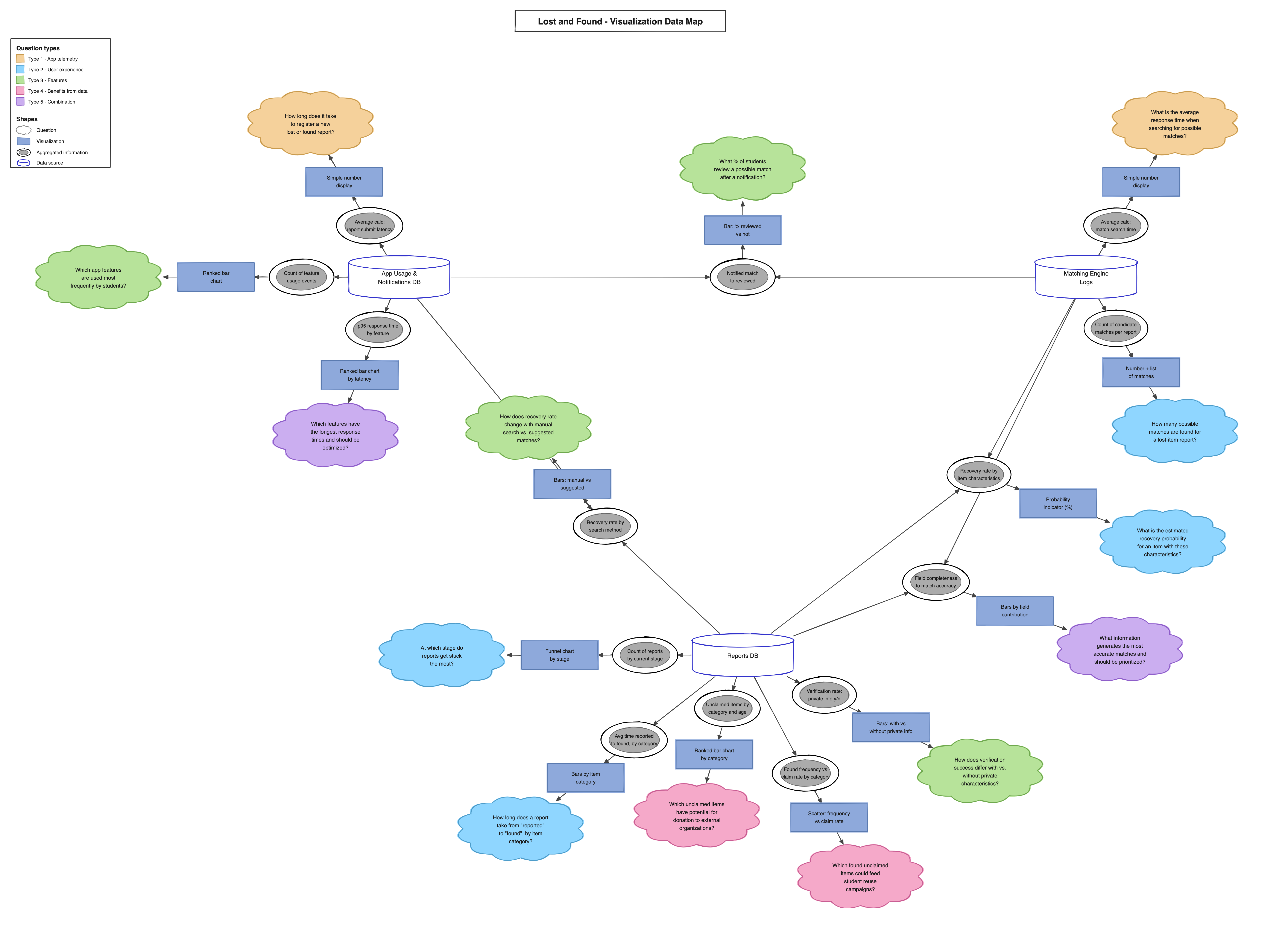
The map is read outwards from each data source: data source -> aggregated information -> visualization -> business question. Cloud colours follow the five question types defined in section 6.
All three data sources are obtainable through the proposed solution. Four aggregations combine more than one source: the notification review rate (App Usage + Matching Engine), the recovery probability and the field completeness analysis (Reports + Matching Engine), and the recovery rate by search method (App Usage + Reports).
Persona: Nicolas Martinez — Prospective Persona
Nicolas has just finished a class at Los Andes University and realizes that his black calculator is missing. There is no lost-item report for it in the system. Given that Nicolas has lost his calculator, he wants to report it by entering its type, location, date, and distinguishing details, so that he can track its recovery without repeatedly visiting the Lost and Found office. The app registers the lost-item report, assigns it a "Reported" status, and makes it available for matching with found-item reports. Nicolas can view the report and its status in the app.
Persona: Santiago Ramirez — Prospective Persona
Santiago finds a black calculator in a university study room. The item has not been registered in the system yet. Given that Santiago has found a calculator, he wants to report it by entering its type, location, date, description, and photo, so that the possible owner can find it through the app. The app registers the item as found and compares its information with existing lost-item reports using characteristics such as location, date, item type, and description.
Persona: William — Analytic Persona
William is reviewing several unresolved lost and found reports in the system during the week. Given that William needs to manage the active reports, he wants to review registered items, inspect possible matches, and update their statuses, so that he can resolve cases more efficiently and maintain accurate records. The app displays active reports and possible matches and saves the status changes made by William, keeping the information centralized and updated.
Persona: María Gonzalez — Prospective Persona
María finds a laptop in the university library that has not yet been registered in the Lost and Found system. Given that María has found a high-value item, she wants to register it with its location, date, time, description, and photo, so that the item remains identifiable and traceable during the recovery process. The app creates the found-item record and allows María to update its status when the item is transferred to the Lost and Found office.
Persona: Nicolas Martinez — Prospective Persona
Nicolas has already reported his black calculator as lost and wants to check whether a similar item has been found. Given that Nicolas is looking for his calculator, he wants to browse and filter the found-item catalog by item type, location, and date, so that he can identify a possible match remotely. The app applies the selected filters and displays the found items that meet the criteria, including their available descriptions, locations, dates, and photos.
Persona: Nicolas Martinez — Prospective Persona
Nicolas has an active report for his lost black calculator. A similar calculator has just been registered as found. Given that a possible match exists, Nicolas wants to be informed about it, so that he can review the found item and continue the recovery process without constantly checking the app. The system compares the lost and found reports and sends Nicolas a notification when the information indicates a possible match.
Persona: William — Analytic Persona
A student has claimed a calculator that the system has identified as a possible match with a lost-item report. Given that William needs to confirm that the claimant is the rightful owner, he wants to use the private verification information associated with the lost-item report, so that he can validate the claim before releasing the item. The app provides the ownership verification process and records the verification result, allowing William to approve or reject the handover based on the provided information.
Persona: María Gonzalez — Prospective Persona
María has already registered a laptop found in the library, and the item is waiting to be transferred to the Lost and Found office. Given that María needs to know whether the item has reached Lost and Found, she wants to track its handover and current custody status, so that she can maintain traceability without repeatedly contacting staff. The app displays the item's current custody status and updates it when the transfer to the Lost and Found office is registered.
Persona: William — Analytics Persona
William is reviewing the lost and found reports in the system after multiple reports have accumulated with different types of information, such as location, date, item category, description, and photos. Given that William wants to improve the accuracy of the successful reports, he wants to identify which information provided by the user contributes most to successful matching, so that he can determine which fields should be prioritized. The system compares successful matches with the information included in their reports and shows the relationship between the information provided and successful matches, such as location, date, item category, description, and photo.
Persona: Santiago Ramirez — Prospective Persona
Santiago has found an item and wants to deliver it to the Lost and Found Office before going to his next class. Given that Santiago has limited time between classes, he wants to check the location and opening hours of the Lost and Found Office, so that he can know if he can deliver the item before going to class. The system displays the location and opening hours of the Lost and Found Office, allowing Santiago to determine whether he can go there before his next class.
Persona: Nicolas Martinez — Prospective Persona
Nicolas is trying to check the status of his lost item report, but he has not authenticated yet and cannot access his personal information. Given that Nicolas needs to access his Lost and Found information, he wants to sign in using his Uniandes credentials, so that he can securely access the reports and features associated with his university account. The system redirects Nicolas to the Uniandes authentication service, validates his credentials, and grants him access to the application.
Persona: Maria Gonzalez — Prospective Persona
Maria has successfully signed into the application using her university account to check her lost and found reports. Given that Maria is authenticated as a staff member, she wants to access the tools associated with her role, so that she can register, review, and manage found items efficiently, without navigating through features intended only for students. The system identifies Maria as a staff role and displays the corresponding interface, including inventory, registration, status-management, and traceability features.
| Field | Details |
|---|---|
| Scenario name | Maintenance reporting without network coverage |
| Quality attributes | Eventual connectivity, Offline capability, Resilience |
| App status and context | A staff member fills out a lost item report inside a campus lab |
| Changes in the context | Mobile data and Wi-Fi network connections are completely lost |
| System reaction | The app persists the report in local storage (SQLite/Room/CoreData) and auto-syncs to the backend within 5 seconds of regaining connectivity without creating duplicate records |
| Field | Details |
|---|---|
| Scenario name | Peak concurrent access at term start |
| Quality attributes | Scalability, Load efficiency, Resilience |
| App status and context | The University does a public/open event and 5,000 active students and staff members are posting reports and browsing the lost items report wall |
| Changes in the context | Traffic spikes sharply during the first hour of the academic semester |
| System reaction | The API gateway queues requests; the system processes posts with an error rate below 0.1% and response confirmation under 3 seconds |
| Field | Details |
|---|---|
| Scenario name | Primary database failure during post creation |
| Quality attributes | Availability, Fault tolerance, Reliability |
| App status and context | A staff member is drafting a high level importance lost item report |
| Changes in the context | Connection to the primary backend database drops unexpectedly |
| System reaction | The system triggers a DB replica failover and saves a local draft on the device with zero data loss |
| Field | Details |
|---|---|
| Scenario name | Unauthorized access to staff functions |
| Quality attributes | Security, Authorization, Privacy |
| App status and context | A student is authenticated in the application and is browsing reported lost and found items |
| Changes in the context | The student attempts to access a staff-only function, such as editing an item record or marking an item as returned |
| System reaction | The backend validates the user's role, denies the operation, returns an authorization error, and does not expose or modify restricted information |
| Field | Details |
|---|---|
| Scenario name | App usage by a user with low vision |
| Quality attributes | Accessibility, Usability, GUI adaptability |
| App status and context | A student with low vision is browsing the found-items catalog using increased system font size and a screen reader |
| Changes in the context | The user increases the device text size to 200% and navigates the application using accessibility services |
| System reaction | The interface adapts without overlapping or cutting off essential content, interactive elements remain accessible, and relevant buttons, images, and fields provide readable accessibility labels |
| Field | Details |
|---|---|
| Scenario name | Memory pressure while browsing the item catalog |
| Quality attributes | Resource efficiency, Performance, GUI responsiveness |
| App status and context | A student is scrolling through a large list of found items containing multiple images while several other applications are open on the device |
| Changes in the context | The operating system reduces the memory available to the application |
| System reaction | The app releases non-essential cached images, loads images progressively, and maintains user interaction without crashing or losing the current search and filter state |
| Field | Details |
|---|---|
| Scenario name | Simultaneous claim of the same found item |
| Quality attributes | Data consistency, Integrity, Concurrency control |
| App status and context | Two staff members are reviewing the same found-item record from different devices |
| Changes in the context | Both staff members attempt to confirm the item as returned to a claimant almost at the same time |
| System reaction | The backend processes only the first valid claim transaction and atomically changes the item's status to returned. The second request is rejected and the other device is updated with the new status, preventing the same item from being assigned twice |
| Field | Details |
|---|---|
| Scenario name | Screen reader navigation for directory search |
| Quality attributes | Accessibility, Usability |
| App status and context | A visually impaired student opens the campus directory on iOS or Android |
| Changes in the context | The user enables to navigate components and search for lost item reported details |
| System reaction | UI elements expose full semantic labels conforming to WCAG 2.1 AA standards, enabling navigation and search completion without friction |
| Field | Details |
|---|---|
| Scenario name | Background match checking on a low battery device |
| Quality attributes | Energy efficiency, Resource management, Battery awareness |
| App status and context | A student has an open lost-item report and keeps the app installed while attending classes all day, while the app periodically checks the backend for new candidate matches |
| Changes in the context | The device drops below 15% battery and the operating system enters low power mode |
| System reaction | The app reduces background match polling to one check per hour, defers image prefetching until the device is charging, and still delivers a push notification when the backend finds a high confidence match. Battery consumption attributable to the app stays under 2% over an 8 hour day |
| Field | Details |
|---|---|
| Scenario name | Cold start on an entry level device |
| Quality attributes | Performance, GUI responsiveness, Startup time |
| App status and context | A student using an entry level Android device with 2 GB of RAM opens the app to check whether a lost item was found |
| Changes in the context | The app is launched from a cold state, with no cached data and a slow mobile connection |
| System reaction | The first meaningful screen renders in under 2.5 seconds using cached placeholders, the found-items list loads progressively, and the interface remains responsive to scrolling while the remaining data arrives in the background |
| Field | Details |
|---|---|
| Scenario name | University identity provider unavailable at sign in |
| Quality attributes | Interoperability, Availability, Graceful degradation |
| App status and context | A student opens the app to report a lost item and must authenticate with their Uniandes account |
| Changes in the context | The university single sign on service stops responding |
| System reaction | Sessions of already authenticated users stay valid for up to 24 hours, reports can still be drafted locally, and the app shows a message explaining that sign in is temporarily unavailable instead of a generic error, retrying automatically in the background |
| Field | Details |
|---|---|
| Scenario name | Retention of private ownership verification answers |
| Quality attributes | Privacy, Confidentiality, Data minimization |
| App status and context | A student files a lost-item report that includes private characteristics used later to verify ownership |
| Changes in the context | The item is returned to its owner and the report is closed |
| System reaction | The system deletes the private verification answers within 30 days of closing the report, keeps only anonymised category, location and date fields for the analytics engine, and never exposes verification answers in the public catalog or in any analytics view |