A mobile app teleoperation system for LeKiwi robots using Flutter, providing intuitive dual-joystick control with real-time video streaming.
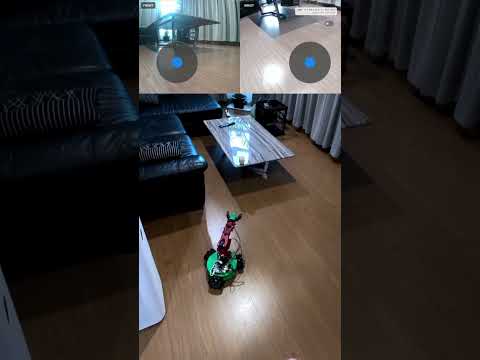
I have vibe coded this app in a few hours as a part of the LeRobot Hackathon. It is definitely not perfect and can have some flaws and bugs but it does the job quite well. I tested it only on Android but it should work on iOS as well. The app designed for research and fun purposes, ensure you have proper safety measures when operating it and controlling the robot.
This system enables remote control of LeKiwi mobile manipulator robots through a Flutter mobile app with following control features:
- Dual-Mode Control: Base movement + arm control (joint by joint)
- Real-Time Video Streaming: Live camera feeds from robot (front + wrist cameras)
- WebSocket Communication: Low-latency bidirectional communication
- Cross-Platform: Single Flutter app for Android and iOS
- Lerobot Integration: The python parts is build on top of the LeRobot library and uses the standard teleoperator interface.
The Python teleoperator should be integrated into your lerobot installation:
# Navigate to your lerobot installation
cd /path/to/lerobot

# Copy the phone teleoperator to lerobot teleoperators directory
cp -r /path/to/this/project/python_teleop/phone_teleop lerobot/common/teleoperators/

# The structure should be:
# lerobot/common/teleoperators/phone_teleop/
# ├── __init__.py
# ├── configuration_phone.py
# └── teleop_phone.pyPrerequisites:
- Flutter SDK 3.16+ installed
- Android Studio or VS Code with Flutter extension
- Android device (API 24+) or iOS device (iOS 12+)
- Enable Developer Options and USB Debugging on your android phone
- I have no idea how to run Flutter app on iOS but it should be possible
Install and run:
cd lekiwi_teleop_flutter

# Get dependencies
flutter pub get

# Connect your phone via USB (enable Developer Options & USB Debugging)
flutter devices
Most of the python dependencies are already installed in the LeRobot library. The only one that can be missing is websockets. You can install it with:
pip install websocketsflutter runIt will automatically start the app on your phone.
Your phone should be connected to the same WiFi network as your computer.
App will show you the IP address of your phone, something like 192.168.1.100:8080 - use it in the teleoperation script.
For detailed instructions on how to run LeRobot on LeKiwi robot, please refer to the LeRobot documentation.
But after the whole set up you just need to run:
python -m lerobot.common.robots.lekiwi.lekiwi_host --robot.id=my_awesome_kiwiAdjust PHONE_IP and LEKIWI_ROBOT_IP in the example_phone_teleoperation.py script to the IP address of your phone and LeKiwi robot.
Run the script:
python -m python_teleop.example_phone_teleoperationYou can also use this script as a template for your own teleoperation logic adjust if for the dataset recording.
Now you should be able to control the robot using the app.
- Add inverse kinematics to the manipulator control
- Add visualization to the manipulator control
- Make it more flexible to work with multiple set ups ( e.g. 3+ cameras, other robots)
- Test latency for the dataset recording and optimize if needed
- Properly review the flutter part of the code (it was 100% vibe coding)
Licensed under the Apache License 2.0.