Repository navigation
SignalR
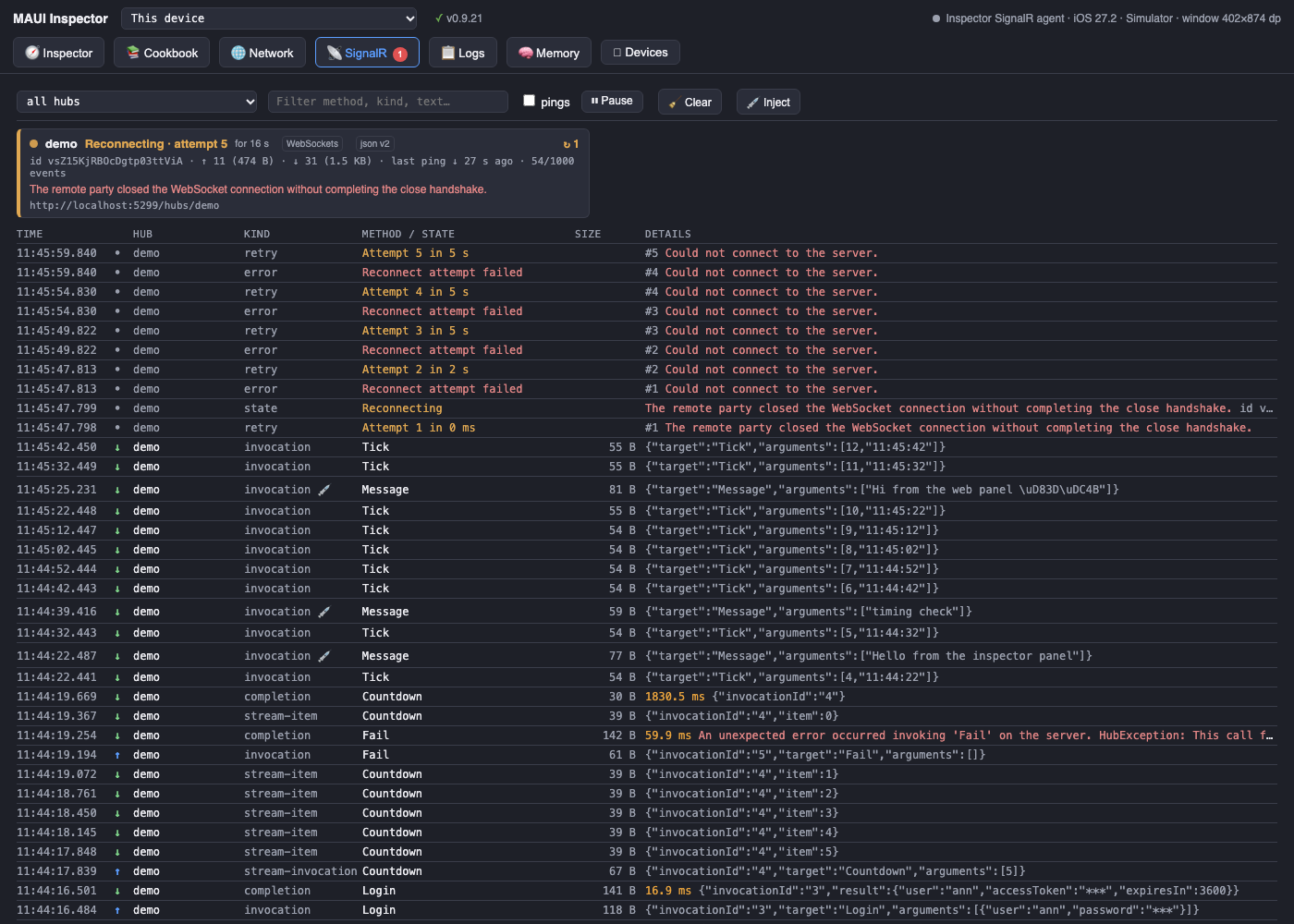
The 📡 SignalR view shows every hub your app registered: its connection state, reconnects and the messages in both directions — method, invocation id, size, invoke → completion time and the arguments (masked, cut to 4 KB). It is the SignalR counterpart of the Network view and lives in its own package, so apps without SignalR never pull the client in.
dotnet add package Immons.Tools.Maui.Inspector.SignalR<!-- Debug-only, like the inspector itself -->
<PackageReference Include="Immons.Tools.Maui.Inspector.SignalR" Version="0.10.0" Condition="'$(Configuration)' == 'Debug'" />using Immons.Tools.Maui.Inspector;
var connection = new HubConnectionBuilder()
.WithUrl(url + "/hubs/chat")
.WithAutomaticReconnect()
#if DEBUG
.WithMauiInspector("chat") // ← the name the panel shows
#endif
.Build();-
Anywhere in the chain. Protocol, transport factory and reconnect policy are resolved when
Build()runs, so the order againstWithUrl,WithAutomaticReconnectorAddMessagePackProtocol/AddNewtonsoftJsonProtocoldoes not matter. -
Inert without the inspector. When
UseMauiInspectorwas not called the method returns the builder untouched — nothing is wrapped. The#if DEBUGabove matches the Debug-only package reference; in builds that keep the package, the line stays harmless. -
Bytes never change. The protocol decorator only looks at what the real protocol parsed or wrote;
the round trip is byte-identical for JSON, Newtonsoft and MessagePack (covered by
tests/SignalRTests). -
One name, one timeline. Apps that build a new
HubConnectionafter every failure keep one entry per name; the hub card counts the instances.
Negotiate in the Network view. Negotiation and long polling are plain HTTP — route them through the HTTP handler and they show up next to your API calls (failed reconnect attempts included):
.WithUrl(url, options =>
{
#if DEBUG
    options.HttpMessageHandlerFactory = inner => new MauiInspectorHttpHandler(inner);
#endif
})
Already have a factory (certificates, proxies)? Wrap its result:
options.HttpMessageHandlerFactory = inner => new MauiInspectorHttpHandler(MyFactory(inner));.
The WebSocket itself does not go through HttpMessageHandler — its frames are what the SignalR view shows.
.WithMauiInspector("chat", o =>
{
    o.MaxPayloadChars = 4096;          // longest payload kept per message (JSON characters)
    o.MaskedFields.Add("iban");        // on top of the built-in list
    o.CapturePayloads = true;          // false = method, id, size only
    o.CapturePings = true;             // false = pings counted, not listed
    o.MaxEvents = 1000;                // ring buffer per hub; the oldest are overwritten
    o.AllowInjection = true;           // the panel's 💉 Inject
})
Masking happens before anything is stored. Values are replaced with *** when the field name
contains token, password, passwd, secret, authorization, apikey, cookie, credential,
privatekey, accesskey, sessionid (case-insensitive, _ - . ignored) or equals pwd, pin,
otp, cvv, cvc, auth, jwt, sid — a whole object under such a key goes too. Strings that
start with Bearer / Basic and JWT-looking strings are masked under any key, and sensitive query
parameters in the hub URL (access_token=) as well.
- Hub cards — colored state (green Connected, amber Connecting/Reconnecting with the attempt number, red Disconnected), how long, transport (WebSockets / ServerSentEvents / LongPolling), protocol, connection id, messages and bytes each way, the last ping, buffer use, the last error and the ↻ reconnect counter (automatic reconnects and app-driven restarts after a drop). Click a card to show only that hub. The tab badge counts hubs that are reconnecting or dropped with an error.
- Timeline (newest on top) — time with milliseconds, ↑ client → server / ↓ server → client / • lifecycle, hub, kind, method, size and details: invoke → completion time, errors, a preview of the payload. Completions and stream items are labelled with the method they answer.
-
Lifecycle —
Connecting,Connected,Reconnecting(with the reason), each retry (Attempt 3 in 5 s— the app's ownIRetryPolicyanswer),Reconnect attempt failed,Reconnected,Closed/Closed with error,Start failed,Handshake failed. - Details — click a row: all facts (invocation and connection id, size, duration, time) and the payload as formatted JSON, with Copy; incoming calls get 💉 Inject again….
- Filter by hub and by text (method, kind, state, error, payload preview), pings on/off, ⏸ Pause (stops recording messages; states and counters keep going), 🧹 Clear.
Inject delivers Method(args…) to the app as if the server had sent it: the frame enters the
connection's receive path between two server frames, the app's own protocol binds the arguments to
the handler's parameter types and your On("Method", …) handler runs for real. Useful to trigger a
chat message, a "call incoming" or a forced logout without a backend.
⚠ It is not a mock. The handler's side effects are real (state, navigation, local writes) and the server knows nothing about it. Use it on development data only.
- Arguments are a JSON array, one item per handler parameter (
["hi"],[{"id":1,"text":"…"}]); a single JSON value is one argument. A wrong count or type shows up on the timeline as a binding error. - The injected invocation has no invocation id — the client never answers the server about it.
- Available for text protocols (JSON, Newtonsoft) on a connected hub, not with stateful reconnect
(it would shift the server's message acknowledgements). The hub card / inject form says why when
it is unavailable. Turn it off per hub with
AllowInjection = false. - Over HTTP:
POST /api/signalr/inject {hub, method, args}— see HTTP API.
dotnet run --project samples/Immons.Tools.Maui.Inspector.SignalRServer # http://0.0.0.0:5299, hub /hubs/demoStart the sample app, tap 📡 SignalR demo → Connect, then Echo, Shout (server → client), Login
(masked password and token), Countdown (a stream) and Failing call. Kill the server process and start
it again to watch Reconnecting → attempts → Reconnected. The server pushes a Tick every 10 s.
The Android emulator reaches it at 10.0.2.2:5299; HV_SIGNALR_URL overrides the address.
- MessagePack (and other binary protocols) — recorded, but the payload is rebuilt from the .NET objects the protocol produced or was given (serialized with System.Text.Json), not decoded from the wire bytes; objects that cannot be serialized show their type name. Injection is unavailable.
- Round-trip time — SignalR pings are not echoed, so there is no ping RTT; the view measures invoke → completion per call instead (and shows when the last ping arrived).
-
Client → server streams (
IAsyncEnumerable/ChannelReaderarguments) — their items are listed as stream items without the method name. - Stateful reconnect — messages the client re-sends after a stateful reconnect come from SignalR's own buffer and are not listed again.
- Transport name — read from the HTTP connection by reflection; blank when that changes.