Repository navigation
AppWrangler 1.1.0

AppWrangler 1.1.0 is about memory, advice you can act on, and easier setup.
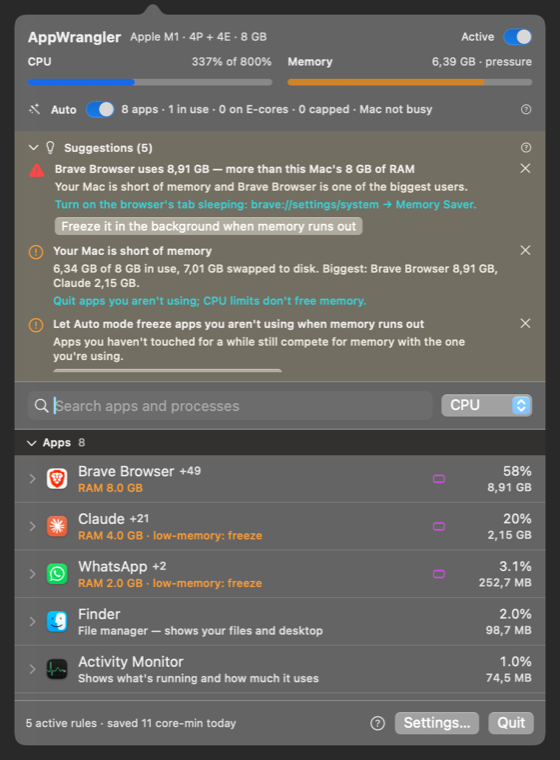
Highlights
- 🧊 Auto mode can free up memory (opt-in). When your Mac runs low on memory, it freezes apps you haven't used for a while, biggest first.
- They resume the moment you switch to them, or when memory frees up.
- The app you're using, audio apps, messaging and calls apps, and menu bar apps are never frozen.
- Turn it on in Settings → General → Auto mode, or run
appwrangler auto freeze-idle on.
- 💡 Suggestions in the panel, for example "Brave uses more than your 8 GB of RAM", with the reason, the benefit and one-click buttons to apply. They're based on minutes of history, not a one-second spike.
- 🪟 Open the panel in a window that stays open, like Activity Monitor (window button in the panel, or Open in a Window in the menu). The menu bar panel stays as it was.
- ↩️ Undo:
appwrangler undo, or ask your AI assistant to "undo that". - 🤖 AI assistants:
appwrangler mcp installsets up Claude Desktop, Claude Code and OpenAI Codex in one step.- New tools:
suggest_settings,get_app_settings,configure_app(change any setting while you talk about an app) andundo_last_change.
- 📖 Built-in Help: the full User Manual inside the app, searchable and offline, with a ? next to every setting.
- 🍺 Homebrew:
brew tap intarso/appwrangler https://github.com/IntarsO/AppWrangler
brew install --cask appwrangler
- New command-line tools:
appwrangler suggest,show <app>,set <app> key=value…. - CI on GitHub Actions, and Russian translations for everything new.
Fixes
- The panel no longer runs off the right edge of the screen.
- An app frozen because memory was low now resumes as soon as you switch to it.
- Copy, paste, select-all and undo now work in AppWrangler's text fields, and ⌘W closes its windows.
Full details are in the CHANGELOG.
Install
- Homebrew: the commands above.
- Download: get AppWrangler-1.1.0.zip below, unzip it, and move AppWrangler.app to Applications. The first time, right-click → Open: it's signed but not notarized by Apple.
- Upgrading: quit AppWrangler and replace the app. Your rules and statistics are kept.
Requirements: macOS 13 or later, on Apple Silicon.
SHA-256 9d39e9e129dc9e5d23967c99f4bd5454ec7b138b39c5cad61c572cd86de09ecb AppWrangler-1.1.0.zip
AppWrangler is free software under the GNU GPL v2. ☕ Buy me a coffee