Repository navigation
Releases: IntarsO/AppWrangler
Release list
AppWrangler 1.7.1

Fixed
- AppWrangler no longer stops what you work with. Idle freezing never touches browsers, AI and coding assistants, dictation tools, Finder, Activity Monitor, System Settings, Calendar or Reminders (messaging, terminals, editors and VMs were already excluded). The rule editor warns if you ask for it anyway. CPU caps, which stop and start an app many times a second, are never applied to those same apps; they still move to the efficiency cores.
- Spotlight and photo-analysis helpers and updaters are slowed, not stopped. The built-in Can wait items move to the efficiency cores when the Mac needs its resources; only an app you mark Can wait yourself is paused. Stopping a daemon that other processes wait on can leave jobs stuck.
- Idle CPU: while no window was open the panel's hidden view was still laid out and redrawn on every state change, costing 5–9% of a core on a busy Mac (the sampling and Auto logic together cost about 1%). The panel's view now only exists while the popover is open, and the menu bar item is only touched when something changed. Measured on a real 8 GB M1 at a load average of ~20: 8.8% → 2.1% of a core.
Added
- A log that survives restarts. What AppWrangler did is kept in
activity.json(the last 500 events) and shown byappwrangler log [N], with or without the app running; Settings → Activity loads it at launch.
Install
-
Homebrew:
brew upgrade --cask appwrangler. New installs:brew tap intarso/appwrangler https://github.com/IntarsO/AppWrangler && brew install --cask appwrangler. -
Download: get AppWrangler-1.7.1.zip below and replace the app in Applications. Your rules and statistics are kept. The first time, right-click → Open, because it's signed but not notarized.
-
Claude Desktop: download AppWrangler-mcp-1.7.1.mcpb below and double-click it to add AppWrangler's tools to Claude. It uses the installed app when there is one (details).
Requirements: macOS 13 or later, on Apple Silicon (the widget needs macOS 14).
SHA-256 8daa056fd996cbdbc905c15c06204d70aea06053137f7f66d23600be54bf7ec5 AppWrangler-1.7.1.zip
Full history: CHANGELOG. AppWrangler is free software under the GNU GPL v2. ☕ Buy me a coffee
AppWrangler 1.7.0
Added
- Calls are handled by themselves. When an app has been recording from the microphone for a few seconds, AppWrangler makes room for it until the call ends (a minute after the mic goes quiet; the camera keeps it going). Inside a browser it's granular: the busy renderer, the GPU and network helpers, the main process and anything recording stay at full speed; renderers of idle tabs move to the efficiency cores. Nothing touching the call is ever slowed or frozen. The panel says In a call: making room for … with Stop (which leaves that app alone for 30 minutes). Setting
auto_meeting, on by default. No permission is needed and nothing is sent anywhere. - Processes started by a prioritized app are prioritized: a test run or build that Codex, Claude, a terminal or an IDE started is never held or paused, through any number of shells.
- One-click Memory Saver for Chrome and Brave (maximum, with Meet, Teams, Zoom, Slack and Discord kept alive) in the memory suggestion; it sets the browser's own policies, reversible with
defaults delete. Docker Desktop and virtual machines get a tip to lower the memory they reserve.
Fixed
- AppWrangler used far too much CPU while its window was open behind other windows (it refreshed and collected thread details every second). The window now refreshes every 3 s unless it's in front, and thread details are only collected while a row is expanded.
Install
-
Homebrew:
brew upgrade --cask appwrangler. New installs:brew tap intarso/appwrangler https://github.com/IntarsO/AppWrangler && brew install --cask appwrangler. -
Download: get AppWrangler-1.7.0.zip below and replace the app in Applications. Your rules and statistics are kept. The first time, right-click → Open, because it's signed but not notarized.
-
Claude Desktop: download AppWrangler-mcp-1.7.0.mcpb below and double-click it to add AppWrangler's tools to Claude. It uses the installed app when there is one (details).
Requirements: macOS 13 or later, on Apple Silicon (the widget needs macOS 14).
SHA-256 4af22968f4c8c3f5fe2e309e009220fbb925948ba9003de75ea2ade10c11492a AppWrangler-1.7.0.zip
Full history: CHANGELOG. AppWrangler is free software under the GNU GPL v2. ☕ Buy me a coffee
AppWrangler 1.6.0
Added
- Make room for an app — for a call, a recording, a render or a game. For 30 minutes, 1 hour, 3 hours or until you stop it, one app gets everything it needs: full speed, never capped or frozen (its own CPU rule set aside; memory limits still apply). Everything else steps back: efficiency cores at once, the Mac counts as busy from 60% and the rest then shares one core less, work that can wait is paused, hot processes are held, and idle apps are frozen if memory gets short, even if idle freezing is off. Away mode is suspended. Start it from the menu bar icon's right-click menu, an app's details,
appwrangler make-room Zoom 1h,appwrangler://make-room/Zoom?minutes=60, or the MCP toolmake_room; the panel shows the time left with Stop. - Unfreeze one app from the menu bar icon's right-click menu (one item per frozen app, with why it was frozen) or the panel's new Frozen list. There's deliberately no "unfreeze all": the rest stays tamed. Something that can wait isn't paused again for 30 minutes after you unfreeze it.
- A snowflake on the menu bar icon (❄︎2) while apps are frozen.
Changed
- Prioritized (was High) apps get room: while one is working, work that can wait is paused and the rest makes way. They still stay within the safety limits: if prioritized apps together would take every core while the Mac is saturated, they share all but one. The tiers now read Prioritized, Normal and Can wait (still
high,normal,lowfor the command line and assistants). - Calls count as what matters: an app playing or recording audio (Zoom, Teams, Meet in a browser) makes the rest step back while it works, and you don't count as away during a call.
Install
-
Homebrew:
brew upgrade --cask appwrangler. New installs:brew tap intarso/appwrangler https://github.com/IntarsO/AppWrangler && brew install --cask appwrangler. -
Download: get AppWrangler-1.6.0.zip below and replace the app in Applications. Your rules and statistics are kept. The first time, right-click → Open, because it's signed but not notarized.
-
Claude Desktop: download AppWrangler-mcp-1.6.0.mcpb below and double-click it to add AppWrangler's tools to Claude. It uses the installed app when there is one (details).
Requirements: macOS 13 or later, on Apple Silicon (the widget needs macOS 14).
SHA-256 ac27e7dbfa302b9bbb7687847e38b270b205402b7f6dd94a019b8c6be4d78c0a AppWrangler-1.6.0.zip
Full history: CHANGELOG. AppWrangler is free software under the GNU GPL v2. ☕ Buy me a coffee
AppWrangler 1.5.0
Added
- Adaptive Auto (on by default;
appwrangler prefs auto_adaptive=offto switch it off). Auto now follows what the Mac needs right now:- when you're plugged in and the Mac is calm and cool, a background app that's doing real work runs free instead of staying on the efficiency cores, so the job finishes sooner. It goes back when the Mac gets busy or the app goes quiet, and nothing runs free for two minutes after a busy spell;
- on battery, in Low Power Mode or when the Mac is hot, background apps move to the efficiency cores after 10 s instead of 30 s;
- idle freezing steps in at the first memory warning, one app at a time (biggest first, every 15 s) instead of waiting for critical and freezing everything at once, and holds while memory is short;
- frozen apps resume one at a time (every 10 s) once memory has been fine for a minute;
- apps running free show in the panel's Auto line, in the app's row, and in the activity log.
- Priorities. Each app or process is High, Normal or Low priority. When the Mac needs its resources for what you're doing (it's saturated while the app in front works, or memory is short), low priority work is moved to the efficiency cores at once and, if the need lasts, paused; it resumes when the Mac has had room for 30 s, and is never paused for more than 10 minutes at a stretch. The built-in Low list is short and conservative: Spotlight and photo analysis helpers, and third-party updaters (Google Software Update, Microsoft AutoUpdate…). High priority apps are never capped, held or frozen. Pick a priority in an app's details, with
appwrangler set <app> priority=low, or throughconfigure_app. A card in the panel says what was paused, with Resume now. Switch it off withappwrangler prefs auto_shed=off. - Auto manages command-line processes (
auto_processes, on by default): the ones that run hot, only while the Mac needs its resources (busy, on battery, in Low Power Mode or hot), and only on the efficiency cores. Never a cap, never frozen; never build tools, dev tools, containers, system software, protected processes or what a terminal is waiting for. - Away mode (
auto_away,auto_away_minutes, on by default): with no input for 5 minutes while you're plugged in, nothing is held back, so background work finishes at full speed. It's all restored within about two seconds of you being back. - Learning your routine (
auto_learn, on by default, stays on this Mac): which app you use in which weekday-hour. Apps you usually use around now stay at full speed 5 minutes after you leave them, aren't frozen for memory, and come back early if they were; the apps you're least likely to need soon are frozen first. Only identifiers and minutes are kept, inpatterns.json; switch it off or forget it in Settings → General → Auto mode.
Changed
-
The menu bar panel is now an overview. It shows:
- CPU and memory charts for the last 10 minutes (a dashed line for the share on efficiency cores; shading while the Mac was short of memory);
- the Auto line with its switch;
- the five busiest apps and the last few things AppWrangler did.
The full list of apps moved to the main window: click All apps. The window is unchanged.
-
Cards for what AppWrangler just did. When Auto freezes an idle app, a memory rule acts, or a background app runs away, the panel shows a card for 30 seconds from when you see it. OK leaves it to Auto, Set manually… opens that app's settings in the main window, and Leave app alone keeps it out of Auto. Nothing needs a click: Auto handles it by default.
-
The panel opens by itself (for 30 seconds, without taking keyboard focus, at most once every two minutes) when a card appears. Turn it off in Settings → General → Notifications or with
appwrangler prefs show_panel_on_action=off. -
Auto comes first for every app. An app's details in the main window start with Auto (recommended), Custom rule or Leave alone, and the manual editor only shows for a custom rule. The right-click menu and the runaway banner lead with Auto too. When Auto can't handle something (a command-line process, or Auto is off), cards and suggestions offer the gentle option, efficiency cores, and Set manually…; the 25% or 50% cap is under Custom rule.
-
In the app, a CPU suggestion needs a few minutes of history, so a one-second spike from a short-lived process isn't flagged. The command line and MCP are unchanged.
-
Clicking an app under Busiest apps opens it, expanded, in the main window.
-
Russian is no longer kept complete: new text shows in English.
Added (for contributors)
- Tests for the chart history and the cards, and for adaptive Auto (running free, battery, cooldown, early and gradual memory handling).
- The GitHub wiki is generated from the docs.
scripts/sync-wiki.pybuilds it (and checks every link); a workflow publishes it whenWIKI_SYNCison.
Install
-
Homebrew:
brew upgrade --cask appwrangler. New installs:brew tap intarso/appwrangler https://github.com/IntarsO/AppWrangler && brew install --cask appwrangler. -
Download: get AppWrangler-1.5.0.zip below and replace the app in Applications. Your rules and statistics are kept. The first time, right-click → Open, because it's signed but not notarized.
-
Claude Desktop: download AppWrangler-mcp-1.5.0.mcpb below and double-click it to add AppWrangler's tools to Claude. It uses the installed app when there is one (details).
Requirements: macOS 13 or later, on Apple Silicon (the widget needs macOS 14).
SHA-256 aec4779d358e88193350263af92a67ab60694ed36e9f976e17e336a685a6a04b AppWrangler-1.5.0.zip
Full history: CHANGELOG. AppWrangler is free software under the GNU GPL v2. ☕ Buy me a coffee
AppWrangler 1.4.1
Added
- One-click install in Claude Desktop: each release now includes an MCP bundle,
AppWrangler-mcp-X.Y.Z.mcpb. Double-click it to add AppWrangler's tools to Claude Desktop. It uses your installed app when there is one. See docs/mcp.md. - AppWrangler is ready for the official MCP Registry (
server.json, nameio.github.IntarsO/appwrangler).
Changed
- README:
- a clearer pitch;
- Homebrew install first, with the notarization note up front;
- an honest comparison with App Tamer, AppPolice and Activity Monitor;
- download links go to the latest release.
- In Impact, "Memory freed" shows "—" instead of "Zero KB" when nothing was freed.
Added (for contributors)
- Screenshots without your own apps: debug builds have a demo mode (
-AWDemoFixture scripts/demo/fixture.json) that shows made-up apps and numbers, with nothing measured or enforced.scripts/screenshots.shuses it. scripts/render-social.shrenders the 1280×640 social preview.scripts/record-demo.shrecords the README demo and turns it into an MP4 and a GIF with Apple's frameworks only.scripts/check-links.shchecks every external link in the docs.scripts/render-widget.shtakes an optionalwidget.jsonand renders in English by default.
Install
- Homebrew:
brew upgrade --cask appwrangler. New installs:brew tap intarso/appwrangler https://github.com/IntarsO/AppWrangler && brew install --cask appwrangler. - Download: get AppWrangler-1.4.1.zip below and replace the app in Applications. Your rules and statistics are kept. The first time, right-click → Open, because it's signed but not notarized.
Requirements: macOS 13 or later, on Apple Silicon (the widget needs macOS 14).
SHA-256 942f904d0eb3ff0e347b55b4b9375253a9f0d932c9ea868c449b85185a9febbd AppWrangler-1.4.1.zip
Full history: CHANGELOG. AppWrangler is free software under the GNU GPL v2. ☕ Buy me a coffee
AppWrangler 1.4.0
Added
-
Memory in Impact. Impact (and
appwrangler stats, MCPget_impact_stats) shows:- time the Mac was short of memory, and peak swap;
- how much macOS had to read back from swap (also per hour of memory shortage);
- how many apps were frozen for memory, and the memory they held.
Compare days with idle freezing on and off to see whether it helps your Mac.
-
One-command releases.
scripts/release.sh X.Y.Ztags a release. GitHub Actions then tests, builds, publishes it with notes from the CHANGELOG, and updates the Homebrew cask. A manual dry run builds without publishing.
Changed
- The watchdog is its own process,
AppWranglerWatchdog, sokillall -9 AppWranglercan no longer take it down too and leave apps frozen. - Rule edits from several places are merged. Edits from the window, the CLI and AI assistants at the same moment are applied under a lock, instead of the last writer replacing the file.
Install
- Homebrew:
brew upgrade --cask appwrangler. New installs:brew tap intarso/appwrangler https://github.com/IntarsO/AppWrangler && brew install --cask appwrangler. - Download: get AppWrangler-1.4.0.zip below and replace the app in Applications. Your rules and statistics are kept. The first time, right-click → Open, because it's signed but not notarized.
Requirements: macOS 13 or later, on Apple Silicon (the widget needs macOS 14).
SHA-256 0bdeb9c98624f6799042cfa33092cd81e8df57d0bdc44b4ba46039109a58a769 AppWrangler-1.4.0.zip
Full history: CHANGELOG. AppWrangler is free software under the GNU GPL v2. ☕ Buy me a coffee
AppWrangler 1.3.0

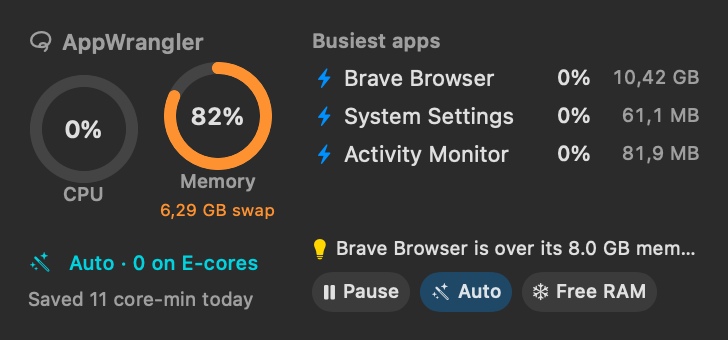
AppWrangler 1.3.0 adds buttons to the widget and Free memory now, and makes freezing safer after a full gap audit.
Highlights
- 🖥 Widget buttons: Pause/Resume, Auto and Free memory on the medium and new large widget. The large size shows five apps and up to three suggestions.
- 🧊 Free memory now freezes the apps you haven't used for a while, right away. Each resumes the moment you switch to it. It never freezes the app in use, audio, busy apps, messaging/calls, terminals, IDEs or VMs. Use it from the widget,
appwrangler free-memory,appwrangler://free-memory, or by asking your AI assistant. - 🔗
appwrangler://links for Shortcuts and scripts:pause,resume,auto/on|off|toggle,free-memory,window,settings,help. - ⚙️ App-wide settings from Terminal and AI assistants:
appwrangler prefsand MCPget_preferences/set_preferences(Auto timings, idle freezing, low-memory level, alerts…).
Safer freezing
- A freeze ends as soon as the setting that caused it is turned off. Before, an app frozen by a memory limit could stay frozen after the rule was removed or changed.
- Low-memory freezes are lifted only after memory has been fine for a minute, so apps don't flip between frozen and running.
- Nothing new is frozen while limits are paused, and commands running in a terminal's foreground are never frozen.
- Idle freezing skips apps still doing work, terminals, code editors and IDEs, and virtual machines.
Fewer surprises
- App names work the same in the CLI, MCP and suggestions. Bundle IDs and installed apps resolve correctly, and ambiguous names list the candidates. Critical macOS processes and patterns like
*are refused. - Undo never overwrites edits you made in the window since (
--forceto override). It also covers alert buttons and right-click actions. mcp installkeeps your extra settings and symlinks, and handles more Codex config layouts safely.- Suggestions no longer propose slowing down compilers and build tools.
- Right-click Force Quit now asks for confirmation.
- Getting Started leads with Auto mode, and the User Manual covers everything new.
Full details are in the CHANGELOG.
Install
- Homebrew:
brew upgrade --cask appwrangler. New installs:brew tap intarso/appwrangler https://github.com/IntarsO/AppWrangler && brew install --cask appwrangler. - Download: get AppWrangler-1.3.0.zip below and replace the app in Applications. Your rules and statistics are kept. The first time, right-click → Open, because it's signed but not notarized.
Requirements: macOS 13 or later, on Apple Silicon. The widget needs macOS 14 or later.
SHA-256 1dd9fdb1b9823960e9e86a88316c5edfb37ac2c967c43591435697aa9379a8db AppWrangler-1.3.0.zip
AppWrangler is free software under the GNU GPL v2. ☕ Buy me a coffee
AppWrangler 1.2.0
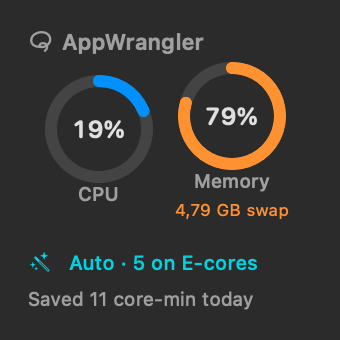
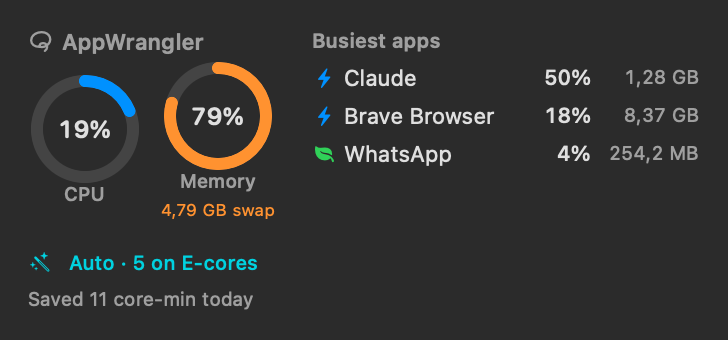
AppWrangler 1.2.0 adds a desktop and Notification Center widget.
Highlights
-
🖥 Widget (macOS 14+), in small and medium sizes:
- CPU and memory rings (with swap);
- what Auto mode is doing, and paused or frozen apps;
- CPU time saved today;
- the three busiest apps and the top suggestion.
Click it to open AppWrangler's window. To add it: right-click the desktop → Edit Widgets… → search AppWrangler.
-
🎨 Monochrome widget style. When an app is in front, macOS shows widgets in monochrome, and AppWrangler's rings and status take your accent colour. For full colour all the time, choose System Settings → Desktop & Dock → Widgets → Widget style → Full-color.
-
🔗
appwrangler://links open the window, Settings, or a page of Help. -
📖 Screenshots in the User Manual, also shown in the in-app Help.
Fixes
- In the Help window, narrow table columns were squeezed to one letter per line.
The widget is sandboxed. It only reads a small status file that AppWrangler writes once a minute, and never measures or changes anything itself. macOS decides how often widgets refresh, so expect it to lag by up to a few minutes.
Full details are in the CHANGELOG.
Install
- Homebrew:
Already installed?
brew tap intarso/appwrangler https://github.com/IntarsO/AppWrangler
brew install --cask appwrangler
brew upgrade --cask appwrangler. - Download: get AppWrangler-1.2.0.zip below and move AppWrangler.app to Applications, replacing the old one. Your rules and statistics are kept. The first time, right-click → Open: it's signed but not notarized by Apple.
Requirements: macOS 13 or later, on Apple Silicon. The widget needs macOS 14 or later.
SHA-256 0c2b62152b337c7ca45450f4161436e7137f3c99cc3101c95f2e651c14fccb33 AppWrangler-1.2.0.zip
AppWrangler is free software under the GNU GPL v2. ☕ Buy me a coffee
AppWrangler 1.1.0
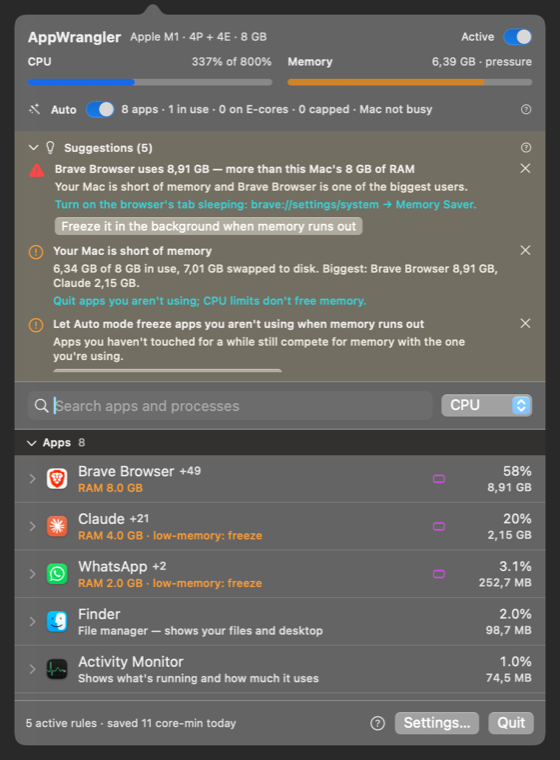
AppWrangler 1.1.0 is about memory, advice you can act on, and easier setup.
Highlights
- 🧊 Auto mode can free up memory (opt-in). When your Mac runs low on memory, it freezes apps you haven't used for a while, biggest first.
- They resume the moment you switch to them, or when memory frees up.
- The app you're using, audio apps, messaging and calls apps, and menu bar apps are never frozen.
- Turn it on in Settings → General → Auto mode, or run
appwrangler auto freeze-idle on.
- 💡 Suggestions in the panel, for example "Brave uses more than your 8 GB of RAM", with the reason, the benefit and one-click buttons to apply. They're based on minutes of history, not a one-second spike.
- 🪟 Open the panel in a window that stays open, like Activity Monitor (window button in the panel, or Open in a Window in the menu). The menu bar panel stays as it was.
- ↩️ Undo:
appwrangler undo, or ask your AI assistant to "undo that". - 🤖 AI assistants:
appwrangler mcp installsets up Claude Desktop, Claude Code and OpenAI Codex in one step.- New tools:
suggest_settings,get_app_settings,configure_app(change any setting while you talk about an app) andundo_last_change.
- 📖 Built-in Help: the full User Manual inside the app, searchable and offline, with a ? next to every setting.
- 🍺 Homebrew:
brew tap intarso/appwrangler https://github.com/IntarsO/AppWrangler
brew install --cask appwrangler
- New command-line tools:
appwrangler suggest,show <app>,set <app> key=value…. - CI on GitHub Actions, and Russian translations for everything new.
Fixes
- The panel no longer runs off the right edge of the screen.
- An app frozen because memory was low now resumes as soon as you switch to it.
- Copy, paste, select-all and undo now work in AppWrangler's text fields, and ⌘W closes its windows.
Full details are in the CHANGELOG.
Install
- Homebrew: the commands above.
- Download: get AppWrangler-1.1.0.zip below, unzip it, and move AppWrangler.app to Applications. The first time, right-click → Open: it's signed but not notarized by Apple.
- Upgrading: quit AppWrangler and replace the app. Your rules and statistics are kept.
Requirements: macOS 13 or later, on Apple Silicon.
SHA-256 9d39e9e129dc9e5d23967c99f4bd5454ec7b138b39c5cad61c572cd86de09ecb AppWrangler-1.1.0.zip
AppWrangler is free software under the GNU GPL v2. ☕ Buy me a coffee
AppWrangler 1.0.0
The first release of AppWrangler: per-app CPU, efficiency-core and memory control for Apple Silicon Macs. It's a ground-up rewrite of AppPolice by Maksym Stefanchuk.
Highlights
- 🪄 Auto mode (on by default).
- The app you're using, and anything playing or recording audio, runs at full speed.
- Other apps move to the efficiency cores 30 s after you leave them.
- Only when your Mac is busy do background apps share the free CPU fairly.
- No rules needed.
- 🎛 Per-app rules:
- CPU limits covering the app and all its helpers, held accurately by a real-time limiter;
- efficiency cores only;
- memory limits (notify, freeze, quit);
- low-memory protection;
- conditions (on battery, Low Power Mode, when hot, schedules).
- 👀 Every running app and process, with a plain-language "what is this?" and whether it's safe to limit.
- 📊 Impact statistics (last hour, today, 7 or 30 days):
- CPU time and estimated energy saved;
- what each app wanted vs. got;
- AppWrangler's own cost.
- 🤖 MCP server, so Claude Desktop, Claude Code, OpenAI Codex or your own agents can audit your Mac and suggest limits (
AppWrangler mcp, with an optional--read-onlymode). - ⌨️ Command line:
appwrangler status | list | limit | stats | auto … - 🛟 Safe by design:
- paused or E-core apps are restored if AppWrangler quits, crashes or is even
kill -9'd (a watchdog process handles that last case); - macOS-critical processes are never touched;
- no network access.
- paused or E-core apps are restored if AppWrangler quits, crashes or is even
Measured on an M1:
- The same workload on efficiency cores used 78% less energy (1.16 J vs 5.3 J), at about half the speed.
- AppWrangler itself uses about 0.2–0.5% of one CPU core.
Install
- Download AppWrangler-1.0.0.zip below, unzip it, and move AppWrangler.app to Applications.
- The first time, right-click → Open. This build is signed but not notarized by Apple. If macOS only offers Move to Bin, open System Settings → Privacy & Security and click Open Anyway.
- Click the lasso icon in the menu bar. See the Getting Started guide.
Or build it yourself with just the Xcode Command Line Tools: ./build.sh --install --run.
Requirements:
- macOS 13 Ventura or later, on Apple Silicon.
- Treating audio apps as "in use" needs macOS 14.2 or later.
Coming from AppPolice? Your saved limits are imported automatically.
Notes
- Savings figures are estimates. Energy saved by efficiency cores uses a measured ≈4.5× P-core/E-core energy ratio, and real apps vary.
- Full details are in the CHANGELOG and docs.
SHA-256 9959ffbb603584877317a750daac753a85c02132724fe7ba72b0c5b1f12bd7d3 AppWrangler-1.0.0.zip
AppWrangler is free software under the GNU GPL v2.