Repository navigation
AppWrangler 1.2.0

AppWrangler 1.2.0 adds a desktop and Notification Center widget.
Highlights
-
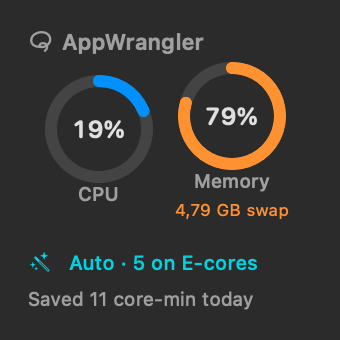
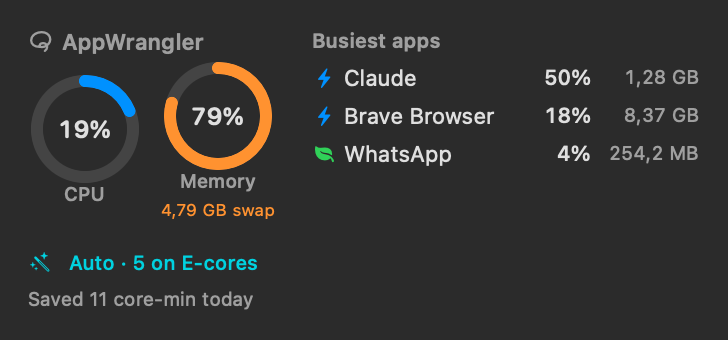
🖥 Widget (macOS 14+), in small and medium sizes:
- CPU and memory rings (with swap);
- what Auto mode is doing, and paused or frozen apps;
- CPU time saved today;
- the three busiest apps and the top suggestion.
Click it to open AppWrangler's window. To add it: right-click the desktop → Edit Widgets… → search AppWrangler.
-
🎨 Monochrome widget style. When an app is in front, macOS shows widgets in monochrome, and AppWrangler's rings and status take your accent colour. For full colour all the time, choose System Settings → Desktop & Dock → Widgets → Widget style → Full-color.
-
🔗
appwrangler://links open the window, Settings, or a page of Help. -
📖 Screenshots in the User Manual, also shown in the in-app Help.
Fixes
- In the Help window, narrow table columns were squeezed to one letter per line.
The widget is sandboxed. It only reads a small status file that AppWrangler writes once a minute, and never measures or changes anything itself. macOS decides how often widgets refresh, so expect it to lag by up to a few minutes.
Full details are in the CHANGELOG.
Install
- Homebrew:
Already installed?
brew tap intarso/appwrangler https://github.com/IntarsO/AppWrangler
brew install --cask appwrangler
brew upgrade --cask appwrangler. - Download: get AppWrangler-1.2.0.zip below and move AppWrangler.app to Applications, replacing the old one. Your rules and statistics are kept. The first time, right-click → Open: it's signed but not notarized by Apple.
Requirements: macOS 13 or later, on Apple Silicon. The widget needs macOS 14 or later.
SHA-256 0c2b62152b337c7ca45450f4161436e7137f3c99cc3101c95f2e651c14fccb33 AppWrangler-1.2.0.zip
AppWrangler is free software under the GNU GPL v2. ☕ Buy me a coffee