Repository navigation
AppWrangler 1.3.0

AppWrangler 1.3.0 adds buttons to the widget and Free memory now, and makes freezing safer after a full gap audit.
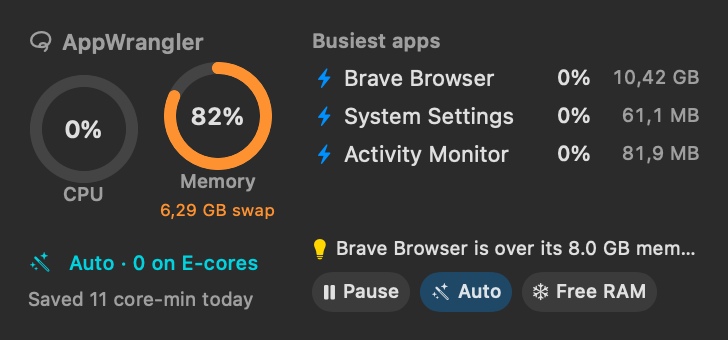
Highlights
- 🖥 Widget buttons: Pause/Resume, Auto and Free memory on the medium and new large widget. The large size shows five apps and up to three suggestions.
- 🧊 Free memory now freezes the apps you haven't used for a while, right away. Each resumes the moment you switch to it. It never freezes the app in use, audio, busy apps, messaging/calls, terminals, IDEs or VMs. Use it from the widget,
appwrangler free-memory,appwrangler://free-memory, or by asking your AI assistant. - 🔗
appwrangler://links for Shortcuts and scripts:pause,resume,auto/on|off|toggle,free-memory,window,settings,help. - ⚙️ App-wide settings from Terminal and AI assistants:
appwrangler prefsand MCPget_preferences/set_preferences(Auto timings, idle freezing, low-memory level, alerts…).
Safer freezing
- A freeze ends as soon as the setting that caused it is turned off. Before, an app frozen by a memory limit could stay frozen after the rule was removed or changed.
- Low-memory freezes are lifted only after memory has been fine for a minute, so apps don't flip between frozen and running.
- Nothing new is frozen while limits are paused, and commands running in a terminal's foreground are never frozen.
- Idle freezing skips apps still doing work, terminals, code editors and IDEs, and virtual machines.
Fewer surprises
- App names work the same in the CLI, MCP and suggestions. Bundle IDs and installed apps resolve correctly, and ambiguous names list the candidates. Critical macOS processes and patterns like
*are refused. - Undo never overwrites edits you made in the window since (
--forceto override). It also covers alert buttons and right-click actions. mcp installkeeps your extra settings and symlinks, and handles more Codex config layouts safely.- Suggestions no longer propose slowing down compilers and build tools.
- Right-click Force Quit now asks for confirmation.
- Getting Started leads with Auto mode, and the User Manual covers everything new.
Full details are in the CHANGELOG.
Install
- Homebrew:
brew upgrade --cask appwrangler. New installs:brew tap intarso/appwrangler https://github.com/IntarsO/AppWrangler && brew install --cask appwrangler. - Download: get AppWrangler-1.3.0.zip below and replace the app in Applications. Your rules and statistics are kept. The first time, right-click → Open, because it's signed but not notarized.
Requirements: macOS 13 or later, on Apple Silicon. The widget needs macOS 14 or later.
SHA-256 1dd9fdb1b9823960e9e86a88316c5edfb37ac2c967c43591435697aa9379a8db AppWrangler-1.3.0.zip
AppWrangler is free software under the GNU GPL v2. ☕ Buy me a coffee