Releases: Iota-Nine/Aion2-Eclipse
Release list
Eclipse 3.0.6 - Shields and support buffs

Eclipse 3.0.6 expands support analysis in the original compact and full HUD, and retains your local runs and preferences on update.
- Improved detection of selected shield skills across Templar, Cleric, Chanter, Sorcerer, Ranger and Spiritmaster, including verified self effects and specialization requirements.
- Blue shield bars show observed activations and received duration ranges. Skill and recipient details are retained in new run histories. Companion notices and near-simultaneous group applications are grouped.
- New violet support-buff bars for selected Cleric and Chanter skills: Light of Protection, Yustiel’s Power, Prayer of Amplification, Sprint Mantra, Undefeated Mantra, Power of the Storm, Guardian Blessing and Barrier Spell. Analysis lists casters, skills and recipients.
- Repeated overlapping aura/mantra refreshes form one observed sequence instead of inflating activation counts. Selected pre-combat support still active by its received lifetime is retained at the first accepted damage event.
- Self healing, shields and buffs remain optional and off by default. Existing healing totals are not counted twice. English is default; French is available in Preferences.
- DPS, run totals, party Combat Power, original HUD controls, Alt+F8, Ctrl+Alt+L, collapse/restore and return after Alt+Tab are retained.
Measurement limits: durations are received lifetimes, not measured active uptime or a shield-destruction countdown. Shield HP capacity, absorbed damage, destruction, buff potency and damage gained are not measured. Selected skills and identified party data only; unavailable metrics stay hidden. Old runs do not invent missing support details.
Validation: 812 logic checks, 390 native Windows interface checks across 16 suites, isolated upgrades from V1 and 3.0.5, standalone setup and shutdown checks. Packet/interface fixtures are fictional; these checks do not establish universal live-game skill coverage.
FR — Détection de boucliers améliorée sur six classes, activations observées et durées reçues. Buffs sélectionnés du Cleric et de l’aède, barres violettes et détails par compétence/destinataire dans l’analyse. Les rafraîchissements de mantras sont regroupés. Détail sur soi en option ; historique et réglages conservés. Les durées ne mesurent pas l’uptime réel. PV des boucliers, absorption, destruction et gain de dégâts des buffs restent inconnus.
Eclipse 3.0.5 - Self support, Combat Power and skill icons
Eclipse 3.0.5 corrects missing skill icons and adds optional self-support details and party Combat Power to the compact and full HUD.
- 97 missing skill icons added, including Murderous Burst and Destructive Impulse. Known skill variants use their matching base icon.
- Preferences → HUD DISPLAY → Show self healing and self shields (off by default). The separate self-healing detail is already included in the healing total and is not added twice. Shields show recognized applications; capacity and absorbed damage are unknown.
- Show party Combat Power (on by default, optional). Group values are matched to the player's identity and server. Missing CP is shown as “—”.
- Existing damage totals, run history, preferences, Alt+F8, click-through, collapse/restore and return after Alt+Tab are retained. English remains the default; French is available in Preferences.
Validation: 637 logic checks, complete native Windows interface checks, isolated upgrades from V1 and 3.0.4, standalone setup and shutdown. The interface and packet checks use fictional fixtures. CP and all self-support skill coverage still need live-game tester comparison; self support uses the existing recognized skills. This update adds no exclusive-fullscreen renderer.
FR — 97 icônes manquantes corrigées, soins/boucliers sur soi en option et CP du groupe dans le HUD compact/complet. Aucun double comptage des soins. Boucliers = applications reconnues, sans capacité ou absorption mesurée. CP absent : —. Historique, réglages et raccourcis conservés. Les tests locaux passent ; la comparaison des nouvelles valeurs en jeu reste à faire.
Eclipse 3.0.4 - HUD return after Alt+Tab
Eclipse 3.0.4 improves HUD visibility when returning to AION 2 after Alt+Tab.
- A visible HUD is automatically brought back above the game window, without taking keyboard focus or moving/resizing it. No need to toggle Alt+F8 just to restore its order.
- A HUD deliberately hidden with Alt+F8 or Ctrl+Alt+H, or closed with ×, stays hidden. Alt+F8 remains available to reopen it.
- Compact/full, folded header, click-through, live damage/healing/allied-shield counters, run history and settings are retained. This update does not reset the current run when game focus changes.
- UPDATE is available from 3.0.3 and older. The installed 3.0.4 does not offer the same update again.
Download Eclipse-Setup.exe below for the complete application and runtime. English is default; French is selectable. Missing Npcap is offered through its official consent wizard.
Validation: 615 logic checks, 44 native Windows foreground/order checks, live-engine HUD and existing interface checks, six previous-version migration paths, standalone setup and shutdown verification. Gallery combat values are fictional. Live-game visual Alt+Tab confirmation has not been explicitly recorded; native fixtures do not establish exclusive-fullscreen compatibility. This correction uses the existing Windows HUD.
Français — La 3.0.4 remet automatiquement un HUD visible devant la fenêtre d'AION 2 au retour après Alt+Tab, sans prendre le focus clavier ni changer sa taille ou sa position. Un masquage volontaire reste respecté ; Alt+F8 permet toujours d'afficher ou de rouvrir le HUD. Modes compact/complet, en-tête replié, clics, mesures, historique et réglages conservés. UPDATE proposé depuis la 3.0.3 et les versions précédentes.
Eclipse 3.0.3 - Live HUD and Alt+F8
Eclipse 3.0.3 connects the original transparent HUD directly to the client's combat engine and adds Alt+F8.
- Alt+F8 shows or hides the HUD automatically once Eclipse is running. It works with the desktop client minimized and can reopen an overlay closed with ×. Showing the HUD does not activate it over the game. If another app owns Alt+F8, the client reports the conflict and its HUD button stays available.
- The production overlay reads the same in-process damage, party identity, healing and allied-shield counters as the client. It requires no separate preview helper or API connection. Reset refreshes the displayed counters immediately.
- The original appearance and controls remain: compact/full, header fold, move, click-through with Ctrl+Alt+L, Ctrl+Alt+H, Ctrl+Alt+R, Build, and UPDATE only when an update is detected.
- Live DPS returns to zero after 2 seconds without positive damage; cumulative run damage and received support totals remain. Existing dungeon, history, build, timer and language features are retained.
- UPDATE is available from 3.0.2 and older. History and settings are preserved; the installed 3.0.3 does not repeatedly ask for the same update.
Download: Eclipse-Setup.exe below includes the application and runtime. English is default; French is selectable. If Npcap is missing, its official consent wizard is offered.
Compatibility: this release uses the standard Windows overlay. It does not integrate into Steam or add exclusive-fullscreen rendering. Shield values still describe observed allied applications; capacity and absorbed damage remain unknown.
Validation: 615 logic checks; native damage/healing/shield display and Alt+F8 lifecycle checks; existing compact/full EN/FR, fold, mouse shortcut, history, analysis and update UI checks; isolated shutdown; ZIP upgrades from V1, 3.0.0, both 3.0.1 builds and 3.0.2; standalone setup verification. Combat fixtures and gallery values are fictional. These checks do not replace exhaustive live-game protocol validation.
Français — La 3.0.3 relie directement le HUD original au moteur de combat du client et ajoute Alt+F8 pour afficher/masquer l'overlay, même lorsque le client est réduit, ou le rouvrir après ×. Les compteurs se rafraîchissent après RESET. Apparence, fonctions, historique et réglages conservés. UPDATE proposé depuis la 3.0.2 et les versions précédentes. Cette version conserve l'overlay Windows habituel ; l'intégration Steam et le plein écran exclusif restent hors de cette release. Les boucliers restent un nombre d'applications observées, sans capacité en PV ni absorption inventée.
Eclipse 3.0.2 - Overlay fold update
Eclipse 3.0.2 delivers the overlay fold correction through UPDATE, including for users already on 3.0.1.
- Press − to fold the overlay to its visible, draggable header. Press + to restore the meter.
- Compact/full mode, width and position are retained. Live measurements and cumulative damage, healing and allied-shield application counts continue while folded.
- UPDATE appears in both the client and overlay when the new version is detected. Installing 3.0.2 clears the prompt; existing run history, language and HUD settings are preserved.
- The existing healing/HPS and allied-shield bars remain available in compact and full modes. Shield capacity and absorbed damage are still unknown.
Install/update: use UPDATE when it appears, or download Eclipse-Setup.exe below. English is the default; French is selectable. Runtime is included. The official Npcap consent wizard is offered if the driver is missing. No manual reinstallation is required just because you have 3.0.1.
Validation: 615 logic checks, 56 native fold checks in English/French and compact/full modes, existing support/shortcut/history/analysis checks, isolated shutdown, final ZIP upgrades from V1, 3.0.0 and both 3.0.1 builds, plus standalone setup verification. Screenshots use fictional demo data; automated UI checks are not an exhaustive live-game protocol test.

Français — La 3.0.2 rend le correctif du repli disponible via UPDATE, y compris depuis la 3.0.1. − conserve l'en-tête visible et déplaçable ; + réaffiche les compteurs. Les mesures continuent, le format compact/complet et la position sont conservés. Historique et réglages préservés. Mise à jour depuis le client ou l'overlay, ou via Eclipse-Setup.exe. Les limites de mesure des boucliers restent inchangées.
Eclipse 3.0.1 - Live HUD support and collapsible overlay
Overlay fold correction — 5 October 2026, same version 3.0.1
The − button now folds the overlay to its visible, draggable header. Press + to restore the meter. It works in compact and full views; the selected mode, width and position are retained. Live measurements and cumulative damage/healing/shield totals continue while folded. Closing the overlay still leaves the main client running.
Already on 3.0.1? Download the current Eclipse-Setup.exe and reinstall to receive this same-version correction. UPDATE detects higher versions, so it will not appear for an existing 3.0.1 installation. Saved runs and settings are preserved.
Validation: 56 native fold checks in English/French and compact/full modes, existing HUD support/shortcut/analysis/history checks, isolated shutdown and ZIP/setup migrations including a previous 3.0.1 installation. Screenshot uses fictional demo data.
Correctif du repli du HUD — même version 3.0.1. Le bouton − replie l'overlay sur son en-tête visible et déplaçable ; + réaffiche les compteurs. Compact/complet, position et largeur conservés. Les mesures et cumuls continuent. Si vous êtes déjà en 3.0.1, retéléchargez Eclipse-Setup.exe et réinstallez : UPDATE ne détecte que les versions supérieures. Historique et réglages conservés.
Eclipse 3.0.1 brings party support into the live HUD, in compact and full modes.
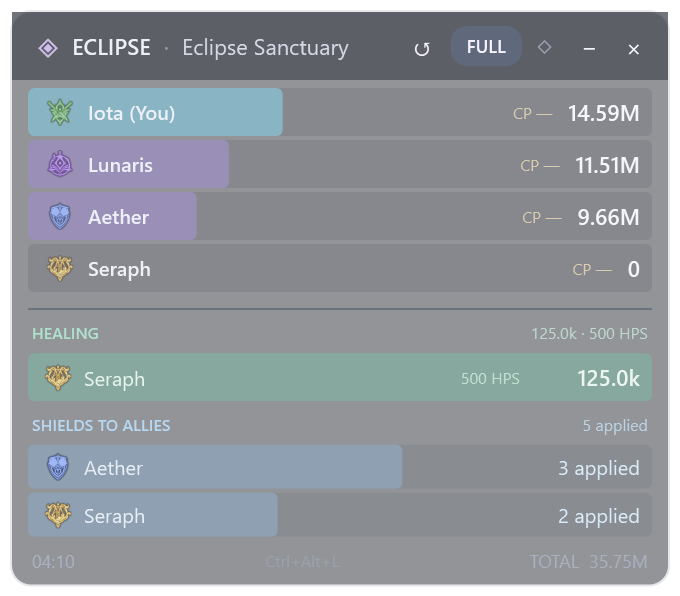
- Healing under the damage bars: green rows show each player's observed healing total and average HPS over the run. Healers remain visible even with zero damage.
- Shields to allies: blue rows count recognized shield applications to other party members. Healing and shielding can appear together for the same player, including Cleric. Self-shields are excluded from these allied HUD rows.
- More accurate shield classification: block bonuses and protection from death no longer count as shields. Six direct shield families and five specialization-dependent families are recognized; conditional effects require the specialization flag in the received data. Selected coverage spans multiple classes, including Cleric.
- Cleaner click-through HUD: the large “Grab mouse back” button is removed. Press Ctrl+Alt+L to toggle mouse interaction; a discreet hint stays inside the HUD. If the shortcut is occupied, the HUD stays clickable. Closing the overlay keeps the main client running.
Support totals stay cumulative when live DPS returns to zero after 2 seconds without positive damage. A new run clears the support totals. English is the default; French remains available.
Measurement limits: shields are application counts, not damage amounts. Shield capacity, damage absorbed or blocked, effective healing and overheal remain unknown. The support decoder covers selected packet families and skills; automated checks do not establish exhaustive live-game or regional coverage.
Install/update: download Eclipse-Setup.exe below, or use UPDATE when it appears in Eclipse. Runtime is included; the official Npcap consent wizard is offered if its driver is missing. Existing history and preferences are preserved. The ZIP is also available for a complete extracted installation.
Validation: 615 logic checks, 26 native HUD support checks and 24 shortcut checks, plus existing analysis/history checks, isolated client shutdown, final ZIP migrations from V1 and 3.0.0, and standalone setup verification. Screenshots use fictional demo data.
Français — Eclipse 3.0.1 affiche les soins et HPS en vert, ainsi que les applications de boucliers sur les alliés en bleu, sous les dégâts du HUD compact et complet. Un Cleric peut apparaître dans les deux catégories. Classification des boucliers corrigée pour plusieurs classes et leurs spécialisations. Gros bouton de récupération supprimé : Ctrl+Alt+L rend le HUD cliquable ou laisse passer les clics. Les dégâts absorbés/bloqués restent inconnus. Mise à jour via UPDATE ou Eclipse-Setup.exe, historique et réglages conservés.
Eclipse 3.0.0 - Party healing and shield applications
Eclipse 3.0.0 adds reported party healing and observed shield applications to the Glass client's run analysis.
- Party healing and HPS: see received healing totals, each caster's contribution, average HPS over the full run, skill details, healing-over-time ticks and recipients. The local user can play any class; healers with zero damage remain identified in the party.
- Shield applications: count observed applications of selected shield skills, with companion notifications deduplicated. Shield capacity and damage absorbed are unknown.
- Identity corrections: healing and recipients remain attached to the same character across internal teleports and session-ID changes. Reused IDs do not transfer old support totals to another player.
- Saved runs: new archives retain support details. Earlier archives show Not recorded, rather than pretending they contained zero healing. Support is kept separate from DPS and total damage.
- Diagnostics: Preferences → Export diagnostics includes counts of recognized support candidates, accepted events and rejection reasons. Export during the affected run; these counters reset with it. The support diagnostic contains no player names, packet payloads or credentials.
Measurement limits: support decoding currently covers eight recognized healing families and five named shield families. Effective healing and overheal are not determined. Automated packet, identity and UI checks do not establish complete live-game or regional protocol coverage; real comparisons by users remain necessary.
The existing features stay available: independent live overlay, party DPS returning to zero after 2 seconds without positive received damage, cumulative run damage, direct history analysis with contribution bars and Back navigation, full skill/hit details, saved builds, comparisons, Rift/event timers and optional favourite-boss alerts. Internal dungeon teleports preserve runs; 22 activity entries are recognized, with automatic final-boss completion limited to 7 dungeons. Startup stays silent.
Install or update: download Eclipse-Setup.exe, or use UPDATE when it appears in Eclipse. Runtime is included; the official Npcap consent wizard is offered if its driver is missing. Existing history, language and HUD preferences are preserved. English is the default; French is selectable. No Eclipse account is required.
Validation: 577 logic checks including synchronized and fragmented TCP, LZ4 compressed batches and all nine local classes; 14 native support checks, 22 history-analysis checks, English/French/compact support views, isolated lifecycle, V1/2.1.10 migrations and standalone setup verification. Gallery values are fictional demo data.
Français — Eclipse 3.0.0 ajoute les soins reçus du groupe, les HPS moyens du run, les détails par compétence/tick/destinataire et les applications de boucliers reconnues. Le joueur local n'a pas besoin d'être healer. Identités à zéro dégât et après TP corrigées, données de support archivées et diagnostic disponible dans Préférences. Les anciens runs indiquent « Non enregistré ». Soins effectifs, overheal et dégâts absorbés restent inconnus ; couverture limitée aux compétences reconnues. Mise à jour via UPDATE ou Eclipse-Setup.exe, historique et réglages conservés.
Eclipse 2.1.10 - Run analysis and overlay fixes
Eclipse 2.1.10 makes reviewing a dungeon run faster and fixes overlay and client closure.
- Click a dungeon in Run history to open its analysis directly.
- See every party member's total damage, sorted by contribution, with a thin class-coloured bar. Players who left the party remain in the saved run.
- Keep the existing skill breakdown, hits and timeline underneath. Time-range selection changes the details while the recap keeps the whole run's totals.
- Back to run history restores your search, filters and scroll position; the same run can be opened again.
- Closing the overlay leaves the desktop client and damage capture running. Use the Overlay button to reopen it.
- Closing the main client hides both windows promptly, finishes pending saves and stops capture before exiting.
The 2.1.9 DPS and dungeon corrections are included: live party DPS returns to zero after 2 seconds without received positive damage, while run totals remain cumulative. Internal teleports preserve runs. Activity recognition covers 22 catalogue entries; automatic final-boss completion remains limited to 7 dungeons.
Install: download Eclipse-Setup.exe, or click UPDATE when it appears in Eclipse. The complete application runtime is included; the official Npcap consent wizard is offered if the driver is missing. Existing history, language and HUD settings are preserved. English is the default; French is selectable. Startup remains silent.
Validation: 500 logic checks, 22 native history-analysis checks, English/French and compact layouts, both client close paths with an existing Npcap driver and isolated local API, migrations from V1 and 2.1.9, and standalone payload verification. Gallery values are labelled demo data. This release does not extend dungeon or regional protocol coverage.
Français Cliquer un donjon de l'historique ouvre directement son analyse. Dégâts totaux de tous les membres avec une fine barre, détails et chronologie conservés. Retour à l’historique retrouve les filtres et le défilement. Fermer l'overlay laisse le client et la capture ouverts ; fermer le client termine les sauvegardes puis quitte le processus. Mise à jour via UPDATE ou Eclipse-Setup.exe, historique et réglages conservés.
Eclipse 2.1.9 - Party DPS and dungeon-run fixes
Eclipse 2.1.9 is a corrective update to V2.
- Live party DPS returns to 0 after 2 seconds without received positive party damage. The next hit starts a fresh DPS window; run totals and archived averages are retained.
- Internal dungeon teleports preserve the same run. Supported final-boss deaths archive its last hits and reset live totals. Interrupted runs retain their summary.
- Fix the permanent no-DPS state after a closed run and a later world load into an activity missing from the catalogue. Unknown combat remains measurable without claiming dungeon recognition.
- Protect old targets from late hits; handle reused player/target IDs and delayed NPC identity.
- Recognize 22 catalogue activities, including three sealed dungeons and Flauke Legion Outpost. Automatic completion is limited to verified final bosses in seven dungeons; other finishes use Finish run / Interrupt run.
Install: download Eclipse-Setup.exe below, or click UPDATE in your current installation. The standalone EXE includes the complete application; guided Npcap consent remains available if needed. Existing language, HUD settings and history are preserved. English is the default; French remains selectable. The app intro is silent.
Validation: 500 logic checks, native Windows interface and update controls, ZIP migrations from V1 and 2.1.8, standalone extraction/install verification. The owner confirmed the original no-DPS fix in game. The two-second cutoff is verified with timed fixtures; complete coverage of every dungeon/region is not claimed.
Mise à jour corrective de la V2, pas une nouvelle V3. DPS live du groupe à 0 après 2 secondes sans dégâts positifs, reprise sur une nouvelle fenêtre au prochain impact. Dégâts totaux et moyennes des bilans conservés ; TP internes sans remise à zéro du run ; reprise du comptage hors catalogue après clôture corrigée. Installation par UPDATE ou Eclipse-Setup.exe, historique et réglages conservés. Reconnaissance de 22 activités ; fin automatique vérifiée limitée à 7 donjons, autres fins manuelles.
Eclipse 2.1.8 - Corrected AION2Hub timers and client UPDATE
Eclipse 2.1.8 fixes the official website and bug-report link using the published production address.
Download Eclipse-Setup.exe directly the full application, assets, game data and runtime are included. Run the installer; no ZIP extraction is needed. Npcap uses its official consent wizard if required. The ZIP remains available for portable installation and in-app updates.
Eclipse 2.1.8 corrects the timers and adds a client UPDATE button matching the overlay.
- AION2Hub regional schedules replace the previous sources: fixed UTC+9 for Global/KR, UTC+8 for Taiwan; actual regional openings displayed in local time and UTC.
- Corrected boss schedules and KR/TW activities. Unknown travel portal duration remains unspecified, with the prior 5-minute/1-hour phases removed.
- Existing favourites, language and timing settings retained; optional 10/5/0 reminders work minimized.
- UPDATE appears only after a newer version is detected. A luminous Eclipse progress panel shows the real download percentage, then verification and installation preparation. English default and French choice. Version 2.1.8 replaces BETA labels. Silent app intro remains unchanged.
- Official website with screenshots, downloads and private bug submissions / JSON export: https://eclipse-aion2-dps-meter.koayo.chatgpt.site
Use UPDATE for the same main Eclipse installation, or extract the complete ZIP and run Eclipse.Setup.exe. The official Npcap wizard opens with your consent if needed. Local settings and saved data are retained.
Timers are a community snapshot checked 3 October 2026, not live game confirmations. Removing BETA is a presentation change, not a promise of every PC or future patch.
Validated: 436 logic checks, native UI, actual ZIP migration from V1 and 2.1.7, original folder unchanged. Shutdown was validated on 2.1.7; 2.1.8 only corrects the website link and displayed version.