Releases: JYPochez/VNS-Better-Xojo-Help
Release list
v0.19.0 — a toolbar you can read, and a choice about how it opens

New: Home
A button left of Back that puts you back where a fresh launch would: the search field cleared, the
whole tree restored, its first topic open. Useful after a search has replaced the tree and you want
your bearings back without quitting.
New: copy this page's address
Beside the globe, at the right of the toolbar. The globe opens the current page on
documentation.xojo.com; the new button puts that same address on the clipboard instead. Both are
available only for the Sphinx-era releases that are still served online, so they enable and disable
together, and the copy is acknowledged by the button itself rather than by a dialog.
New: Settings ▸ At launch
"Reopen the last page read", on by default, which is exactly what the app already did. Turn it
off and every launch starts fresh — the newest documentation set in the popup, opened on its first
topic. The choice takes effect at the next launch.
The toolbar is icons now
Home, back, forward, copy-address and the globe carry Material Design Icons (Google, Apache
License 2.0) rather than text glyphs, so the row reads as one set. Each is supplied at 1×, 2× and 3×
so it stays sharp on a Retina screen, in a light and a dark set that follow the system appearance.
The buttons are square and the row is aligned to the height macOS actually renders its popups at.
The About window credits the icons, as the licence asks.
Fixed
-
The window reopens at its saved position and size again. A constant added during the Linux
investigation to skip the bounds restore for a single test build was left behind switched off, so
the app went on saving the bounds and stopped reading them. The rest of that investigation's
scaffolding went with it, which also stops five redundant layout passes at startup and five more
after every page load, on every platform. -
A tab is named after the member, not the class page it lives on. Opening
DesktopListBox.AddRow,.AddRowAtand.AddExpandableRowgave three tabs all captioned
DesktopListBox, because in the Sphinx era every live member is a section of its class's page.
Linux works
Two Xojo issues stood between this app and a usable Linux build, and both are now worked around by
the app itself — nothing to configure.
- The pane rendered blank on some hardware. Xojo documents this and recommends turning WebKit's
hardware acceleration off, which the app now does at startup. It is also why the pane behaved
differently under GNOME and XFCE: acceleration defaults off on Wayland and on elsewhere. - The pane was drawn at the window's top-left corner rather than in its own pane. The cause was
not the layout: filling a popup menu and setting its selection before the window is fully
presented displaces the viewer. That is Xojo issue #81717 — confirmed by Xojo, a fix promised
in a future release, and their suggested workaround is to defer that work, which the app now does.
Confirmed on Ubuntu on ARM under XFCE: the tree, the splitter, the tab strip, search and the reading
pane all behave as they do on macOS.
Download
macOS only, signed and notarised, universal. Windows and Linux compile from source and work — no
download is offered for either, because the Chromium runtime they embed puts the Windows build at
~118 MB compressed, over GitHub's file limit.
Better Xojo Help 0.18.0
v0.18.0 — install documentation without Xojo
New: File ▸ Install Documentation…
If you no longer have a Xojo release installed, its documentation was until now unreachable. This
takes the file directly.
- A legacy
XojoLangRefDB— the single SQLite file that is the whole documentation set for
2015r2.1 through 2021r3.1, about 25 MB. - A Sphinx-era
docs.tgz— the archive every 2022r1-and-later Xojo application bundle carries at
Contents/Resources/Language Reference/, about 190 MB. Its root is theDocumentationfolder, so
it unpacks straight into place.
Both are installed under ~/Library/Application Support/Better Xojo Help/Documentation/, in the same
layout Xojo uses. Your Xojo installation is never written to — this app only ever reads it, and
for the people this feature is for it may not exist at all.
Which release is it for?
Worked out from the file where the file says:
- A legacy database from 2015–2019 carries a
versiontable:2018,0300.4means 2018r3. - A Sphinx set names its release in the notes page its
index.htmllinks.
And asked when it does not, which is not a rare case: the 2020–2021 databases carry no version
table at all, and the five oldest Sphinx sets link no release-notes page. Where nothing is found the
file's modification date is offered as a clue — a database dated 2020-12-14 is a 2020r2.x.
The release is confirmed even when detected, because a wrong one is invisible until the version popup
shows the wrong number.
One thing worth knowing: a docs.tgz reports the version of the documentation, which can lag the
IDE by a point release. The archive inside a 2026r1.2 bundle identifies as 2026r1.1.
Already installed?
You are told before the work starts, not after — unpacking 190 MB and then being told it was already
there is no use to anyone. A set this app installed can be replaced; one found in your Xojo
installation is left alone, and you can install your copy alongside it, which then takes precedence.
Removing one
Settings ▸ Open the documentation folder… reveals them in the Finder. There is no delete button
on purpose: the Finder does this better, and a mistaken click here would discard a download you may
have no other copy of.
Other platforms
Windows works. Compiled and run on Windows 11 on ARM against 2026r2: the version popup, the
platform filters, tabs, the MCP server and the layout all behave. An x86-64 build is expected to work
but has not been run.
Linux is not validated. It compiles and finds the documentation, but GTK draws the reading pane at
the top-left of the window instead of beside the topic list. The app's own geometry is correct — the
position is set and reads back correctly — and GTK discards it, so this is not something the layout
can work around. Everything else on that platform is right.
Neither is offered as a download, and that is a size decision rather than a quality one: those
builds embed a Chromium runtime for the documentation viewer, which puts the Windows zip at ~118 MB —
over GitHub's 100 MB file limit. Build from source instead: open the project in Xojo, choose your
target, run. There is nothing to configure.
Download
macOS, universal — Apple Silicon and Intel — signed, notarised and stapled. Attached below and in
Binaries/.
Better Xojo Help 0.17.0
v0.17.0 — MCP server, and a fix for the download that would not open
Fixed: "the developer cannot be recognised"
Some people could open 0.16.0 and some could not, on macOS 12 through macOS 26 alike. The zip was
at fault, not your Mac.
It was built with ditto -c -k --keepParent, which stores extended attributes as AppleDouble ._
members. Finder and ditto turn those back into attributes on extraction and the app opens normally.
Any other extractor writes them as real files — ._Resources, ._Versions, ._XojoFramework inside
XojoFramework.framework — which breaks the seal on the embedded framework. codesign reports
"unsealed contents present in the root directory of an embedded framework", and Gatekeeper refuses
to launch it.
So whether it worked came down to which extractor you happened to use. 0.17.0 is built with
--norsrc --noextattr: no AppleDouble members at all, verified by extracting with plain unzip and
checking codesign --verify --deep --strict and spctl. The stapled notarisation ticket is intact.
Already stuck on 0.16.0? Re-extract rather than re-download:
ditto -x -k ~/Downloads/Better-Xojo-Help-0.16.0-macOS-universal.zip /Applications/
New: serve the documentation to an AI assistant (MCP)
Switch the server on in Settings, and point an MCP client at it. Help ▸ MCP Setup has the
commands for Claude Code, Claude Desktop and others, and a button that copies the one-liner.
- Two tools.
xojo_lookupreturns one class, method, property or event as plain text, code
samples included.xojo_searchmatches words together across titles and paths. - Every answer names the release it read, and any installed release can be asked for by name.
That is the point:RecordSetis a live class in 2018r3 and deprecated in 2026r1.2, and an
assistant reading only the newest documentation cannot tell you that. - Local only. It listens on 127.0.0.1, refuses connections from anywhere else, and runs only
while the app is open. A launcher script is included if you would rather your client started the
app itself — it does so hidden, in about a second, and quits it again afterwards. - A status dot and a traffic meter sit on the toolbar so you can see when something is asking.
Also
- The tab strip is always visible, and a lone tab no longer shows a close cross.
- Tab titles show the page name rather than an internal key.
- Documentation era boundaries corrected: the legacy SQLite format runs to 2021r3.1 and the
Sphinx format starts at 2022r1. An earlier note claiming some releases shipped no local
documentation was wrong — every Xojo release ships a set; it has to be installed once per release.
Download
Universal — Apple Silicon and Intel — signed, notarised and stapled. Attached below and in
Binaries/.
First time? Xojo does not install its documentation by default:
Preferences → General → Documentation → Install Local Documentation, once per release.
Better Xojo Help 0.16.0
v0.16.0 — filter the documentation by platform
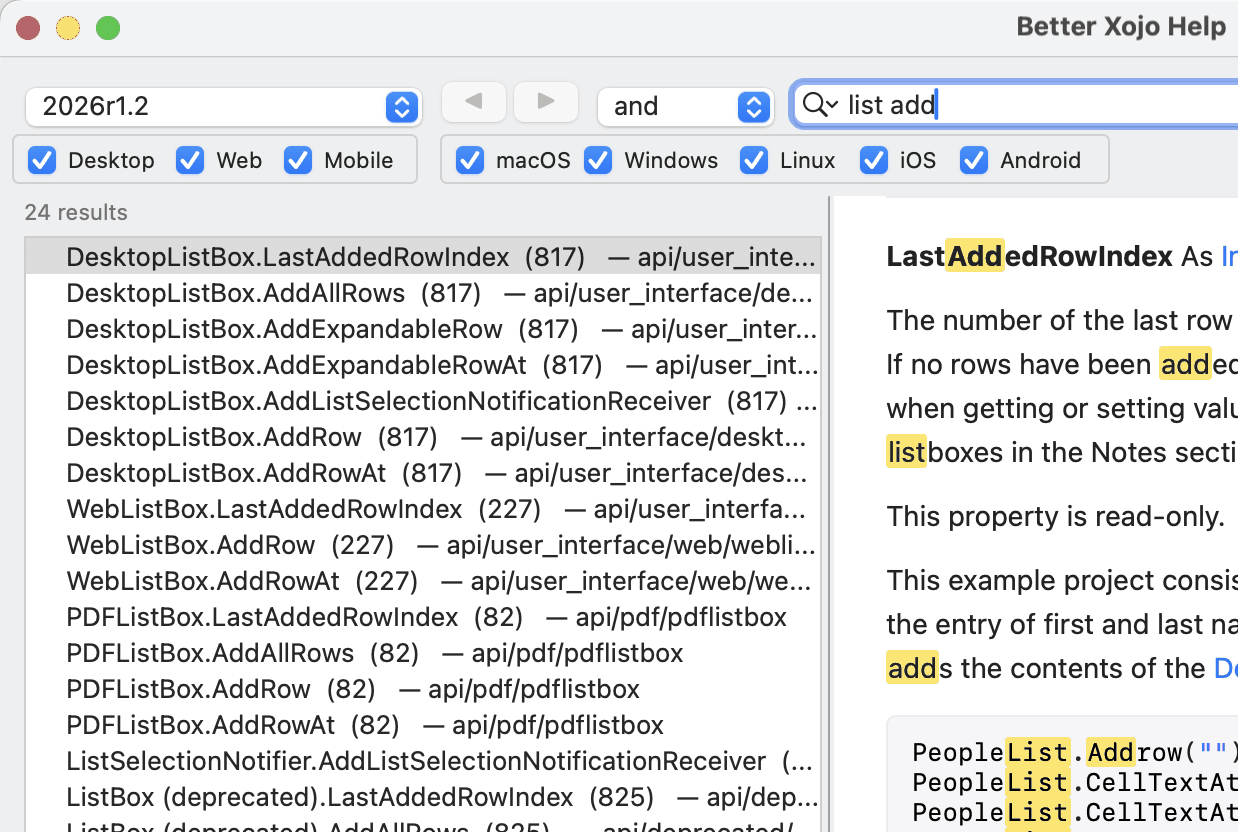
Search results and the topic tree can now be narrowed to the platforms you actually build for, taken
from each page's own Compatibility table rather than guessed from class names.
New
- Two groups of checkboxes, because Xojo's Compatibility table has two rows: project types
(Desktop / Web / Mobile) and operating systems (macOS / Windows / Linux / iOS / Android).
A page has to satisfy both. UntickWebandWebListBox.AddRowgoes — even though a web app
genuinely runs on macOS, which is why the two axes are kept separate. - The topic tree narrows too, not just the results. A folder stays while anything under it
survives. - Right-click either group for Check All / Check None. Choices are remembered between launches.
- Pages that say nothing about platforms — the language reference and the guides, 1337 of 2123 pages
on 2026r1.2 — always match, so no combination of boxes can hideString. - On the 2015–2019 documentation, which ships no Compatibility table, the filter falls back to class
names:Web…is web,iOS…is iOS, everything else always shows. Android is inert there, correctly
— it did not exist before 2020.
Fixed
- Page titles showed their HTML markup: the tree listed
<cite>Graphics</cite>verbatim. 24 of 2123
titles were affected.
Also
- You can read the documentation of a Xojo you can no longer launch. Every modern Xojo bundle
carries the whole set atXojo.app/Contents/Resources/Language Reference/docs.tgz, and that archive
is theDocumentationfolder. Untar it into
~/Library/Application Support/Xojo/Xojo/Xojo <release>/Documentationand it appears in the popup.
The README has the command. Sphinx-era releases only.
Download
Universal — Apple Silicon and Intel — signed and notarised. Attached below and in
Binaries/.
First time? Xojo does not install its documentation by default:
Preferences → General → Documentation → Install Local Documentation, once per release.
Better Xojo Help 0.15.1
v0.15.1
A fix release, one day after the first public build.
Fixed
- Tabs showed the internal page key instead of the page title. A tab opened on the Console index
readdoc:api/console/indexrather thanConsole, which made a row of tabs unreadable as soon as
there was more than one. Tabs are now named after the page they show, and are renamed as you
navigate within them.
Unchanged
Everything else is as in v0.15.0
— searching titles, paths and members, and / or / exact, deprecated results last, tabs, links,
favourites and the globe.
Download
The signed and notarised build for Apple Silicon is attached below, and also in
Binaries/ in the repository.
Unzip and drag to Applications — it opens without a Gatekeeper warning, so no Xojo licence is needed
to run it.
If this is your first time: Xojo does not install its documentation by default. In Xojo,
Preferences → General → Documentation → Install Local Documentation, once per release you want to
read. Without it the app has nothing to show.
Better Xojo Help 0.15.0
v0.15.0 — first public release
Browse every set of Xojo offline documentation installed on your machine, from one window.
The IDE's help only reaches the docs of the version it belongs to, and the pre-2019 sets are in a
SQLite format nothing opens any more. This reads both formats — 30 releases on the machine it was
built on — and lets you switch between them from a popup.
Searching
- Members are searchable, which the shipped index cannot do. In the modern documentation only a
deprecated member gets a page of its own, soDesktopListBox.AddRowis a section inside its class
page and page-level search cannot see it. Better Xojo Help harvests them — 15 502 on 2026r1.2. and/or/exactfor multi-word queries. Typelist add, leave it onand, and you get
theDesktopListBoxmembers that match both words wherever they sit in the title or the path.- Deprecated results sort last, whatever their score, because a deprecated page repeats the name
of whatever replaced it and would otherwise rank first. Switchable in Settings. - Results are ranked by how often the term actually appears in the page, the count shown per row.
- Selecting a member scrolls to that member, not to the top of its class page.
Reading
- Links work on both documentation formats and open in the app.
- Tabs: Cmd-click a link or a topic to open one behind what you are reading. Cmd+T, Cmd+W.
- Back and Forward on Cmd+← / Cmd+→.
- Favourites on Cmd+D, kept per documentation version.
- A globe that opens the current page on documentation.xojo.com.
- Code samples carry a Copy button, and keep the syntax colouring the release shipped.
Before you start
Xojo does not install its documentation by default. In Xojo:
Preferences → General → Documentation → Install Local Documentation, once per release you care
about. Without it the app has nothing to read.
2019r2 through 2022r1 shipped no local documentation at all, so those releases never appear.
Notes
- macOS on Apple Silicon. The download is signed and notarised, so it opens without a Gatekeeper
warning. Intel and Universal builds are not provided yet; building from source works on either. - Works entirely offline. Nothing is downloaded, nothing is written outside the app's own folder, and
your Xojo installation is only ever read. - MIT licensed.