
✨ PoshUI v1.4.1 — Canvas Polish & Release Showcase
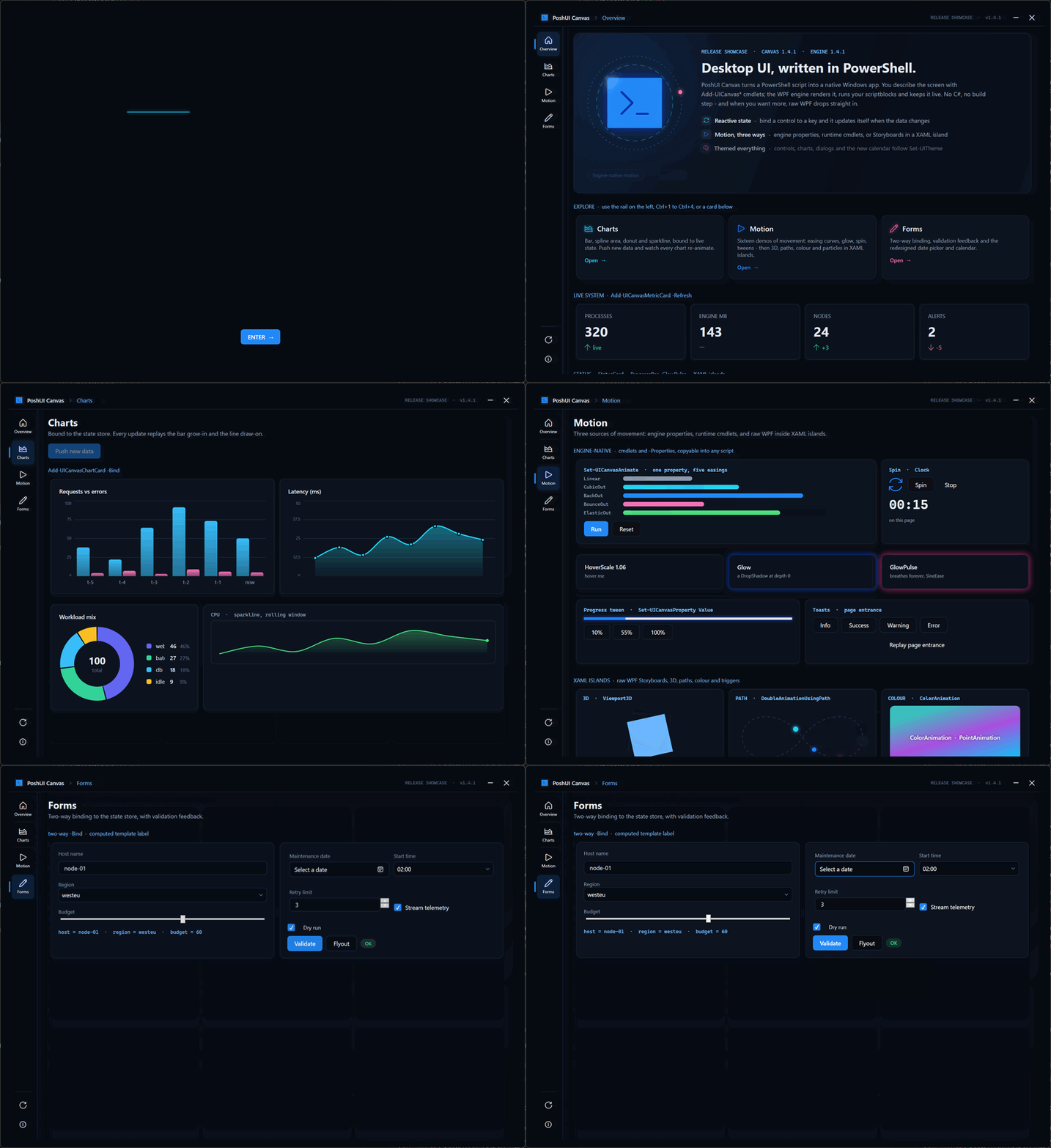
A polish release for PoshUI.Canvas. It brings a redesigned date picker and calendar, a showcase app that
takes Canvas to full stretch, and a complete guide to motion.
Nothing breaks. No cmdlet or parameter changed, so existing scripts run as they are. Every app that uses
Add-UICanvasDatePicker gets the new look automatically.
🆕 First Release With PoshUI.Canvas
This is the first signed release package since v1.3.1. Version 1.4.0 was never packaged, so everything it
added ships here for the first time:
- PoshUI.Canvas: free-form apps from ~85 cmdlets, where a single
.ps1is the whole app - An engine-native workflow runner with live progress, retry, timeouts, skip conditions and reboot-resume
- Off-gate script cards that stream output without freezing the app
- Declarative cascading fields, tabs, menus, splitters, Viewbox and master/detail grids
- A raw XAML escape hatch with
-Actionswiring, and per-monitor V2 DPI - Authoring diagnostics:
-Propertieskeys that nothing reads are logged by name
The full list is under 1.4.0 in the changelog.
📅 A Date Picker That Belongs in a Dark App
The old picker had no style of its own, so Canvas fell back to the stock Windows one. That meant:
- a hard-coded white border around the text;
- the old gradient calendar icon;
- faint text on a translucent fill;
- a light calendar popup, even inside a dark app.
Colours set on the outer control never reached the calendar inside it.
Every part is now themed, and follows Set-UITheme in both light and dark mode:
- Full-contrast day numbers
- An accent-filled selected day and a ring on today
- Dimmed days from the neighbouring months
- Chevron paging, with month and year views to match
- An accent border when the field has focus
🚀 Release Showcase
Examples\Showcase-Release.ps1 is one script that shows what Canvas can do. It's in the release zip together
with the logo files it uses. From the extracted folder:
Get-ChildItem -Recurse | Unblock-File
powershell -NoProfile -STA -File .\Examples\Showcase-Release.ps1- Splash: the PoshUI logo is revealed in two halves on opposite axes, with the colour channels converging
and a CRT power-down exit. It moves on to the app by itself. - Overview: a hero panel explaining Canvas, clickable explore cards and live metrics.
- Charts: bar, spline area, donut and sparkline charts, bound to live data. Push new data and watch every
chart animate again. - Motion: sixteen demos of movement (see below).
- Forms: two-way binding, validation feedback and the new calendar.
Navigation is a custom icon rail on the left, plus Ctrl+1 to Ctrl+4, under a slim top bar of the app's own.
🎬 Motion, Three Ways
Motion in the showcase comes from three places, and all of them are available to any script:
| Source | What it looks like |
|---|---|
| Engine properties | Stagger, HoverScale, Glow / GlowPulse: one line in -Properties |
| Runtime cmdlets | Set-UICanvasAnimate with Linear, Cubic, Back, Bounce and Elastic easings; Spin; progress tweens; the -Clock elapsed timer |
| XAML islands | Raw WPF inside Add-UICanvasXaml: a 3D cube, motion along a curve, colour animation, spring-on-hover, a particle field, an odometer, stroke draw-on |
New guide: Animation & Motion. It covers:
- what the engine animates for you, and where that stops;
- why storyboards in a XAML island must start themselves;
- the property paths that work, with a technique catalogue;
- easing and timing guidance;
- how to check that an animation works without watching it.
The AI context packs now include these motion rules too.
🔧 Fixed
- Faint, dated date picker. See above.
- A false
[unused property]warning forClockon elapsed-clock labels. - Garbled AI context packs. Docs saved without a byte-order mark came out with
—wherever there was an
em dash. The packs now also include every agent doc.
📦 Versions
| Component | Version |
|---|---|
PoshUI engine (PoshUI.exe) |
1.4.1 |
| PoshUI.Canvas | 1.4.1 (was 1.3.0; now matches the engine, and still accepts engine 1.4.0 or later) |
| PoshUI.Wizard / Dashboard / Workflow | 1.3.1 (unchanged) |
PoshUI.exe is Authenticode-signed. Check it with Get-AuthenticodeSignature .\bin\PoshUI.exe.
⚠️ Known Issue
Timers (-Refresh), state watchers and shortcuts registered on a page stay alive until the app closes. They are
registered again each time the user visits that page. If an app lets users move between pages a lot, throttle its
tickers. The showcase shows the pattern.
📋 Requirements
| Requirement | Version |
|---|---|
| Operating System | Windows 10/11 (64-bit) |
| PowerShell | Windows PowerShell 5.1 |
| .NET Framework | 4.8 (included with Windows 10/11) |
| Permissions | User-level (no admin required for most features) |
📖 Documentation
Full documentation: https://kanders-ii.github.io/PoshUI/
- Animation & Motion: the new motion guide
- About Canvas: what Canvas is and how it works
Made with ❤️ for the PowerShell Community