Repository navigation
Releases: Keenny38/ModernTinyPedals
Release list
NeoPedal 0.27.0

A new Home page with a debrief of your last session, a richer What's New page, a livelier Overlays page, the official circuit of Le Mans Ultimate on the track map from the first meters, a race calculator that follows the real race (drivers, penalties, pit menu), new telemetry channels, goals and road conditions in Driver Stats, and smoother animations on fast screens.
New
Track map from the first meters (Le Mans Ultimate)
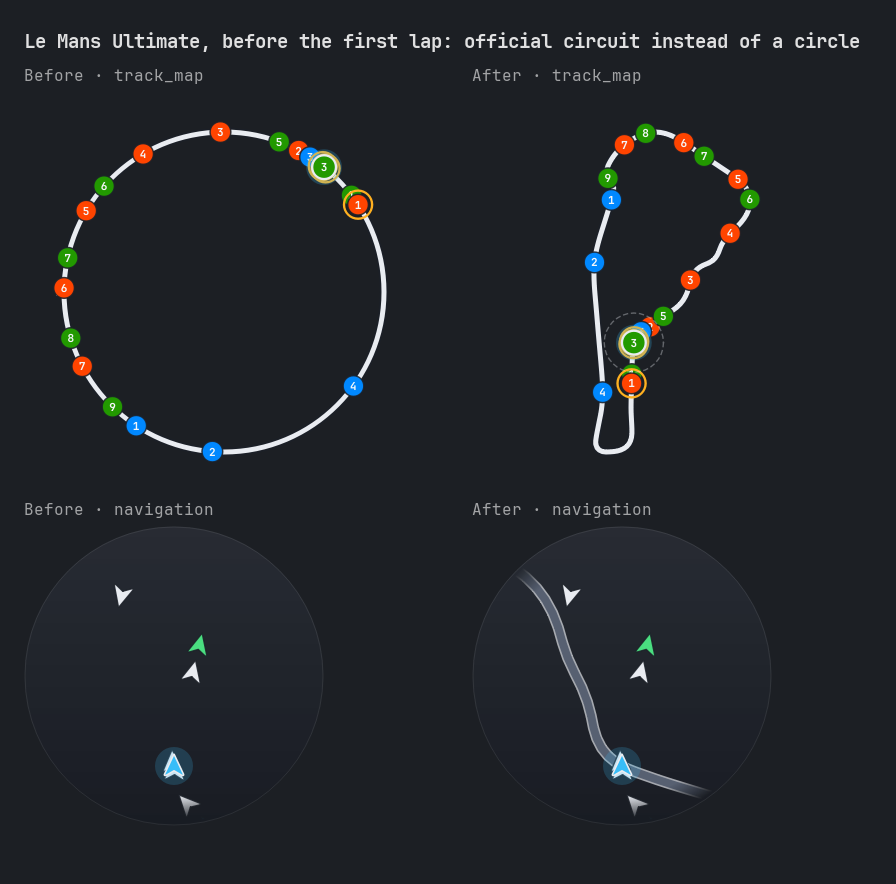
- Track Map and Navigation show the official circuit of the game as soon as it answers, without driving a lap first (
enable_restapi_access, on by default):- the shape at once, with the cars on it;
- the start line (and the Elevation profile, Corner Coach) once a car drives on track;
- the sector lines once you cross them, then it is saved as the track map.
- A short freeze of the app or the game while recording a lap no longer loses it: the lap is shown with its gap and the next lap without a gap is saved. A real jump (back to the garage, part of the lap skipped) is still not kept.
- Without any map yet, Track Map shows
Track map after one lapinstead of a made-up circle. - rFactor 2, or Rest API off: one complete lap is still needed.
Home page
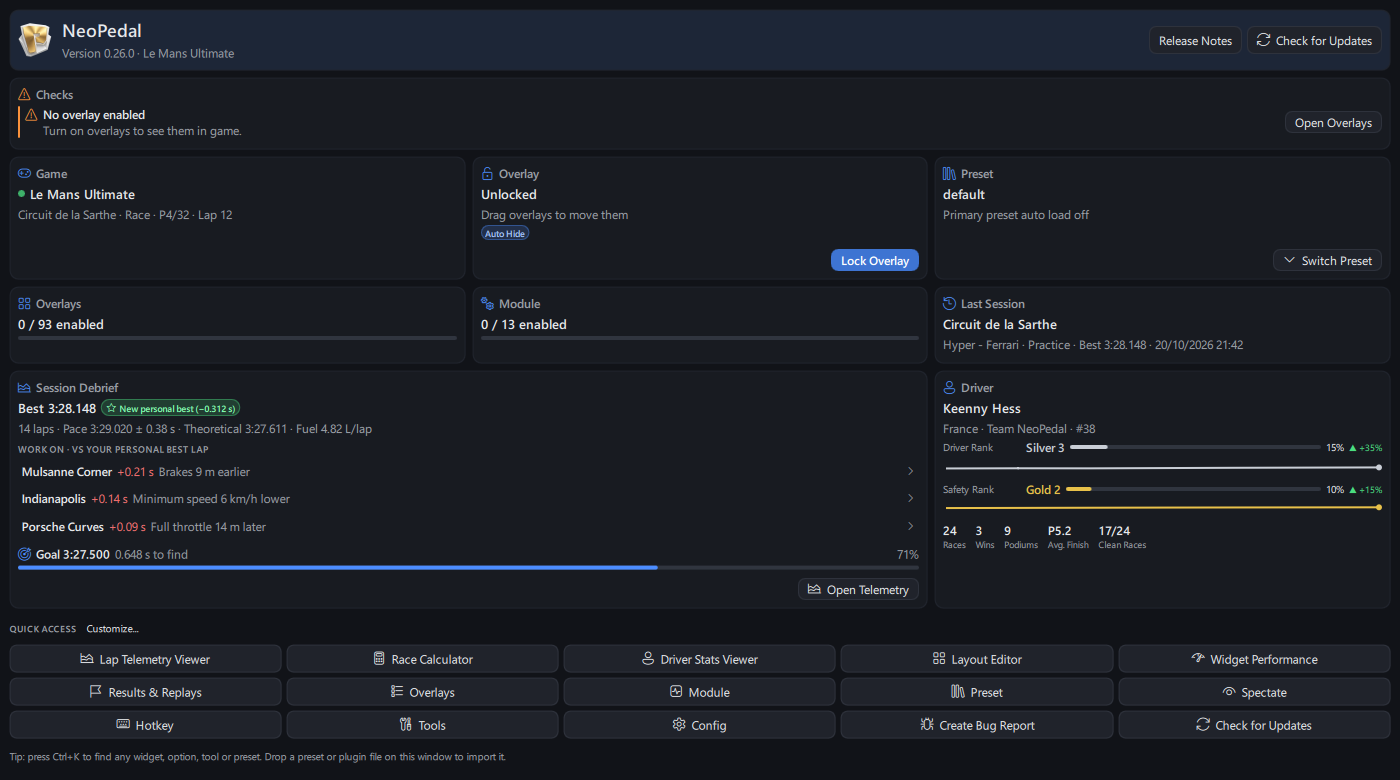
- Checks: what keeps overlays from showing right, most important first, each with a button to fix it:
Game running without data(Le Mans Ultimate open with plugins off),Game not running,Active State Override is on,No overlay enabled,Spectate Mode Enabled,Lap recording is off,Update Available. While you drive with nothing wrong:Ready. - Session Debrief of your last session: best lap against your personal best, pace and consistency, theoretical best, fuel per lap, and
Work on: the three corners where you lose most time, with the likely cause (Brakes 6 m earlier,Minimum speed 4 km/h lower...). Click a corner to open the telemetry on it, charts zoomed;Open Telemetryopens both laps. Your lap time goal (Driver Stats) with a progress bar. Switch Presetfrom the preset card, the last session opens its track and car in Driver Stats, the game card opens the API options.- Driver card: change since your previous Driver & Safety Rank and a line of each rank over time.
- The page is now drawn in Qt Quick (1 to 3 columns) and reads the game and files only while it is shown.
What's New page
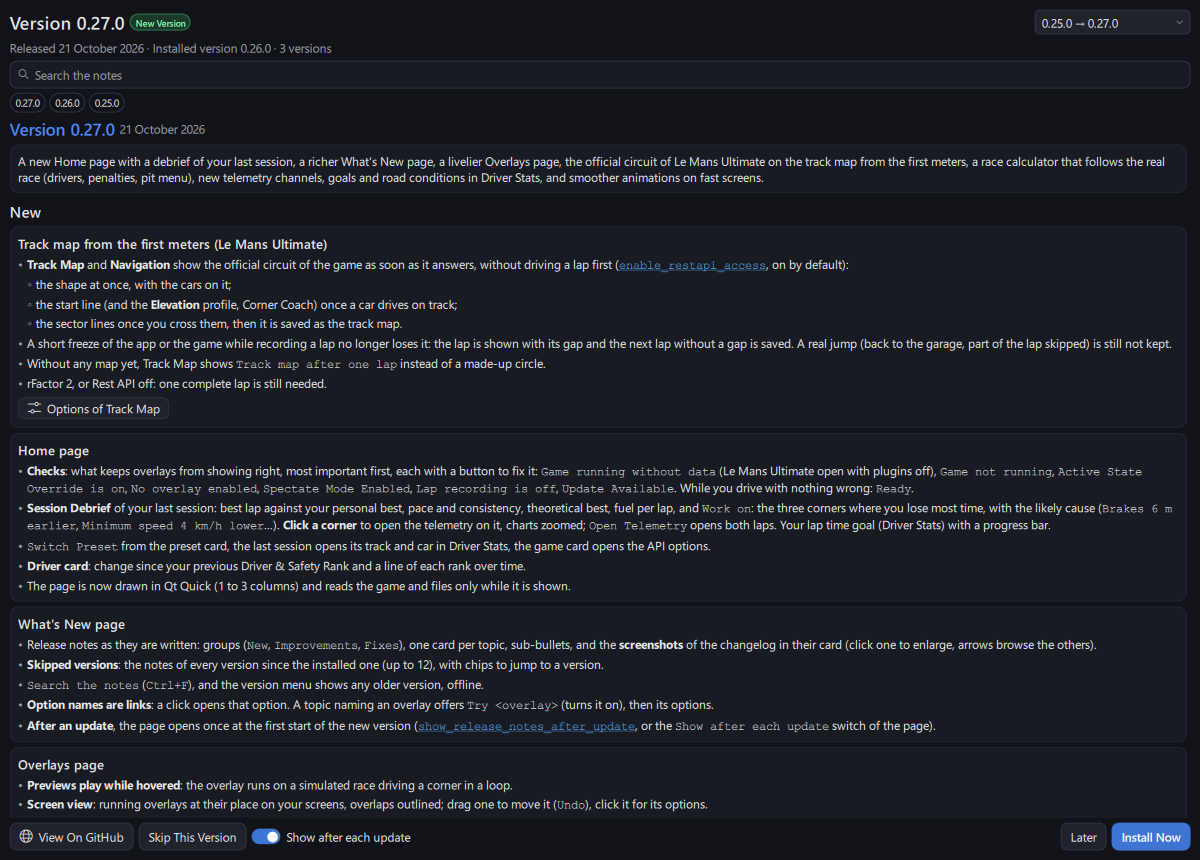
- Release notes as they are written: groups (
New,Improvements,Fixes), one card per topic, sub-bullets, and the screenshots of the changelog in their card (click one to enlarge, arrows browse the others). - Skipped versions: the notes of every version since the installed one (up to 12), with chips to jump to a version.
Search the notes(Ctrl+F), and the version menu shows any older version, offline.- Option names are links: a click opens that option. A topic naming an overlay offers
Try <overlay>(turns it on), then its options. - After an update, the page opens once at the first start of the new version (
show_release_notes_after_update, or theShow after each updateswitch of the page).
Overlays page
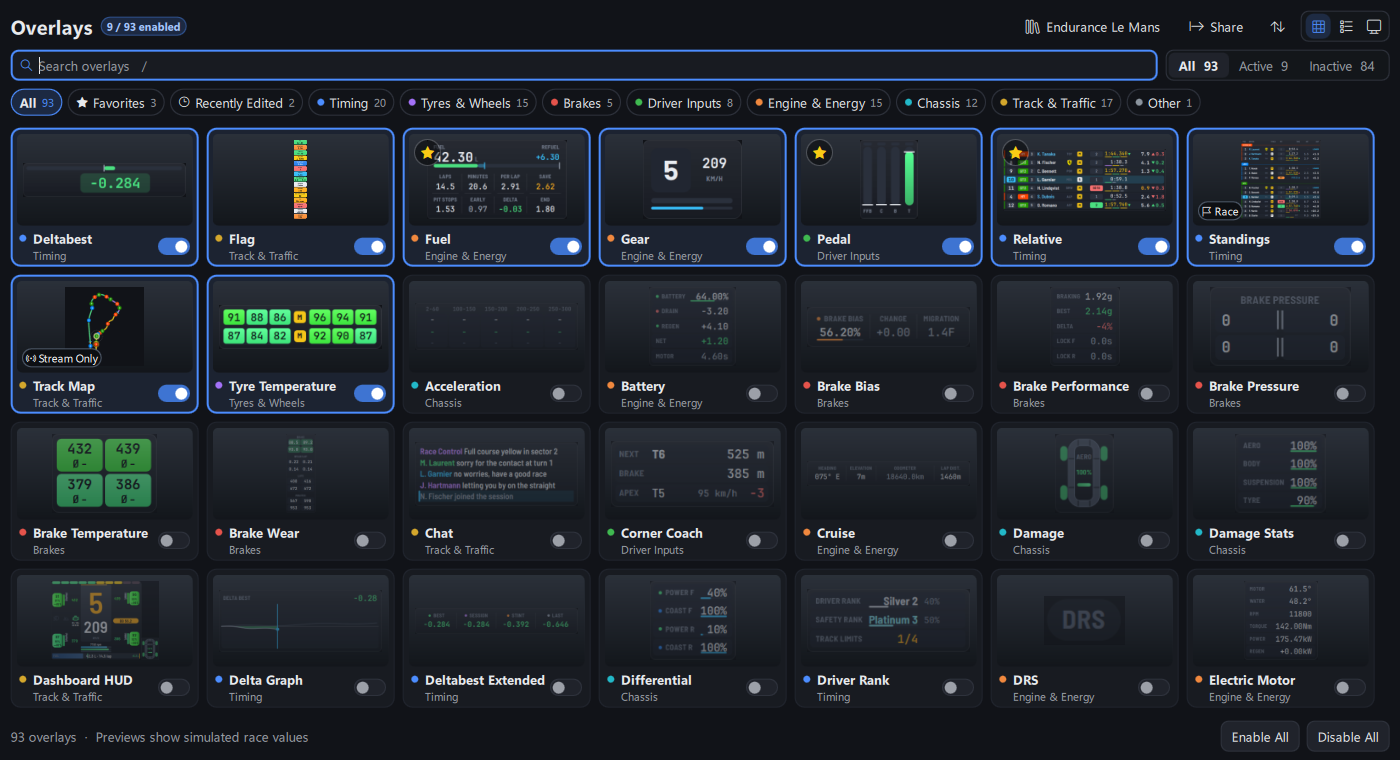
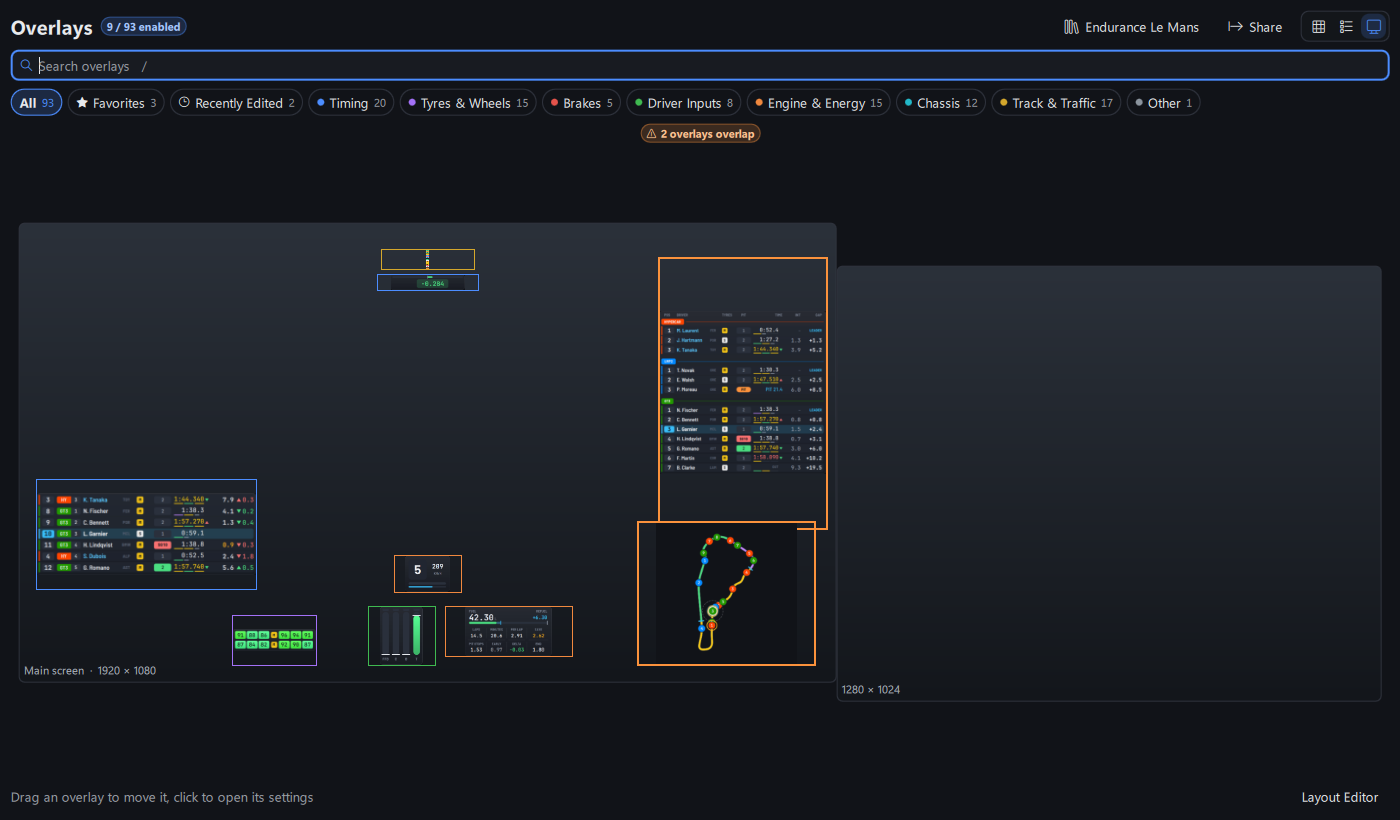
- Previews play while hovered: the overlay runs on a simulated race driving a corner in a loop.
- Screen view: running overlays at their place on your screens, overlaps outlined; drag one to move it (
Undo), click it for its options. - Favorites (star of a card,
Ctrl+F) and Recently Edited chips, a sort button (name, enabled first, category); a switched overlay stays where it is. - What each overlay shows, in its tooltip and in the compact list; badges for overlays shown only in some sessions (
Race,In Pits...) or only on stream or screen. - The loaded preset at the top: click it to load another one.
- Enabling or disabling many overlays at once is a single step (one save, one restart of the modules).
- Overlay Options: the preview plays the overlay on the simulated race (inputs, speed, gear, G force, brakes heating up, loads), with a play / pause button under it; overlays showing a fixed sample stay still.
Race Calculator
- Live race with the real drivers: the driver in the car and the driving time of each stint come from the race (LMU team order), with penalties to serve and a pending repair in the replan.
- Where you rejoin (under
Class Rivals): class place and gaps if you stop at the end of this lap. Pit Menu(LMU, in a session): sets the refill of the next stop in the game pit menu (virtual energy for a car using it, else fuel).Safety Car Risk: chance of a safety car over the race, the part of the race where it saves a stop, and for each stint whether to stop under it (Safety Cars per Hour).- Tyre pace:
Used Tyre Pace Loss(tyres changed when it pays), lap time difference of each compound (gear button of the tyre stock), andCompound Comparisonof the whole race on Soft, Medium, Hard. - Temperature:
Lap Time per °Cwith theTemperature Trendof the weather forecast (Livetab). - Driver minimums that cannot fit in the race are shown on the
Driving Timecard instead of being planned in one-lap stints; a driver short of its minimum drives whole laps up to it. - Race plan overlay:
enable_live_consumption(on by default) plans the rest of the race with the lap time and consumption of your latest race laps, even with the page closed. - Saving target, strategy and compound comparisons and safety car risk are calculated on a worker thread: typing stays smooth on a long race.
Telemetry viewer
- New channels: throttle and brake cut by the driving aids, aero balance, rake, damper velocity (presets
Driving AidsandAero), and bottoming marks on the map. enable_100hz_lap_recording(off by default): a sample every 10 ms instead of 20 ms; newer laps also keep the pedals after driving aids, front and rear downforce and camber.- Track notes:
Add Track Note Hereon the charts; notes are those of the Track Notes overlay (a note added here shows in game). Share Lap...: one.csv.gzfile for another driver, who adds it withAdd File...(shown "shared by" you).- Session tab: sector times, or for one corner the minimum speed, braking point or corner time of every lap.
- Exports
CSV, Visible Part...,CSV, Passage A ↔ B...and MoTeC between the markers. - A lap read from its binary copy loads only the channels shown: about half the memory per lap.
Driver Stats
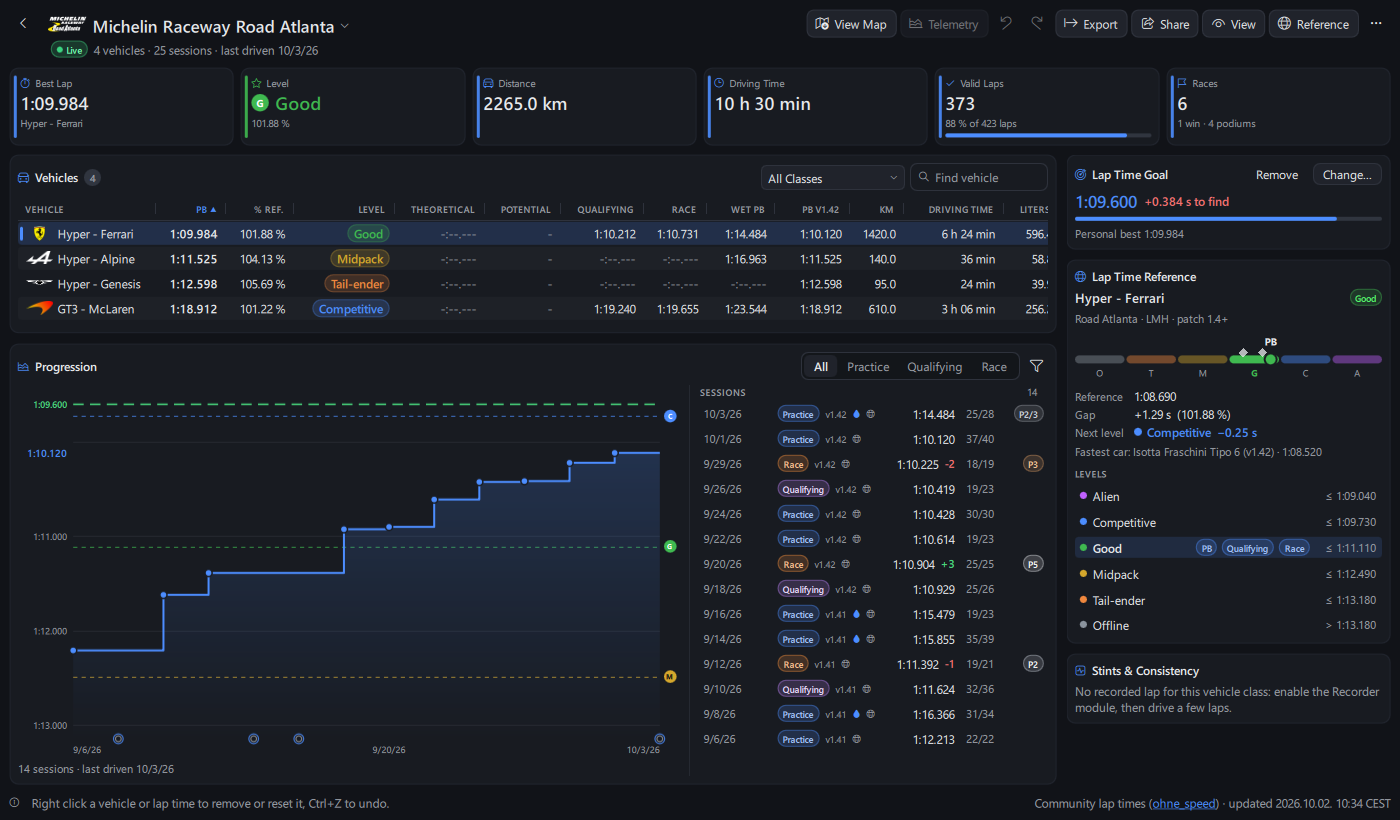
- Road conditions of each session (dry or wet road, track temperature, tyre compound), start position and online or offline: filter by road, server or since a game version, with a wet PB and a PB of the latest game version.
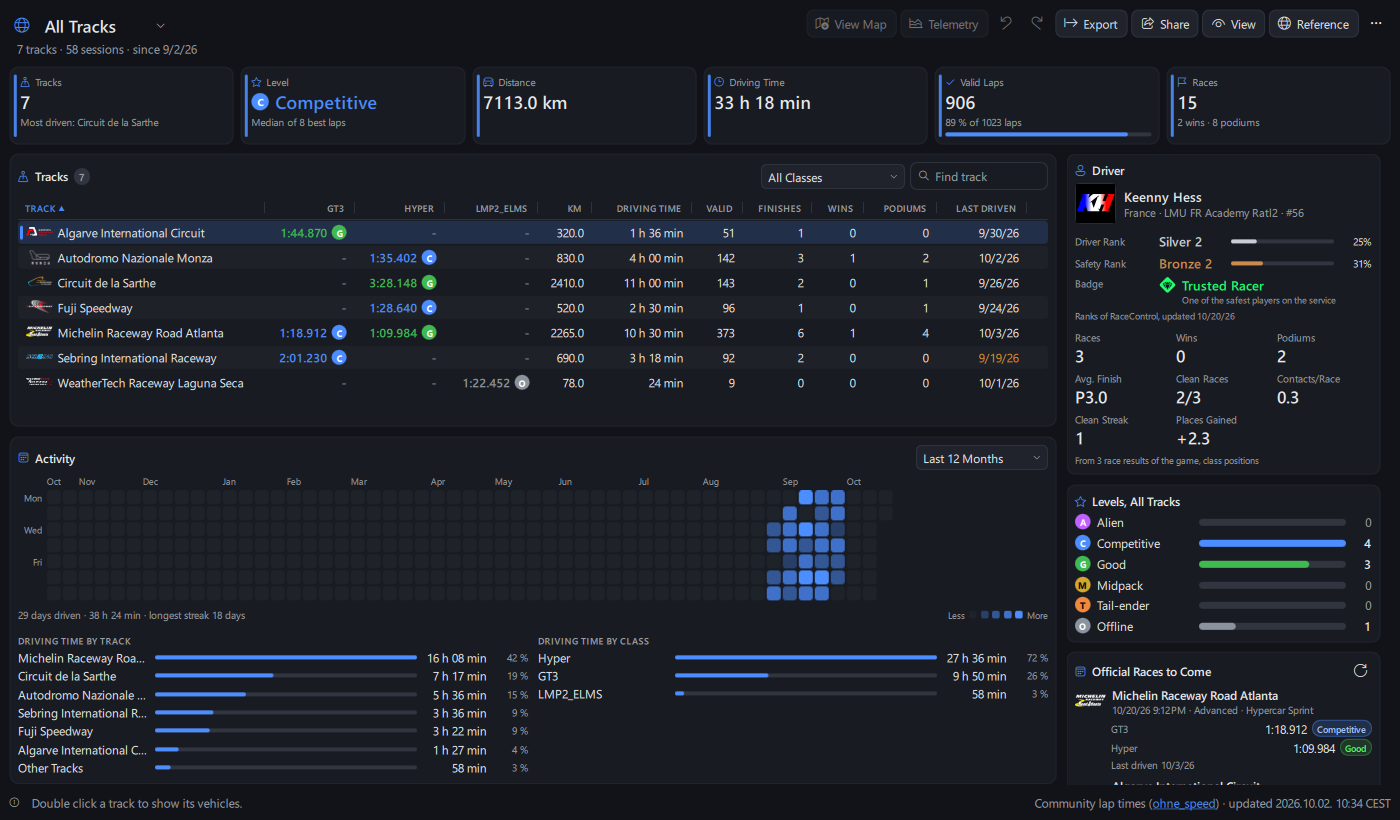
Lap Time Goalper car (suggested from the next community level): progress bar, goal line on the progression chart, a message once beaten.- Places gained, clean race rate and streak,
Rivalsmet in several online races, rank history. - Table search, class filter,
Group Vehicles by Class; combos not driven for 30 days marked; activity of any year with driving time by track and class (Breakdown). Official Races to Come (RaceControl)(off by default) with your best laps on their track.- Share your personal best as a picture card or a code to paste in a chat (
Copy Personal Best Card,Copy Personal Best Code,Compare a Personal Best Code...).
Improvements
- Smoother animations: pages animate and scroll at the refresh rate of the screen (up to 125 images per second on a 240 Hz screen, 143 on 144 Hz) instead of 62 (Windows).
- Lap and sector time colors (modern Standings, Relative, Rivals and Track Map sectors): purple for the best of the class, now including sectors of the lap being driven, so a sector beaten mid-lap is at once the only purple one; green for a personal best as soon as it is set; a slower valid last lap is yellow.
- Running lap time for every car, also those without telemetry, and while your own telemetry is frozen (garage, monitor, spectating).
- Real game sessions replayed in the automated tests through every data module and overlay, checked against the game values.
Fixes
- Fuel: the lap you joined mid-lap (app started or preset loaded on track) was counted as a full lap, with a partial consumption in the history and the race calculator.
- Flag: in a timed race, the last lap alert also comes on the extra lap when the leader crosses the line after you.
- Track Map, Navigation, Elevation, Corner Coach: the map is read as one piece, never half of an old map and half of the new one while...
NeoPedal 0.26.0
A corner coach, the Driver Rank and Safety Rank of every driver online, new flag alerts, darker panels, two overlays from TinyPedal 2.51, and three audits of bugs, performance and interface.
New
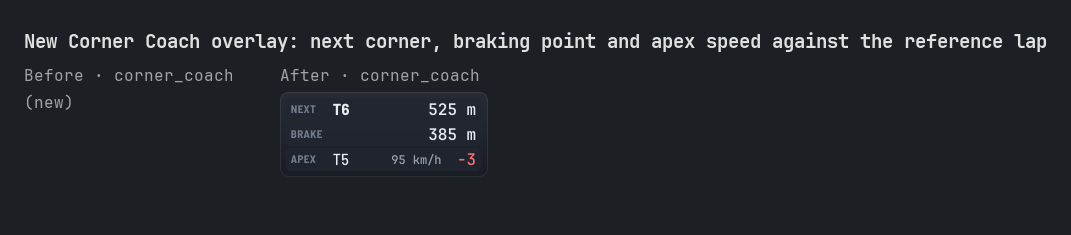
Corner Coach overlay
- Coaching corner by corner against the same reference lap as Telemetry Compare (
reference_lap_source:Viewer,BestorLast), off by default,Driver Inputscategory:- Next: the next corner, with its official number or name (
T5,Tertre Rouge), and the distance to its apex (show_next_corner). - Brake: distance to the braking point of the reference lap, then once you brake
On point,8 m earlyor8 m late(show_braking_point,braking_point_tolerance3 m by default), orNo brakingfor a corner taken flat. - Apex: minimum speed of the corner you just left and its difference to the reference lap, green when faster (
show_apex_speed).
- Next: the next corner, with its official number or name (
Online Driver Rank and Safety Rank (Le Mans Ultimate)
- Recent game versions no longer keep ranks in their menu file while the game runs: with
enable_online_driver_ranks(Config>Application>Online, on by default) the app reads them from RaceControl the way the game menu does (Steam ticket of the running game, ranks only, nothing saved), at start, after each session and every 5 minutes. - On an online server (practice, race, private server), the ranks of every driver of the session are read too, by name:
Driver & Safety Rankcolumn in Relative, Standings and Rivals (column_driver_ranks, off by default):S2 P3in rank colors, with the game badge of each driver;- strength of field of each class in Standings class headers (
show_class_sof) and field average in the Session overlay (show_field_level); - Driver Rank and Safety Rank on the Broadcast Director driver cards.
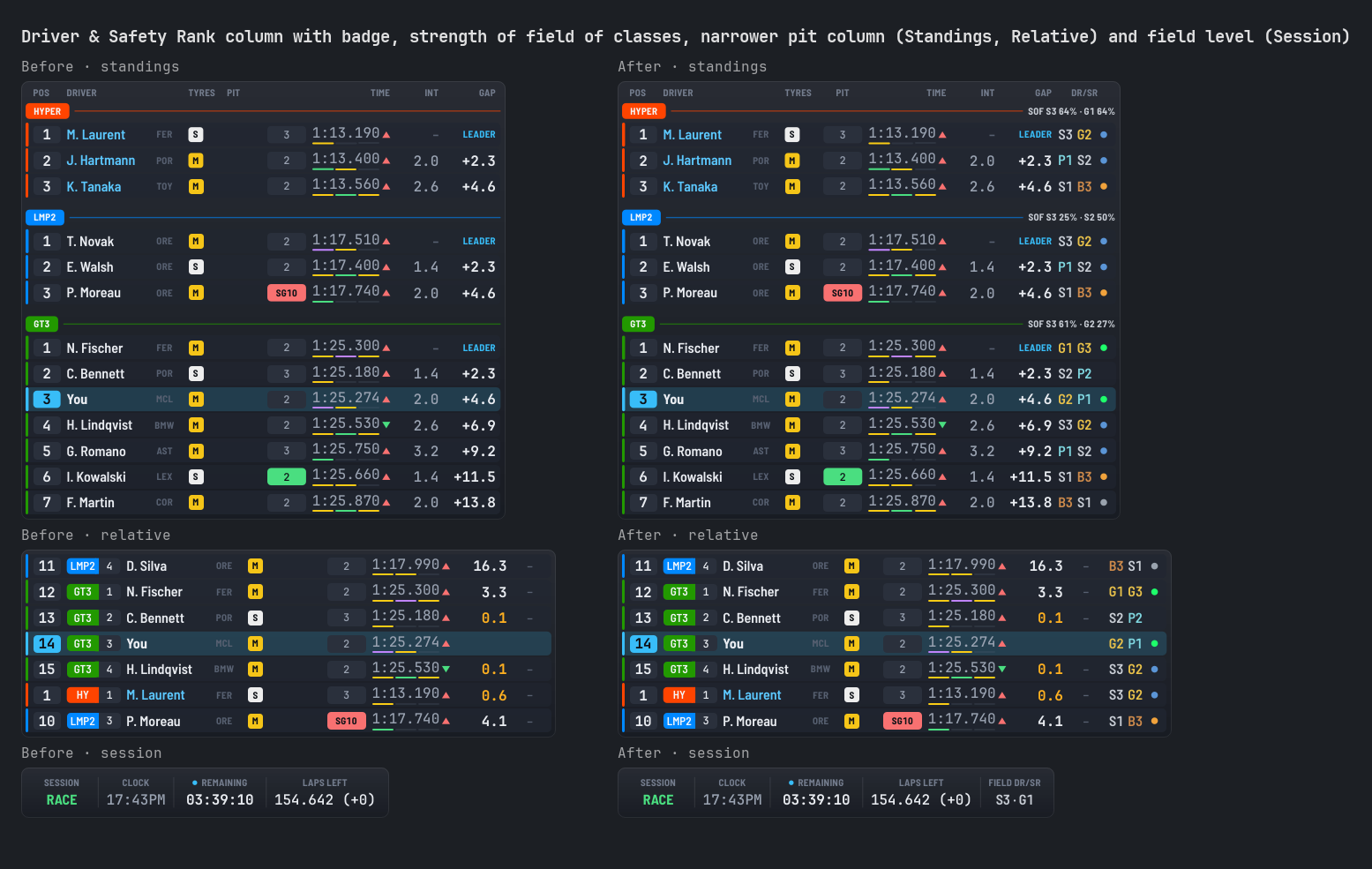
Flag: new alerts
- Penalty to serve (
DT,SG10,PEN×2), last lap (timed races too) and heavy damage (aero %), both designs. - Under blue flag, the gap of the car lapping you.
- Speed limiter against the pit speed limit: green when on, red when over the limit in the pit lane, and an alert when the pit lane is driven without it.
- Modern design:
enable_new_flag_flash(alerts flash when raised),enable_urgency_order(most urgent first), and the overlay takes only the room of the alerts shown. show_sector_yellow_flags_for_race_only: sector yellow flags have their own race only option (taken from the yellow flag one in your presets).
Darker panels and opacity of all overlays
enable_black_background: panels of the modern dark themes in neutral black instead of blue-tinted slate (issue #5).background_opacity_percentage: opacity of the modern panels (92 by default, as before; 100 solid).overlay_opacity_percentage: every overlay more see-through at once, on screen, stream and VR. It multiplies the opacity of each overlay, which keeps its own.
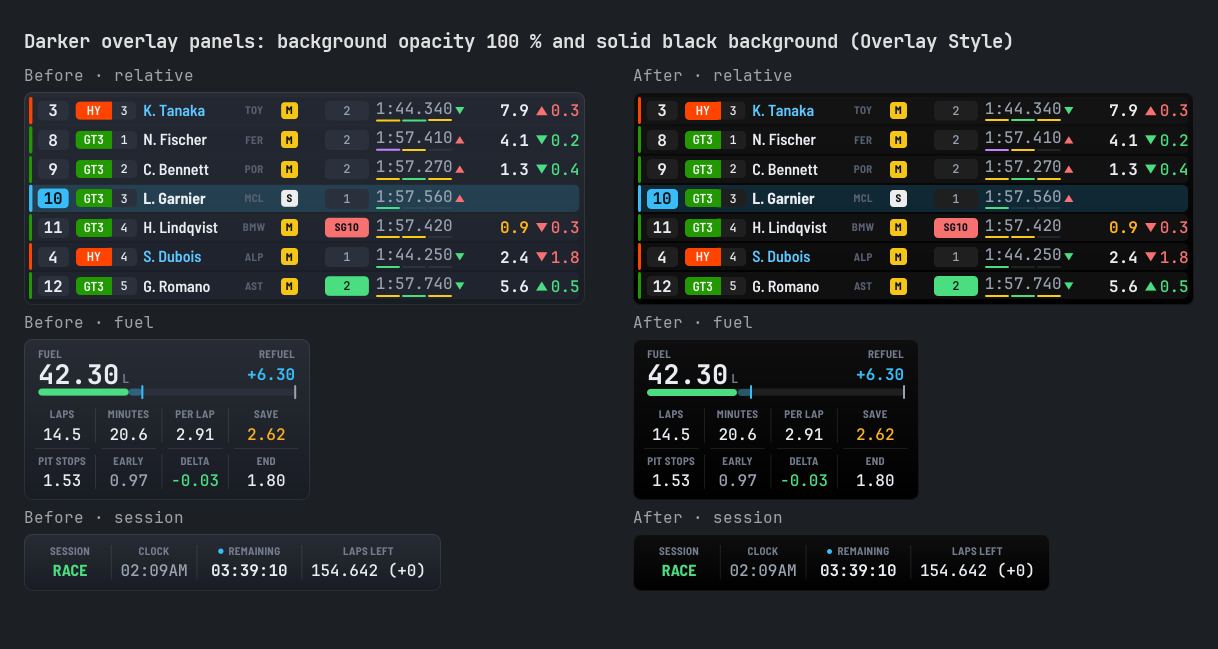
From TinyPedal 2.51
- Wind Direction overlay: compass turning with your car and arrow of where the wind blows (up: tailwind), colored by wind strength; a dot while calm.
wind_speed_unit(m/s,KPH,MPH) also used by Weather. - Wheel Dimension overlay: front and rear tyre radius measured while driving (Wheels module
enable_wheel_dimension_measurement). - Track Map:
Orient (°)column of the Track info editor turns the map of one track. Mapping:minimum_node_distancebetween recorded points (5 m by default), a lap with a jump (back to the garage) is no longer recorded. - Instrument:
warning_color_engine_off, ignition red while ignition and engine are off. - Heatmaps: new default heatmaps
tyre_optimal_80(new compounds) andbrake_optimal_400(new brakes);tyre_defaultis nowthermal_infrared. Your heatmaps and choices are kept.
Overlays
- Corner numbers: the official corner numbers (or names) on the Track Map and under the Elevation profile (
show_corner_numbers, off by default). - Relative: lap time delta column (
column_delta_laptime), as in Standings and Rivals.
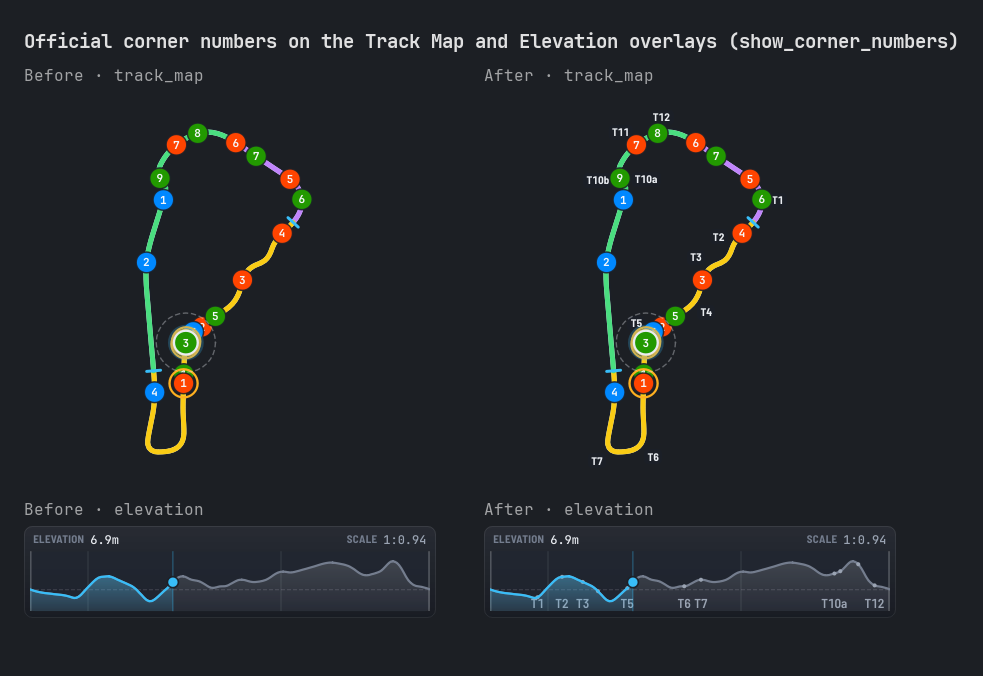
App
- Undo everywhere: lap trash with 20 levels and
Recently Deleted Laps...to restore older laps (kept 30 days);Ctrl+Z/Ctrl+Yfor the switches of Find Option;Configundo goes back pastApply. - Recent files in the race calculator (
Load File,Open Recentfor race plans and tyre plans), and.consumption,.race-planand.tyre-strategyfiles dropped on the page or the main window..svgmaps dropped on the Track Map Viewer, with a search in the recorded maps. Streampage in the navigation bar, afterBroadcast(added to customized bars too).- Overlay Editing options (edit mode, snapping, grid, guides) moved to
Config>Overlay Style(still saved in the same place). - Keyboard:
/jumps to the search,Deletedeletes the selection. - Actions that erase something ask first, with a button named after the action; toolbars of the lap viewer, track map viewer, stats, replays and results fold into a menu when the window is narrow.
- Exports name their file with
Show in Folder;Clear Filterson the Results page when nothing matches; a results file that can't be read is flagged.
Improvements
- Sectors: times and gaps wait for the sector time given by the game, so they match the game HUD; the out lap and in lap count for best sectors (only the sectors through the pit lane are left out), personal best sectors never come from a lap through the pits.
- Standings:
show_pitstop_duration_while_requested_pitstopoff by default (the Time column keeps lap times when a pit stop is requested), also in existing presets. - One copy of the app per settings folder with a system lock, released even after a crash (no more
pid.log); a restart waits for the previous copy to close. - Lighter and smoother: hidden pages no longer refresh, fewer refreshes when the followed car changes (Broadcast Director, spectate), lap viewer playback texts at 10 Hz, lighter lists, charts and gauges.
- Telemetry viewer: changing a setting (time axis, smoothing, channels...) no longer waits for the disk: up to hundreds of milliseconds on a busy disk.
- Replays: deleted replays go to the recycle bin in the background, with progress and
Stop. - Updates: the installer is downloaded into a private temporary folder and checked again as it is extracted; it is deleted when you decline the install or when it fails to start.
- Interface review: consistent sizes, spacings and colors, French labels fitting at every width (Race Calculator header), focus and keys in the Broadcast Director.
Fixes
- Auto Hide: overlays hide again in the garage while stream overlays are on air (OBS keeps them); while spectating they stay on the stream only.
- Web dashboard: sign-in cookie per port (
np_session_<port>): sign in once again after the update. - Stream overlays: WebSocket only accepted from NeoPedal's own pages while their server runs; a new access token asks first; a layout reset can be undone.
- VR overlay: shared layer folders protected (owner check and access rights).
- Instrument & Dashboard HUD: ignition read correctly while cranking.
- Wheels module: radius measurement no longer shows a fake wheel lock while it starts.
- Wind Direction & Weather: wind arrow exact at 0° and 360°.
- Stint timer: overlay previews no longer change the live driving times.
- Standings: strength of field counted on the cars of the session only.
- Race calculator: consumption history saved and deleted safely while the live session writes to it.
- More than 100 fixes from three audits (bugs, performance, interface), across overlays, pages and connections.
Removed
maximum_loading_attempts: a damaged settings file is no longer read again and again: it is kept as a backup and defaults are used at once (a file locked by an antivirus or cloud sync is still retried).
Commits
Added
- Add Corner Coach, online ranks of every driver, flag alerts, darker panels & 0.26.0 changelog (d15848d)
Fixed
- Fix lap viewer settings saved with a disk flush on the UI thread (20 ms to hundreds of ms on a busy disk) (8c116cb)
- Fix CI budget test: garbage collected before each timed slot (full GC pause of Python 3.11 counted in the slot) (03df744)
- Fix Windows CI test: shared layer root owned by the Administrators group when the runner is elevated (475ab90)
- Fix Linux CI tests: VR layer owner check mocked off Windows, toolbar modes as QJSValue, show list scrolled within bounds (048f24c)
SHA256
be96c8eae8b840f4eeeae6706cd09b7d8d3be1e5d8468914e970ed408f84a0db NeoPedal-0.26.0-windows-setup.exe9ca2af9d3325c9162eb1f27f8f5f15266ff012d844f9c9addec0a78bfb964ceb NeoPedal-0.26.0-setup.zip- `43b0ee0d80b80ed8dc94adf080e2ed72ec73d278...
NeoPedal 0.25.0
Safer options everywhere: every number has limits you can see, presets are repaired as they load, and the Overlay Options page shows race situations and both designs.
New
Overlay Options
- Race situations in the preview:
Racing,Yellow & Blue Flags,In Pits,DamageandRainshow flags, pit timer, limiter, damage or wet weather without driving. - Test on Screen: the overlays on screen show the chosen situation for 10 seconds (saved values), to set their colors and thresholds.
- Other Design: the same values drawn by the other design (modern or classic), with the number of options of each design.
- Used only filter: hides the options doing nothing with the current values (greyed out).
- Allowed values in the tooltip of every number (
Allowed: 0 - 4000). - Options used by several parts (a Dashboard HUD label shown by its chip and by the setting pop-up) are greyed out only while every part is off:
Used only with one of: ....
New Tyre Overview overlay
- Every tyre reading in one card per tyre (off by default,
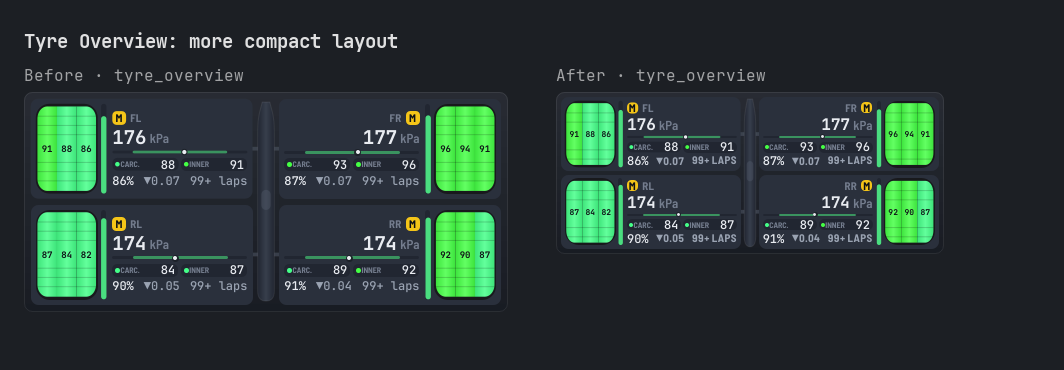
Tyres & Wheelscategory), placed as on the car seen from above (modern design: car body in the middle, each tyre drawn at its corner): inner / center / outer surface temperatures on the tyre in heatmap colors, compound badge or alert (detached wheel, puncture, flat spot) with the tyre highlighted, carcass & inner layer temperatures, pressure in blue below and red above the target range with its place on a target scale (same ranges as the Dashboard HUD, per compound too), tread gauge, wear per lap and laps left. Every part has its own on/off option, the car body and tyre drawing too.
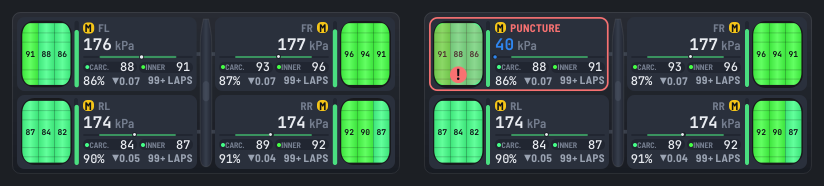
Presets and options
- Check Preset (Presets page menu): lists the unknown, invalid and out of range options of a preset, and repairs it.
- Standings:
show_class_column_with_class_headerkeeps the class column with the class headers (off by default). - Flag:
low_energy_percentage_threshold, low energy alert at a percent of energy left (100 by default: laps threshold only, as before).
Improvements
- Every number option has limits: a value out of range in a preset file, an imported preset or a package is brought within them as the preset loads (written in the log), instead of drawing an overlay of tens of thousands of pixels.
- An overlay too big is cut to 8192 pixels with a message, instead of freezing the computer.
- Import Overlay Settings: each option left out or corrected is listed with the reason, and numbers out of limits are brought within instead of skipped.
- Import Settings: tried again at the next start (up to 3 times) when files are in use (other instance closing, antivirus).
- Broadcast Director: closing the page no longer waits for the events log to be written.
Fixes
- Standings, Relative and Rivals: column order and columns on or off follow the page every time; the classic design no longer lists the orders of modern only columns (gap trend, track limits, energy per lap).
- Overlay Options:
UndoandRedowhile a field is being edited show the restored value; options greyed out wrongly, or not greyed out, on many overlays. - Driver Rank: ranks saved before 0.24.0 (without their Steam account) are shown again while the game menu file has none: they go to the account in use when no other account has saved ranks, never to a second account.
- French translation reviewed in full: the app speaks to you with « vous » everywhere, one word for vehicle classes (« catégorie »), about 200 labels, help texts and messages corrected (agreements, power/weight ratio, missing words), and texts still in English translated (Flag, Engine, Force, System Performance overlays, error messages).
- Overlays, found by reviewing every option: radar fade radius, brake average temperature and Speedometer top speed reset with the session, Dashboard HUD impact cone after a restart, overlay brought back on screen staying there, low fuel or energy alert with an unknown consumption, global scale no longer turning on options set to 0,
100%no longer cut, lap times like1:60.0, Sectors after a reset, Trailing time scale, Heading decimals, Tyre Pressure average, Track Notes timers, Steering Meter marks, and many more.
Commits
Changed
- Compact Tyre Overview, ranks saved before accounts kept & 0.25.0 changelog (f60431d)
- Audit fixes, option checks, French review & new Tyre Overview overlay (511544c)
Visuals
Tyre Overview: more compact layout
SHA256
d049910cc7ae92e60f3ee92ca07fb0735ffe12e87051d1da39a4c727d5c9c6fb NeoPedal-0.25.0-windows-setup.exe93b12b44d28f949bae6960ae6c206b65bc6394e0727fa4db725ca689d00a1c5f NeoPedal-0.25.0-setup.zipc8d40b2a9dd2d84cdbeeeb68b770b0dffd8e92c7525e293f3718315d3f120002 NeoPedal-0.25.0-source.zip
NeoPedal 0.24.0
Your Driver Rank and Safety Rank everywhere, Standings like a timing tower, the Black box renamed Dashboard HUD with a setting pop-up, Results & Replays in one page, one look per meaning in every overlay and page, and a lighter app.
New
Driver Rank & Safety Rank (Le Mans Ultimate)
- New
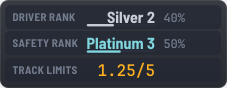
Driver Rankoverlay (off by default,Timingcategory): your Driver Rank (DR) and Safety Rank (SR) as the game menu shows them (Silver 2, progress to the next tier40%), and your track limits points against the session limit (1.25/5). - On your driver cards:
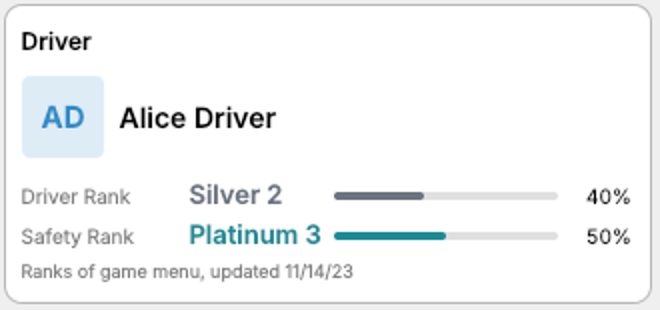
Driver Stats Viewer, the Home page and theBroadcast Director(you and your teammates, those of the events you registered for included). Each rank in its color, with the progress to the next tier and the change since your previous rank (▲ +10%), and your badge with its icon, name and description as in the game menu. - Last ranks kept: when the game rewrites its menu file without your ranks (it did with its update of October 13), your last ranks are shown with their date instead of nothing. Every change is kept in
driver_ranks.history. - Several Steam accounts on one computer: ranks and badge are kept per account, the account signed in to Steam is followed live, and your other accounts are shown below your driver card. The ranks of one account are never shown as those of another.
- Ranks are only read from the game folder (
coherent_local_storage.json): nothing is sent anywhere, no sign-in.
Home: driver card
- New
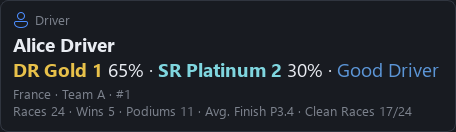
Drivercard on the Home page: your name, ranks, badge, country, team and number, and your race record from the game results files (races, wins, podiums, average finish, clean races). Click it to openDriver Stats Viewer.
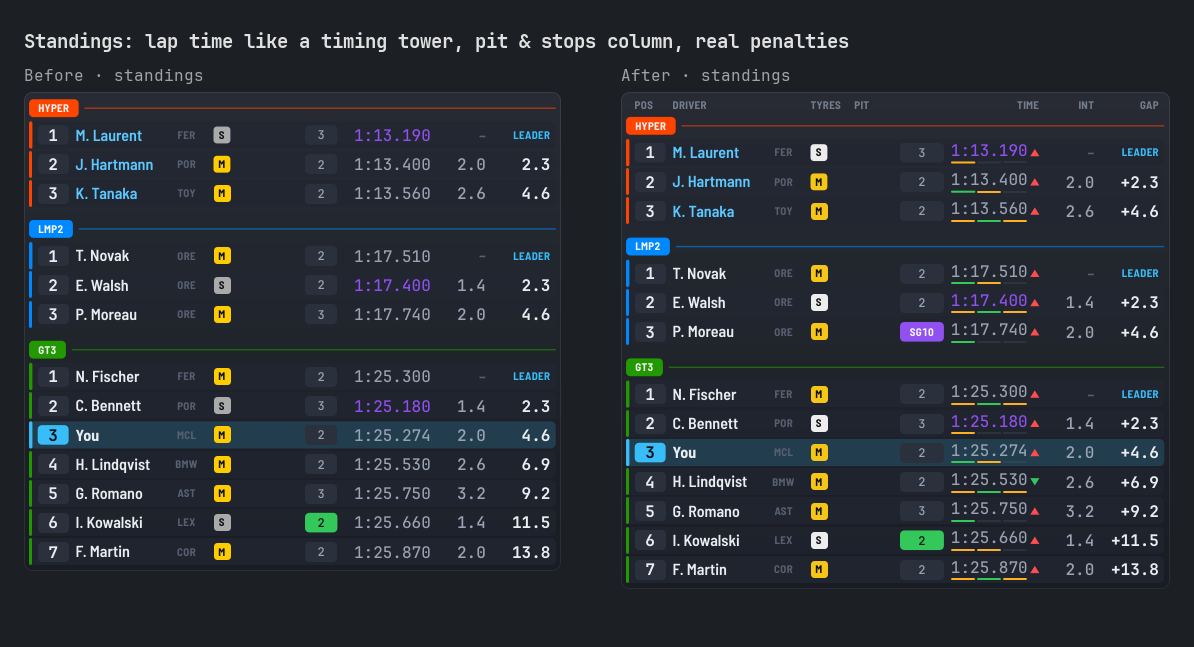
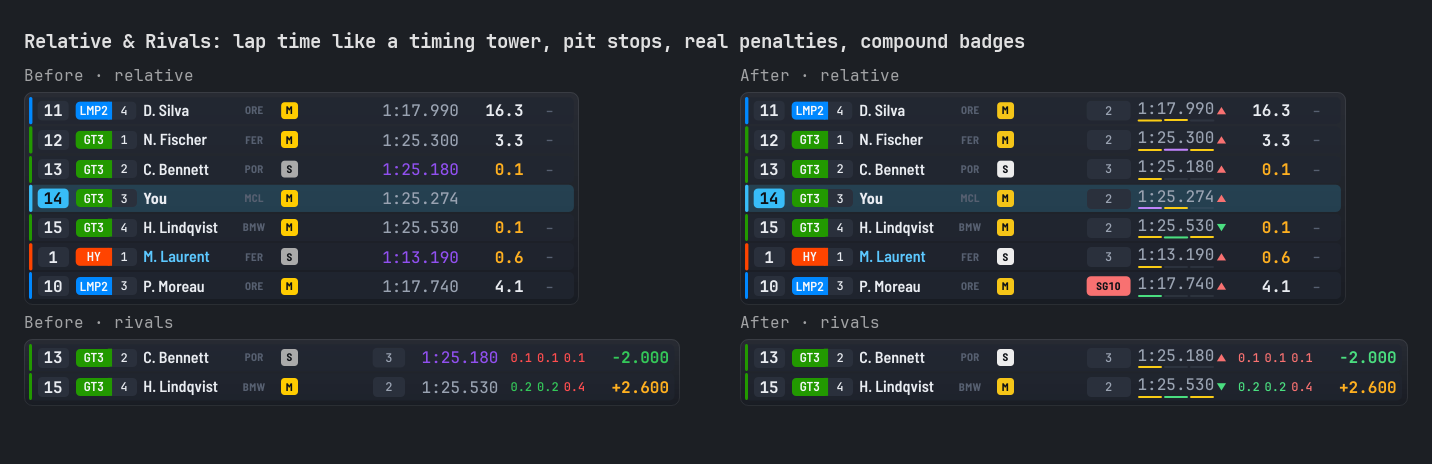
Standings, Relative and Rivals like a timing tower
- Time column like on TV (modern design, each part can be turned off): the running lap time, then the completed lap with its colors and the gap to the driver's best (
+0.345),OUT/INlaps, invalid lap in red and a trend arrow. Three sector bars under the time, colored like the game live timing: purple best of the class, green personal best, orange slower. - Real penalties (Le Mans Ultimate, both designs):
DTdrive through,SG10stop & go,+10stime penalty,SG×2several to serve,DQdisqualified, instead ofPENor-1. - Pit status and pit stops in one column: the
PIT,GAR,SLOW,FINpill, then the stops count or the penalty. - Column labels above the cars (
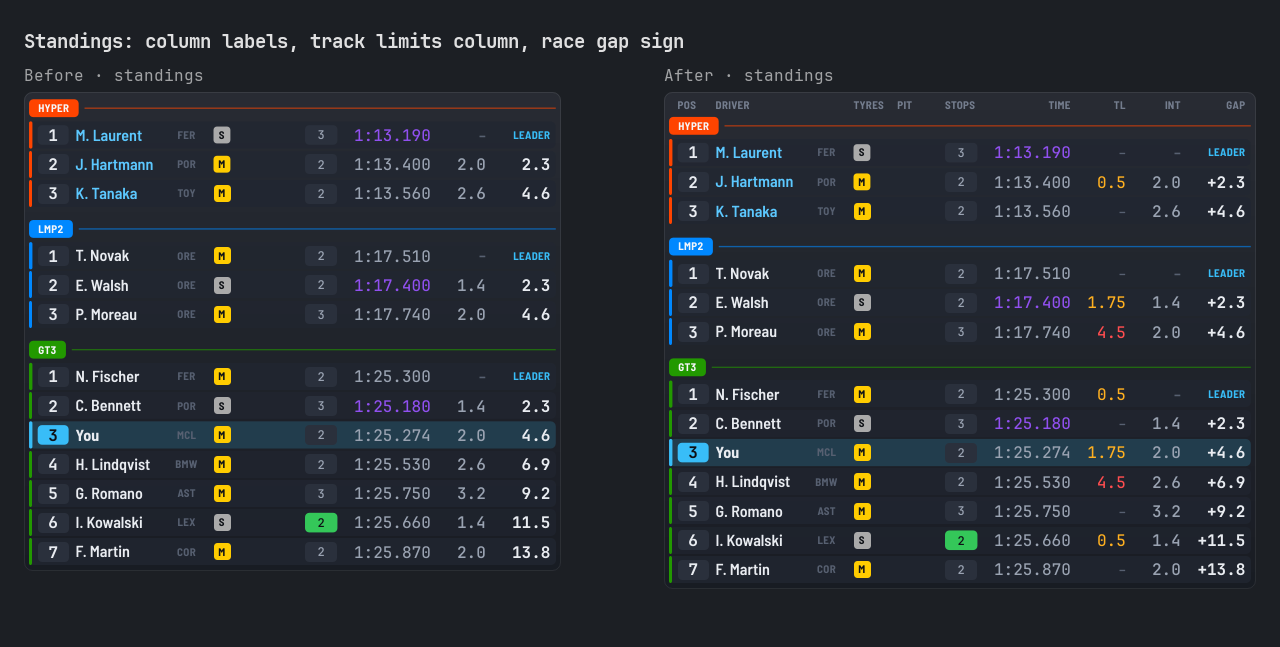
Pos,Driver,Tyres,Pit,Time,Gap...), on by default. - New
Energy per Lapcolumn (Le Mans Ultimate, off by default): virtual energy each driver used in the last lap, or the average of the last 5 laps. - New
Track limitscolumn (Le Mans Ultimate, off by default): track limits points of each driver, amber once any, red one point before the penalty. - Race gap with its sign (
+12.3,+1L), last lap in green when it is the driver's personal best.
Dashboard HUD (formerly Black box): setting pop-up, new readings, your own profiles
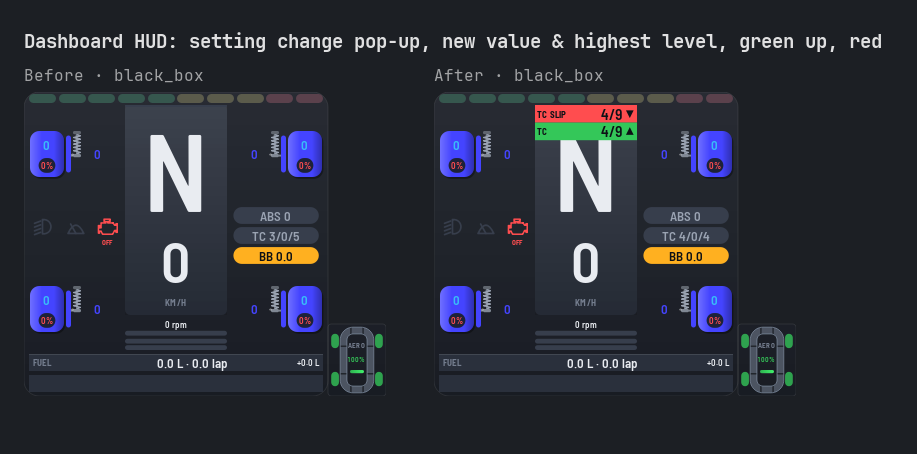
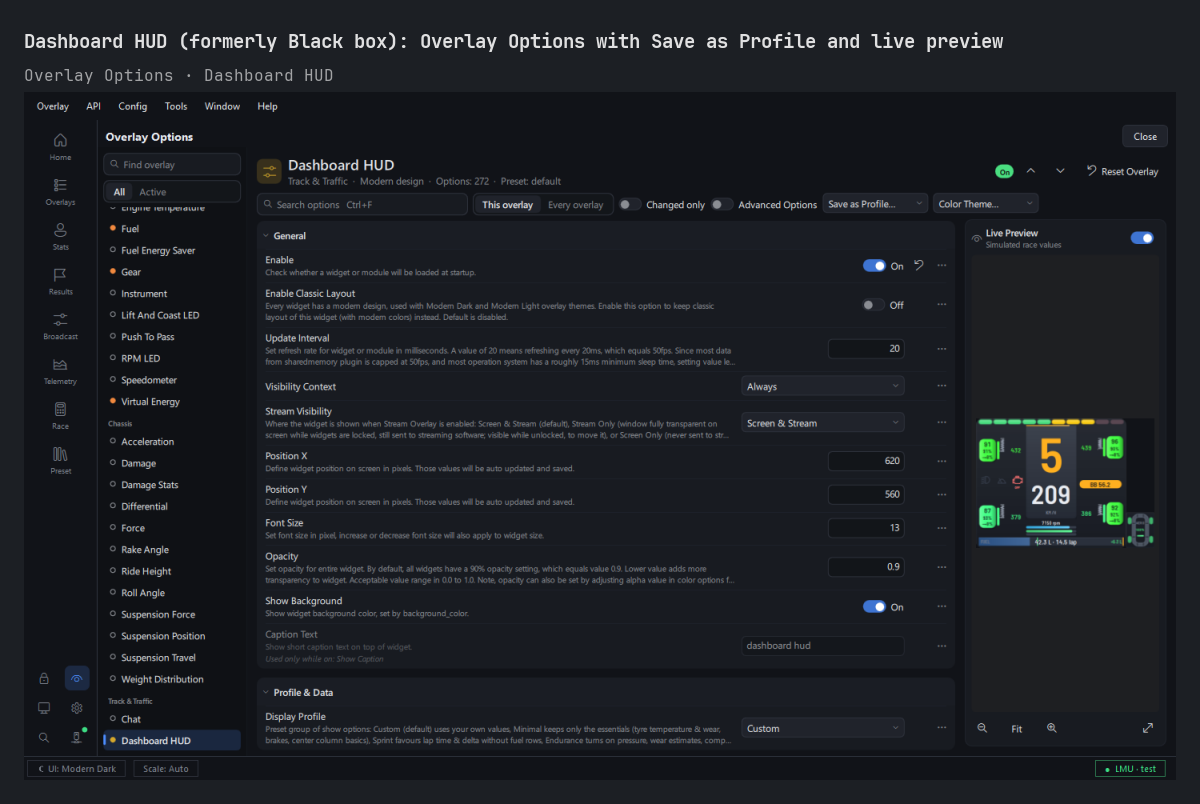
- The Black box overlay is now called
Dashboard HUDeverywhere in the app. Your settings, presets and incidents are kept. - Setting change pop-up (on by default): change TC, ABS, brake bias, brake migration, engine map or an anti-roll bar in the car and the center column shows it for 2 seconds (
TC 4/9 ▲), green going up, red going down. Pit limiter, headlights and wipers too (LIM ON). Position, duration and colors can be set. - New readings (Le Mans Ultimate, off by default): track limits points (
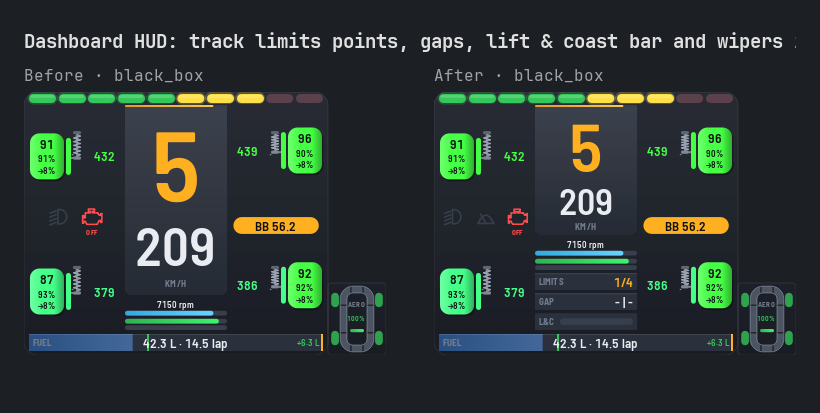
LIMITS 1.25/5), gap to the car ahead and behind (GAP 1.2 | 3.0), a lift & coast bar, and a wipers icon next to the headlights. - Tyre compound and wear together: the compound badge is drawn next to the wear (
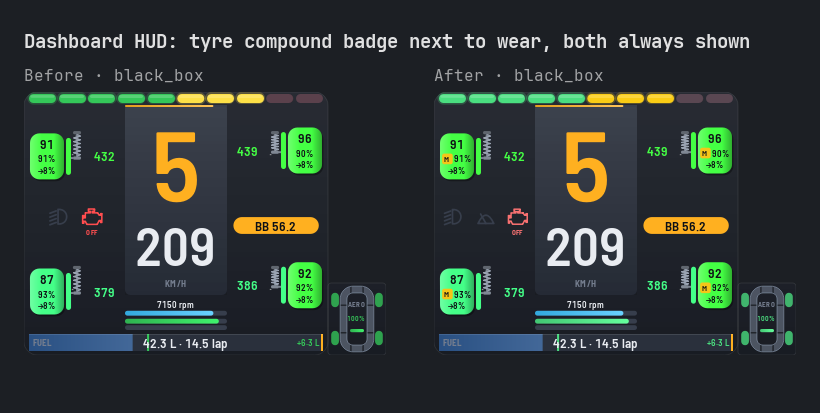
[M] 91%), so turning onshow_tyre_compoundno longer hides the wear, or the compound, for lack of room. - Your own display profiles:
User 1,User 2andUser 3, saved withSave as Profile.... Changing an option of a profile now switches it toCustominstead of locking the option. - Overlay Options: click a part of the Dashboard HUD picture (tyre, center column, damage, trace...) to jump to its options. Simple mode shows the main items only (46 options instead of 89).
Results & Replays: one page
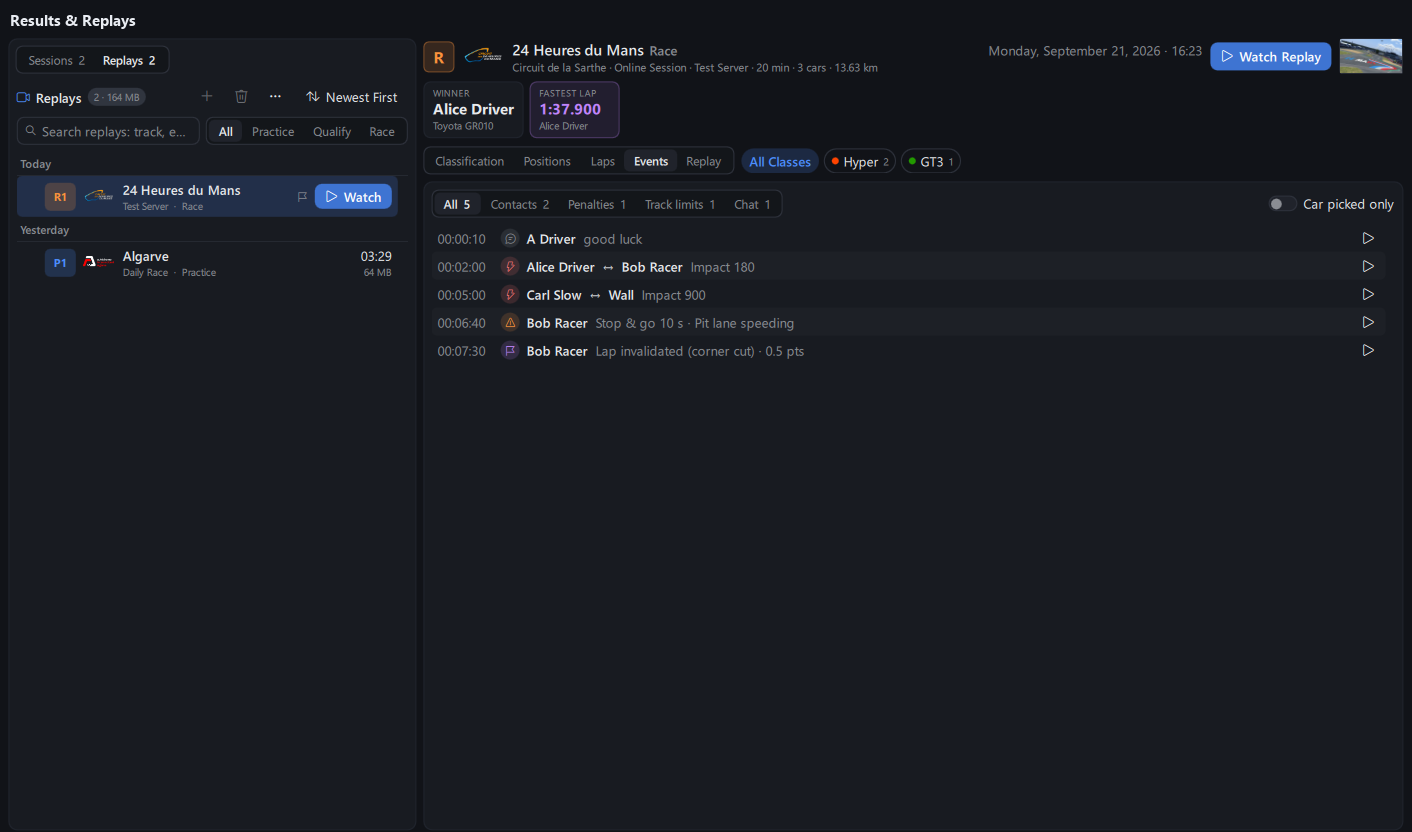
Race ResultsandGame Replaysare now one page,Results & Replays(Resultsin the navigation bar). The switch at the top of the list shows the sessions of the results files or the replays saved by Le Mans Ultimate; theReplaytab has everything the replays page had.- Each replay is linked to its results: a flag on replays that have a results file,
Show Resultsin their menu, and the replay of a session picked with it. - Watch an event or a lap: the play button of an event (contact, penalty, track limits) opens the replay a few seconds before it, camera on the car concerned; the play button of a lap opens the replay at the start of that lap.
On / off switch for the Broadcast Director and the Race Calculator
- Switch at the top left of both pages (on by default, remembered): off, the page asks the game nothing, cuts no camera, and is freed after 10 minutes hidden. Turn it back on with the switch or the button in the page.
- Dot on their navigation bar entry: green on, grey off. New
director_toggleandrace_calculator_togglehotkeys (remote control too) and command palette entries (Ctrl+K). NewBroadcast Director Onnotice at the bottom of the main window.
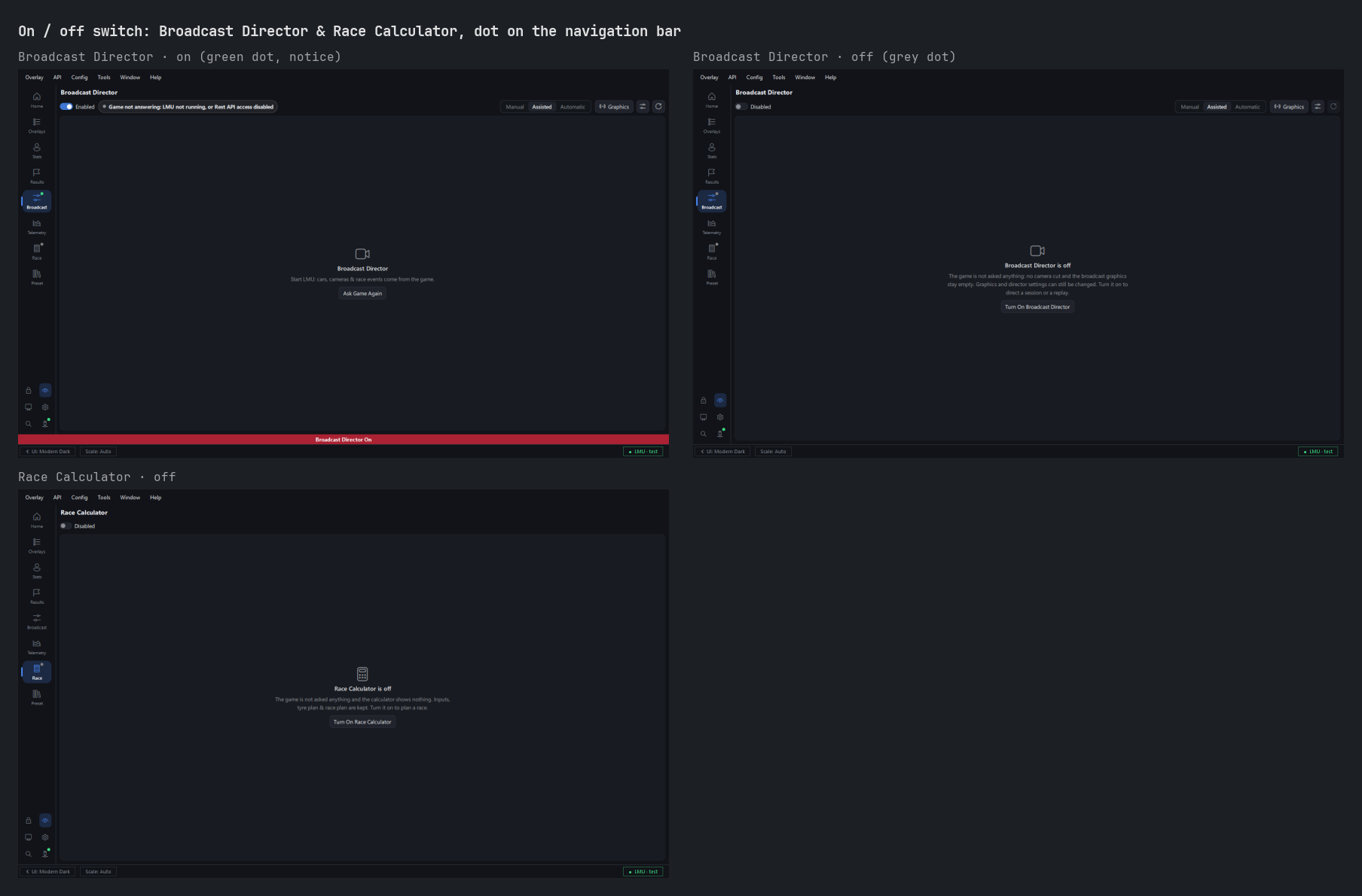
Broadcast Director: standings tower carousel and game HUD
- Standings tower carousel: up to 70 cars (was 30), the tower slides page after page every 10 seconds, class after class if you want, with a bar showing which part of the field is on screen.
- Game HUD menu on the camera desk: hide the whole game UI for clean pictures (
middle click), or each part (chat, MFD, car HUD, timing, track map).
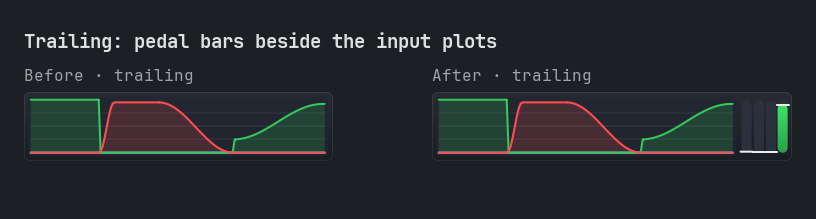
Trailing: pedal bars
- Pedal bars beside the plots (off by default): throttle, brake, clutch and force feedback, raw and filtered side by side, with peak marker and optional readings.
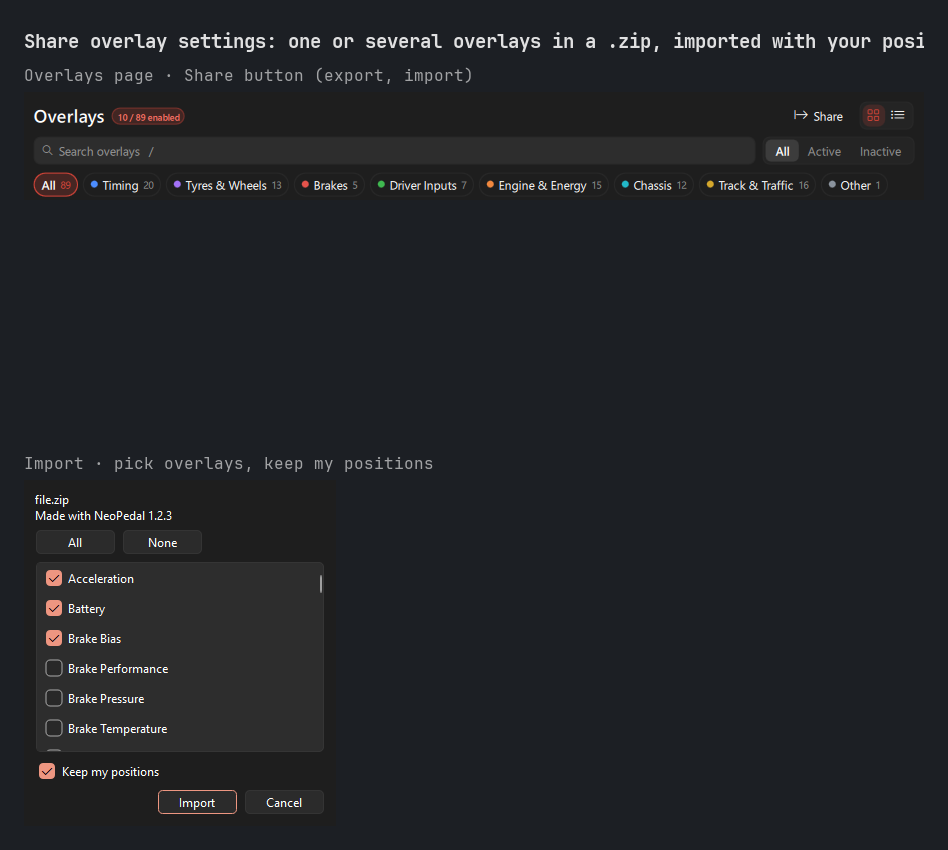
Share overlay settings
- Share the settings of one overlay or of several you pick, as a
.zipfile:Share>Export Overlay Settings...on theOverlaysandOverlay Optionspages (orExport Settings...in the menu of an overlay card), tick the overlays, save. Only options changed from default are written, so your friend gets exactly your look. - Import with
Share>Import Overlay Settings...or by dropping the file on the window: untick the overlays you do not want,Keep my positionsis ticked by default (else positions are scaled to your screen). Settings are applied as pending changes ofOverlay Options, kept withApply, undone withCtrl+Z.
Import Settings
- New
Config>Import Settings...: copies the global settings of another copy of the app (options, hotkeys, driver stats, language packs, Dashboard HUD incidents) from the folder you choose, after a restart. Your curren...
NeoPedal 0.23.0
New name: NeoPedal
- The app is now called NeoPedal, everywhere: window, menus, installer, Start menu, Task Manager, web dashboard, VR overlay and documentation. It stays a modified version of TinyPedal, with the same license and credits.
- Settings separate from the original TinyPedal: the global config folder is now
%APPDATA%\NeoPedal(Linux:~/.config/NeoPedaland~/.local/share/NeoPedal). Until now the app shared%APPDATA%\TinyPedalwith the original TinyPedal, so each app could change the other's settings, and both can now be used side by side. - Your settings come along: update from the app as usual. On first start, your
TinyPedalfolder (config, shortcuts, driver stats, language packs, Black box incidents) is copied once to the new one and left unchanged, so the original TinyPedal keeps working. If the copy fails, the app uses the old folder for this run and tries again next time. Presets and data next to the executable do not move, the install folder is kept and the shortcuts are renamed. - Your choice: after the copy, the app asks once whether to keep the imported settings or start with default settings (the imported ones are set aside, never deleted). Later,
Config>TinyPedal Settingsimports them again or starts over with default settings, each time keeping a backup of the current settings.
New overlay, new columns and track map colors
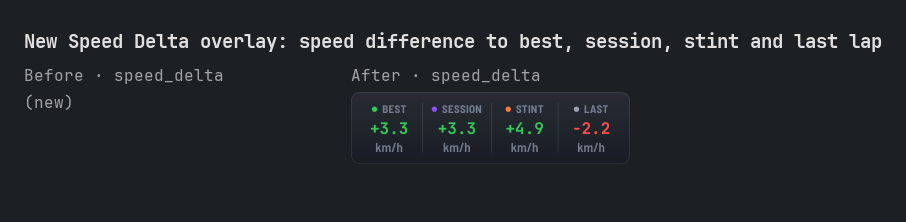
- New
Speed Deltaoverlay: your speed difference to four reference laps at the same place of the lap (all time best, session best, stint best and last lap), positive when you are faster, smoothed (speed_delta_smoothing_samples). Each reference can be shown or hidden, with its own prefix and colors. A dash while there is no reference lap yet, on an out lap or in the pit lane before the start line. Off by default: turn it on in theOverlayspage.
- Relative:
Gap Trendcolumn (modern design,column_gap_trend, on): how the gap to each car changes per lap, averaged over about 30 s. Green arrow when you gain (closing on the car ahead, pulling away from the car behind), red when you lose, a dash when steady (under 0.05 s per lap) or for a car in the pits. - Standings: class header (modern design,
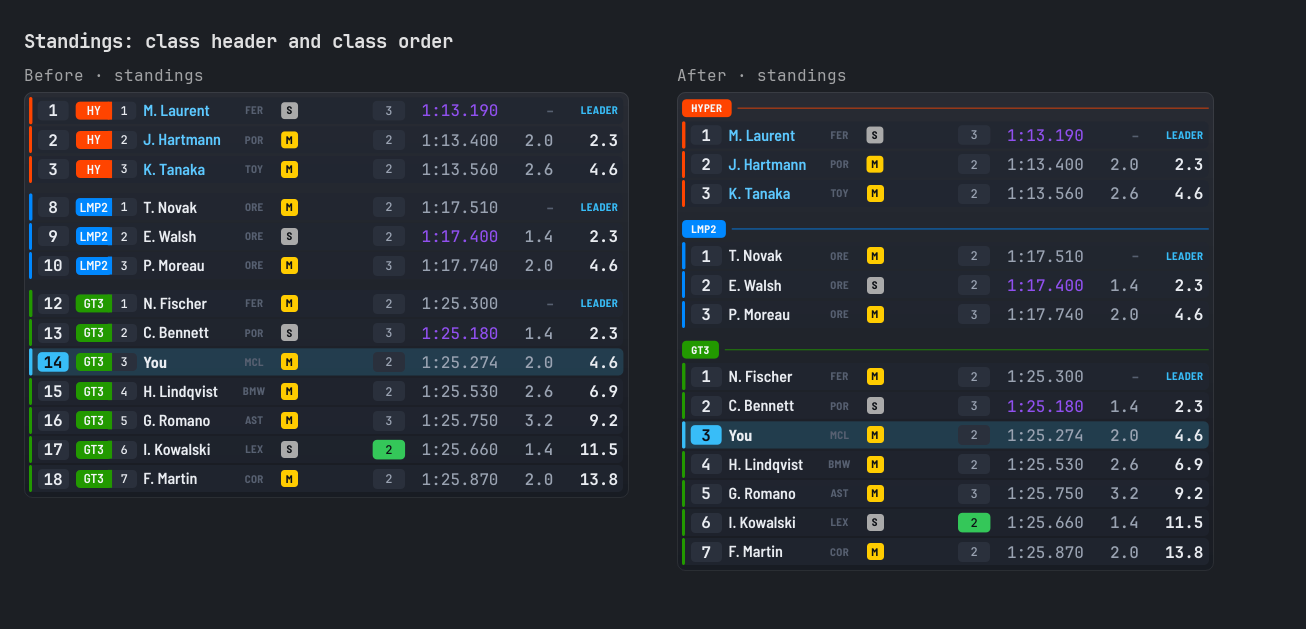
show_class_header, on): in multi-class split mode, or with one class shown, each class starts with its name in a colored pill; the class column goes and the position badge shows the place in class. - Standings: class order (
class_order, both designs): classes of multi-class split mode in the order you choose (Hypercar, LMP2, LMP3, GT3... by default), set inOverlay Optionsby dragging them or with the arrows (Default Orderputs the default back). Classes found in no list come after, fastest first, as before.maximum_vehicles_per_split_othersnow takes any value,0hides the other classes.
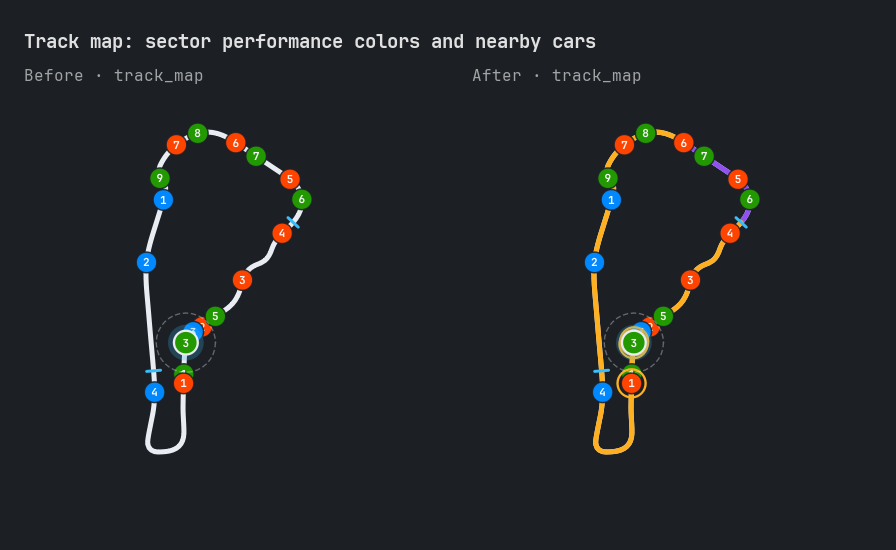
- Track map: sector performance and nearby cars (modern design): each sector of the road is colored by your last time there (purple session best, green faster than your best lap, amber slower;
show_sector_performance), and cars less than 1 s ahead or behind get a ring (show_nearby_vehicle_highlight,nearby_vehicle_threshold). Both on by default.
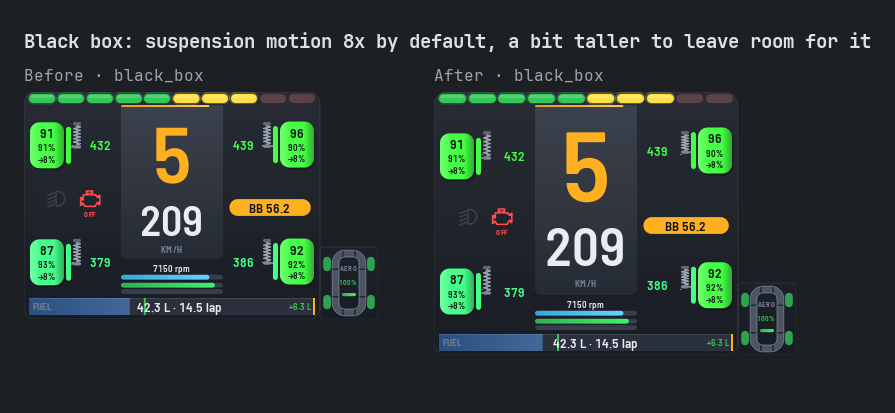
- Black box: suspension motion is magnified 8 times by default (
suspension_motion_scale) so it can be seen; presets still at 1 get 8 once, another value you chose is kept. The overlay is a bit taller (about 15 %) to leave room for the wheel travel; set the scale back to 1 for the previous size.
- Chat: messages fade out at the end of their display time also in the garage and menus (they stayed on screen while overlays were paused). Modern design: your own name in the accent color, game notices dimmed.
Race results, replays and driver stats
- Watch the replay of a session:
Race Resultsshows aWatch Replaybutton when LMU saved the replay of the session, and a camera icon in the session list. The replay opens in the game throughGame Replays(game state checked, confirmation, playback controls there). The replay is found from the time it was saved next to the results file, so the icons show even while the game is closed. - Game version of your lap times: every session recorded in
Driver Stats Viewernow keeps the game version (LMU). The personal best line shows it (PB 1:09.984 set on 03/10/2026 · Version 1.42), and so does each session of the list. Older sessions take it from the game results file of the session. - Race results in
Driver Stats Viewer: sessions are linked to the game results files. The list shows your class position (P3/12) and a mark when you had contacts or penalties; the tooltip adds position, gap, contacts, penalties, track limits points, online or single player and the server. Click a session to open it inRace Results. - Driver card (All Tracks): name, country, team and number of your game profile, your Steam profile picture (read from Steam's own cache, nothing downloaded), and your races in the results files: wins, podiums, average class finish, clean races, contacts per race.
- Complete your lap times: personal, qualifying and race bests that are missing from your stats, or slower than a best lap in an LMU results file, are offered with
Complete.... The confirmation lists every change, a backup is made first and Ctrl+Z undoes it. Laps invalidated by track limits have no time in LMU results, and in team races only your own laps count. Game Replaystrack map follows the cars like the Broadcast Director: with the game on this computer, cars are placed where the game shows them, 10 times a second, and glide smoothly from one place to the next, in a session or a replay (paused, slow motion, fast forward). Before, they moved by estimate along the track between game answers every 2 to 5 seconds, which is still the case when the game data can't be read.
Telemetry viewer
- New
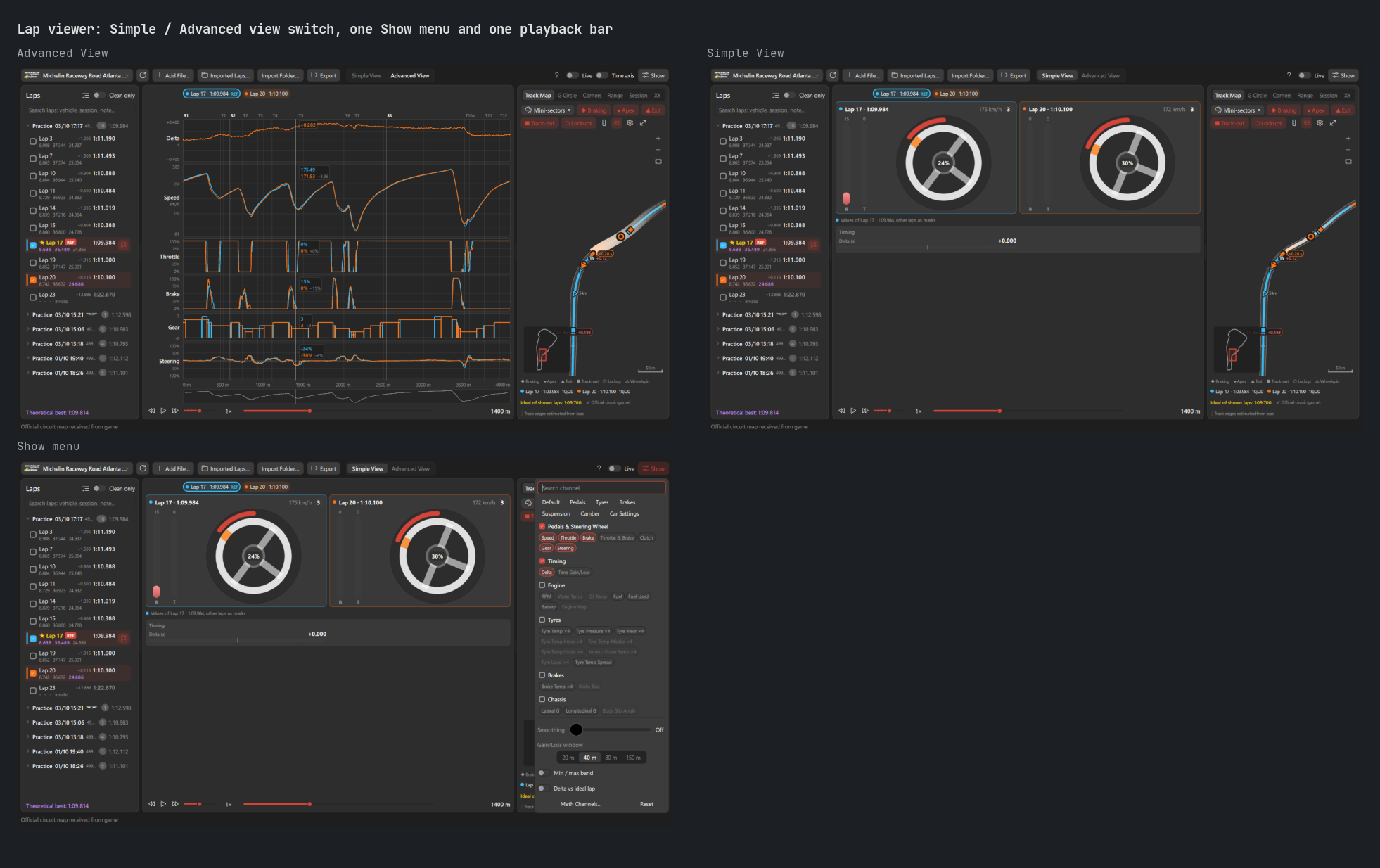
Simple View: aSimple View/Advanced Viewswitch in the toolbar shows, in place of the charts, every shown channel at the cursor drawn like overlays. APedals & Steering Wheelcard per lap, side by side (throttle, brake, clutch, steering wheel turned by its real angle, gear, speed), thenTiming,Engine,Tyres(four wheels colored cold to hot),Brakes,Chassis,Electronics,TrackandMath Channels. Values of the main lap (click its card), other laps as marks of their color. The chosen view is kept per folder. - Same channels in both views: one
Showmenu, in place ofChannels, picks what both views show (a channel charted in the advanced view is a gauge or tile in the simple view), by group or channel, with search, presets and every chart option (smoothing, gain/loss window, min / max band, delta vs ideal lap, math channels). Channels of one wheel are found with the search. - One playback bar under both views: back, play, forward, A-B loop and speed moved under the charts, with a bar to drag along the lap and the cursor position. It stays at the same place in the simple view, where the charts are hidden.
- Recorded laps now keep the steering wheel rotation, so the wheel turns by its real angle.
- Long laps no longer freeze the page: charts, map, delta best and MoTeC export are made in the background, side tabs open without a stall.
Race calculator
- New
Livetab: every value the game gives, next to the value of the calculator, with where it comes from: race length, formation laps and start time of day (LMU session settings or the track clock), number of drivers (LMU team), lap time, fuel, energy and tyre wear per lap, tank capacity, compound on the car, fuel, energy and tread on the grid, pit lane time from the stops of the session, refuel and energy rates, tyre and driver change times and what is done while refuelling (LMU pit stop times of the series), tyre allocation and rain from the forecast (as a rain scenario). Fill a value in with its arrow, orFill In All; a switch per row leaves a value out. Load LiveandFollow Livetake every followed value, not only the laps: pit stop times, tyre rules, drivers, formation, start time, rain forecast... LMU garage screens are read in the background (every 10 s while the tab is shown or inputs follow live).- Race in progress read from the game: lap, race time and time left, fuel, energy, tread, stops, safety car or full course yellow (also in the
Live Racestatus), penalties, class position, pending repair and the game's next stop time. - Tyres available: the tyres the LMU pit menu offers, new compounds and used tyres of each wheel with their tread.
Add Used Tyres to Stockputs them in the tyre plan stock with their own tread (a used tyre starts the stint at 84 %, not as new). Driver Change While Refuelling: the driver change counts only when longer than the service, as in LMU.- Faster: a pit stop plan of a 10 hour race with safety car, rain and fuel effec...
Modern Tiny Pedals 0.22.4
VR overlay
- OpenXR layer off by default: in 0.22.3, turning on
enable_vr_overlayregistered the app's OpenXR layer, which every OpenXR game loads. Le Mans Ultimate is one of them (its VR goes through OpenXR with the built-in OpenComposite), and it could fail to start in VR ("Unable to start the game in VR mode"). The layer is now experimental, behind its ownenable_openxr_layeroption (off by default). Every start removes a layer left registered by 0.22.3, also in safe mode, and closing the app removes it too: games started without the app never load it. - SteamVR no longer stuck on a dark grey screen when you quit it: the SteamVR overlay of the app never answered SteamVR's quit request, so SteamVR waited for it before closing. The app now answers at once, releases its overlay and only connects again once SteamVR has fully closed and started again.
Commits
Fixed
- Fix VR breaking OpenXR games & SteamVR stuck on quit: OpenXR layer off by default (e5295e6)
Changed
- Keep PySide6 below 6.12: 6.12.0 aborts Python 3.11 with a refcount error (4a6d4c8)
- Use list in SteamVR quit test (ruff PIE807) (1549880)
SHA256
3452e4735165608785c7d29b8c67d0f8c40339479577b7c9af5adb81ec8f3fe5 ModernTinyPedals-0.22.4-windows-setup.exe022978a838516377ef7280a9315df2c03bcdd294b712ebcb181cb4ac01059f6d ModernTinyPedals-0.22.4-setup.zipab421056a506aa52edd9f741cbe8d9feb420ada860539c69aa63dccb4451cfbc ModernTinyPedals-0.22.4-source.zip
Modern Tiny Pedals 0.22.3
Overlays
- Unlocking no longer starts the edit mode: as before 0.22.0,
Unlock Overlayonly makes overlays movable. Move the mouse over an overlay to see its outline, name and corner handle, then drag it; arrow keys andCtrl+Zstill work. The edit mode toolbar is in the right-click menu of an overlay (Edit Mode). To get it at each unlock, turn onenable_edit_mode_on_unlockinConfig>Application>Overlay Editing. - Gear: the speed limiter pill (and its pit lane reminder) sat over the top edge and the speed digits. It now takes the place of the speed unit under the speed.
- Overlay Style fonts in modern overlays: with
enable_modern_font, labels and names keepmodern_design_font_nameand values (times, gaps, speeds, temperatures, fuel) usemodern_font_name(JetBrains Mono: digits stay in place). Turned off, every modern overlay draws its text in its ownfont_name. Gear widens to fit its bar readings. - Overlays no longer freeze for 5 seconds on every settings
Applyor when an overlay is turned off. - Classic
Accelerationfailed to start with one or no speed range enabled. Classic track map and elevation no longer fail on sectors beyond the map. - Classic radar fade drawn correctly; background cache limited to 32 MB.
VR overlay
- VR overlay in OpenXR games, on any OpenXR runtime (not only SteamVR): a bundled OpenXR layer (D3D11, D3D12, Vulkan) draws the overlays in the game. The app registers it for your Windows user while the VR overlay is enabled, and the uninstaller removes it. Nearby overlays are sent as tiles, not as one large image. Not tested on a headset yet: tell us how it works for you.
- The SteamVR overlay starts once SteamVR runs and hides while the OpenXR layer draws. Two OpenXR games at once are handled.
- The VR overlay was never shown in the installed app (OpenVR library missing). Also fixed: Windows user names with accents, app run as administrator, broken layer entries that stopped OpenXR games from starting.
Telemetry viewer and replays
- Lap of another circuit: opening one (file, drop, lap library, MoTeC import) switches the viewer to that circuit instead of refusing it. Laps of two circuits are never compared, also when a lap of another layout has a similar length (driving line shape is checked).
- Imported laps (MoTeC) were shifted along the distance, and an imported reference lap shifted the recorded laps. Its delta best export is aligned and scaled to the track length.
- Laps with invalid positions no longer stop the viewer. Multi lap MoTeC export never overwrites a file.
- Long replays: a 3-hour replay opens in 0.4 s instead of 14 s and uses 1 MB instead of 400 MB of memory. Replays load in the background with progress. Opening a replay no longer stops recording before it is loaded, and a recording error is reported, then retried after 30 s.
Replayspage track map was shown upside down.
Recorded data
- Best lap kept when you press Esc right after the line: delta best, fuel, stats and sectors wait for the game lap time (up to 10 s), also in the garage.
- Data files held by another program (antivirus, OneDrive) when the app reads them are never saved over: settings, driver stats, history, lap marks, delta best, sectors and consumption history. They are merged once readable, and a corrupt file is backed up.
- Best S3 and personal best sectors never come from an invalid lap.
Stream overlay, web dashboard and remote control
- They stayed off after a settings
Applyor a preset load on Windows: servers now keep listening across reloads and retry when the address is busy. Web dashboard sessions stay open unless the access code changes. - A slow or hostile client on your network can no longer freeze the dashboards: connections are limited and must send their request within 10 s. No more GUI freeze on a slow DNS, nor start error with a non ASCII computer name.
Fixes
- Language change: no more crash with
Widget PerformanceorRecorderopen, pages and dialogs reopened by it are closed properly, brand logos follow the light/dark theme. - No QML errors when quitting with
SpectateorPresetopen. - A hotkey that reloads the preset no longer runs again while it is still held.
- Number fields accept a decimal typed in a whole number.
Layout Editorscreenshot and snapping work on each screen of a multi monitor setup.- Language packs with invalid messages, corrupt packages, invalid heatmap files and setup files saved at 1000 ms are handled.
- Game replay temporary files deleted by the game during a scan are no longer listed.
Commits
Added
- Add 0.22.3 changelog (English & French) (cab272f)
Fixed
- Fix flaky update checker test: answer held until checking state seen (77838f9)
- Fix replay temp files listed after deletion & Windows-only test failures (2653f67)
- Fix language change leftovers, theme logos & decimal number fields (d0d6d99)
- Fix server start host lookup, hotkey held across reload & dashboard retry status (8c7ab55)
- Fix lap viewer position plane, non finite map points & stale prepared laps (31923cf)
- Fix classic Acceleration with 0-1 speed range & map sectors out of range (bef0597)
- Fix invalid heatmap file, package version type & 1000 ms setup file names (1c4b8ae)
- Fix remaining audit issues: language packs, layout editor screens, packages, QML teardown (f4c3634)
- Fix lap viewer imported reference alignment, NaN positions & GUI freezes (57bab93)
- Fix VR overlay on Windows: non ASCII paths, admin app, stale layer entries (396bf81)
- Fix long replay memory, recording stopped by replay open or errors, lap file numbers (ceebfa2)
- Fix crash on language change with Widget Performance or Recorder page open (0d4e9f9)
- Fix core, UI, widget & VR robustness issues found by audit (ef3b9d7)
- Fix recorder, replay & import robustness issues found by audit (af8cc5f)
- Fix overlay radar fade, background cache size & lifetime restart budget (b74966b)
- Fix VR overlay layer issues found by audit (d8f2601)
- Fix user data loss when a settings, stats, history or marks file is locked (83a350d)
- Fix imported laps shifted along distance in lap telemetry viewer (e569577)
- Fix stream overlay dead after reload: keep server listening, retry bind (eff4ff0)
- Fix overlays frozen for 5 s on every settings Apply or overlay toggle-off (34ee1bf)
- Fix VR overlay never shown in release build: bundle OpenVR native library (48e876b)
- Fix replay page track map shown upside down (f760f15)
Changed
- Show Gear speed limiter pill in place of the speed unit [visual] (f0b0d82)
- Unlock overlays without the edit mode toolbar by default (a6275af)
- Unload QML of rail pages before their backends at quit (ceedcd7)
- Keep best lap finished just before leaving track & never overwrite locked files (a34bb3d)
- Uninstall every VR layer copy & handle several OpenXR games, layer resume (b02b50b)
- Close input dialogs left pointing at the old view on language change (b2dd009)
- Never overwrite files in lap viewer multi lap MoTeC export (3096994)
- Harden local servers against LAN clients & fix reload states (5f33ce5)
- Restore English after language change crash test (2f53f3e)
- Switch lap viewer to the circuit of a lap opened from another circuit (bba0a01)
- Load replays in background & check imported laps circuit shape (c4abfc3)
- Send VR overlay to OpenXR games as tiles of nearby widgets (a74eb30)
- Apply Overlay Style font options to modern design overlays [visual] (02e07be)
- Pause settings saver during preset style import & stop game images thread (cac6cd2)
- Keep remote control & web dashboard alive across reloa...
Modern Tiny Pedals 0.22.2
Fixes
- Update installed by the app also when run from source: on Windows,
Download And Install(orInstall Now) of a copy run from source opened the download in the browser, and the setup ZIP had to be extracted and run by hand. It now downloads, checks and runs the installer like the installed app does: your installed copy is updated, or installed if there is none, then started. Its folder comes from the installer registry entry, else from the Start menu shortcut. - The installed app now always updates its own folder.
Open Folderof theReplayspage showed no tooltip and stayed enabled without a replay folder.- Closing the
Track Map Viewerno longer logs a QML error. - Settings saved from several threads at once (car brand names learned while driving) could stop the save of another settings file.
Reliability
A full review of the code found and fixed about 90 issues, most of them rare.
- Stream overlay access token and web dashboard access code kept across restarts: they were reset at each start, so OBS browser sources stopped working after every restart of the app. Copy the source addresses once more after this update. Calculator collapsed sections, hidden Driver Stats columns and their widths were also forgotten at each start.
- A language installed with a language pack went back to English at each start.
- Settings file held by another program at start (antivirus, OneDrive): it was replaced with default settings and its backup deleted. The app now waits for it, and if it stays locked, uses default settings without ever saving over your file, and tells you so.
- Recorded data no longer wrong after a pit stop or a cut lap: a lap invalidated by the game (track limits) can no longer become your delta best or your best sector 1 and 2; the out lap no longer raises the reference pace used by the fuel module; a lap through the pit lane is not recorded as the track map; brake failure thickness is no longer saved under the next car; fuel and energy use is only recorded from the lap time of the lap just finished.
- Online sessions: when a driver leaves, the car taking their place in the game list no longer inherits their pit stops, stint laps, lap times, fuel use, speed trap or gap trend. A car whose telemetry is unknown shows no data instead of another car's.
- Fuel module with no known lap time (first laps on a new car and track): no more absurd laps and minutes remaining in time races.
- Overlays:
- Modern overlays at 125 %, 150 % or 175 % Windows scaling redrew their whole background at every frame.
- The impact cone of
Damagestayed shown in the next session. Gearfroze during refuelling with a progressive consumption bar.Steering Metershowed an angle of 0 with scale marks hidden.Pit Lane Helperwithshow_alwaysshowed "–" for the distance to the pit box after the first stop.Elevationshowed the whole lap as driven at the start line.Delta Graphcould lose the previous lap trace at the line.Lap Time Historyshowed a wrong delta on its oldest lap.Race Notificationscould announce an old lap as fastest lap when a driver came back.- The classic
Delta Bestcrashed with a bar range of 0. Black Boxno longer hides the "module off" notice when it could not start a required module.- Car brand logos: missing logos are no longer looked for on disk at every row change, and logos recolored for dark backgrounds are prepared about 50 times faster, no longer freezing overlays.
- Car and circuit pictures from the game: a car name with accents blocked every download for a minute, a server error marked a picture as missing for 7 days, and an empty catalog outside sessions was never read again.
- Saved files: one damaged line of the consumption history no longer drops the whole file, damaged driver stats values no longer stop the stats module, delta files of 10 to 12 lines are read again, track notes with invalid distances are skipped, and compressed telemetry laps are flushed to disk.
- Presets: renaming the loaded preset while a page had unsaved changes could create a second preset, renaming or duplicating right after a change could miss it,
Transferchecks again that the destination is not loaded or locked, a name typed with.jsonis handled, and names reserved by Windows (CON,NUL...) are refused. - Connections:
- On Windows, a port already used by another program is now reported, instead of two programs sharing it.
- Turning off the stream overlay or its LAN access now also disconnects browsers already connected.
- A port out of range no longer stops the app from starting.
- Idle web dashboard and remote control clients are disconnected after 15 seconds.
- Updates: an unsigned installer is only accepted from the official repository, checked against the repository where the update was found.
- Plugins: a damaged plugin
.zipshows an error instead of failing silently, no half-installed plugin is left behind, and a plugin trusted after review is refused if its code changed meanwhile. - App: closing the app after a failed restart works again, no more tray icon left after a restart, a locked
pid.logor an invalid user path no longer stops the app from starting, the VR mirror keeps updating when SteamVR fails, pages reading from the game no longer stay busy after an error,Replayscopies no longer stay stuck at "copying", Driver Stats reads its laps once when moving through the list, and theTelemetry Viewerreads the laps of a large track in the background. - Shortcuts with modifiers typed in another order (
shift+ctrl+f1) work, and the stream overlay access token is removed from bug reports.
Performance
Less CPU used while driving, and smoother app pages.
- Data modules (delta, force, fuel, hybrid, mapping, notes, sectors, vehicles, wheels) skip their work when the game sent no new data since the last update, instead of computing again 100 times per second. Smoothing (G force, delta, average suspension position) now counts game samples as its option says: before, repeated samples made it react faster than set.
- Map overlays (track map, radar, navigation, spotter) only redraw when cars moved. Place numbers on the classic track map are drawn from a cache.
- Stopping modules (preset reload, quit, spectating another driver) asks every module to stop at once, then waits for all of them together.
- VR overlay and stream overlay capture only copy the overlays that changed since the last frame, and the VR overlay no longer draws every overlay twice.
- Home page: the last session is read from the end of the driver history instead of the whole file.
- Stream page: no network address lookup every second (addresses kept 30 seconds).
- Driver Stats: the page no longer waits while the stats file is being saved by a module.
- App pages stop their timers and animations while hidden behind another page, in the tray or minimized: replay map, race calculator, stream overlays, track map viewer playback, incident timeline. Status dots pulse three times instead of forever, and cars on the replay map glide between two game answers then rest.
- Telemetry Viewer: zooming, panning and playback do less work per frame (one view update per frame, cached lists, cursor values computed once, corner labels placed again only when the zoom changes), hidden side tabs no longer follow the cursor, and charts and maps are built 3 to 6 times faster.
- Overlay pictures of the
Overlays,Overlay Optionsand setup pages are loaded in the background and only reloaded when they changed. - Overlay Options: changing an option updates only its row instead of the whole page.
- Search fields search 120 ms after the last key instead of on every key (Enter searches at once).
- Settings and the lap list of the
Telemetry Viewerreuse their rows while scrolling. - Race Results positions chart and Driver Stats chart only redraw the highlighted lines on hover.
- Replays page: folder sizes computed once instead of on every copy progress step, and the incident timeline, standings and laps only updated when they changed.
- Lists sorted again (stats, replays, spectate) update in one step instead of moving rows one by one.
Commits
Fixed
- Fix visual check of classic elevation start line render [visual] (9779b13)
- Fix ~90 issues found by a code review & use less CPU while driving (6189783)
SHA256
3e7dbc300a707115b37fb9b96c95ee58f9d71fd07739b6c879ed0e4791add724 ModernTinyPedals-0.22.2-windows-setup.exe5f2adbc21dd368709e1715aff3a1532df9ab07ea143f55e5a0a88ee4a51d9d8c ModernTinyPedals-0.22.2-setup.zip568fa54989eb2525244724c47409f2dd05e0688f449a079899a01481ed8790cf ModernTinyPedals-0.22.2-source.zip
Modern Tiny Pedals 0.22.1
Fixes
- Session best delta kept during the session: restarting the app, reloading a preset (also the automatic preset of the car class), saving a global setting or changing screen setup no longer forgets the session best and stint best laps; the session delta then became the same as the stint delta. Both laps are saved next to the delta best file of the track and class (
.session) and loaded again in the same session. - No delta on out laps: in Le Mans Ultimate, going back to the garage starts a new lap whose time counts the time spent there, and the lap distance is negative in the garage and in the pit lane before the start line. Delta overlays showed
+0.000everywhere, then a huge delta once on track. On an out lap and in the pit lane before the line,Deltabest,Deltabest Extended,Delta Graph,Lap Time History,Black Boxand the web dashboard now show a dash (line interrupted on the graph), and the estimated lap time is left empty. A stint best not set yet, and a last lap with a pit stop, show a dash instead of+0.000too. - A new session also starts a new stint: the stint best of the previous session was kept until the first pit stop.
Commits
Fixed
- Fix session best delta lost on restart and out lap deltas shown as zero (f216e62)
SHA256
84f2da098d78c67586dab311544f0ec3787cbcc0e89c7bfef5e33e71757fc525 ModernTinyPedals-0.22.1-windows-setup.execde5afb88c3b87aeafb9621df7c379e07b3e9ce6025ba72036d1e405fef190e5 ModernTinyPedals-0.22.1-setup.zip262590c31ed04378494dfc0c3700ae28f8cf9a13f8b0d2496c128539f840caa7 ModernTinyPedals-0.22.1-source.zip
Modern Tiny Pedals 0.22.0
Overlay edit mode
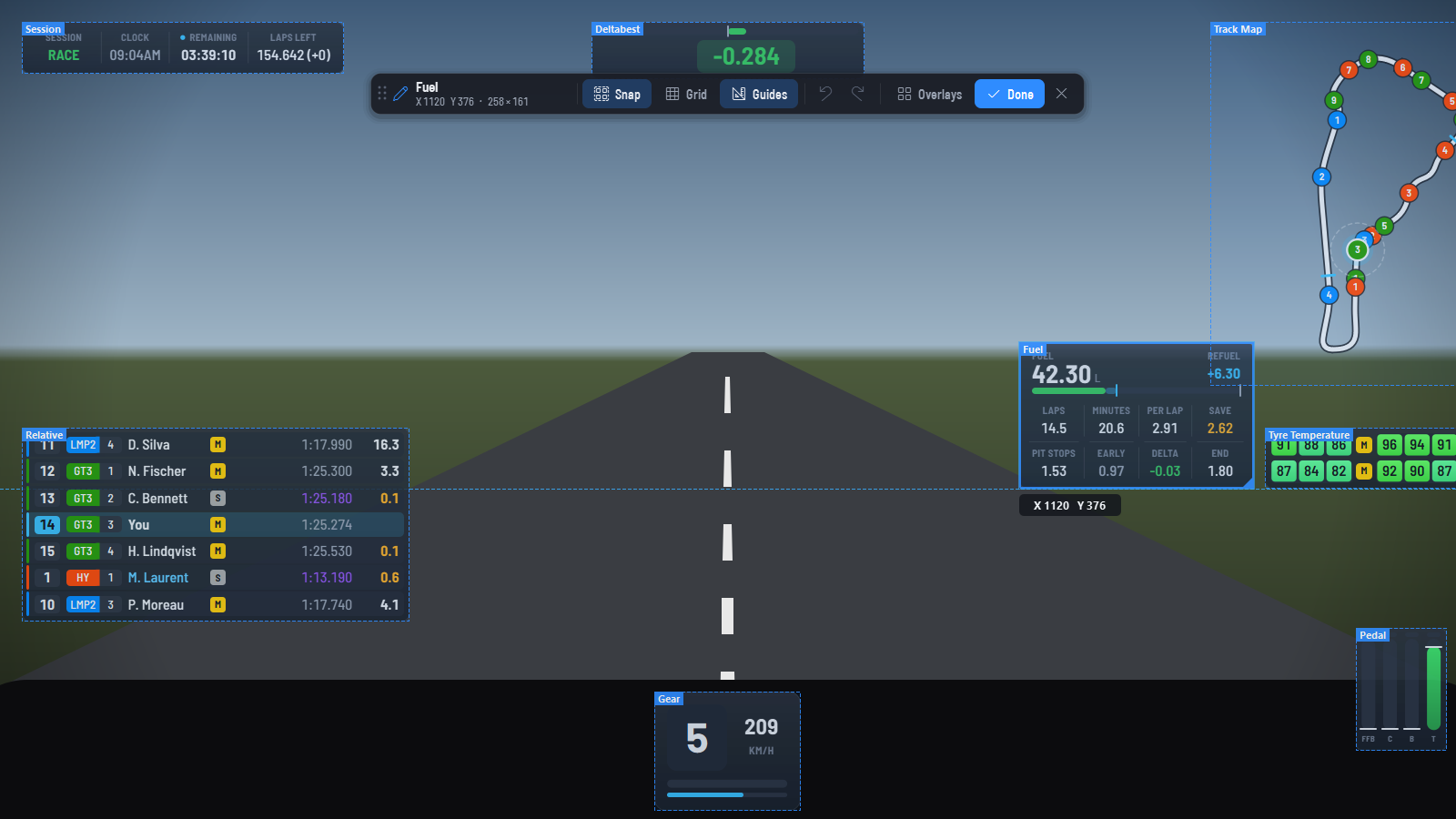
Placing the overlays on the game screen is now a real edit mode. Unlock the overlay (Unlock Overlay on the Home page, tray menu, command palette or overlay_lock hotkey) and a toolbar shows up at the top of the game screen.
- Every overlay shows its outline and name, also the ones that draw nothing yet and the ones hidden by
Auto Hideor by their visibility context: each one can be found and moved, even from the game menus. - Toolbar:
Snap,GridandGuidestoggles,Undo/Redo, the active overlays (uncheck one to turn it off) andDoneto lock the overlay. Drag it by its grip; the✕hides it and leaves the overlay unlocked. - Magnetic snapping: a dragged overlay snaps to screen edges, screen center and the edges and centers of the other overlays (new
enable_magnetic_snapoption, on by default). HoldCtrlto move freely,Shiftto keep the move horizontal or vertical. The guides show the aligned lines and the position of the overlay. - Keyboard: click an overlay to select it (solid outline), then arrow keys move it by one pixel (
Shift: 10 pixels, one grid step withGrid Move),Ctrl+Z/Ctrl+Yundo and redo,Deleteturns it off,Escunselects it. - Undo for moves, arrow keys, centering, resizing with the corner handle, opacity, visibility and turning an overlay off, until the overlay is locked.
- Right-click menu:
Move to Screen(same place on another monitor),Visibility(Always, Race, Qualifying & Race, Practice & Qualifying, On Track, In Pits),Opacity,Undo,Edit ModeandLock Overlay, next toConfig, centering,ReloadandDisable.
An overlay already unlocked at startup does not start edit mode: as before, its outline only shows under the mouse, so nothing stays on screen while driving with an unlocked overlay.
Fixes and performance
Center HorizontallyandCenter Verticallycenter the overlay on its own screen: on a second monitor it was moved to the first one.- An overlay left outside every screen (monitor unplugged, preset made on another computer) is shown on the nearest screen at startup, its saved position kept (
enable_window_position_correction, off with the VR overlay). - Locking and unlocking no longer hides and shows every overlay window: no flicker.
- Locked overlays no longer send each update and paint event through the edit outline (less work while driving), and the outline is only created the first time the overlay is unlocked.
- The alignment guides only redraw what changes on each mouse move instead of the whole screen, and free their screen-sized image once the drag ends.
Modern design for every overlay
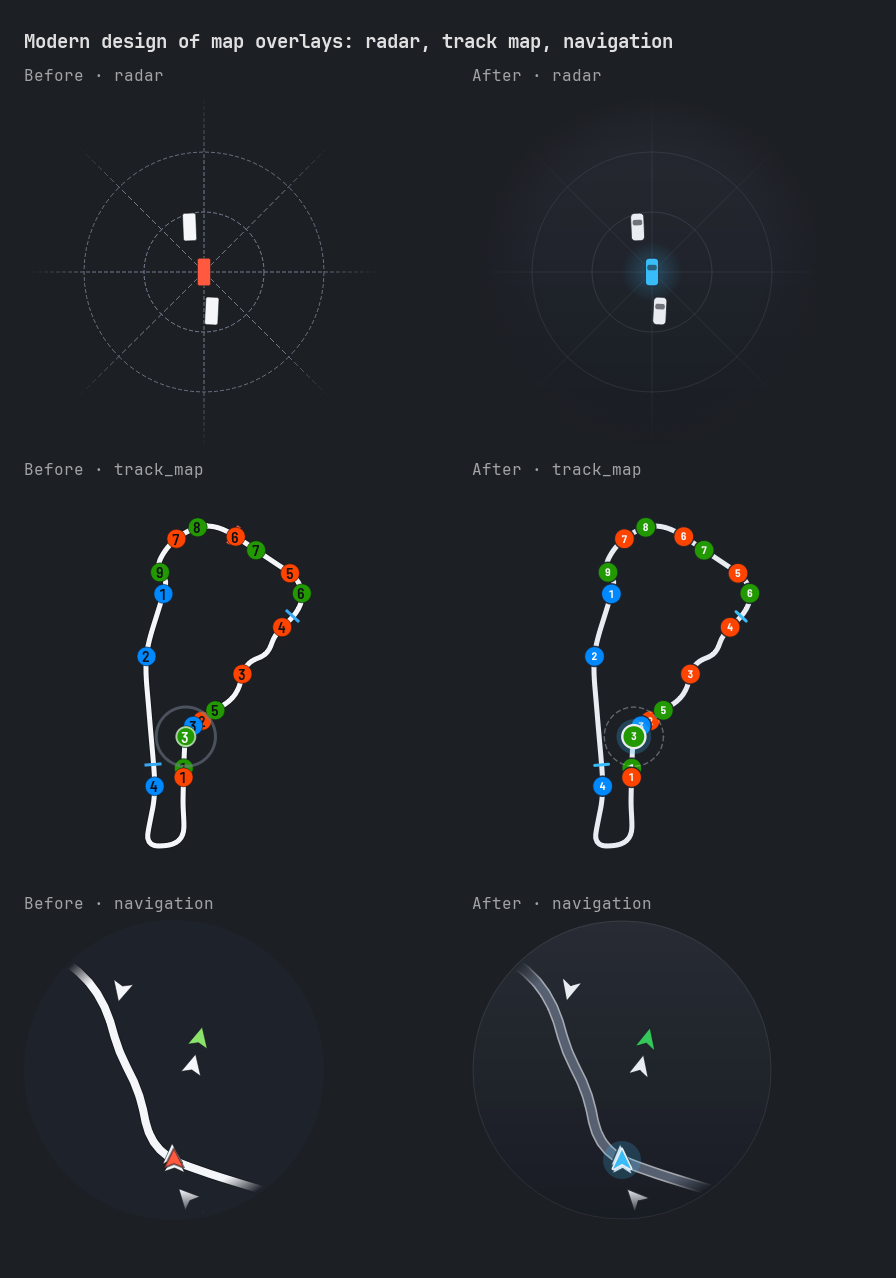
The ten graphic overlays get their own modern design, drawn for it instead of the classic drawing in modern colors. They read the game data the same way as the classic layout, so both show the same values.
- Radar: round, fading at its edge, with an amber then red glow toward a car alongside.
- Track map: cars as numbered dots in their class colors (or race status colors), checkered start line.
- Navigation: road with edge lines, view fading at its edge.
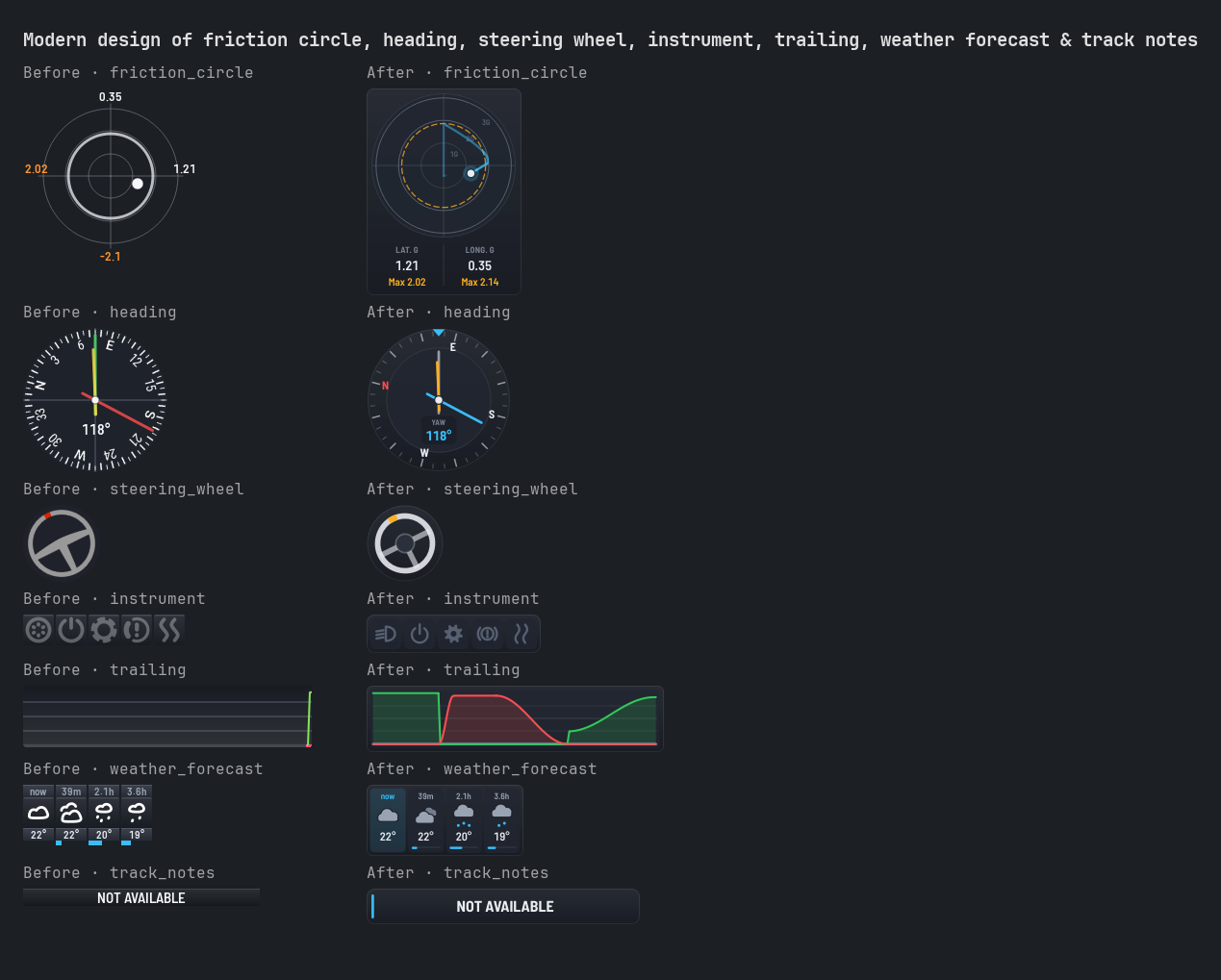
- Friction circle: G rings, a trace fading with age and the recent peaks.
- Heading: compass ring with yaw and front slip angle.
- Steering wheel, instrument and weather forecast: wheel and icons drawn as shapes in the theme colors.
- Trailing: soft areas under the throttle and brake lines.
- Track notes: note on a card.
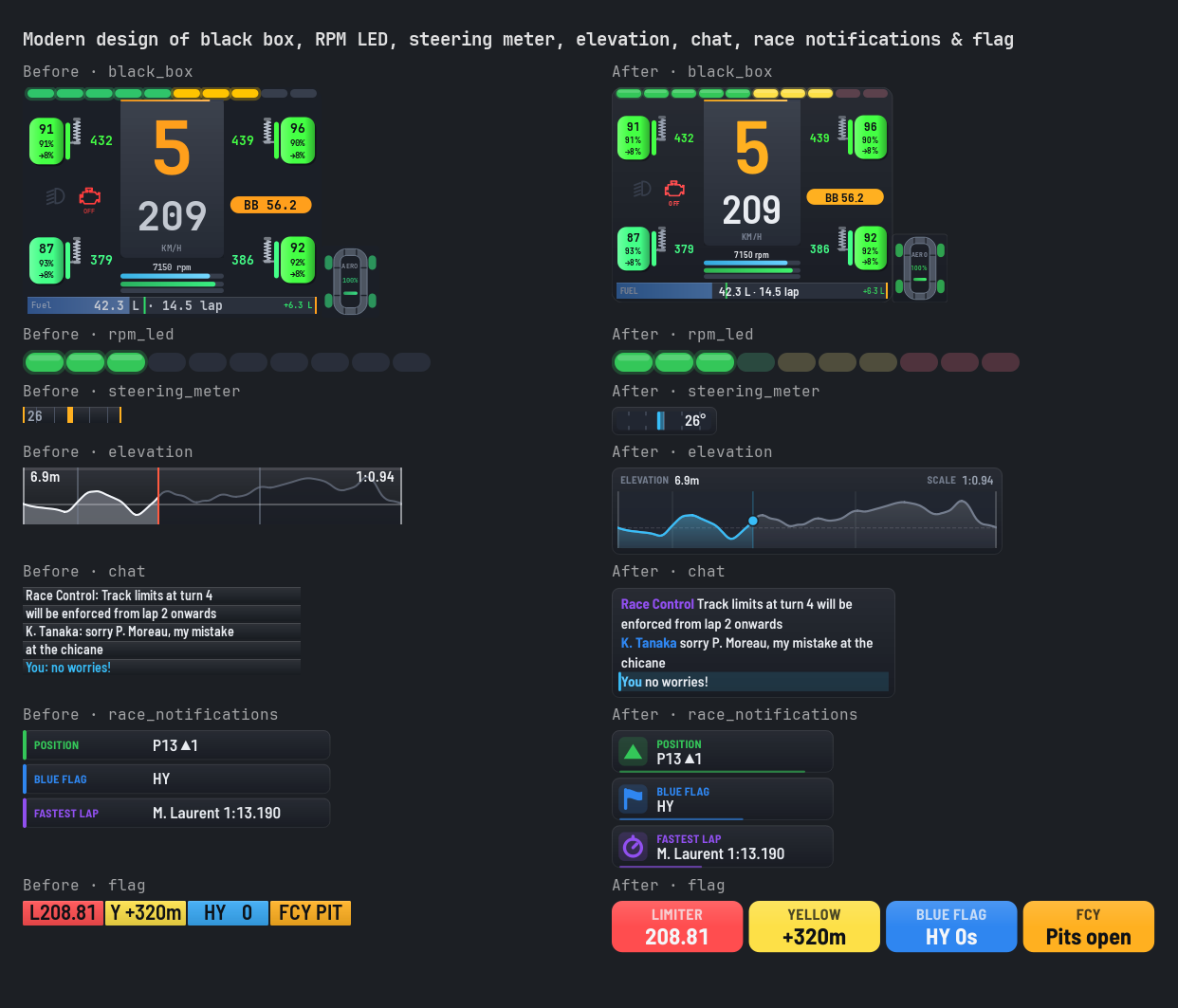
Black box, chat, elevation, flag, steering meter, race notifications and RPM LED get a new modern design too: every overlay has one now (enable_classic_layout or a Legacy theme bring the classic look back).
- Black box: same layout and options, drawn in the Barlow font with capital labels, theme colors (colors left at their default value follow the overlay theme and the colorblind option, your own colors are kept), cards with soft shading and a hairline border, capsule RPM LEDs.
- Flag: one chip per active item in its flag color (yellow, blue, green, red...), caption above the value: pit time, fuel left, speed with the limiter on, distance to the yellow flag, class and time of the blue flag, traffic gap, pit window, repair time, sectors under yellow, full course yellow phase. Inactive items take no room;
*_textoptions you changed replace the captions. - Chat: one card growing with the messages, each sender in its own color, new messages highlighted with an accent edge, messages fading out at the end of their display time.
- Elevation: elevation profile on a chart, the part of the lap already driven in accent color, the car as a dot on the profile, current elevation and scale above the chart.
- Steering meter: bar growing from the center toward the steering side with a thumb, scale marks, angle written on the other half.
- Race notifications: an icon for each message (arrow, flag, stopwatch, penalty, invalid lap), title above detail, a thin bar shrinking with the time left.
- RPM LED: unlit LEDs keep a faint tint of their color zone, so the green, yellow and red zones show before they light up.
- On the
Overlayspage, flag, chat, race notifications and spotter show a sample instead of an empty picture.
Spotter
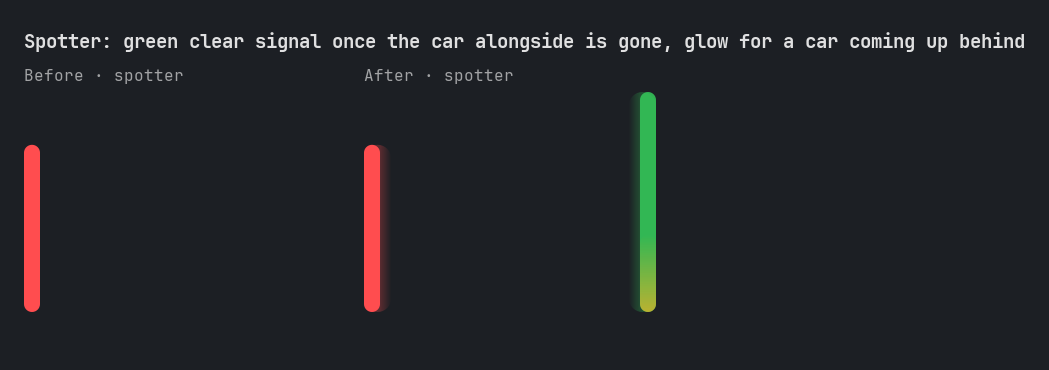
- Clear signal: a side bar flashes green once the car alongside is gone, like a spotter calling "clear" (
show_clear_signal,clear_signal_duration;bar_color_clearin classic layout). - Car coming up behind: the bottom of a side bar lights up while a car comes up behind on that side, brighter as it gets closer (
show_approaching_cars,approaching_distance). A car right behind you in your lane is left out. - Modern design: rounded bars glowing toward the screen center, going from amber to red as the car alongside gets closer sideways.
Real logos and pictures from the game
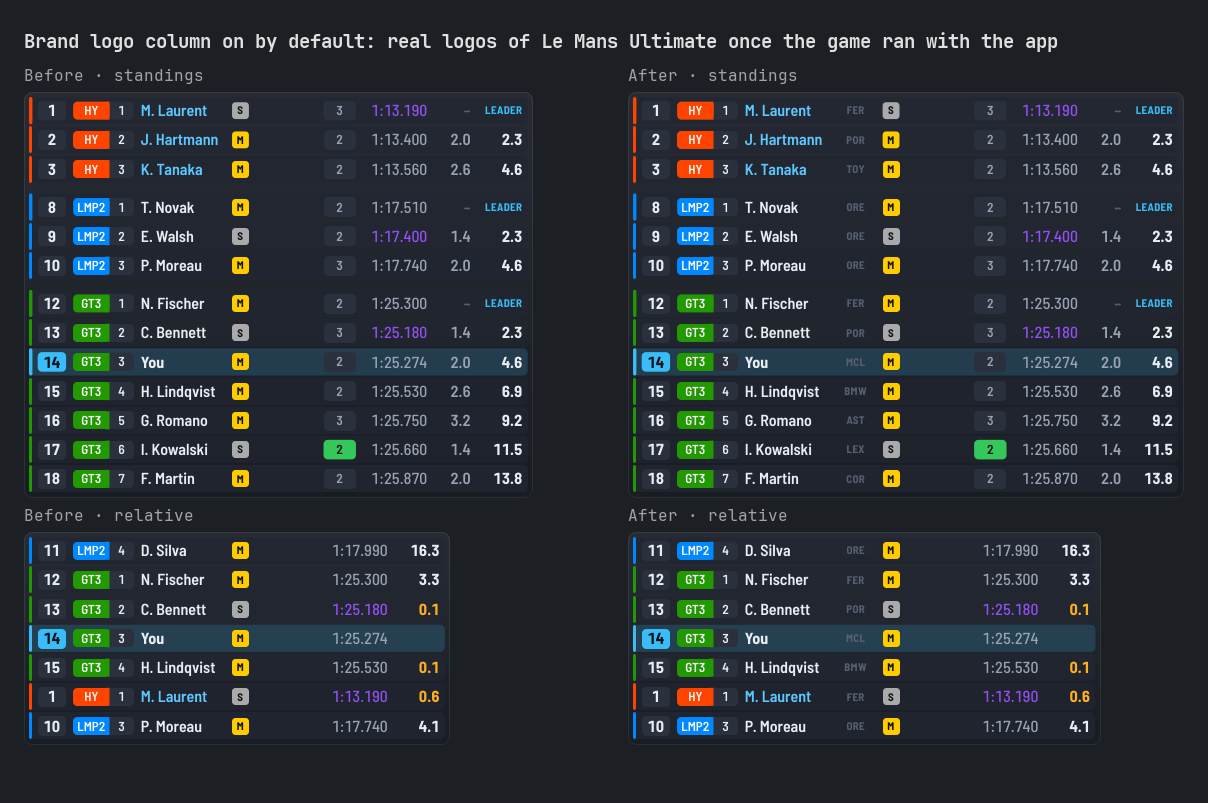
With Le Mans Ultimate, the app shows the real car brand logos, circuit logos, car pictures and circuit pictures of the game menus. They are taken from the game running on your computer (enable_restapi_access, on by default) and kept in the new gameimage folder: nothing is shipped with the app, and they show up once the game was open with the app.
- Overlays: brand logo column of Relative, Standings and Rivals (
column_brand_logo), now on by default and turned on once in existing presets, a bit wider. While a brand has no logo, its first letters are shown. - Pages: circuit and brand logos, car and circuit pictures on the Home page and the Race Results, Driver Stats, Spectate, Replays, Race Calculator, Telemetry and Track Map Viewer pages.
- Stream overlay: the race results source shows the circuit logo and the car brand logos.
- A PNG logo of your own in the
brandlogofolder still comes first (a word of the brand is enough:Corvette.pngfor "Chevrolet Corvette"). Logos get a readable copy on dark and light backgrounds and their empty margins trimmed. With rFactor 2, your own files are the only logos.
Overlay Options
- Relative, Standings and Rivals list their columns in one
Columnslist, from left to right as the overlay draws them: switch each column on or off, drag it or use the arrows to move it. Sections follow for the rows, the classes and number of cars, then the options of each column, dimmed while the column is hidden. - Their live preview shows a sample race with fictional drivers.
Removed
- The example speed plugin is no longer shipped, and the installer removes the copy of earlier versions. Overlay plugins still work: Widget plugins has a short example.
Commits
Added
- Add overlay edit mode, modern design for every overlay & real game logos (8beefe2)
Fixed
- Fix stream only overlay test failing in CI after settings page tests (99af59d)
Visuals
Modern design of friction circle, heading, steering wheel, instrument, trailing, weather forecast & track notes
Modern design of black box, RPM LED, steering meter, elevation, chat, race notifications & flag
Spotter: green clear signal once the car alongside is gone, glow for a car coming up behind
SHA256
3429bdc7787e286886558b58b05cabdea0181a04c294651bbff52dc8409a56bd ModernTinyPedals-0.22.0-windows-setup.exe370a9745194f8984ec048ee7dbe7fe77e7631df1cd0cdd56c6d81e5c5e2dc1fe ModernTinyPedals-0.22.0-setup.zip- `289...