Repository navigation
Home
NeoPedal is a free, open-source telemetry overlay and analysis app for Le Mans Ultimate (LMU) and rFactor 2, on Windows and Linux. Modern overlay design, a clear interface, many tools and a lot of reliability work.
The app is built with PySide6 (Qt 6) and runs in English or French.
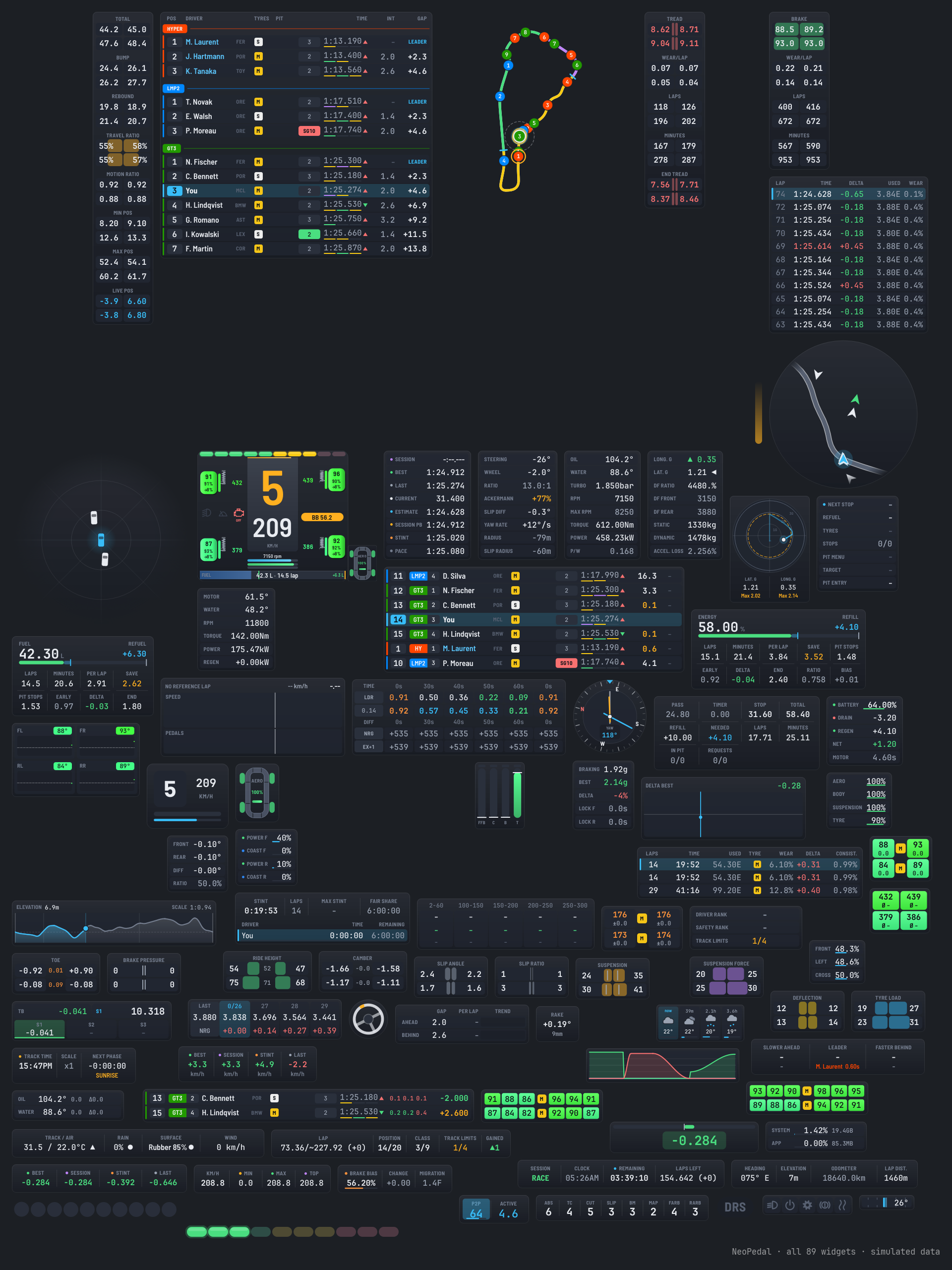
- 88 configurable overlays with a modern design (rounded panels, short labels, values colored by meaning), four themes (Modern or Legacy, dark or light, with a colorblind variant), and visibility per session type or pit state. The classic look is still available (Legacy themes).
- Race aids: delta graph, gap trend, pit lane helper, stint timer, spotter, race notifications, tyre temperature trend.
- Dashboard HUD (formerly Black box): an all-in-one view of the four wheels, brakes, suspension, damage, fuel and energy, with an incident log.
- Telemetry viewer drawn by the graphics card: every lap is recorded and can be compared, with a racing line map, corner analysis ("where time is lost"), session pace, XY plots, MoTeC import and export.
-
Race calculator: fuel, virtual energy and tyre strategy in one page, safety car and rain scenarios, several drivers, live race replanning, a
Livetab with every value the game gives, race plan files. - Driver stats: your lap times per track and car, compared with community LMU lap times, with progression, session history linked to the race results (class position, game version), a driver card and lap times completed from the game results files.
- Race results: classification, positions lap by lap, laps and events of every session read from the game results files, with the replay of the session one click away (LMU).
- Le Mans Ultimate data: chat overlay, game replays and contacts, official delta, invalid lap, team stints and more, read from the game REST API with nothing to configure.
- Broadcast Director (LMU): cast a race live or in a replay, with every game camera in one click, an assisted or automatic director (battles, overtakes, contacts, pit stops...), a commentator screen, a timing table and its own broadcast graphics for your stream (standings tower, driver and battle cards, banners, onboard, track map...), placed with a layout editor.
- Connections: remote control (Stream Deck, Companion, SimHub), WebSocket telemetry stream, web dashboard for a phone or tablet, stream overlays as browser sources (OBS, Streamlabs, XSplit, vMix), also for a race you spectate, with a 16:9 layout for ultrawide screens and a layout editor, SteamVR overlay and VR mirror window, session recorder.
- Reliable updates: Windows installer, in-app updates with SHA-256 check, signed build provenance for every release file.
- Extensible: widget plugins and JSON language packs.
| Page | What you will find |
|---|---|
| Installation | Windows installer, moving from a portable copy, Linux, running from source, uninstalling |
| Game Setup | Le Mans Ultimate and rFactor 2 setup on Windows and Linux |
| Getting Started | First launch, moving overlays, layout editor, configuring overlays, hotkeys |
| Overlays | Modern and classic design, themes, visibility, the list of all overlays, Dashboard HUD |
| Presets and Settings | Presets, preset packages, trash, backups, global config, languages |
| Telemetry Viewer | Lap recording and analysis, track map viewer |
| Race Calculator | Fuel, energy and tyre strategy, live race, Race plan overlay |
| Driver Stats | Career, levels, progression, sessions |
| Results & Replays | Classification, positions lap by lap, laps and events of every session, game replays linked to them |
| Broadcast Director | Cast a Le Mans Ultimate race: director, cameras, commentator screen, broadcast graphics for your stream |
| Connections | Remote control, WebSocket, web dashboard, stream overlays, VR, session recorder, game replays |
| Updates and Security | In-app updates, release files, verifying downloads, reporting a vulnerability |
| Troubleshooting | FAQ: overlay not visible, game not detected, safe mode, logs, bug reports |
| Development | Running from source, checks, architecture, Windows build, release process |
Every option of every overlay, module and tool is described in the settings reference (customization.md), which is also bundled with the app.
- Download the latest release and all releases
- Issues: bug reports and ideas
- Changelog (English) and CHANGELOG.fr.md (French)
- Roadmap
- Contributing
- Security policy: report vulnerabilities privately, never in a public issue
Copyright (C) 2022-2026 TinyPedal developers (see contributors and NOTICE.md).
It is free software under the GNU GPL v3 or any later version, distributed WITHOUT ANY WARRANTY. The icon and images of the images folder are under CC BY-SA 4.0, the Barlow font under the SIL Open Font License 1.1. Third-party licenses are listed in docs/licenses.