FormatGhost Persistence
Signature data does not stay as raw bytes forever. Tools like certutil and Explorer turn certificate attributes into readable text for the user. If the formatter for a chosen OID points at your DLL, the analyst's own inspection tool loads that DLL while it tries to display the data.
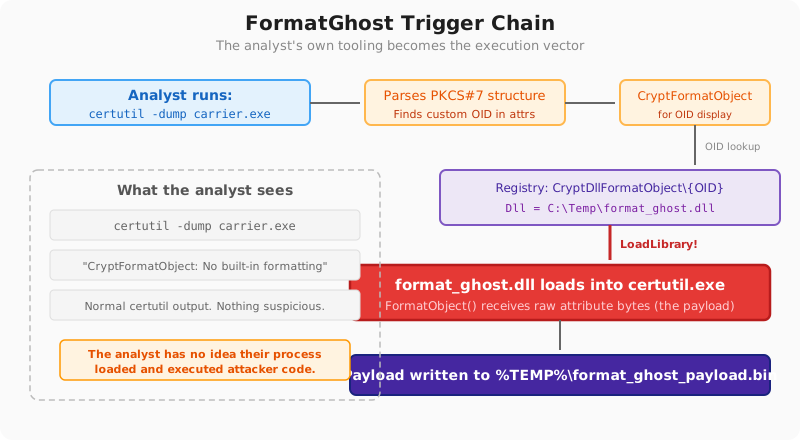
Windows looks up object formatters under:
HKLM\SOFTWARE\Microsoft\Cryptography\OID\EncodingType 0\CryptDllFormatObject\<OID>
When a process encounters that OID and needs a human-readable string, CryptoAPI loads the registered DLL and calls the named export.
TrustMeBro's FormatGhost research tool registers a DLL for a custom OID. When a carrier file holds that OID inside its PKCS#7 signature, the next viewer that parses it triggers the DLL load.
Common trigger points:
certutil -dump- Explorer certificate property dialogs
- any application that calls
CryptFormatObject
The execution vector is the analyst's own process context.
CryptDllDecodeObjectEx did not land as a useful path. The registry keys reject admin writes with ACCESS DENIED, and WinVerifyTrust does not call CryptDecodeObjectEx for unauthenticated attribute OIDs. The format path remained the only practical route.
CryptDllFormatObject keys are writable by a standard admin. CryptDllDecodeObjectEx keys require SYSTEM. That ACL split is why FormatGhost stays on the format side.
WinVerifyTrust does not call CryptFormatObject during verification. Execution starts only when a viewer asks for a human-readable rendering, such as certutil -dump, a Properties dialog, or a certificate viewer. The analyst tool is the trigger.