Repository navigation
Releases: KuchiSofts/vlc-redesign
Release list
VLC Redesign 0.2.6

🎨 Design by Juxtopposed
Every screen of this interface was designed by Juxtopposed. ▶ Watch the video: I Redesigned VLC After 25 Years · CC BY 4.0 · Juxtopposed does not endorse this project.
Fixed (reported in #4, thanks!)
- Menus kept the check marks of earlier choices: choosing one profile after another left all of them checked. A check mark that goes now goes, in every menu.
- The Visualizer could not be changed or turned off once its window was closed. Its button now stays above the controls while a music file shows a visualization.
- Right click over the music player, and over a visualization, opens the player's menu again.
- Open Network Stream only takes links and paths, and says which word isn't one (typed words became broken items of the playlist).
- Profiles no longer turn the media library off (Home, Videos, Music, Playlists and Recent greyed out after choosing a profile saved with it off).
Already on 0.2.4 or 0.2.5? This update downloads only what changed (⋯ → About → Check for updates). From 0.2.3 or earlier, use the installer.
vlc-redesign-0.2.6-win64-setup.exe |
Recommended: per-user install, automatic updates |
vlc-redesign-0.2.6-win64.zip |
Portable |
CHANGELOG · ROADMAP · Wiki · SHA-256 in SHA256SUMS.txt
Unofficial build, not affiliated with or endorsed by VideoLAN. VLC and the cone are VideoLAN trademarks. GPL v2 or later; source: the v0.2.6 tag.
VLC Redesign 0.2.5
🎨 Design by Juxtopposed
Every screen of this interface was designed by Juxtopposed. ▶ Watch the video: I Redesigned VLC After 25 Years · CC BY 4.0 · Juxtopposed does not endorse this project.
Switch your speakers or headphones while playing
Changing Windows' default sound device in the middle of a film (#3):
- No more sudden closing. Switching a few times, or while paused, could close VLC Redesign 0.2.3.
- No more gap. Every switch dropped over a second of sound. The sound now goes on after a fifth of a second, in sync with the picture. Choosing another device in VLC Redesign's own menu is as smooth.
- No more memory growing at every switch (up to 9 MB each time): the sound decoded ahead for the previous device is now played on the new one.
Thanks for the report!
English by default
VLC Redesign and its installer start in English until you choose a language in Settings, whatever the language of Windows. Reset all comes back to English.
The first small update
Already on 0.2.4? This update downloads only what changed, in the background (⋯ → About → Check for updates), and Restart now reopens VLC Redesign where you were. From 0.2.3 or earlier, use the installer.
vlc-redesign-0.2.5-win64-setup.exe |
Recommended: per-user install, automatic updates |
vlc-redesign-0.2.5-win64.zip |
Portable |
CHANGELOG · ROADMAP · Wiki · SHA-256 in SHA256SUMS.txt
Unofficial build, not affiliated with or endorsed by VideoLAN. VLC and the cone are VideoLAN trademarks. GPL v2 or later; source: the v0.2.5 tag.
VLC Redesign 0.2.4
🎨 Design by Juxtopposed
Every screen of this interface was designed by Juxtopposed. ▶ Watch the video: I Redesigned VLC After 25 Years · CC BY 4.0 · Juxtopposed does not endorse this project.
Setup no longer gets stuck
Setup could stay on Preparing VLC Redesign for a fast start (#2). That step is gone: the plugin cache that comes with VLC Redesign now stays right in every time zone, and when it doesn't match the files (after unzipping the portable copy elsewhere, for instance), VLC Redesign saves a fresh one by itself, so the next start is fast again. Thanks for the report!
Small updates
From the next release on, an update downloads only what changed (a few hundred kilobytes instead of the 55 MB installer), in the background, checked file by file. Restart now reopens VLC Redesign on what was playing, where it was, in about two seconds; Later puts it in place when you close it. The portable copy updates itself too, and nothing is left half-done: if a file can't be replaced, everything goes back as it was.
This release itself comes with the installer (or the zip): earlier versions can't apply a small update.
Fixed
- Pause, seek, play froze the video while the sound went on. A seek while paused now lands where asked and shows its picture, and a frame step no longer hangs the media.
- The sound could break up while the computer was busy: the Windows audio buffer was 22 ms, it is 200 ms now.
- Memory and threads grew with every video (each one left its Direct3D 11 device behind): a playlist of short clips reached 7,000 threads. The count now stays flat.
- A crash when changing tracks quickly.
- Casting:
- Windows asks for the firewall rule at once, only when it's missing, and the window doesn't freeze meanwhile.
- Stopping a cast in the middle showed broken pixels and flickered: playback now goes on here where the TV was, with a clean picture (Chromecast and DLNA).
- A DLNA TV that can't read a file as it is gets it converted, instead of an error.
- Back from a paused cast, play, the picture and quit work; the time stays while the TV pauses.
- Icons are sharp at 150 % and 200 % display scale, and follow a scale changed while VLC Redesign runs.
- Keyboard: the last Settings editors that needed the mouse (equalizer, startup volume, colour swatches, the shortcut list) work with the keyboard.
- Reopening after an update no longer turns the media into a clip that starts where it was.
And more (subtitle services, updates, interface): see the CHANGELOG.
Already on 0.2.x? An installed copy offers this update by itself (⋯ → About → Check for updates).
vlc-redesign-0.2.4-win64-setup.exe |
Recommended: per-user install, automatic updates |
vlc-redesign-0.2.4-win64.zip |
Portable |
CHANGELOG · ROADMAP · Wiki · SHA-256 in SHA256SUMS.txt
Unofficial build, not affiliated with or endorsed by VideoLAN. VLC and the cone are VideoLAN trademarks. GPL v2 or later; source: the v0.2.4 tag.
VLC Redesign 0.2.3
🎨 Design by Juxtopposed
Every screen of this interface was designed by Juxtopposed. ▶ Watch the video: I Redesigned VLC After 25 Years · CC BY 4.0 · Juxtopposed does not endorse this project.
A new installer, drawn like the app
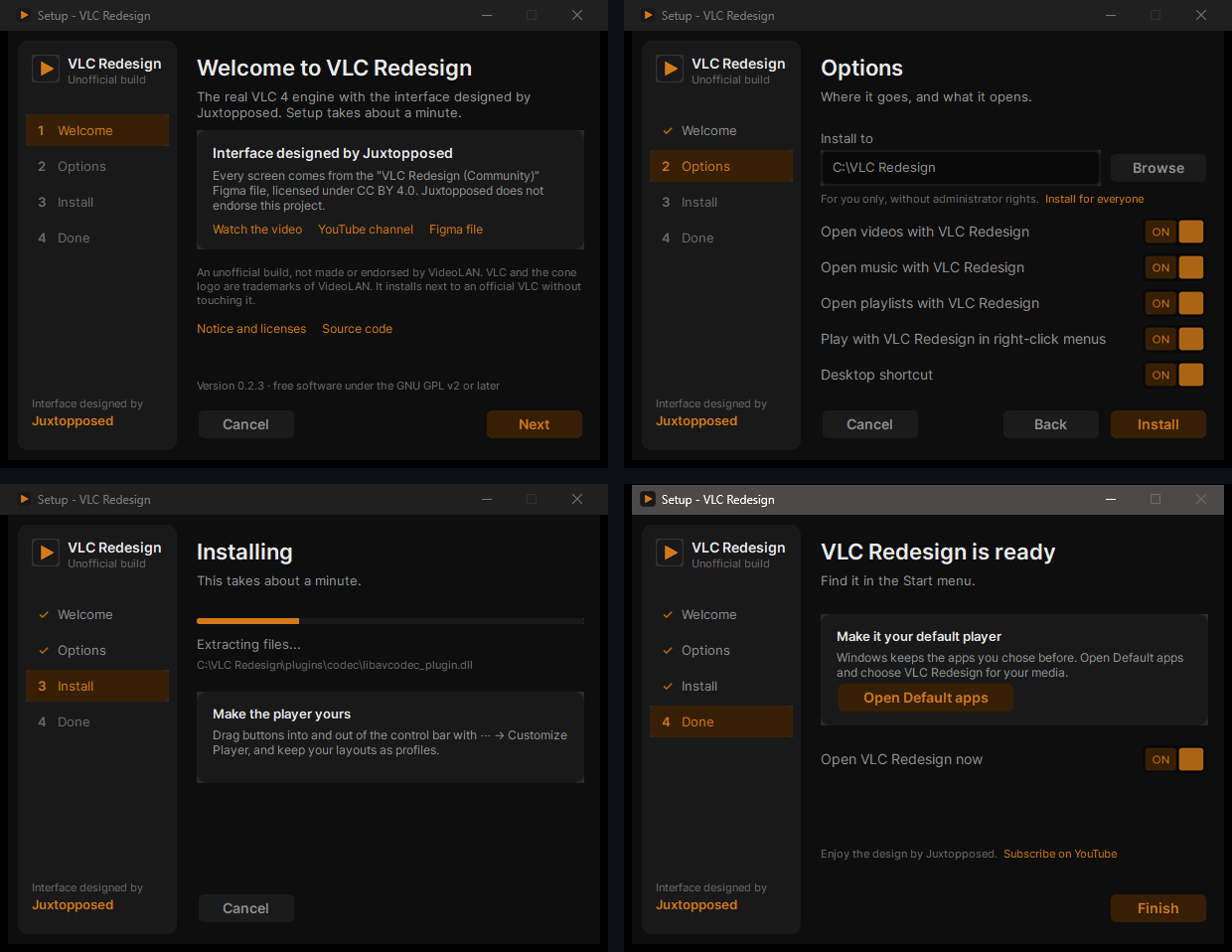
- The library's sidebar with the steps, the design's buttons, ON / OFF toggles and an orange progress bar; English and Hebrew.
- Open videos, music and playlists with VLC Redesign (the ~130 formats VLC plays), wherever you haven't picked another app; the last page opens Windows' Default apps for the rest.
- Play with VLC Redesign and Add to VLC Redesign queue in the right-click menu of files and folders, a desktop shortcut, and Install for everyone.
- Three clicks from Welcome to Done. An update keeps your choices; uninstalling gives every file type back to the app it had before.
Faster seek bar previews
Frames are kept, and while you hover the seek bar the frames around the pointer are decoded ahead: a sweep along the bar, or back, shows them at once.
Fixed
- Playback started paused at a time could show a time of hundreds of hours.
A wiki
Every screen and every option, with screenshots: installation, the player, the library, subtitles, audio and video, customizing the player, all thirteen sections of Settings, shortcuts and troubleshooting.
Already on 0.2.x? An installed copy offers this update by itself (⋯ → About → Check for updates).
vlc-redesign-0.2.3-win64-setup.exe |
Recommended: per-user install, automatic updates |
vlc-redesign-0.2.3-win64.zip |
Portable |
CHANGELOG · ROADMAP · Wiki · SHA-256 in SHA256SUMS.txt
Unofficial build, not affiliated with or endorsed by VideoLAN. VLC and the cone are VideoLAN trademarks. GPL v2 or later; source: the v0.2.3 tag.
VLC Redesign 0.2.2
🎨 Design by Juxtopposed
Every screen of this interface was designed by Juxtopposed. ▶ Watch the video: I Redesigned VLC After 25 Years · CC BY 4.0 · Juxtopposed does not endorse this project.
The fullscreen button moves to the control bar, as suggested in #1. Thank you @Darkdevworker!
- Fullscreen button in the control bar: at the right end of the bottom bar, away from Close. Saved profiles get it once; take it out with ⋯ → Customize Player and it stays out.
- Customize Player: a button dropped between two controls of the bar now goes between them (it used to be ignored).
- Updates: a check from About no longer also shows the update card behind it.
- New in the README: Customize the interface, a 44-second video.
Already on 0.2.0 or 0.2.1? An installed copy offers this update by itself (⋯ → About → Check for updates).
vlc-redesign-0.2.2-win64-setup.exe |
Recommended: per-user install, automatic updates |
vlc-redesign-0.2.2-win64.zip |
Portable |
CHANGELOG · ROADMAP · SHA-256 in SHA256SUMS.txt
Unofficial build, not affiliated with or endorsed by VideoLAN. VLC and the cone are VideoLAN trademarks. GPL v2 or later; source: the v0.2.2 tag.
Contributors

Assets 5
VLC Redesign 0.2.1
🎨 Design by Juxtopposed
Every screen of this interface was designed by Juxtopposed. ▶ Watch the video: I Redesigned VLC After 25 Years · CC BY 4.0 · Juxtopposed does not endorse this project.
Fullscreen fixes, reported in #1. Thank you @Darkdevworker!
- Leaving fullscreen works everywhere: fullscreen entered from the library or the music view could only be left with F11. The Fullscreen and Leave fullscreen shortcuts (F, Escape, or the keys you set) now leave it from any view.
- No frame in fullscreen: the video fills the screen; its frame and rounded corners stay for the window.
- Tip: to keep the fullscreen button away from Close, drag it into the control bar with ⋯ → Customize Player.
Already on 0.2.0? An installed copy offers this update by itself (⋯ → About → Check for updates).
vlc-redesign-0.2.1-win64-setup.exe |
Recommended: per-user install, automatic updates |
vlc-redesign-0.2.1-win64.zip |
Portable |
CHANGELOG · ROADMAP · SHA-256 in SHA256SUMS.txt
Unofficial build, not affiliated with or endorsed by VideoLAN. VLC and the cone are VideoLAN trademarks. GPL v2 or later; source: the v0.2.1 tag.
Contributors
Assets 5
VLC Redesign 0.2.0
🎨 Design by Juxtopposed
Every screen of this interface was designed by Juxtopposed. ▶ Watch the video: I Redesigned VLC After 25 Years
YouTube · Website · Figma · X · Bluesky
The design is "VLC Redesign (Community)" by Juxtopposed, licensed under CC BY 4.0, adapted to Qt/QML with redrawn and modified icons. Juxtopposed does not endorse this project.
Solid on every Windows PC, and it keeps itself up to date.
Install
vlc-redesign-0.2.0-win64-setup.exe |
Recommended. Per-user install (no admin rights), Start menu entry, automatic updates. |
vlc-redesign-0.2.0-win64.zip |
Portable: unzip anywhere and run vlc.exe. |
Both keep their own settings and never touch an installed official VLC. Windows 10/11, 64-bit.
Not code-signed yet: SmartScreen may ask you to confirm (More info → Run anyway). SHA-256 sums are in SHA256SUMS.txt.
Highlights
- 🚀 Starts every time, fast: a second copy no longer hangs on start, and the plugin cache survives unzipping and installing (≈0.4 s to the window)
- 📦 Installer in the redesign's look: closes a running copy, updates it, and opens it again
- 🔄 Updates from GitHub: a card when a release is out; installed copies update themselves (checksum-verified) and reopen on what was playing
- ℹ️ New About window with the design credit and links to Juxtopposed
- 👤 Profiles: New, Rename, Clone, Delete, and the design's Movies / Shows / Music / Work profiles
- 🔎 Settings search on what you see, applies after restart hints, visible errors
- 🧹 ~80 fixes from a full audit, including a crash in the video effects, the sleep timer, Q / L keys, Stream ↔ Convert, OpenSubtitles, Repeat after restart, HDR, and the blank window without the media library
- 🆙 VLC 4 merged up to 2026-10-19 (110 commits)
Everything: CHANGELOG · What's next: ROADMAP · Ideas and bugs: Issues
Unofficial build, not affiliated with or endorsed by VideoLAN. VLC and the cone are VideoLAN trademarks.
First implementation by MrDouglax. GPL v2 or later; the source of this build is the v0.2.0 tag. Fonts: Inter and DM Mono (OFL 1.1).
VLC Redesign 0.1.0: first Windows release
🎨 Design by Juxtopposed
Every screen of this interface was designed by Juxtopposed. ▶ Watch the video: I Redesigned VLC After 25 Years
YouTube · Website · Figma · X · Bluesky
The design is "VLC Redesign (Community)" by Juxtopposed, licensed under CC BY 4.0, adapted to Qt/QML with redrawn and modified icons. Juxtopposed does not endorse this project.
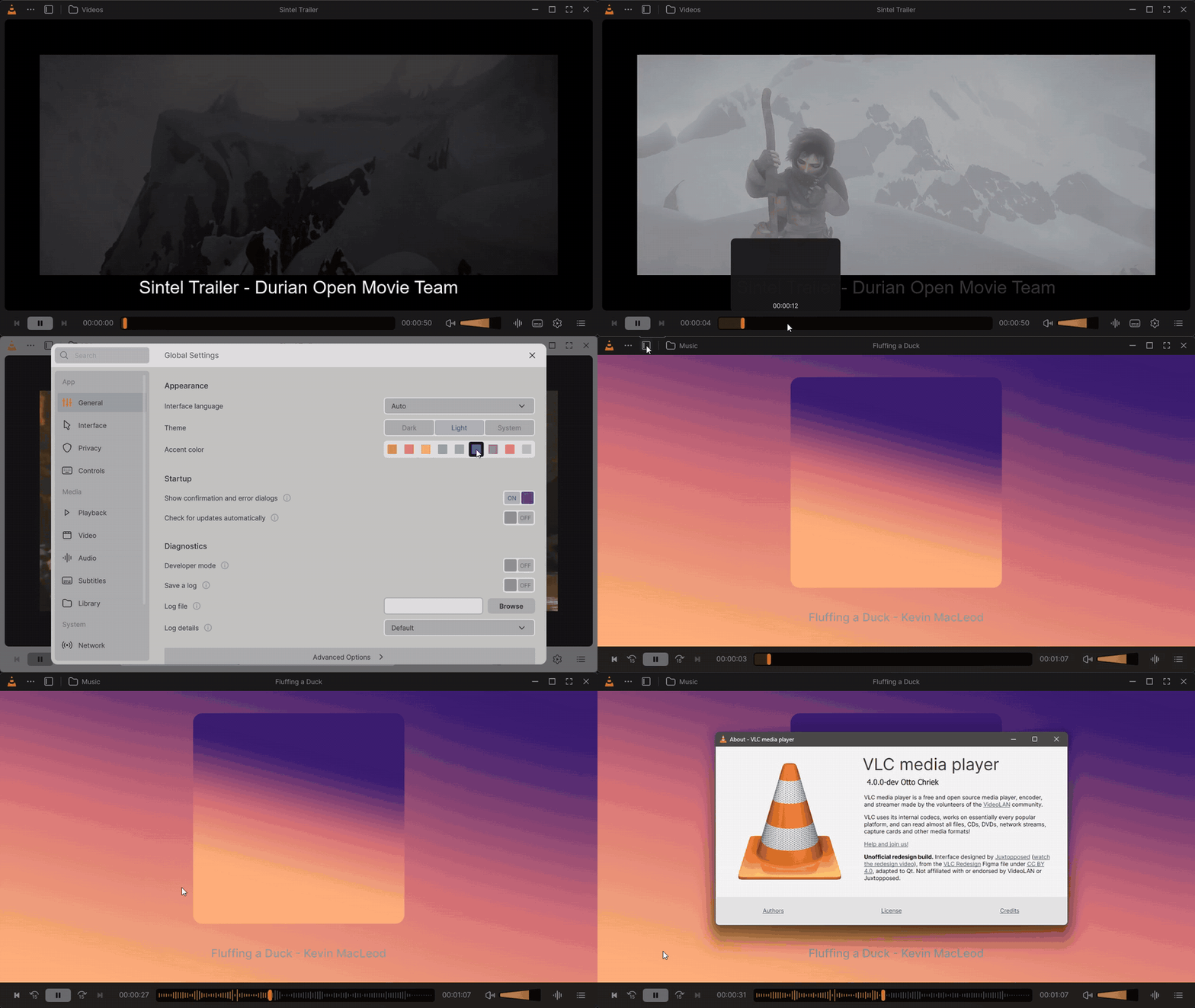
The first Windows release. The real VLC 4 engine with the redesigned interface: pixel-matched to the design on the measured screens, and the interface freezes are gone.
Install
- Download
vlc-redesign-0.1.0-win64.zipbelow. - Unzip it anywhere and run
vlc.exe.
It's portable: settings stay in the portable folder next to vlc.exe, so an installed official VLC isn't touched. Windows 10/11, 64-bit.
The build isn't code-signed, so SmartScreen may ask you to confirm (More info → Run anyway).
Highlights
- 🎯 Text, spacing and colours matched to the Figma frames; Dark, Light and System themes with 9 accents
- 🖼️ Frame previews on the seek bar, a waveform seek bar for music
- 📚 Listen Again, Frequently Visited Folders, a compact library and a queue card in the player
- 🎛️ Redesigned settings with search, and many more VLC options
- 🧊 Three interface/core deadlocks fixed
- Full list: CHANGELOG
Known limitations
Based on VLC 4.0-dev · Windows only · English interface · a few dialogs still use the classic VLC look · update checks are off (VideoLAN's feed is for the official VLC). Details in the README.
Unofficial build, not affiliated with or endorsed by VideoLAN. VLC and the cone are VideoLAN trademarks.
First implementation by MrDouglax. Licensed GPL v2 or later; the source of this exact build is the v0.1.0 tag (source archives below). Fonts: Inter and DM Mono (OFL 1.1, licenses in the zip).
SHA-256 (vlc-redesign-0.1.0-win64.zip): 7b638fb6e23a0f0f277c917d5ccf1d16d178ab4dd2f6ea8d892988c123455c1b