Releases: LLK-LL/Memnex
Release list
v12.6.0 - Memnex visual memory workspace and recall-chain hardening

v12.6.0 - Visual memory workspace and recall-chain hardening
Released 2026-07-16.
This release packages two connected improvements: a navigable 2D/3D memory
workspace and repairs across the memory_save, memory_recall, graph
expansion, representation, session, and rules-layer paths. The public viewer
remains local-first and static: the exporter reads SQLite in read-only mode and
writes generated files only to the output directory.
What changed since the previous Memnex release
The comparison baseline is the previous public LLK-LL/Memnex v0.3.0
release (main commit 1b6280b, 2026-06-27). The old local/package label
total-agent-memory refers to this same project and is retained only for
backward compatibility.
| Area | Memnex v0.3.0 | Memnex v12.6.0 |
|---|---|---|
| Export | Read-only static graph export with a 2D Memory Galaxy and a separate basic 3D sphere viewer | Embedded graph data, inline viewer modules, 2D/3D coexistence bridge, and one workspace-level view switch |
| Navigation | Galaxy, solar-system, and planet-satellite exploration in the 2D surface | The same 2D navigation plus 2D-focus-to-3D synchronization, 3D navigation tree, projected minimap, and Knowledge Solar System surface |
| 3D | Node spheres, links, filters, pointer drag, wheel zoom, and node inspection | Observatory and fly-through modes, graph-derived planet systems, real satellites, NASA texture assets, asteroid belt, comets, LOD/instancing diagnostics, and reset/focus controls |
| Interaction | Mouse/pointer-based graph interaction | Pointer/keyboard interaction plus a worker-backed MediaPipe gesture runtime with stable hand association, hysteresis, dropout recovery, and diagnostics |
| Memory engine | File-backed memory vault and graph-viewer documentation | Project/alias-aware save and recall, agent-namespace isolation, relevance-gated retrieval, routed graph expansion, multi-representation filtering, phase-scoped rules, and recall telemetry |
The comparison is intentionally limited to capabilities verified in the
current source trees. The viewer does not upload memory data or camera frames.
CodeGraph chain map
The current visualization path was re-indexed with CodeGraph 0.9.9 and then
confirmed against the source files.
CLI / export command
  -> main()
  -> export_viewer()
  -> connect_readonly()
  -> load_graph()
  -> write_graph_json() + embed_graph_data()
  -> copy_assets() + inline_viewer_modules()

index.html
  -> viewer.js:init()
  -> graph conversion / filtering / 2D rendering
  -> initMemoryUniverse3DCoexistence()
       -> setActiveView("2d" | "3d")
       -> applyCurrent2DFocusTo3D()
       -> mountKnowledgeSolar()
            -> knowledge-solar-system iframe route
                 -> loadCodexKnowledgePlanetSystems()
                 -> createKnowledgeSolarSystemSourceFromGraphs()
                 -> createKnowledgeSolarLayout()
                 -> createKnowledgeSolarPlanetVisualPlans()
                 -> Three.js render loop
                 -> gesture control runtime
The gesture branch is:
Start gesture control
  -> getUserMedia()
  -> frame scheduler
  -> gesture worker
  -> MediaPipe inference
  -> gesture interpreter
  -> rotate / pan / zoom action
  -> orbit controls

Fly-through mode
  -> same worker/inference pipeline
  -> left-hand flight gesture controller
  -> forward + speed multiplier
  -> right-hand look controller
  -> yaw/pitch update in solar flight controller
Panel reference
2D Memory Galaxy
- Header and breadcrumb: Return to the previous scope, show the current
galaxy/system context, and search the visible memory graph. - View Controls: Camera mode, speed, auto-rotate, motion trails, and comet
visibility. These affect the visualization only. - Filters: Search nodes, choose node types, select graph layers, adjust
relationship/metric modes, and tune relevance, recency, and node strength. - Performance HUD: FPS, frame time, CPU load, JavaScript memory estimate,
GPU estimate/renderer, and visible node/edge counts. - Live Graph Scope: Counts for systems, nodes, direct connections, and
inferred links in the active graph. - Minimap: Shows the current 2D viewport and provides a compact way to
jump around a large graph. - Inspector:
Overview,Nodes, andConnectionstabs show the selected
system/node, its counts and members, and related edges. The prompt area
stages a selected node as context for a future agent action.
3D Memory Universe and Knowledge Solar System
- 2D / 3D switch: Changes the main surface without losing the current
graph scope. - Knowledge Solar System mode (
K): Opens the graph-derived solar route. - Observatory mode (
O): Keeps the camera in orbit/browse mode for
selecting planet systems, planets, and satellites. - Fly-through mode (
S): Enters bounded first-person movement around the
solar scene. The current orbit/inspect state is restored on exit. - Center and reset (
U): Returns the solar camera and mode state to a
known center position. - Navigation panel: Lists galaxy/system/planet relationships and lets the
user move between scopes. - Projected minimap: Projects the 3D scene into a compact navigation view;
in fly-through mode it also shows the camera marker, heading, orbit tracks,
and asteroid belt boundary. - Inspection overlays: Show the current target, relationship traces,
satellite pick targets, runtime diagnostics, and scene performance.
Operation reference
| Input | Operation |
|---|---|
| Search input | Filter visible nodes by text. |
| Type/layer checkboxes | Include or exclude node types and graph layers. |
| Relevance/recency/strength sliders | Recompute the visible graph and layout. |
| Left-drag in 2D/3D orbit view | Rotate the view. |
| Middle-drag | Pan the view. |
| Wheel | Zoom in or out in orbit/browse mode. |
| Click a node or satellite | Select and inspect the item. |
| Right-click | Focus the camera on the clicked point when supported. |
| Double-click a system/planet | Drill into the corresponding scope. |
| Inspector tabs | Switch between overview, nodes, and connections. |
K, O, S, U buttons |
Switch Knowledge Solar, observatory, fly-through, and reset actions. |
| Keyboard arrows / escape | Pan or exit an active inspection where the route supports it. |
Gesture reference
Gesture control is opt-in. The browser asks for camera permission only after
the user presses Start gesture control. The published screenshots in this
release intentionally hide the camera preview.
Observatory / orbit mode
| Gesture | Operation |
|---|---|
| One open palm, move | Rotate the orbit view. |
| One pinched hand, move | Pan the view. |
| One pointing-up hand, move | Pan the view through the robust pointing-up path; this is also the geometric fallback when classifier evidence is incomplete. |
| Two valid hands, change separation | Zoom in when the hands move apart; zoom out when they move together. The transform uses an accumulation window and dead zone to suppress jitter. |
| Closed fist | Pause gesture actions and hold the current view. |
| Unknown handedness, stale frame, or hand loss | Ignore or reset the active intent until a fresh stable hand association is confirmed. |
Fly-through mode
| Gesture | Operation |
|---|---|
| Left open palm | Move forward. |
| Left palm moves upward/downward | Increase/decrease the cruise-speed multiplier while the left open palm remains active. |
| Right open palm | Look around with the high-gain look mapping. |
| Right pointing-up | Look around with the lower-gain precision mapping. |
| Left hand disappears or becomes invalid | Stop forward motion after the short dropout tolerance. |
| No stable right-hand look gesture | Hold the current heading; it does not inject a camera jump. |
The solar route ignores orbit gestures while fly-through is active and sends
the flight-specific actions to the bounded solar flight controller. Leaving
fly-through restores the saved orbit/inspection state.
Memory save and recall repairs
The release also includes the current working-tree repairs outside the viewer:
- Project identity: canonical project names, Windows paths, and registered
aliases resolve to one identity; project filters accept aliases but never
widen to another project. - Save path: sessions normalize project context, stale sessions can be
closed automatically, and optional representation/enrichment work remains
queueable without making the core save dependent on an LLM response. - Recall path: FTS, semantic, multi-representation, episode, and graph
tiers receive the same project and agent-namespace boundary. A final
post-fusion filter removes candidates that violate that boundary. - Relevance: high-signal query terms are extracted, matched terms and
coverage are returned, and the configurable relevance gate prevents a
merely similar result from displacing a low-signal query. - Graph expansion: query routing selects applicable graph families and
returns explicit applied/skipped diagnostics instead of hiding the decision. - Rules layer: phase/project-scoped rule context is preserved through the
recall chain; rule effectiveness counts explicitly rated outcomes rather
than treating every fire as a success or failure. - Observability: recall responses and monitor summaries retain routing,
project alias, relevance, graph-family, and retrieval-tier diagnostics.
The operational map and troubleshooting entry point are in
MEMORY_SYSTEM_FEATURES_TROUBLESHOOTING.md.
Quick start
Export a local viewer from a memory database:
v0.3.0 - Memory Galaxy visualization workspace
v0.3.0 - Memory Galaxy visualization workspace
Memnex v0.3.0 upgrades the graph viewer from a plain node-link export into a
local Memory Galaxy workspace: a cinematic but practical interface for reading
personal AI memory systems.
Visual tour
Galaxy overview
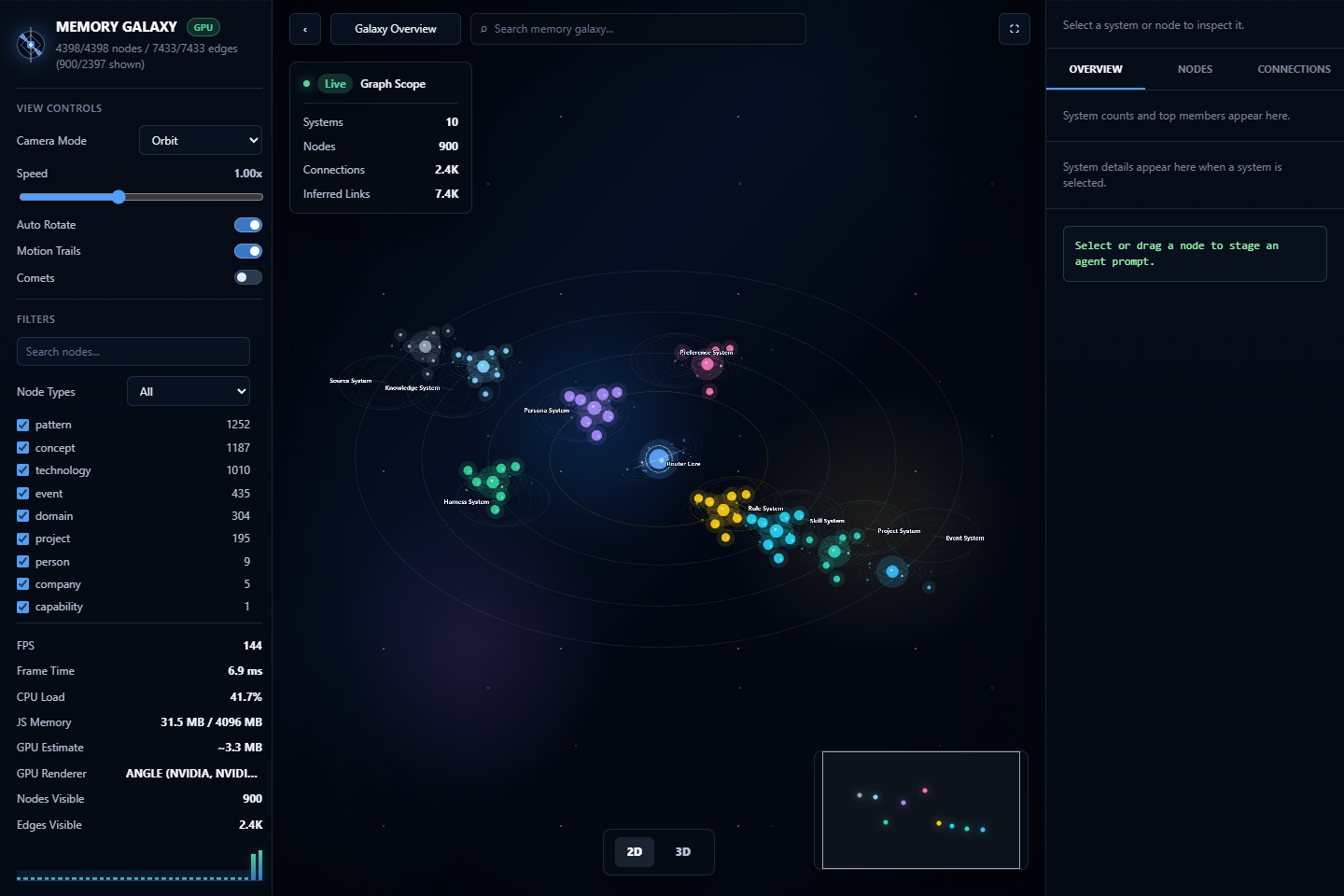
The overview turns the whole memory graph into an orbiting map of memory
systems. Use it to scan system density, search nodes, filter types/layers, and
watch the live performance HUD while navigating large graphs.
System solar-system view
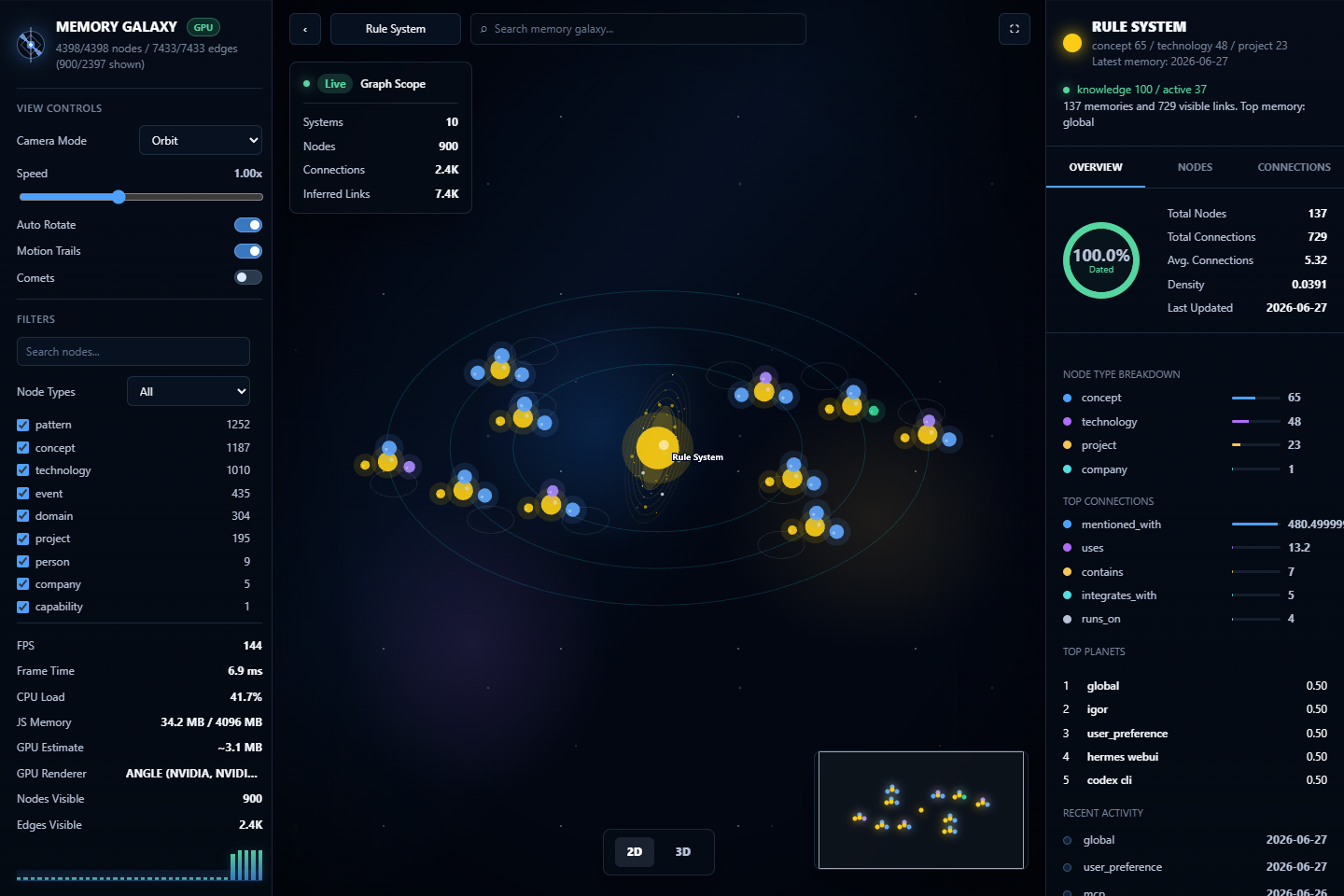
Double-click a system to enter its local solar system. The system center becomes
the star; important memories become planets; the inspector shows counts,
density, recent activity, and high-weight connections.
Planet-satellite context
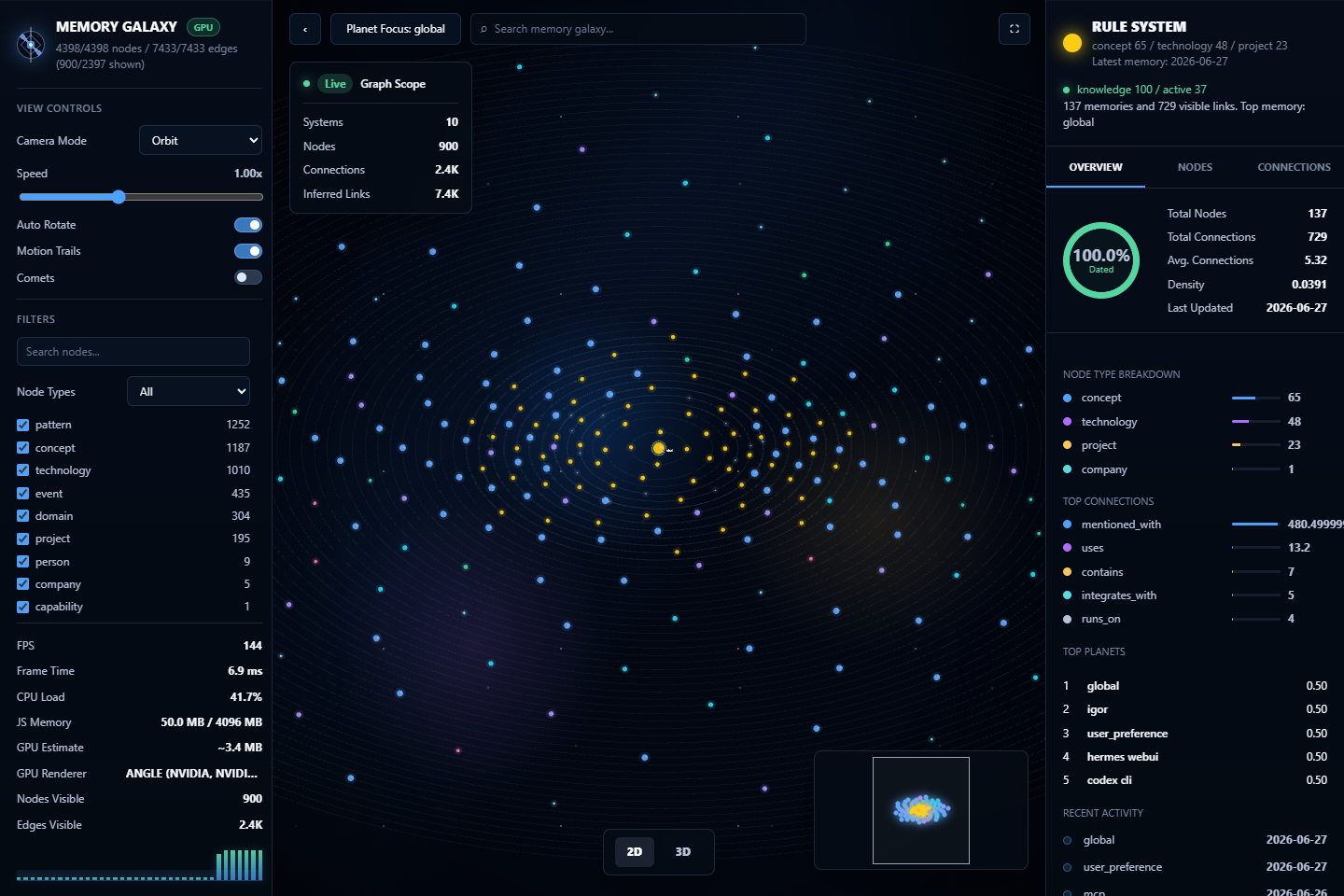
Double-click a planet to inspect direct neighbors, derived context, evidence,
and external relations as readable orbital rings.
What is included
- PixiJS-powered Memory Galaxy UI.
- Galaxy overview, system drill-down, and planet-satellite navigation.
- Full graph export by default. Node/edge limits are used only when explicitly
requested with--max-nodesor--max-edges. - Search, node type filters, layer/edge filters, breadcrumbs, minimap, and
inspector tabs. - Performance HUD for FPS, frame time, memory estimate, GPU renderer, and
visible graph size. - Exporter support for embedded graph data and inlined viewer modules, making
exported folders easy to open locally. - Animation rendering tuned to update existing scene objects instead of
rebuilding the scene on every animation tick.
Who should try it
- Codex, Claude, Cursor, and MCP users with local memory graphs.
- People who want to audit what their AI assistant has learned without reading
raw SQLite rows. - Developers building local-first agent memory workflows.
- Researchers comparing rule, preference, skill, and evidence structures inside
a personal memory system.
Privacy boundary
This release includes viewer source code and sanitized demo screenshots only. It
does not include live memory databases, raw memories, private graph exports,
logs, transcripts, backups, WAL/SHM files, tokens, cookies, or user data.
Generated viewer folders may contain private memory summaries from the selected
database. Keep generated graph.json files private unless you have reviewed and
sanitized them.
How to use
python .\memory-system\tools\graph-viewer\export_graph_viewer.py `
  --db "$env:USERPROFILE\.tam\memory.db" `
  --output .\graph-viewer-output
Open graph-viewer-output\index.html for the full 2D Memory Galaxy workspace.
Do not pass --max-nodes or --max-edges when you want the full graph.
Current limitations
- The viewer is a local static export, not a hosted service.
- Very large graphs may need export limits or local filtering.
- The exporter expects Total Agent Memory-style graph tables.
- Demo screenshots use synthetic/sanitized graph data, not a public dump of a
private memory database.
Suggested repository description
Local-first memory vault for personal AI agents, now with a Memory Galaxy viewer
for exploring rules, skills, preferences, evidence, and graph context.
Suggested topics
ai-memory, ai-agent, local-first, mcp, codex, claude, cursor,
knowledge-graph, memory-graph, graph-visualization, personal-ai,
agent-tools
v0.2.0 - Memory graph visualization
v0.2.0 - Memory graph visualization
Memnex v0.2.0 publishes only the memory system layer and adds a local graph
viewer for inspecting memory graph structure without committing private memory
data.
What is included
- A local 2D/3D memory graph viewer exporter under
memory-system/tools/graph-viewer/. - Static browser assets for Cytoscape.js 2D graph exploration and
3d-force-graph3D exploration. - Read-only SQLite export from graph tables into
graph.json. - README and memory-system documentation for the visualization workflow.
- Git ignore rules that exclude live memory data, generated graph viewer output,
SQLite databases, WAL/SHM files, logs, and temporary files.
Privacy boundary
This release intentionally excludes memory-data/ from Git. It contains system
files only: documentation, scripts, viewer source, and static assets. It does
not include live memory exports, raw memories, database snapshots, logs,
transcripts, backups, or generated graph exports.
How to use
python .\memory-system\tools\graph-viewer\export_graph_viewer.py `
  --db "$env:USERPROFILE\.tam\memory.db" `
  --output .\graph-viewer-output
Open graph-viewer-output\index.html for 2D mode or
graph-viewer-output\viewer-3d.html for 3D mode.
Current limitations
- The graph viewer is a local static export, not a hosted service.
- Generated
graph.jsoncan contain private memory summaries; keep exported
viewer directories private unless reviewed. - The exporter expects Total Agent Memory-style graph tables.
v0.1.0 - Local-first memory vault for personal AI agents
v0.1.0 - Local-first memory vault for personal AI agents
Memnex v0.1.0 introduces the first public shape of a local-first memory vault for personal AI users.
What is included
- A versioned
memory-data/structure for memories, rules, skills, agent skills, preferences, templates, exports, and snapshots. - A
memory-system/layer with sync and scheduling scripts. - PowerShell-based manual sync for Windows.
- Weekly Windows scheduled task installer.
- Conservative redaction for sensitive-looking preference and configuration values.
- Manifest metadata for sync provenance.
- English and Simplified Chinese README files.
- Adapter examples for Codex, Claude, Cursor, and MCP memory exports.
- Security and redaction guidance for public/private vault use.
Who should try it
Memnex is useful if you:
- use AI agents frequently;
- want Codex, Claude, Cursor, or MCP-backed tools to remember how you work;
- prefer local files over opaque memory databases;
- want to version and review your AI working memory;
- want a small personal system instead of a heavy agent platform.
Current limitations
- The sync workflow is currently Windows/PowerShell-first.
- macOS and Linux sync scripts are not included yet.
- Retrieval is intentionally left to the agent/client layer for now.
- Public sharing still requires manual review of memory data.
Suggested repository description
Lightweight local memory vault for personal AI agents. Preserve memories, rules, skills, preferences, and workflows across Codex, Claude, Cursor, MCP, and local agents.
Suggested topics
ai-agent, ai-memory, memory, mcp, codex, claude, cursor, personal-ai, local-first, agent-tools, rag, knowledge-base, automation, powershell