Repository navigation
Releases: LNPANDY/NX2Apple
Release list
NS Port Builder v0.4.1 — Animal Crossing verified on an iPhone, archive reuse

The third verified game, the host fix that got it there, and a pack step that stops redoing multi-GB work.
Verified: Animal Crossing: New Horizons
3.0.3 builds, installs and runs smoothly on an iPhone — 103,645 files into 72 archive shards (tested with Happy Home Paradise). Getting there took one more host fix:
- The bug: every file-existence check (stat) against the archive passed a path with a leading slash, while the archive's binary search expects paths without one — so every stat against a packed file answered "not found", and the title crashed at boot.
- How it was isolated: on a Mac host the same game ran clean from a plain romfs tree (2100+ frames) but crashed from the archive at the identical program counter — pinning the fault to the archive layer, a one-line fix.
New: the archive pack reuses its work
The pack step now writes a fingerprint (.packstamp) next to the shards. When the extracted RomFS is unchanged — same NSPs, same versions — the next build skips the whole multi-GB shard pack and reports how many files were reused. Change an NSP or the DLC selection and it packs again automatically. The first pack after upgrading to this version writes the stamp, so expect exactly one repack, then none.
What this build is
NS-Port-Builder-macOS-arm64.zip — the app itself, ad-hoc signed, Apple Silicon, macOS 13+. Unzip, then right-click → Open on first launch (or xattr -dr com.apple.quarantine "NS Port Builder.app").
This is a front end only. It drives the scripts of NX2Apple, so clone that repository on the same Mac; the app finds it automatically and otherwise you pick it once with Choose repository….
Verified games
| Game | Update required | Status |
|---|---|---|
| Tears of the Kingdom | 1.4.3 (v720896) | Verified — builds, installs and runs on an iPhone; 304,243 files into 127 archive shards, byte-verified |
| Hades II | 1.0.137848 (v1) | Verified — builds, installs and runs on an iPhone; 33-file archive |
| Animal Crossing: New Horizons | 3.0.3 (v2228224) | Verified — builds, installs and runs smoothly on an iPhone; 103,645 files into 72 archive shards |
Every other game is unverified by this fork. Twenty-odd are reported playable upstream; the full table with per-game versions is in the README. If you try another title, expect to bring it up yourself, and please report what you find.
Requirements
- An Apple Silicon Mac, macOS 13+
- Python 3.9+ with
lz4,capstone,fontTools, and zstd (compression.zstdon 3.14+,backports.zstdbefore) — the dependency panel manages a venv with all of this - .NET SDK 10 (Homebrew, .pkg and dotnet-install.sh all work)
- ~6 GB free beyond the NSPs; the shader compile is the long step
- Your own game files and
prod.keys— nothing is bundled
Legal
No Nintendo code, assets, firmware or keys are included anywhere. The pipeline requires your own dumps and your own keys and talks to no server. Not affiliated with or endorsed by Nintendo; trademarks belong to their owners. Personal-backup laws differ by country — you are responsible for your jurisdiction, and the outputs are for your own hardware only. See the README's Legal section for the full statement, including takedown handling.
中文说明
第三个完整验证的游戏、让它跑起来的宿主修复,以及一个不再重复打包几十 GB 的构建步骤。
已验证:集合啦!动物森友会
3.0.3 构建、安装、在 iPhone 上流畅运行——103,645 个文件归档成 72 片(实测含 Happy Home Paradise)。走到这一步又修了一个宿主 bug:
- 问题所在:所有针对归档的文件存在性检查(stat)传入的路径带前导斜杠,而归档的二分查找要求不带斜杠的相对路径——于是对已打包文件的每次 stat 都回答「找不到」,游戏一启动就崩。
- 怎么定位的:Mac 宿主上同一游戏用纯目录 romfs 跑得干干净净(2100+ 帧),换归档就在同一个程序计数器处崩溃——把问题钉死在归档层,一行修复。
新增:归档打包会复用成果
打包步骤现在会在分片旁边写一个指纹(.packstamp)。提取出的 RomFS 没变——同样的 NSP、同样的版本——下一次构建就跳过整个几十 GB 的分片打包,并显示复用了多少文件。换了 NSP 或 DLC 选择就自动重打。升级到这个版本后的第一次打包会补写指纹,所以只会重打这一次,之后不再有。
这个包是什么
NS-Port-Builder-macOS-arm64.zip 就是 App 本身,ad-hoc 签名,Apple Silicon,macOS 13+。解压后首次启动右键 → 打开(或执行 xattr -dr com.apple.quarantine "NS Port Builder.app")。
这只是前端。 它调用 NX2Apple 的脚本,所以同一台 Mac 上需要 clone 那个仓库;App 会自动发现,找不到就点 Choose repository… 选一次。
已验证的游戏
| 游戏 | 需要的更新包 | 状态 |
|---|---|---|
| 塞尔达传说:王国之泪 | 1.4.3 (v720896) | 已验证 —— 构建、安装、在 iPhone 上运行;304,243 个文件归档成 127 片,逐字节校验通过 |
| Hades II | 1.0.137848 (v1) | 已验证 —— 构建、安装、在 iPhone 上运行;33 个文件的归档 |
| 集合啦!动物森友会 | 3.0.3 (v2228224) | 已验证 —— 构建、安装、在 iPhone 上流畅运行;103,645 个文件归档成 72 片 |
其他游戏本 fork 均未验证。 二十余个上游报告 iPhone 可玩;完整表格(含每个游戏的版本)在 README。试别的游戏请做好自行 bring-up 的准备,欢迎反馈。
环境要求
- Apple Silicon Mac,macOS 13+
- Python 3.9+,装有
lz4、capstone、fontTools,以及 zstd(3.14+ 用内置compression.zstd,更早用backports.zstd)——依赖面板通过 venv 全部管理 - .NET SDK 10(Homebrew / .pkg / dotnet-install.sh 三种都支持)
- 除 NSP 外约 6 GB 空间;shader 编译是最慢的一步
- 你自己的游戏文件和
prod.keys——不含任何数据
法律
任何地方都不包含任天堂的代码、资源、固件或密钥。流水线需要你自己的导出文件和自己的密钥,不连接任何服务器。与任天堂无关联、未获认可;商标归权利人所有。个人备份的法律各地不同——请自行确认所在地法律,产物仅用于自己的硬件。完整声明(含下架处理)见 README 的法律一节。
NS Port Builder v0.4.0 — copy-ready romfs folder, install guide, NX2Apple
Three releases in one: a GUI that carries a first-time user from NSPs to a working install, an automated link to upstream, and the recovery of two features a sync had silently dropped.
Screenshot (click to expand)
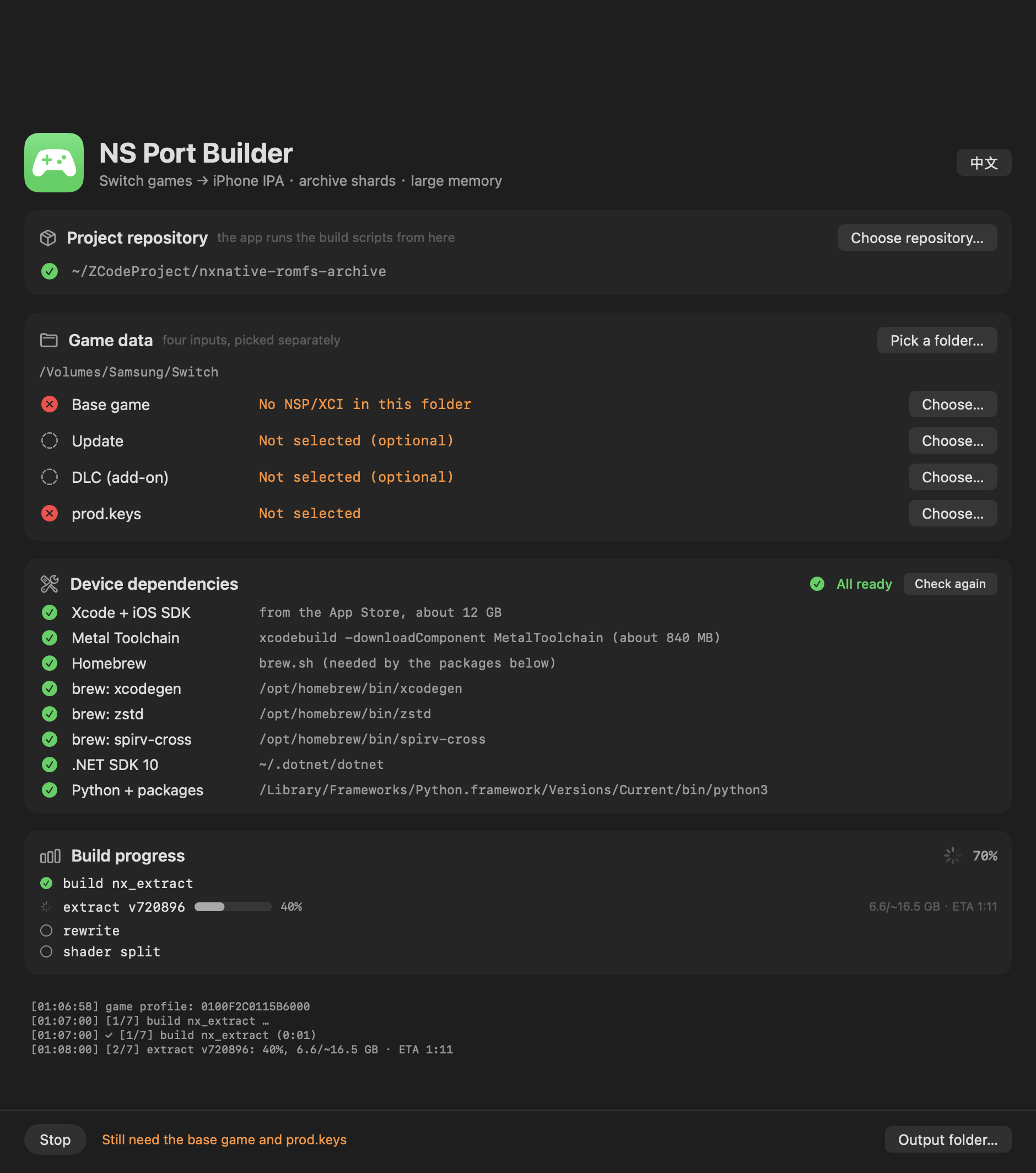
New: the archive folder is ready to copy, with an install guide
The shards now land in a romfs/ folder — romfs.idx plus the shards — next to the NSPs. That is exactly the layout the game app's Documents/romfs wants, so the folder is copied onto the phone without renaming. A previous pack's shards are cleared first, so a smaller new pack never leaves stale files behind.
When the build finishes, the window gains an "安装到 iPhone" group: the three steps (install the IPA with AltStore / Sideloadly → copy the whole romfs folder into the game app's Documents through the Files app → launch), the IPA and folder paths, and a Reveal-in-Finder button for each — no more digging through directories.
New: the dependency list collapses
The eight dependency rows only matter while setting a machine up. The section is now a disclosure: collapsed automatically once everything is green, open while something is missing, and your manual choice is remembered.
New: the README lists each game's required update version
The build checks the update NSP's display version against the profile's registered build, so the games table now has an "Update required" column — the exact version each game needs (e.g. Tears of the Kingdom 1.4.3, Mario Kart 8 Deluxe 4.0.0), with "无(v0)" for games that need no update.
The repository is now NX2Apple
Renamed from nxnative-romfs-archive — old links redirect automatically. The README opening was rewritten around what the project has become, and the legal section was substantially expanded (what the project contains and what it cannot do, trademarks, user responsibility, takedowns, no warranty).
Also since v0.3.1
- 48 games (up from 46): Mario Kart 8 Deluxe and Balatro, plus the upstream host work behind them.
- One translation chain version for every game (upstream's fix for issue #78): the stale-header failure that stopped the first Animal Crossing build can no longer happen.
- The automated upstream sync (
.github/workflows/sync-upstream.yml, daily): re-applies the fork's features onto upstream's tree, verifies (Python 3.9 parse, archive reader test, macOS host build), pushes — or opens an issue with the log. The replay tests caught and recovered two features the earlier wholesale sync had dropped:romfs.idxrecognition and the Hades II update support.
What this build is
NS-Port-Builder-macOS-arm64.zip — the app itself, ad-hoc signed, Apple Silicon, macOS 13+. Unzip, then right-click → Open on first launch (or xattr -dr com.apple.quarantine "NS Port Builder.app").
This is a front end only. It drives the scripts of NX2Apple, so clone that repository on the same Mac; the app finds it automatically and otherwise you pick it once with Choose repository….
Verified games
| Game | Update required | Status |
|---|---|---|
| Tears of the Kingdom | 1.4.3 (v720896) | Verified — builds, installs and runs on an iPhone; 304,243 files into 127 archive shards, byte-verified |
| Hades II | 1.0.137848 (v1) | Verified — builds, installs and runs on an iPhone; 33-file archive |
Every other game is unverified by this fork. Twenty-odd are reported playable upstream; the full table with per-game versions is in the README. If you try another title, expect to bring it up yourself, and please report what you find.
Requirements
- An Apple Silicon Mac, macOS 13+
- Python 3.9+ with
lz4,capstone,fontTools, and zstd (compression.zstdon 3.14+,backports.zstdbefore) — the dependency panel manages a venv with all of this - .NET SDK 10 (Homebrew, .pkg and dotnet-install.sh all work)
- ~6 GB free beyond the NSPs; the shader compile is the long step
- Your own game files and
prod.keys— nothing is bundled
Legal
No Nintendo code, assets, firmware or keys are included anywhere. The pipeline requires your own dumps and your own keys and talks to no server. Not affiliated with or endorsed by Nintendo; trademarks belong to their owners. Personal-backup laws differ by country — you are responsible for your jurisdiction, and the outputs are for your own hardware only. See the README's Legal section for the full statement, including takedown handling.
中文说明
三件事合成一个版本:把第一次构建的用户从 NSP 一路带到装好的图形界面、与上游的自动联动、以及找回两次同步中静默丢失的特性。
新增:归档文件夹直接可拷贝,附安装引导
分片现在落在 romfs/ 文件夹——romfs.idx 加分片文件——就在 NSP 旁边。这正是游戏 App 的 Documents/romfs 要的布局,整个文件夹不用改名直接拷上手机。打包前会清掉上一轮的旧分片,新包变小也不会留残留文件。
构建完成后,窗口出现**「安装到 iPhone」**分组:三步(AltStore / Sideloadly 装 IPA → 用文件 App 把 romfs 文件夹整个拷进游戏 App 的 Documents → 启动),附 IPA 和文件夹的路径,以及各自的「在访达中显示」按钮——不用再自己翻目录。
新增:依赖列表可折叠
八行依赖只在装机时需要看。现在是一个可折叠分组:全绿后自动收起,缺东西时自动展开,手动选择会被记住。
新增:README 列出每个游戏的所需版本
构建会用 profile 注册的 build 严格校验更新包的显示版本,所以游戏表加了**「需要的更新包」列**——每个游戏的精确版本(如王国之泪 1.4.3、马里奥赛车 8 4.0.0),无需更新的标「无(v0)」。
仓库更名为 NX2Apple
从 nxnative-romfs-archive 改名——旧链接自动跳转。README 开头围绕项目现在的形态重写,法律声明大幅扩充(项目包含什么、做不到什么、商标、用户责任、下架处理、无担保)。
v0.3.1 之后还包含
- 48 个游戏(原 46):新增马里奥赛车 8 豪华版和 Balatro,以及它们需要的宿主工作。
- 所有游戏共用一个翻译链版本(上游对 issue #78 的修复):第一次动物森友会构建碰到的过期 header 失败不会再发生。
- 自动上游同步(
.github/workflows/sync-upstream.yml,每天):把 fork 特性重新应用到上游新树,验证后推送;补丁对不上就开 issue 附日志。回放测试抓到并恢复了更早的整树替换丢掉的两个特性:romfs.idx识别和 Hades II 更新支持。
这个包是什么
NS-Port-Builder-macOS-arm64.zip 就是 App 本身,ad-hoc 签名,Apple Silicon,macOS 13+。解压后首次启动右键 → 打开(或执行 xattr -dr com.apple.quarantine "NS Port Builder.app")。
这只是前端。 它调用 NX2Apple 的脚本,所以同一台 Mac 上需要 clone 那个仓库;App 会自动发现,找不到就点 Choose repository… 选一次。
已验证的游戏
| 游戏 | 需要的更新包 | 状态 |
|---|---|---|
| 塞尔达传说:王国之泪 | 1.4.3 (v720896) | 已验证 —— 构建、安装、在 iPhone 上运行;304,243 个文件归档成 127 片,逐字节校验通过 |
| Hades II | 1.0.137848 (v1) | 已验证 —— 构建、安装、在 iPhone 上运行;33 个文件的归档 |
其他游戏本 fork 均未验证。 二十余个上游报告 iPhone 可玩;完整表格(含每个游戏的版本)在 README。试别的游戏请做好自行 bring-up 的准备,欢迎反馈。
环境要求
- Apple Silicon Mac,macOS 13+
- Python 3.9+,装有
lz4、capstone、fontTools,以及 zstd(3.14+ 用内置compression.zstd,更早用backports.zstd)——依赖面板通过 venv 全部管理 - .NET SDK 10(Homebrew / .pkg / dotnet-install.sh 三种都支持)
- 除 NSP 外约 6 GB 空间;shader 编译是最慢的一步
- 你自己的游戏文件和
prod.keys——不含任何数据
法律
任何地方都不包含任天堂的代码、资源、固件或密钥。流水线需要你自己的导出文件和自己的密钥,不连接任何服务器。与任天堂无关联、未获认可;商标归权利人所有。个人备份的法律各地不同——请自行确认所在地法律,产物仅用于自己的硬件。完整声明(含下架处理)见 README 的法律一节。
NS Port Builder v0.3.1 — fixes for Homebrew Python and dotnet (#1, #2)
Two reported builds that failed on machines the first release never met: a Homebrew Python 3.15 and a Homebrew .NET. Both are fixed. Thank you @carbonimax for two excellent reports.
Fixed: Python 3.14+ was rejected, and installs failed silently (#1)
- The dependency probe required
backports.zstd, which declares Python < 3.14. Python 3.14 hascompression.zstdbuilt in, so a perfectly good Homebrew Python 3.15 was reported as missing packages. The probe now accepts either:compression.zstdwhere it exists, the backport where it does not. - The 安装 button ran
pip install --user, which Homebrew's externally-managed Python refuses under PEP 668 — and the output went to a pipe nobody read. Packages now install into a dedicated virtual environment (~/Library/Application Support/NS Port Builder/venv) created from the best interpreter found. Your system Python is never touched.backports.zstdis only installed where it is actually needed (before 3.14). - Install output streams into the log window and a failure says so.
Fixed: Homebrew dotnet built the extractor, then the extractor could not start (#2)
The app detected /opt/homebrew/bin/dotnet fine, then launched the build with a hardcoded DOTNET_ROOT=~/.dotnet. Homebrew's runtime lives in …/opt/dotnet/libexec, so the generated apphost found no runtime and nx_extract exited 131.
DOTNET_ROOT (and DOTNET_ROOT_ARM64) are now derived from the detected installation via dotnet --list-runtimes, which resolves symlinks and layout differences between Homebrew, the .pkg installer and dotnet-install.sh. The build script had the same bug in its own derivation; fixed there too.
Verified
- The root parser handles Homebrew output, the standard
~/.dotnetlayout and backslash paths; the real~/.dotnetderives itself. - A venv created from the package-less system Python 3.9 installs all four packages and passes the probe (PEP 668 never involved).
- A fake Homebrew tree (symlinked
bin, runtime inlibexec) derives…/opt/dotnet/libexec; the old code derived…/bin.
Requirements (updated)
- An Apple Silicon Mac, macOS 13+
- Python 3.9+ with
lz4,capstone,fontTools, and zstd fromcompression.zstd(3.14+) orbackports.zstd— the app's dependency panel manages a venv with all of this; you never pip-install by hand - .NET SDK 10 — Homebrew, the .pkg installer and
dotnet-install.shall work now
中文说明
两个来自真实机器的构建失败:一台是 Homebrew 的 Python 3.15,一台是 Homebrew 的 .NET。都已修复。感谢 @carbonimax 的两份高质量报告。
修复:Python 3.14+ 被误判缺包,安装静默失败(#1)
- 依赖探针原来写死了
backports.zstd(它声明只支持 Python < 3.14),而 3.14 起标准库自带compression.zstd,于是 Homebrew 的 Python 3.15 被误报缺包。现在两者都接受:有内置用内置,没有用 backport。 - 「安装」按钮原来跑
pip install --user,Homebrew 的受管 Python 会在 PEP 668 下拒绝——而且输出进了没人读的管道。现在包装进专用虚拟环境(~/Library/Application Support/NS Port Builder/venv),用检测到的最佳解释器创建,完全不碰系统 Python。backports.zstd只在真正需要时(3.14 之前)安装。 - 安装输出实时进日志窗口,失败会明确提示。
修复:Homebrew 的 dotnet 能编译,但生成的程序起不来(#2)
App 检测 /opt/homebrew/bin/dotnet 正常,构建时却写死 DOTNET_ROOT=~/.dotnet。Homebrew 的运行时在 …/opt/dotnet/libexec,所以 apphost 找不到运行时,nx_extract 退出码 131。
现在 DOTNET_ROOT(和 DOTNET_ROOT_ARM64)通过 dotnet --list-runtimes 从检测到的安装推导,符号链接和 Homebrew / .pkg / dotnet-install.sh 三种布局都能解析。构建脚本里同样的推导也有同样的 bug,一并修复。
验证
- 根目录解析器覆盖 Homebrew 输出、标准
~/.dotnet布局和反斜杠路径;真实~/.dotnet正确推导。 - 用无包的系统 Python 3.9 真实创建 venv,四个包全部装上且探针通过(全程未触碰 PEP 668)。
- 伪造 Homebrew 目录(bin 符号链接、运行时在 libexec)推导出
…/opt/dotnet/libexec;旧代码得到…/bin。
环境要求(更新)
- Apple Silicon Mac,macOS 13+
- Python 3.9+,
lz4、capstone、fontTools,以及 zstd(3.14+ 用内置的compression.zstd,更早用backports.zstd)——这些由 App 的依赖面板通过 venv 管理,不需要手动 pip - .NET SDK 10 —— Homebrew、.pkg 安装器、dotnet-install.sh 三种方式都支持
Contributors

Assets 3
NS Port Builder v0.3.0 — app icon, 46 games
The app now has an icon, and the repository follows upstream through 296 commits — 46 games instead of 19.
Screenshot (click to expand)
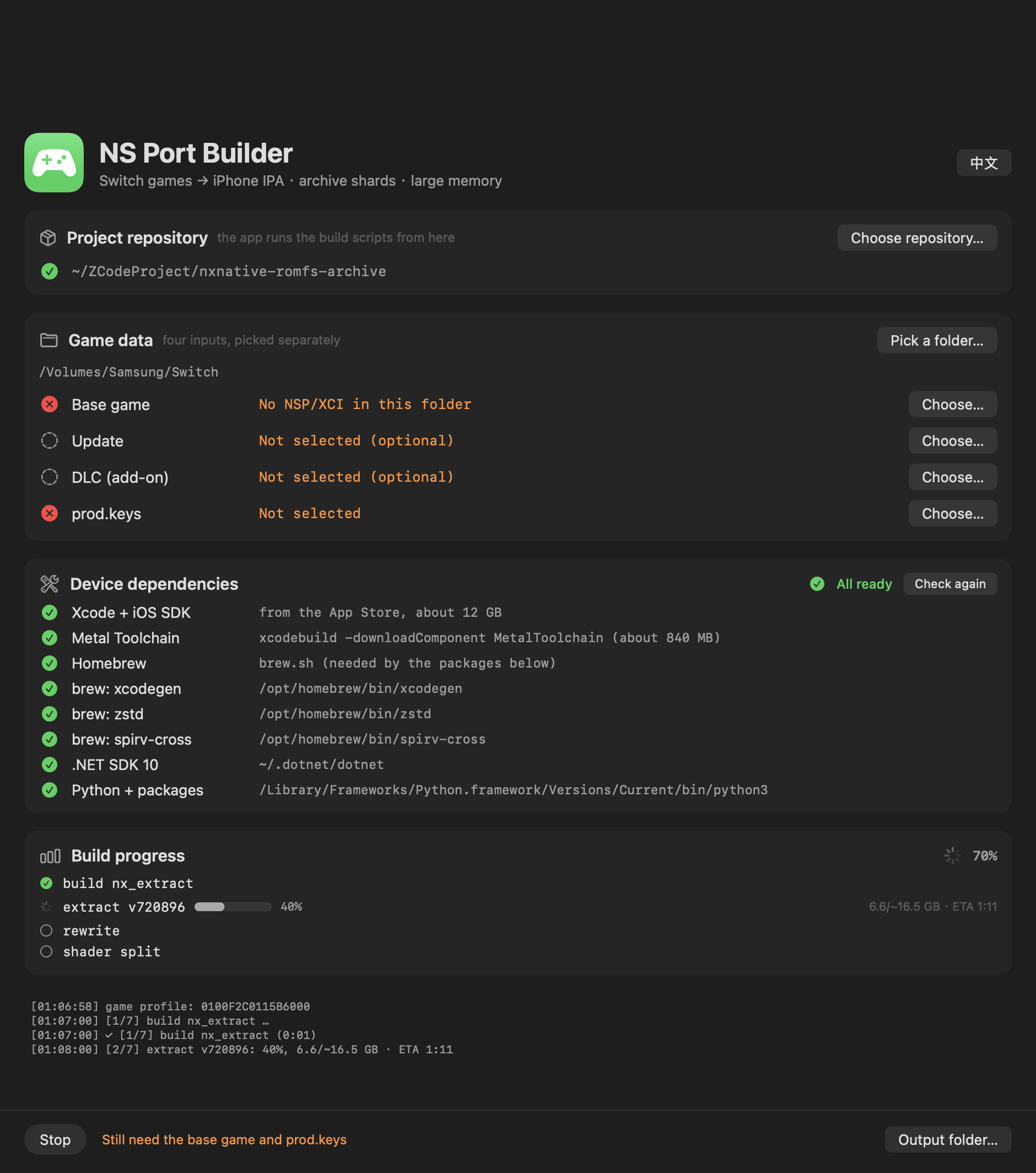
What's new in v0.3.0
An app icon. A green badge with a controller, in the same green as the app's header. The app is
no longer a blank square in the Dock and the Finder.
46 game profiles, up from 19. The repository was 296 upstream commits behind. Syncing brought
27 new titles, and the host and graphics work they need:
Hollow Knight: Silksong, Celeste, DARK SOULS: REMASTERED, Animal Crossing: New Horizons,
Paper Mario: The Thousand-Year Door, Pokémon Legends: Z-A, Luigi's Mansion 3, Super Mario Galaxy 2,
AI: THE SOMNIUM FILES, Cuphead, Catherine: Full Body, DRAGON QUEST XI S, DRAGON QUEST VII Reimagined,
FINAL FANTASY TACTICS, FINAL FANTASY RESONANCE, Monster Train 2, ANIMAL WELL, Raging Loop,
Digimon Story Cyber Sleuth, The Great Ace Attorney Chronicles, STEINS;GATE RE:BOOT,
Captain Toad: Treasure Tracker, Big Brain Academy, Patrick's Parabox, Absolum,
Brain Memory Training Academy, AI: nirvanA Initiative
That is the profile count, not a promise that every title boots. A profile carries a game's build
IDs, memory layout and shader tables; the host changes a game needs are part of the same upstream
work and came along with it. See the games table in the README for what is verified where.
The fork's own features still work, re-applied on top of the rewritten host:
- The RomFS archive layer, re-ported into the rewritten
hle_fs.c. The host builds and the archive
reader passes its test against a real two-shard archive. - Slim IPA by default (
DM_FULL_ROMFS=1for upstream's full package) and the placeholder ad-hoc
signature that carries the Increased Memory Limit entitlement into a sideloader. Upstream now only
sets that entitlement in its--prepare-xcodemode, so an IPA built from upstream alone would have
lost it. romfs.idxrecognition,--work-dir, and theDOTNET_ROOTderivation.
The Python 3.9 fix from v0.2.1 is still in place, and the new upstream code had three more of
the same problem (f-strings only Python 3.12 can parse). All fixed; every .py in the repository
parses under 3.9.
What this build is
NS-Port-Builder-macOS-arm64.zip
— the app itself, ad-hoc signed, Apple Silicon, macOS 13+. Unzip it anywhere and double-click.
Because the signature is ad-hoc, the first launch needs right-click → Open, or
xattr -dr com.apple.quarantine "NS Port Builder.app".
This is a front end only. It drives the scripts of
nxnative-romfs-archive, so you also need a
clone of that repository on the same Mac — and this release needs the current main, which carries
the 46 profiles. The app finds the checkout automatically when it sits next to it, and otherwise you
pick it once with Choose repository….
Verified games
| Game | Status |
|---|---|
| The Legend of Zelda: Tears of the Kingdom (0100F2C0115B6000) | Verified — builds, installs and runs on an iPhone; 304,243 files into 127 archive shards, every file byte-verified |
| Hades II (0100A00019DE0000) | Verified — builds, installs and runs on an iPhone; 33-file archive |
Every other game is unverified by this fork. 20 of the 46 are reported playable on an iPhone by
upstream; the rest have a profile only. If you try another title, expect to bring it up yourself,
and please report what you find.
Requirements
- An Apple Silicon Mac (the app is arm64 only; the build scripts also run on Intel)
- macOS 13 or later
- Python 3.9 or newer with
lz4,capstone,fonttoolsandbackports.zstd - ~6 GB free beyond the NSPs for the extraction; the shader compile is the long step
- Your own game files and
prod.keys— nothing is bundled
Notes
- No game data, keys or firmware are included. Bring your own dumped NSPs.
- The command line remains the reference; every option and limitation documented in the repository
applies here too. - Sideloading to the phone (AltStore, Sideloadly, Xcode) is outside this app's scope — see
dm/ios/ENTITLEMENTS.mdfor the memory-limit entitlement a large game needs.
中文说明
App 有图标了,仓库同步了上游 296 个提交——游戏从 19 个增加到 46 个。
v0.3.0 新增
App 图标。 绿色圆角底 + 手柄图形,和 App 标题栏同一个绿色。Dock 和访达里不再是空白方块。
46 个游戏 profile,原来 19 个。 仓库落后上游 296 个提交,同步后新增 27 个游戏,以及它们需要的宿主和图形层改动:
Hollow Knight: Silksong, Celeste, DARK SOULS: REMASTERED, Animal Crossing: New Horizons,
Paper Mario: The Thousand-Year Door, Pokémon Legends: Z-A, Luigi's Mansion 3, Super Mario Galaxy 2,
AI: THE SOMNIUM FILES, Cuphead, Catherine: Full Body, DRAGON QUEST XI S, DRAGON QUEST VII Reimagined,
FINAL FANTASY TACTICS, FINAL FANTASY RESONANCE, Monster Train 2, ANIMAL WELL, Raging Loop,
Digimon Story Cyber Sleuth, The Great Ace Attorney Chronicles, STEINS;GATE RE:BOOT,
Captain Toad: Treasure Tracker, Big Brain Academy, Patrick's Parabox, Absolum,
Brain Memory Training Academy, AI: nirvanA Initiative
这是 profile 数量,不代表每个游戏都能跑起来。profile 提供 build ID、内存布局和 shader 表;游戏所需的宿主改动属于同一批上游工作,一并同步过来了。哪些验证到哪一步,见 README 的游戏表。
本 fork 自己的功能都还在,在重写后的宿主上重新落地:
- RomFS 归档层,重新移植进重写后的
hle_fs.c。宿主编译通过,归档读取器用真实的双分片归档跑通了测试。 - 默认瘦身 IPA(
DM_FULL_ROMFS=1才是上游的完整包),以及把「增加内存上限」entitlement 带进侧载工具的 ad-hoc 占位签名。上游现在只在--prepare-xcode模式下设这个 entitlement,直接用上游打出的 IPA 会丢掉它。 romfs.idx识别、--work-dir、DOTNET_ROOT自动推导。
v0.2.1 的 Python 3.9 修复仍在,而且新同步的上游代码里又出现了三处同样的问题(只有 Python 3.12 能解析的 f-string),已全部修掉。仓库里每个 .py 都能被 3.9 解析。
这个包是什么
NS-Port-Builder-macOS-arm64.zip 就是 App 本身,ad-hoc 签名,Apple Silicon,macOS 13+。解压到任意位置双击即可。因为用的是 ad-hoc 签名,首次启动需要右键 → 打开,或者执行 xattr -dr com.apple.quarantine "NS Port Builder.app"。
这只是前端。 它调用 nxnative-romfs-archive 里的脚本,所以这台 Mac 上还需要 clone 那个仓库——而且必须是带 46 个 profile 的当前 main。App 会自己找:放在仓库旁边能自动发现,找不到就用「Choose repository…」指定一次。
已验证的游戏
| 游戏 | 状态 |
|---|---|
| 塞尔达传说:王国之泪(0100F2C0115B6000) | 已验证 —— 构建、安装、在 iPhone 上运行;304,243 个文件归档成 127 片,逐字节校验通过 |
| Hades II(0100A00019DE0000) | 已验证 —— 构建、安装、在 iPhone 上运行;33 个文件的归档 |
其他游戏本 fork 均未验证。 46 个里有 20 个是上游报告 iPhone 可玩的,其余只有 profile。如果你试了别的游戏,请做好自行 bring-up 的准备,也欢迎反馈结果。
环境要求
- Apple Silicon Mac(App 只有 arm64;构建脚本在 Intel 上也能跑)
- macOS 13 或更高
- Python 3.9 或更新,并装有
lz4、capstone、fonttools、backports.zstd - 除 NSP 外额外预留约 6 GB 用于解包;shader 编译是最慢的一步
- 你自己的游戏文件和
prod.keys—— 包里不含任何游戏数据
注意事项
- 不含任何游戏数据、密钥或固件,请使用自己 dump 的 NSP。
- 命令行仍是权威;仓库里记录的所有选项和限制在这里同样适用。
- 往手机侧载(AltStore、Sideloadly、Xcode)不在这个 App 范围内 —— 大体积游戏需要的内存上限 entitlement 见
dm/ios/ENTITLEMENTS.md。
NS Port Builder v0.2.1 — Python 3.9 build fix
Bilingual interface: the app now speaks English, and Chinese only when your device does.
Screenshot (click to expand)
What's new in v0.2.0
The interface is bilingual. Before this release it was Chinese-only, which shut out anyone who
does not read Chinese.
- It follows your device. On first launch, any Chinese variant (Simplified, Traditional, Hong
Kong, Taiwan) gets Chinese; every other language gets English. 中文/ENin the title bar switches at any time. The button shows the language you would
switch to, and the choice is remembered across launches.- All 78 user-visible strings live in one table as
key: (Chinese, English)pairs. A missing
translation renders as the key itself rather than a blank button, and a self-check reports any
empty side at launch. - Values that carry data — a missing package's path, exit codes, the archive destination — are
translated as whole sentences with placeholders, so word order stays right in both languages. - Switching language re-renders the dependency rows and game-data slots immediately; it does not
disturb a running build.
Also in this release: the label column no longer wraps ("Add-on content (DLC)" broke onto two lines
at the old width), and the download now includes English and Chinese screenshots.
Everything else is unchanged from v0.1.0: four inputs picked separately, dependency detection with
one-click install, progress parsed from the script's own stage lines, and automatic RomFS archive
shards.
Fixed in v0.2.1
A build could fail with a Python syntax error. If the app picked
/usr/bin/python3 (the 3.9 that ships with the Xcode command line tools), the
build stopped with SyntaxError: f-string: unmatched '[' in
build_ipa_from_nsp.py. Nested same-quote strings inside an f-string need Python
3.12; the script now avoids that construct and parses on 3.9.
The dependency check is also stricter: an interpreter older than 3.9 is skipped
instead of chosen, and the row now says whether the problem is too old or
missing packages — the two need different fixes. Every .py in the
repository is checked against 3.9.
Requirement: Python 3.9 or newer, with lz4, capstone, fonttools and
backports.zstd. The app's dependency panel installs the packages into the
interpreter it picked; if no suitable Python exists, install one (python.org or
brew install python) and press Check again.
What this build is
NS-Port-Builder-macOS-arm64.zip
— the app itself, ad-hoc signed, Apple Silicon, macOS 13+. Unzip it anywhere and double-click.
Because the signature is ad-hoc, the first launch needs right-click → Open, or
xattr -dr com.apple.quarantine "NS Port Builder.app".
This is a front end only. It drives the scripts of
nxnative-romfs-archive, so you also need a
clone of that repository on the same Mac. The app finds it automatically when it sits next to the
checkout, and otherwise you pick it once with Choose repository… (the row turns green when the
folder is a real checkout — it contains dm/tools/nx_extract/Program.cs).
Verified games
| Game | Status |
|---|---|
| The Legend of Zelda: Tears of the Kingdom (0100F2C0115B6000, v1.0.0 + update 1.4.3) | Verified — builds, installs and runs on an iPhone; 304,243 files packed into 127 archive shards, every file byte-verified against the source |
| Hades II (0100A00019DE0000, base + update) | Verified — builds, installs and runs on an iPhone; 33-file archive |
Every other game is unverified. nxnative needs a per-game profile (dm/games/<title ID>/) and,
for a game without one, the build falls back to a survey plus a provisional profile whose values
are guessed — it may not boot. If you try another title, expect to bring it up yourself, and please
report what you find.
Requirements
- An Apple Silicon Mac (the app is arm64 only; the build scripts themselves also run on Intel)
- macOS 13 or later
- ~6 GB free beyond the NSPs for the extraction; the shader compile is the long step (~50 minutes
for Tears of the Kingdom) - Your own game files and
prod.keys— nothing is bundled
Notes
- No game data, keys or firmware are included. Bring your own dumped NSPs.
- The app is a convenience wrapper; the command line remains the reference. Every option and
limitation documented in the repository applies here too. - Sideloading to the phone (AltStore, Sideloadly, Xcode) is outside this app's scope — see
dm/ios/ENTITLEMENTS.mdfor the memory-limit entitlement that a large game needs.
中文说明
界面双语化:现在支持英文,只有设备是中文时才显示中文。
v0.2.0 新增
界面支持中英双语。 在此之前只有中文,把不看中文的人挡在了外面。
- 跟随设备语言。 首次启动时,任何中文变体(简体、繁体、香港、台湾)都用中文,其他所有语言一律英文。
- 标题栏的
中文/EN按钮随时切换。按钮显示的是你将要切换到的语言,选择会被记住。 - 全部 78 条界面文案集中在同一张表里,每条都是
key: (中文, 英文)配对。缺少翻译时会直接显示 key 本身而不是空白按钮,启动时还会自检并报告哪一边为空。 - 带数据的文案——缺失的包路径、退出码、归档目标目录——整句翻译并用占位符替换,保证两种语言的语序都正确。
- 切换语言会立即重新渲染依赖列表和游戏数据槽位,不会干扰正在运行的构建。
本次还包括:标签列不再折行(Add-on content (DLC) 在原来的宽度下会断成两行),下载包内附中英文两版截图。
其余功能与 v0.1.0 相同:四项输入分开选、依赖检测与一键安装、从脚本自身阶段行解析的进度、自动生成 RomFS 归档分片。
v0.2.1 修复
构建可能因 Python 语法错误失败。 如果 App 选中了 /usr/bin/python3(Xcode 命令行工具
自带的 3.9),构建会在 build_ipa_from_nsp.py 报
SyntaxError: f-string: unmatched '['。f-string 里嵌套同种引号是 Python 3.12 的特性,
脚本现在改用 str.format,3.9 也能正常解析。
依赖检测也收紧了:低于 3.9 的解释器会被跳过而不是选中,面板会区分版本太旧和缺包两种
情况——两者的解决办法不同。仓库里所有 .py 都通过了 3.9 语法检查。
要求:Python 3.9 或更新,并装有 lz4、capstone、fonttools、backports.zstd。
App 的依赖面板会把包装到它选中的那个解释器里;如果找不到合适的 Python,请自行安装
(python.org 或 brew install python)后点「Check again」。
这个包是什么
NS-Port-Builder-macOS-arm64.zip 就是 App 本身,ad-hoc 签名,Apple Silicon,macOS 13+。解压到任意位置双击即可。因为用的是 ad-hoc 签名,首次启动需要右键 → 打开,或者执行 xattr -dr com.apple.quarantine "NS Port Builder.app"。
这只是前端。 它调用的是 nxnative-romfs-archive 里的脚本,所以这台 Mac 上还需要 clone 那个仓库。App 会自己找:放在仓库旁边能自动发现,找不到就用「Choose repository…」指定一次(目录里有 dm/tools/nx_extract/Program.cs 才算真正的仓库,那一行会变绿)。
已验证的游戏
| 游戏 | 状态 |
|---|---|
| 塞尔达传说:王国之泪(0100F2C0115B6000,v1.0.0 + 更新 1.4.3) | 已验证 —— 构建、安装、在 iPhone 上运行;304,243 个文件归档成 127 片,逐字节校验全部通过 |
| Hades II(0100A00019DE0000,本体 + 更新) | 已验证 —— 构建、安装、在 iPhone 上运行;33 个文件的归档 |
其他游戏均未验证。 nxnative 需要每个游戏自己的 profile(dm/games/<title ID>/);没有 profile 时会退化成「调研 + 推测参数」的临时 profile,可能无法启动。如果你试了别的游戏,请做好自行 bring-up 的准备,也欢迎把结果反馈过来。
环境要求
- Apple Silicon Mac(App 只有 arm64;构建脚本本身在 Intel 上也能跑)
- macOS 13 或更高
- 除 NSP 外额外预留约 6 GB 空间用于解包;shader 编译是最慢的一步(王国之泪约 50 分钟)
- 你自己的游戏文件和
prod.keys—— 包里不含任何游戏数据
注意事项
- 不含任何游戏数据、密钥或固件,请使用自己 dump 的 NSP。
- 这个 App 只是便捷封装,命令行仍是权威;仓库里记录的所有选项和限制在这里同样适用。
- 往手机侧载(AltStore、Sideloadly、Xcode)不在这个 App 的范围内 —— 大体积游戏需要的内存上限 entitlement 见
dm/ios/ENTITLEMENTS.md。
NS Port Builder v0.2.0 — bilingual (English / 中文)
Bilingual interface: the app now speaks English, and Chinese only when your device does.
Screenshot (click to expand)
What's new in v0.2.0
The interface is bilingual. Before this release it was Chinese-only, which shut out anyone who
does not read Chinese.
- It follows your device. On first launch, any Chinese variant (Simplified, Traditional, Hong
Kong, Taiwan) gets Chinese; every other language gets English. 中文/ENin the title bar switches at any time. The button shows the language you would
switch to, and the choice is remembered across launches.- All 78 user-visible strings live in one table as
key: (Chinese, English)pairs. A missing
translation renders as the key itself rather than a blank button, and a self-check reports any
empty side at launch. - Values that carry data — a missing package's path, exit codes, the archive destination — are
translated as whole sentences with placeholders, so word order stays right in both languages. - Switching language re-renders the dependency rows and game-data slots immediately; it does not
disturb a running build.
Also in this release: the label column no longer wraps ("Add-on content (DLC)" broke onto two lines
at the old width), and the download now includes English and Chinese screenshots.
Everything else is unchanged from v0.1.0: four inputs picked separately, dependency detection with
one-click install, progress parsed from the script's own stage lines, and automatic RomFS archive
shards.
What this build is
NS-Port-Builder-macOS-arm64.zip
— the app itself, ad-hoc signed, Apple Silicon, macOS 13+. Unzip it anywhere and double-click.
Because the signature is ad-hoc, the first launch needs right-click → Open, or
xattr -dr com.apple.quarantine "NS Port Builder.app".
This is a front end only. It drives the scripts of
nxnative-romfs-archive, so you also need a
clone of that repository on the same Mac. The app finds it automatically when it sits next to the
checkout, and otherwise you pick it once with Choose repository… (the row turns green when the
folder is a real checkout — it contains dm/tools/nx_extract/Program.cs).
Verified games
| Game | Status |
|---|---|
| The Legend of Zelda: Tears of the Kingdom (0100F2C0115B6000, v1.0.0 + update 1.4.3) | Verified — builds, installs and runs on an iPhone; 304,243 files packed into 127 archive shards, every file byte-verified against the source |
| Hades II (0100A00019DE0000, base + update) | Verified — builds, installs and runs on an iPhone; 33-file archive |
Every other game is unverified. nxnative needs a per-game profile (dm/games/<title ID>/) and,
for a game without one, the build falls back to a survey plus a provisional profile whose values
are guessed — it may not boot. If you try another title, expect to bring it up yourself, and please
report what you find.
Requirements
- An Apple Silicon Mac (the app is arm64 only; the build scripts themselves also run on Intel)
- macOS 13 or later
- ~6 GB free beyond the NSPs for the extraction; the shader compile is the long step (~50 minutes
for Tears of the Kingdom) - Your own game files and
prod.keys— nothing is bundled
Notes
- No game data, keys or firmware are included. Bring your own dumped NSPs.
- The app is a convenience wrapper; the command line remains the reference. Every option and
limitation documented in the repository applies here too. - Sideloading to the phone (AltStore, Sideloadly, Xcode) is outside this app's scope — see
dm/ios/ENTITLEMENTS.mdfor the memory-limit entitlement that a large game needs.
中文说明
界面双语化:现在支持英文,只有设备是中文时才显示中文。
v0.2.0 新增
界面支持中英双语。 在此之前只有中文,把不看中文的人挡在了外面。
- 跟随设备语言。 首次启动时,任何中文变体(简体、繁体、香港、台湾)都用中文,其他所有语言一律英文。
- 标题栏的
中文/EN按钮随时切换。按钮显示的是你将要切换到的语言,选择会被记住。 - 全部 78 条界面文案集中在同一张表里,每条都是
key: (中文, 英文)配对。缺少翻译时会直接显示 key 本身而不是空白按钮,启动时还会自检并报告哪一边为空。 - 带数据的文案——缺失的包路径、退出码、归档目标目录——整句翻译并用占位符替换,保证两种语言的语序都正确。
- 切换语言会立即重新渲染依赖列表和游戏数据槽位,不会干扰正在运行的构建。
本次还包括:标签列不再折行(Add-on content (DLC) 在原来的宽度下会断成两行),下载包内附中英文两版截图。
其余功能与 v0.1.0 相同:四项输入分开选、依赖检测与一键安装、从脚本自身阶段行解析的进度、自动生成 RomFS 归档分片。
这个包是什么
NS-Port-Builder-macOS-arm64.zip 就是 App 本身,ad-hoc 签名,Apple Silicon,macOS 13+。解压到任意位置双击即可。因为用的是 ad-hoc 签名,首次启动需要右键 → 打开,或者执行 xattr -dr com.apple.quarantine "NS Port Builder.app"。
这只是前端。 它调用的是 nxnative-romfs-archive 里的脚本,所以这台 Mac 上还需要 clone 那个仓库。App 会自己找:放在仓库旁边能自动发现,找不到就用「Choose repository…」指定一次(目录里有 dm/tools/nx_extract/Program.cs 才算真正的仓库,那一行会变绿)。
已验证的游戏
| 游戏 | 状态 |
|---|---|
| 塞尔达传说:王国之泪(0100F2C0115B6000,v1.0.0 + 更新 1.4.3) | 已验证 —— 构建、安装、在 iPhone 上运行;304,243 个文件归档成 127 片,逐字节校验全部通过 |
| Hades II(0100A00019DE0000,本体 + 更新) | 已验证 —— 构建、安装、在 iPhone 上运行;33 个文件的归档 |
其他游戏均未验证。 nxnative 需要每个游戏自己的 profile(dm/games/<title ID>/);没有 profile 时会退化成「调研 + 推测参数」的临时 profile,可能无法启动。如果你试了别的游戏,请做好自行 bring-up 的准备,也欢迎把结果反馈过来。
环境要求
- Apple Silicon Mac(App 只有 arm64;构建脚本本身在 Intel 上也能跑)
- macOS 13 或更高
- 除 NSP 外额外预留约 6 GB 空间用于解包;shader 编译是最慢的一步(王国之泪约 50 分钟)
- 你自己的游戏文件和
prod.keys—— 包里不含任何游戏数据
注意事项
- 不含任何游戏数据、密钥或固件,请使用自己 dump 的 NSP。
- 这个 App 只是便捷封装,命令行仍是权威;仓库里记录的所有选项和限制在这里同样适用。
- 往手机侧载(AltStore、Sideloadly、Xcode)不在这个 App 的范围内 —— 大体积游戏需要的内存上限 entitlement 见
dm/ios/ENTITLEMENTS.md。
NS Port Builder v0.1.0 — macOS GUI front end
NS Port Builder — a macOS window for the whole pipeline (unpack → module rewrite → shader compile → slim IPA → RomFS archive shards), so a first build does not need a terminal.
界面截图(点开)
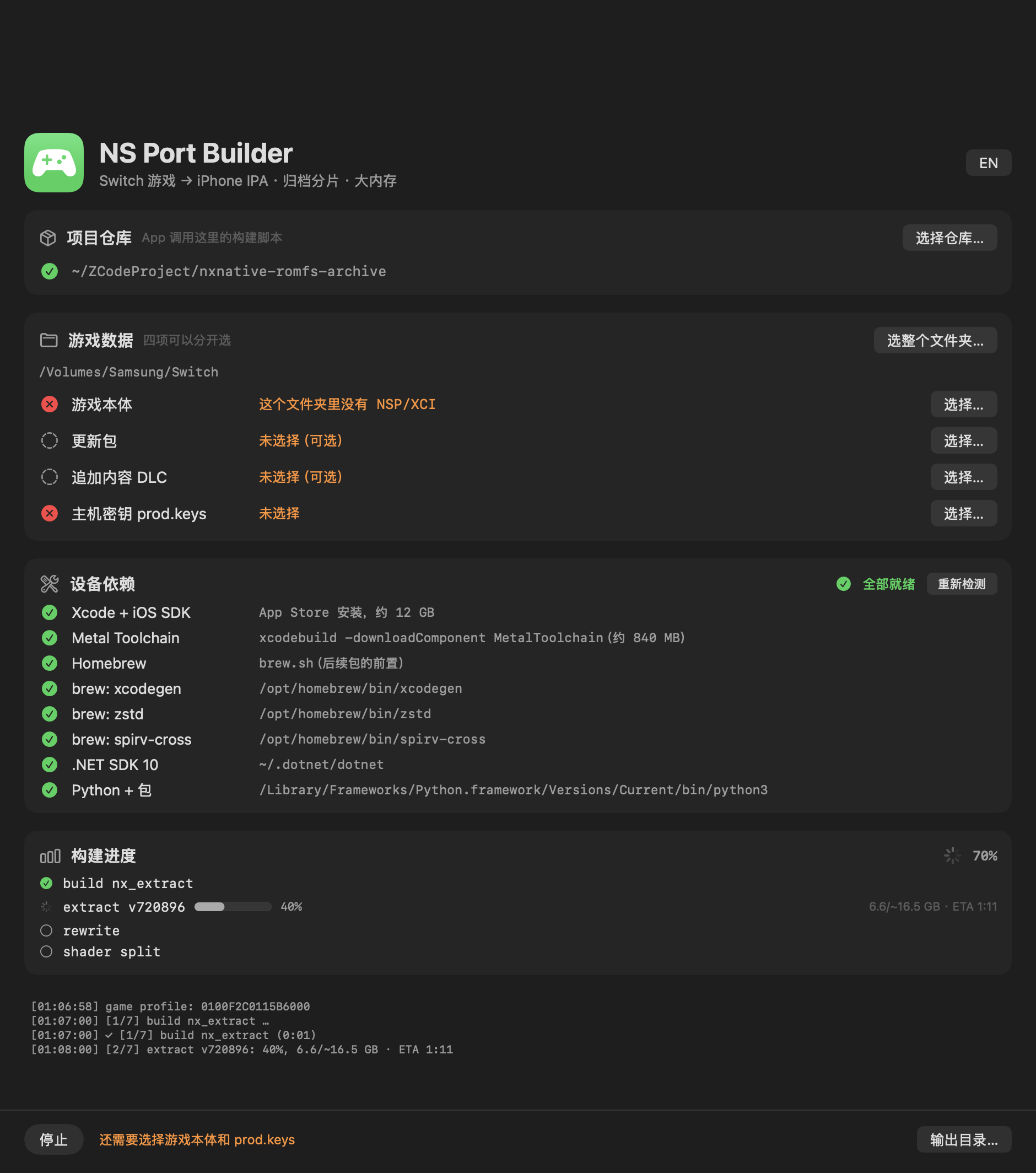
What this build is
NS-Port-Builder-macOS-arm64.zip — the app itself, ad-hoc signed, Apple Silicon, macOS 13+.
Unzip it anywhere and double-click. (Because the signature is ad-hoc, the first launch needs
right-click → Open, or xattr -dr com.apple.quarantine "NS Port Builder.app".)
This is a front end only. It drives the scripts of
nxnative-romfs-archive, so you also need a
clone of that repository on the same Mac. The app finds it automatically when it sits next to the
checkout, and otherwise you pick it once with 选择仓库… (the row turns green when the folder is a
real checkout — it contains dm/tools/nx_extract/Program.cs).
What it does
- Four inputs, picked separately: base game, update, add-on content (DLC, multi-select) and
prod.keys.选整个文件夹…fills all four at once by title ID (…000base,…800update,
base + 0x1000 + nDLC), skipping 0-byte files. Files in different folders are staged as
symlinks, and the build folder still lands next to the base game. - Device dependencies, detected and installable: Xcode + iOS SDK, the Metal Toolchain,
Homebrew,xcodegen/zstd/spirv-cross, the .NET SDK and the Python packages. Each row
shows ✓ / ✗; a missing one gets an 安装 button that runs the real installer. 开始构建 stays
disabled until everything is green, so a first build does not die halfway through. - Progress from the script's own stages: the app parses the
[k/n]lines the build writes, so
the list follows the real plan with a live percentage per stage — no guessed five-step list. - Archive shards at the end, which is what makes a large game installable at all.
Paths are shown with your home directory abbreviated to ~.
Verified games
| Game | Status |
|---|---|
| The Legend of Zelda: Tears of the Kingdom (0100F2C0115B6000, v1.0.0 + update 1.4.3) | Verified — builds, installs and runs on an iPhone; 304,243 files packed into 127 archive shards, every file byte-verified against the source |
| Hades II (0100A00019DE0000, base + update) | Verified — builds, installs and runs on an iPhone; 33-file archive |
Every other game is unverified. nxnative needs a per-game profile (dm/games/<title ID>/) and,
for a game without one, the build falls back to a survey plus a provisional profile whose values
are guessed — it may not boot. If you try another title, expect to bring it up yourself, and please
report what you find.
Requirements
- An Apple Silicon Mac (the app is arm64 only; the build scripts themselves also run on Intel)
- macOS 13 or later
- ~6 GB free beyond the NSPs for the extraction; the shader compile is the long step (~50 minutes
for Tears of the Kingdom) - Your own game files and
prod.keys— nothing is bundled
Notes
- No game data, keys or firmware are included. Bring your own dumped NSPs.
- The app is a convenience wrapper; the command line remains the reference. Every option and
limitation documented in the repository applies here too. - Sideloading to the phone (AltStore, Sideloadly, Xcode) is outside this app's scope — see
dm/ios/ENTITLEMENTS.mdfor the memory-limit entitlement that a large game needs.
中文说明
NS Port Builder —— 一个 macOS 窗口,把整条流水线(解包 → 模块改写 → shader 编译 → 瘦身 IPA → RomFS 归档分片)包起来,第一次构建不用碰终端。
这个包是什么
NS-Port-Builder-macOS-arm64.zip 就是 App 本身,ad-hoc 签名,Apple Silicon,macOS 13+。解压到任意位置双击即可。因为用的是 ad-hoc 签名,首次启动需要右键 → 打开,或者执行 xattr -dr com.apple.quarantine "NS Port Builder.app"。
这只是前端。 它调用的是 nxnative-romfs-archive 里的脚本,所以这台 Mac 上还需要 clone 那个仓库。App 会自己找:放在仓库旁边能自动发现,找不到就用「选择仓库…」指定一次(目录里有 dm/tools/nx_extract/Program.cs 才算真正的仓库,那一行会变绿)。
它能做什么
- 四项输入分开选:游戏本体、更新包、追加内容 DLC(可多选)、
prod.keys。用「选整个文件夹…」可以按 title ID 一次填满四项(…000本体、…800更新、base + 0x1000 + nDLC),0 字节文件自动跳过。文件分散在不同文件夹时,App 会用软链接搭一个暂存目录,构建产物仍然落在本体旁边。 - 设备依赖检测 + 一键安装:Xcode + iOS SDK、Metal Toolchain、Homebrew、
xcodegen/zstd/spirv-cross、.NET SDK、Python 包。每项显示 ✓ / ✗,缺失的直接点「安装」跑真正的安装程序。依赖没齐时「开始构建」是禁用的,不会跑到一半才失败。 - 进度来自脚本自己的阶段:App 解析构建输出的
[k/n]行,列表跟着真实的构建计划走,每个阶段带实时百分比,不是猜出来的五步。 - 最后自动产出归档分片,这是大体积游戏能装进手机的关键。
路径显示时会把家目录缩写成 ~。
已验证的游戏
| 游戏 | 状态 |
|---|---|
| 塞尔达传说:王国之泪(0100F2C0115B6000,v1.0.0 + 更新 1.4.3) | 已验证 —— 构建、安装、在 iPhone 上运行;304,243 个文件归档成 127 片,逐字节校验全部通过 |
| Hades II(0100A00019DE0000,本体 + 更新) | 已验证 —— 构建、安装、在 iPhone 上运行;33 个文件的归档 |
其他游戏均未验证。 nxnative 需要每个游戏自己的 profile(dm/games/<title ID>/);没有 profile 时会退化成「调研 + 推测参数」的临时 profile,可能无法启动。如果你试了别的游戏,请做好自行 bring-up 的准备,也欢迎把结果反馈过来。
环境要求
- Apple Silicon Mac(App 只有 arm64;构建脚本本身在 Intel 上也能跑)
- macOS 13 或更高
- 除 NSP 外额外预留约 6 GB 空间用于解包;shader 编译是最慢的一步(王国之泪约 50 分钟)
- 你自己的游戏文件和
prod.keys—— 包里不含任何游戏数据
注意事项
- 不含任何游戏数据、密钥或固件,请使用自己 dump 的 NSP。
- 这个 App 只是便捷封装,命令行仍是权威;仓库里记录的所有选项和限制在这里同样适用。
- 往手机侧载(AltStore、Sideloadly、Xcode)不在这个 App 的范围内 —— 大体积游戏需要的内存上限 entitlement 见
dm/ios/ENTITLEMENTS.md。